


A production-ready, AI-powered subtitle generation backend built with Go. Powers SmartSRT — a service that turns audio and video files into accurate
.srtsubtitles.
SmartSRT Backend is the API and processing service behind SmartSRT. Users upload audio/video files; the backend queues them in RabbitMQ, dispatches transcription jobs to AWS Lambda, stores the resulting subtitle files in S3 and notifies users by email. It exposes a REST API for uploads, subscription management (Paddle) and account features.
The codebase follows Clean Architecture with strict separation between delivery → usecase → repository → domain, making it testable, extendable and provider-agnostic.
- Audio & video transcription to
.srtsubtitles via AWS Lambda - Asynchronous processing pipeline powered by RabbitMQ
- Authentication with JWT plus Google and GitHub OAuth
- Subscription & billing integrated with Paddle
- Usage tracking & quotas per user / subscription tier
- Transactional emails through Resend with HTML templates
- SMS / OTP via Sinch
- Observability — Prometheus metrics + Grafana dashboards + Sentry error tracking
- Containerized stack — API, consumer, MongoDB replica set, RabbitMQ, monitoring
- Hot reload in development with Air
| Layer | Technology |
|---|---|
| Language | Go 1.23+ |
| HTTP Framework | Gin |
| Database | MongoDB (3-node replica set) |
| Secondary Store | AWS DynamoDB |
| Object Storage | AWS S3 (uploads + generated .srt) |
| Processing | AWS Lambda |
| Message Queue | RabbitMQ |
| Billing | Paddle SDK |
| Email / SMS | Resend, Sinch |
| Auth | JWT, Google OAuth, GitHub OAuth |
| Config | Viper |
| Validation | go-playground/validator |
| Monitoring | Prometheus, Grafana, Sentry |
| Logging | log/slog (structured) |
| Containerization | Docker & Docker Compose |
SmartSRT runs as two cooperating Go services behind a shared infrastructure stack:
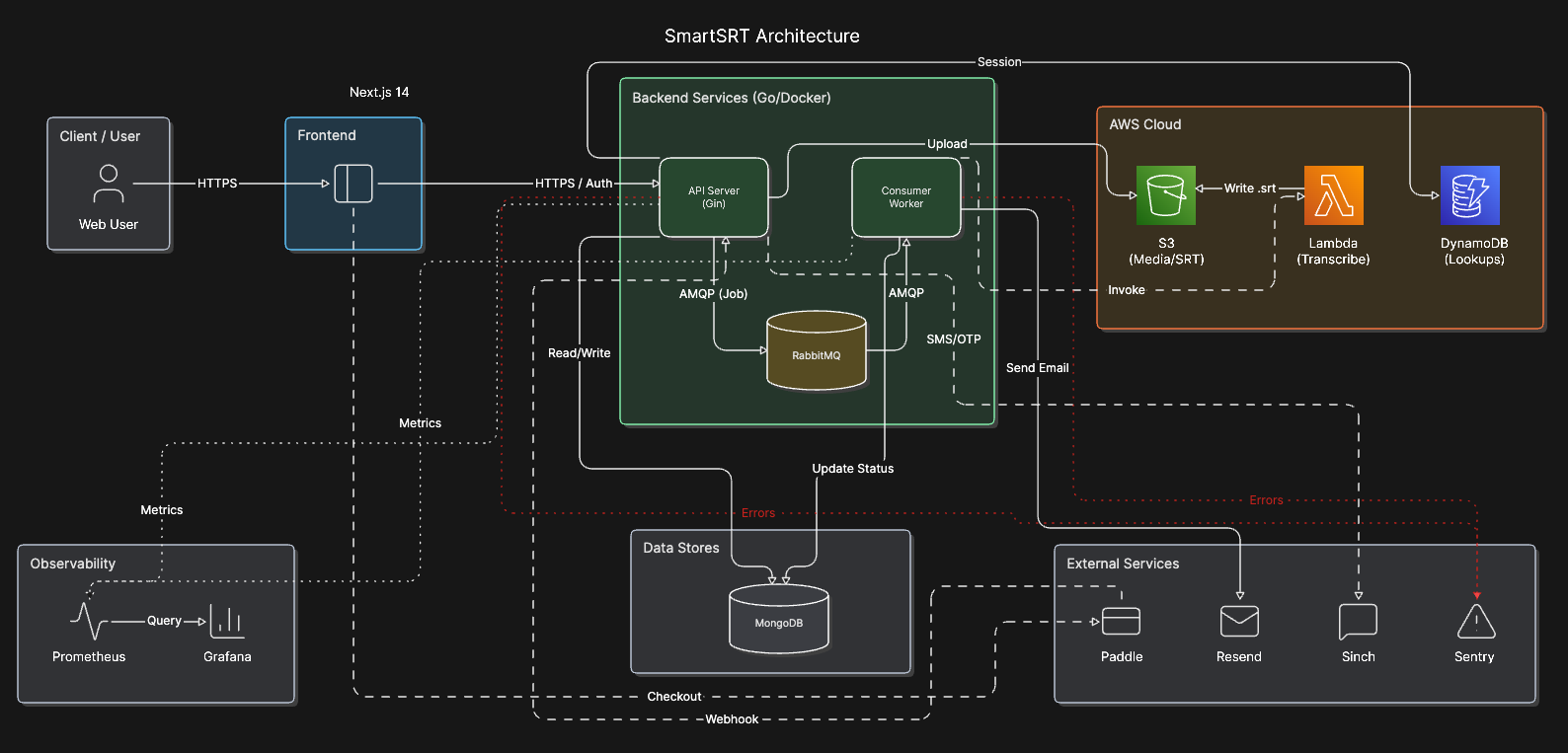
cmd/— entry points (main.gofor API,consumer/main.gofor the worker)api/— HTTP delivery, middleware and route registrationdomain/— core entities and repository / usecase interfacesusecase/— business logicrepository/— concrete data access (MongoDB, DynamoDB, S3, …)bootstrap/— dependency wiring and service initializationconfig/— environment-driven configuration (Viper)utils/— shared helpers
- Docker & Docker Compose
- AWS account with access to Lambda, S3 and DynamoDB
- Paddle account (for billing endpoints)
- Resend & Sinch accounts (for email / SMS)
git clone https://github.com/kwa0x2/SmartSRT-Backend.git
cd SmartSRT-BackendCopy .env.example to .env and fill in your credentials:
cp .env.example .envGIN_MODE=debug
APP_ENV=development
SERVER_ADDRESS=:9000
FRONTEND_URL=http://localhost:3000
JWT_SECRET=
# MongoDB (replica set is started by docker compose)
MONGO_URI=mongodb://user:password@mongo_rs0:27017,mongo_rs1:27018,mongo_rs2:27019/smartsrt?replicaSet=rs0&authSource=admin
MONGO_DB_NAME=smartsrt
# OAuth — Google
GOOGLE_CLIENT_ID=
GOOGLE_CLIENT_SECRET=
GOOGLE_REDIRECT_URL=http://localhost:9000/api/v1/auth/google/callback
# OAuth — GitHub
GITHUB_CLIENT_ID=
GITHUB_CLIENT_SECRET=
GITHUB_REDIRECT_URL=http://localhost:9000/api/v1/auth/github/callback
# AWS
AWS_ACCESS_KEY_ID=
AWS_SECRET_ACCESS_KEY=
AWS_REGION=
AWS_S3_BUCKET_NAME=
AWS_LAMBDA_FUNC_NAME=
# SMS (Sinch) & Email (Resend)
SINCH_APP_KEY=
SINCH_APP_SECRET=
RESEND_API_KEY=
NOTIFY_EMAIL=
# Billing (Paddle)
PADDLE_API_KEY=
PADDLE_WEBHOOK_SECRET_KEY=
# Observability
SENTRY_DSN=
# Quotas (minutes / month)
FREE_MONTHLY_LIMIT=600
PRO_MONTHLY_LIMIT=3000docker compose up --buildThis spins up:
| Service | URL |
|---|---|
| API Server | http://localhost:9000 |
| MongoDB Express | http://localhost:8081 |
| RabbitMQ Management | http://localhost:15672 |
| Prometheus | http://localhost:9090 |
| Grafana | http://localhost:3001 |
Metrics are exposed at http://localhost:9000/api/v1/metrics.
docker build --platform=linux/amd64 -t smartsrt-backend .
docker build --platform=linux/amd64 -f Dockerfile.consumer -t smartsrt-consumer .All endpoints are prefixed with /api/v1. Route groups:
| Group | Purpose |
|---|---|
/auth |
Sign-up, login, OAuth, sessions |
/user |
Profile management |
/srt |
Upload media, list and download .srt |
/subscription |
Plans and subscription lifecycle |
/paddle |
Paddle webhooks |
/usage |
Per-user usage and quota |
/contact |
Contact form submissions |
/metrics |
Prometheus scrape endpoint |
SmartSRT-Backend/
├── api/                # HTTP delivery, middleware, routes
│   ├── http/delivery/  # Gin handlers
│   ├── middleware/     # Auth, CORS, rate-limit, metrics
│   └── route/          # Route registration per domain
├── bootstrap/          # App initialization & DI
├── cmd/                # Entry points (API + consumer)
├── config/             # Viper-driven configuration
├── domain/             # Entities and contracts
├── email_templates/    # HTML email templates
├── monitoring/         # Prometheus & Grafana configs
├── rabbitmq/           # Queue setup & helpers
├── repository/         # MongoDB / DynamoDB / S3 implementations
├── seeder/             # DB seeders for local development
├── usecase/            # Business logic
├── utils/              # Helpers
├── compose.yaml        # Full Docker Compose stack
├── Dockerfile          # API image
└── Dockerfile.consumer # Consumer image
- SmartSRT Frontend — web client
- SmartSRT Lambda — transcription Lambda function
Distributed under the MIT License. See LICENSE for more information.