




OpenccNetLib is a fast and efficient .NET library for converting Chinese text, offering support for Simplified ↔ Traditional, Taiwan, Hong Kong, and Japanese Kanji variants. Built with inspiration from OpenCC, this library is designed to integrate seamlessly into modern .NET projects with a focus on performance and minimal memory usage.
- Features
- Installation
- Usage
- Office Document & EPUB Conversion
- Example: Convert Office Document In-Memory
- Backward-Compatible String Overload
- Async API
- Convert Files
- What does conversion do?
- Error Handling
- Unit Tested
- Why This Matters
- Performance
- API Reference
- Dictionary Data
- Add-On CLI Tools
- Usage Notes -
OpenccNet pdf - Project That Use OpenccNetLib
- License
- Fast, multi-stage Chinese text conversion using prebuilt dictionary unions
(optimized with static caching and zero-allocation hot paths) - Supports:
- Simplified ↔ Traditional Chinese
- Taiwan Traditional (T) ↔ Simplified / Traditional
- Hong Kong Traditional (HK) ↔ Simplified / Traditional
- Japanese Kanji Shinjitai ↔ Traditional Kyujitai
- Accurate handling of Supplementary Plane CJK (U+20000+) characters
(correct surrogate-pair detection and matching) - Optional punctuation conversion
- Thread-safe conversion core with immutable shared dictionaries; suitable for high-throughput parallel processing when converters are not reconfigured concurrently.
- Office document & EPUB conversion (pure in-memory):
.docx(Word),.xlsx(Excel),.pptx(PowerPoint),.epubbyte[] → byte[]conversion with full XML patching- Async/await supported (
ConvertOfficeBytesAsync) - Zero temp files required; safe for Web, Server, and WASM/Blazor hosts
- .NET Standard 2.0 compatible
(cross-platform: Windows, Linux, macOS; supported on .NET Core 2.0+, .NET 5+, .NET 6/7/8/9/10 LTS)
- Add the library to your project via NuGet or reference the source code directly.
- Add required dependencies of dictionary files to library root.
dicts\dictionary_maxlength.zstdDefault dictionary file.dicts\*.*Others dictionary files for different configurations.
Install via NuGet:
dotnet add package OpenccNetLibOr, clone and include the source files in your project.
using OpenccNetLib;

// Recommended: use the enum-based constructor
var opencc = new Opencc(OpenccConfig.S2T); // Simplified → Traditional

string traditional = opencc.Convert("汉字转换测试");
Console.WriteLine(traditional);
// Output: 漢字轉換測試
Or, using the legacy string-based configuration:
using OpenccNetLib;
var opencc = new Opencc("s2t"); // Simplified to Traditional
string traditional = opencc.Convert("汉字转换测试");
Console.WriteLine(traditional);
// Output: 漢字轉換測試| Config | Description |
|---|---|
| s2t | Simplified → Traditional |
| t2s | Traditional → Simplified |
| s2tw | Simplified → Traditional (Taiwan) |
| tw2s | Traditional (Taiwan) → Simplified |
| s2twp | Simplified → Traditional (Taiwan, idioms) |
| tw2sp | Traditional (Taiwan, idioms) → Simplified |
| s2hkp | Simplified → Traditional (Hong Kong phrases) |
| hk2sp | Traditional (Hong Kong phrases) → Simplified |
| s2hk | Simplified → Traditional (Hong Kong) |
| hk2s | Traditional (Hong Kong) → Simplified |
| t2tw | Traditional → Traditional (Taiwan) |
| tw2t | Traditional (Taiwan) → Traditional |
| t2twp | Traditional → Traditional (Taiwan, idioms) |
| tw2tp | Traditional (Taiwan, idioms) → Traditional |
| t2hk | Traditional → Traditional (Hong Kong) |
| hk2t | Traditional (Hong Kong) → Traditional |
| t2jp | Traditional Kyujitai → Japanese Kanji Shinjitai |
| jp2t | Japanese Kanji Shinjitai → Traditional Kyujitai |
var opencc = new Opencc("s2t");
string result = opencc.Convert("“汉字”转换。", punctuation: true);
Console.WriteLine(result);
// Output: 「漢字」轉換。var cc = new Opencc(OpenccConfig.S2Hkp);
Console.WriteLine(cc.Convert("别随便录影侵犯个人隐私权"));
// 別隨便錄影侵犯個人私隱權using OpenccNetLib;
var opencc = new Opencc("s2t"); // Or: var opencc = new Opencc(OpenccConfig.S2T);
// Initial conversion
string result = opencc.Convert("动态切换转换方式");
Console.WriteLine(result); // Output: 動態切換轉換方式
// Switch config using string
opencc.Config = "t2s"; // Also valid: opencc.SetConfig("t2s")
result = opencc.Convert("動態切換轉換方式");
Console.WriteLine(result); // Output: 动态切换转换方式
// Switch config using enum (recommended for safety and autocomplete)
opencc.SetConfig(OpenccConfig.S2T);
result = opencc.Convert("动态切换转换方式");
Console.WriteLine(result); // Output: 動態切換轉換方式
// Invalid config falls back to "s2t"
opencc.Config = "invalid_config";
Console.WriteLine(opencc.GetLastError()); // Output: Invalid config provided: invalid_config. Using default 's2t'.Thread-safety note:
Openccinstances should not be reconfigured while they are being used by other threads. For parallel conversion, create one instance per configuration and treat it as immutable, or use direct conversion methods.GetLastError()is instance-level diagnostic state and should not be shared across threads.
- Use
OpenccConfigenum for compile-time safety and IntelliSense support. - Use
GetLastError()to check if fallback occurred due to an invalid config. - You can also validate config strings with
Opencc.IsValidConfig("t2tw").
You can also use direct methods for specific conversions:
using OpenccNetLib;
var opencc = new Opencc();
opencc.S2T("汉字");
// Simplified to Traditional opencc.T2S("漢字");
// Traditional to Simplified opencc.S2Tw("汉字");
// Simplified to Taiwan Traditional opencc.T2Jp("漢字");
// Traditional to Japanese Kanji
// ...and moreIDS preservation is disabled by default. Enable it when working with Unicode Ideographic Description Sequences (IDS). Complete IDS chunks are preserved, while surrounding normal text is still converted.
using OpenccNetLib;

var cc = new Opencc(OpenccConfig.T2S);

Console.WriteLine(cc.Convert("⿰氵漢"));
// ⿰氵汉

cc.SetPreserveIds(true);

Console.WriteLine(cc.Convert("⿰氵漢"));
// ⿰氵漢

Console.WriteLine(cc.Convert("測試⿰氵漢文本"));
// 测试⿰氵漢文本
The same option can be set as a property:
var cc = new Opencc("t2s")
{
    IsPreserveIds = true
};CompatIdeographs is an optional Unicode compatibility pre-processing helper. It maps CJK Compatibility Ideographs to
their Unicode decomposition targets before OpenCC segmentation and dictionary conversion. This is useful when input text
contains compatibility forms such as 金 but you want conversion to behave as if the canonical ideograph 金 had been
provided.
Compatibility ideograph normalization is not OpenCC linguistic conversion. It does not modify OpenCC dictionaries, phrase matching, regional variant selection, script detection, or punctuation conversion. For converted text, the recommended order is:
- Normalize compatibility ideographs with
NormalizeCompat(...)orCompatIdeographs. - Run normal OpenCC conversion with
Convert(...). - Optionally run DeTofu on the converted result for display fallback.
Convenient Opencc instance API:
using OpenccNetLib;

var cc = new Opencc();

Console.WriteLine(cc.NormalizeCompat("天龍八部書裡的喬峰是契丹人"));
// Output: 天龍八部書裡的喬峰是契丹人

Console.WriteLine(cc.NormalizeCompat("abc天龍八部書裡的喬峰是契丹人123"));
// Output: abc天龍八部書裡的喬峰是契丹人123
Normalize before conversion:
using OpenccNetLib;

var cc = new Opencc(OpenccConfig.T2S);

string normalized = cc.NormalizeCompat("天龍八部書裡的喬峰是契丹人");
string converted = cc.Convert(normalized);

Console.WriteLine(converted);
// Output: 天龙八部书里的乔峰是契丹人
Direct reusable normalizer usage:
using OpenccNetLib;

var compat = CompatIdeographs.Builtin();

Console.WriteLine(compat.Normalize("天龍八部書裡的喬峰是契丹人"));
// Output: 天龍八部書裡的喬峰是契丹人
CompatIdeographs also supports custom mapping text for advanced callers:
using OpenccNetLib;

var compat = CompatIdeographs.FromText("金\t金\n");
Console.WriteLine(compat.Normalize("金"));
// Output: 金
Compatibility ideograph APIs:
CompatIdeographs.Builtin()
CompatIdeographs.FromText(...)
CompatIdeographs.Normalize(...)
CompatIdeographs.NormalizeScalar(...)
CompatIdeographs.NormalizeChar(...)
CompatIdeographs.NormalizeInPlace(...)
CompatIdeographs.NormalizeCompatIdeographs(...)
Opencc.NormalizeCompat(...)
Characters outside the CJK Compatibility Ideograph ranges, and compatibility ideographs without a decomposition mapping, are preserved unchanged.
DeTofu is an optional display-compatibility pass for rare non-BMP CJK extension characters. Some systems, browsers, document viewers, e-book readers, and mobile platforms do not have complete font coverage for these characters, so they may render as tofu boxes or missing glyphs.
DeTofu is not OpenCC linguistic conversion. It does not modify OpenCC dictionaries, phrase matching, regional variant selection, script detection, or punctuation conversion. For converted text, the recommended order is:
- Optionally normalize CJK Compatibility Ideographs before conversion.
- Run normal OpenCC conversion with
Convert(...). - Run DeTofu on the converted result.
Normal OpenCC conversion:
using OpenccNetLib;

var cc = new Opencc(OpenccConfig.S2T);
string converted = cc.Convert("汉字转换测试");
Console.WriteLine(converted);
// Output: 漢字轉換測試
OpenCC conversion followed by DeTofu:
using OpenccNetLib;

var cc = new Opencc(OpenccConfig.T2S);
string converted = cc.Convert("驂𬴂");
string displaySafe = cc.DeTofu(converted, DeTofuLevel.ExtB);

Console.WriteLine(displaySafe);
Direct utility usage:
using OpenccNetLib;

string displaySafe = DeTofu.Convert("驂𬴂", DeTofuLevel.ExtB);
Console.WriteLine(displaySafe);
DeTofu APIs:
DeTofu.ParseLevel(...)
DeTofu.Convert(...)
DeTofuMap.Builtin(...)
DeTofuMap.WithCustomFile(...)
DeTofuMap.WithCustomPairs(...)
Opencc.DeTofu(...)
Opencc.DeTofuWithCustomFile(...)
Opencc.DeTofuWithCustomPairs(...)
Reusable map usage:
using System.Collections.Generic;
using OpenccNetLib;

var map = DeTofuMap
    .Builtin(DeTofuLevel.ExtB)
    .WithCustomPairs(new[]
    {
        new KeyValuePair<string, string>("𣭲", "氄")
    });

string displaySafe = map.Convert("𣭲");
Console.WriteLine(displaySafe);
Custom in-memory pairs usage:
using OpenccNetLib;

var cc = new Opencc();

var pairs = new Dictionary<string, string>
{
    ["𣭲"] = "氂",
    ["𬴂"] = "騑"
};

var output = cc.DeTofuWithCustomPairs(
    "𣭲毛 骖𬴂",
    DeTofuLevel.ExtB,
    pairs);

Console.WriteLine(output);
// 氂毛 骖騑
In-memory pairs are supplied as IEnumerable<KeyValuePair<string, string>>, where each key is a tofu-risk character and
each value is its display-compatible fallback character. Only the first Unicode scalar value from each key and value is
used, and null or empty keys and values are ignored. Pairs do not carry an extension column, so they are applied
directly
to the selected map after the built-in mappings. Custom pairs override built-in mappings for the same tofu-risk
character. If duplicate keys are supplied, the later mapping wins according to enumeration order.
Custom fallback file usage:
using OpenccNetLib;

var cc = new Opencc(OpenccConfig.T2S);
string converted = cc.Convert("驂𬴂");
string displaySafe = cc.DeTofuWithCustomFile(
    converted,
    DeTofuLevel.ExtB,
    "dicts/custom-tofu.txt");

Console.WriteLine(displaySafe);
Fallback files are UTF-8 text files with one mapping per line:
# Format: tofu_char<TAB>fallback_char<TAB>extension
Example:
# Custom DeTofu fallbacks
𣭲	氂	B
𬴂	騑	ExtC
Blank lines and lines beginning with # are ignored. The extension column accepts compact B-I values and legacy
ExtB-ExtI values.
Built-in mappings are loaded from dicts/TSCharactersTofu.txt. Custom files and custom pairs are applied after the
built-in mappings. File mappings override built-in mappings for the same tofu-risk character, and custom pairs do the
same. Later mappings override earlier mappings when the same tofu-risk character is provided.
Characters without built-in or custom fallback mappings are preserved unchanged, even if they belong to an enabled CJK
extension block. DeTofu is non-destructive: it never replaces unknown characters with ?, □, �, or empty text.
DeTofuLevel is threshold-based:
| Level | Replacement threshold |
|---|---|
DeTofuLevel.ExtB |
ExtB and above |
DeTofuLevel.ExtC |
ExtC and above |
DeTofuLevel.ExtD |
ExtD and above |
DeTofuLevel.ExtE |
ExtE and above |
DeTofuLevel.ExtF |
ExtF and above |
DeTofuLevel.ExtG |
ExtG and above |
DeTofuLevel.ExtH |
ExtH and above |
DeTofuLevel.ExtI |
ExtI only |
If an error occurs (e.g., invalid config), use:
string error = opencc.GetLastError();
Console.WriteLine(error); // Output the last error messageDetect if a string is Simplified, Traditional, or neither:
using OpenccNetLib;
int result = Opencc.ZhoCheck("汉字"); // Returns 2 for Simplified, 1 for Traditional, 0 for neither
Console.WriteLine(result); // Output: 2 (for Simplified)By default, OpenccNetLib uses the built-in Zstandard-compressed lexicon. For advanced custom dictionary workflows, build
or customize a DictionaryMaxlength instance, then activate it before creating Opencc instances.
DictionaryMaxlength DictionaryLib.FromDicts(
    string relativeBaseDir = "dicts",
    IDictionary<DictSlot, string> overrides = null,
    IDictionary<DictSlot, string> appends = null)
OpenccNetLib follows the OpenCC lexicon structure. Custom dictionaries must attach to existing OpenCC dictionary slots
such as DictSlot.STPhrases or DictSlot.TSPhrases; dynamic generic slots such as user_dict are intentionally
rejected. Preserving the OpenCC dictionary topology keeps dictionary metadata, lookup acceleration structures, and
runtime plans deterministic and compatible.
Regional variant phrase slots are also customizable. DictSlot.TWVariantsPhrases is applied before
DictSlot.TWVariants, and DictSlot.HKVariantsPhrases is applied before DictSlot.HKVariants, so phrase exceptions
can protect a full term from later character-level regional variant mappings. These slots can be used with both append
and override custom dictionary APIs.
Direct Hong Kong phrase slots are customizable too. DictSlot.HKPhrases is used by s2hkp after
Simplified-to-Traditional conversion, and DictSlot.HKPhrasesRev is used by hk2sp before Traditional-to-Simplified
conversion.
Use DictionaryLib.FromDicts() when custom files should be applied while loading the OpenCC text dictionaries.
Use appends to load custom entries after the built-in dictionary in the selected slot. Appended entries use
"late-comer wins" behavior, so duplicate keys override earlier built-in mappings.
using System.Collections.Generic;
using OpenccNetLib;

var dict = DictionaryLib.FromDicts(
    appends: new Dictionary<DictSlot, string>
    {
        [DictSlot.STPhrases] = "custom_st_phrases.txt",
        [DictSlot.TWVariantsPhrases] = "custom_tw_variant_phrases.txt"
    });

Opencc.UseCustomDictionary(dict);

var opencc = new Opencc("s2t");
Console.WriteLine(opencc.Convert("帕兰蒂尔是一家公司"));
Hong Kong phrase slots can be customized with the same API:
var dict = DictionaryLib.FromDicts(
    appends: new Dictionary<DictSlot, string>
    {
        [DictSlot.HKPhrases] = "custom_hk_phrases.txt"
    });

Opencc.UseCustomDictionary(dict);

var cc = new Opencc(OpenccConfig.S2Hkp);
Console.WriteLine(cc.Convert("小女孩问:什么是个人隐私权?"));
// 妹丁問:什麽是個人私隱權?
For in-memory pairs, apply a post-load custom spec:
var dict = DictionaryLib.New();

DictionaryLib.WithCustomDicts(
    dict,
    new[]
    {
        new CustomDictSpec
        {
            Slot = DictSlot.HKPhrases,
            Mode = CustomDictMode.Append,
            Pairs = new Dictionary<string, string>
            {
                ["小女孩"] = "妹丁",
                ["動畫片"] = "卡通片"
            }
        }
    });

Opencc.UseCustomDictionary(dict);

var cc = new Opencc(OpenccConfig.S2Hkp);
Console.WriteLine(cc.Convert("小女孩喜欢看动画片"));
// 妹丁喜歡看卡通片Use overrides only when replacing the full content of an OpenCC dictionary slot with a complete custom dictionary.
using OpenccNetLib;

var dict = DictionaryLib.FromDicts(
    overrides: new Dictionary<DictSlot, string>
    {
        [DictSlot.STPhrases] = "./company/STPhrases.txt"
    });

Opencc.UseCustomDictionary(dict);Use DictionaryLib.WithCustomDicts() when you already have a loaded DictionaryMaxlength provider and want to apply
additional slot-level changes.
using System.Collections.Generic;
using OpenccNetLib;

var dict = DictionaryLib.New();

DictionaryLib.WithCustomDicts(
    dict,
    new CustomDictSpec[]
    {
        new CustomDictSpec
        {
            Slot = DictSlot.STPhrases,
            Mode = CustomDictMode.Append,
            Paths = new[] { "company_terms.txt", "product_terms.txt" },
            Pairs = new Dictionary<string, string>
            {
                ["帕兰蒂尔"] = "帕蘭蒂爾"
            }
        }
    });

Opencc.UseCustomDictionary(dict);
var opencc = new Opencc("s2t");
Post-load customization works with any already loaded provider, including DictionaryLib.New(), FromDicts(),
FromJson(), FromCbor(), or another customized DictionaryMaxlength instance.
Each CustomDictSpec targets one slot. Paths is optional and can contain multiple custom dictionary files. Pairs is
optional and contains in-memory entries. At least one of Paths or Pairs must be supplied. When both are supplied,
files are applied first in array order, then pairs are applied; later duplicate keys overwrite earlier entries, so pairs
win over file entries.
CustomDictMode.Append merges into the existing slot. CustomDictMode.Override replaces the whole target slot with the
merged result from that spec. Dictionary metadata and lookup acceleration structures are rebuilt automatically after
customization.
Use CustomDictSpec.Pairs for small, exact in-memory fallback pairs when an application needs project-local conversion
patches without restructuring the built-in OpenCC dictionary files.
This is especially useful for tofu-risk or CJK Extension Unicode cases where some target platforms may not render newer characters correctly. Applications can provide temporary alternate mappings while keeping the built-in dictionary topology unchanged.
using System.Collections.Generic;
using OpenccNetLib;

var dict = DictionaryLib.New();

DictionaryLib.WithCustomDicts(
    dict,
    new CustomDictSpec[]
    {
        new CustomDictSpec
        {
            Slot = DictSlot.STPhrases,
            Mode = CustomDictMode.Append,
            Pairs = new Dictionary<string, string>
            {
                // Project-local fallback pairs for tofu-risk / Extension Unicode cases.
                // Keep these patches small, explicit, and easy to remove later.
                ["骖𬴂"] = "驂騑",
                ["𫜩合"] = "齧合",
                ["𫜩蘗吞针"] = "齧蘗吞針",

                // Normal custom phrase pairs may be mixed in as well.
                ["帕兰蒂尔"] = "帕蘭蒂爾"
            }
        }
    });

Opencc.UseCustomDictionary(dict);

var opencc = new Opencc("s2t");

Console.WriteLine(opencc.Convert("骖𬴂"));
Console.WriteLine(opencc.Convert("𫜩合"));
Console.WriteLine(opencc.Convert("帕兰蒂尔"));
This keeps the core dictionary structure unchanged while still allowing applications to patch specific high-risk entries at load time.
| API | Description |
|---|---|
DictSlot |
Strongly typed OpenCC dictionary slot selector |
CustomDictSpec.Slot |
Target slot |
CustomDictSpec.Paths |
Custom dictionary files |
CustomDictSpec.Pairs |
In-memory dictionary entries |
CustomDictSpec.Mode |
Append or Override |
CustomDictMode.Append |
Merge into the existing slot |
CustomDictMode.Override |
Replace the whole slot |
Custom dictionary files are UTF-8 text files. Each entry is written as phrase<TAB>translation; blank lines are
ignored,
comments are supported, and duplicate keys use late-comer wins behavior.
# Company terminology
帕兰蒂尔	帕蘭蒂爾
人工智能	人工智慧
Short append example:
var dictionary = DictionaryLib.FromDicts(
    appends: new Dictionary<DictSlot, string>
    {
        [DictSlot.STPhrases] = "custom-st-phrases.txt"
    });

Opencc.UseCustomDictionary(dictionary);
var opencc = new Opencc("s2t");| DictSlot | Serialization Field | Default File |
|---|---|---|
DictSlot.STCharacters |
st_characters |
STCharacters.txt |
DictSlot.STPhrases |
st_phrases |
STPhrases.txt |
DictSlot.STPunctuations |
st_punctuations |
STPunctuations.txt |
DictSlot.TSCharacters |
ts_characters |
TSCharacters.txt |
DictSlot.TSPhrases |
ts_phrases |
TSPhrases.txt |
DictSlot.TSPunctuations |
ts_punctuations |
TSPunctuations.txt |
DictSlot.TWPhrases |
tw_phrases |
TWPhrases.txt |
DictSlot.TWPhrasesRev |
tw_phrases_rev |
TWPhrasesRev.txt |
DictSlot.TWVariants |
tw_variants |
TWVariants.txt |
DictSlot.TWVariantsPhrases |
tw_variants_phrases |
TWVariantsPhrases.txt |
DictSlot.TWVariantsRev |
tw_variants_rev |
TWVariantsRev.txt |
DictSlot.TWVariantsRevPhrases |
tw_variants_rev_phrases |
TWVariantsRevPhrases.txt |
DictSlot.HKVariants |
hk_variants |
HKVariants.txt |
DictSlot.HKPhrases |
hk_phrases |
HKPhrases.txt |
DictSlot.HKVariantsPhrases |
hk_variants_phrases |
HKVariantsPhrases.txt |
DictSlot.HKVariantsRev |
hk_variants_rev |
HKVariantsRev.txt |
DictSlot.HKPhrasesRev |
hk_phrases_rev |
HKPhrasesRev.txt |
DictSlot.HKVariantsRevPhrases |
hk_variants_rev_phrases |
HKVariantsRevPhrases.txt |
DictSlot.JPSCharacters |
jps_characters |
JPShinjitaiCharacters.txt |
DictSlot.JPSCharactersRev |
jps_characters_rev |
JPShinjitaiCharactersRev.txt |
DictSlot.JPSPhrases |
jps_phrases |
JPShinjitaiPhrases.txt |
Japanese Shinjitai dictionary layout follows upstream OpenCC commit 93ee7f7: JPShinjitaiCharacters.txt
is the authoritative character mapping source, and JPShinjitaiCharactersRev.txt is the generated reverse
dictionary used by t2jp. JPVariants.txt and JPVariantsRev.txt are no longer part of the active
dictionary schema. Users who provide custom dictionary bundles, JSON, CBOR, or Zstd packs must regenerate
those bundles or include the new non-empty JPShinjitaiCharactersRev.txt / jps_characters_rev slot.
The retired DictSlot.JPVariants and DictSlot.JPVariantsRev enum members remain defined as obsolete compatibility
sentinels with their original numeric values. Custom dictionary APIs reject these inactive slots rather than silently
redirecting their values to a different dictionary.
The retired DictSlot.JPVariants and DictSlot.JPVariantsRev enum members remain defined as obsolete compatibility
sentinels with their original numeric values. Custom dictionary APIs reject these inactive slots rather than silently
redirecting their values to a different dictionary.
Use appends for company terms, product names, domain vocabulary, and temporary conversion fixes. Use overrides only
when maintaining a full proprietary replacement dictionary. Prefer following the upstream OpenCC lexicon structure
whenever possible.
Call Opencc.UseCustomDictionary(dict) once during application startup, before constructing Opencc instances. The
chosen dictionary should be treated as the application's single source of truth. Do not hot-swap the global dictionary
provider while existing Opencc instances are still active; if the provider must change, set the new provider and then
discard and recreate existing Opencc instances.
This global provider design is intentional for performance: dictionary data, metadata, StarterUnion / UnionCache
acceleration structures, and runtime plans can be shared instead of duplicated per Opencc instance. Normal
applications
usually need only one custom provider. Unit tests that mutate the global provider should not run in parallel with tests
expecting the default provider.
OpenccNetLib intentionally preserves the OpenCC dictionary topology. Generic dynamic slots complicate conversion
contracts, DictRefs, starter indexes, StarterUnion, and the conversion plan/union caches. Existing OpenCC slots
already provide deterministic and extensible customization points.
Starting from OpenccNetLib v1.3.2, the library now provides a pure in-memory Office / EPUB conversion API.
This allows converting .docx, .xlsx, .pptx, and .epub directly from byte[] to byte[], without touching the
filesystem.
This is ideal for:
- Web servers (ASP.NET Core)
- Blazor / WebAssembly
- JavaScript interop
- Desktop apps that want to avoid temp paths
- Security-restricted environments
| Format | Description |
|---|---|
docx |
Word document (Office Open XML) |
xlsx |
Excel spreadsheet (Office Open XML) |
pptx |
PowerPoint presentation (Office Open XML) |
odt |
OpenDocument Text (LibreOffice / OpenOffice) |
ods |
OpenDocument Spreadsheet |
odp |
OpenDocument Presentation |
epub |
EPUB e-book (with correct uncompressed mimetype) |
using OpenccNetLib;

var opencc = new Opencc("s2t"); // Simplified → Traditional

byte[] inputBytes = File.ReadAllBytes("sample.docx");

// New strongly-typed OfficeFormat enum (recommended)
byte[] outputBytes = OfficeDocConverter.ConvertOfficeBytes(
    inputBytes,
    format: OfficeFormat.Docx,
    converter: opencc,
    punctuation: false,
    keepFont: true
);

File.WriteAllBytes("output.docx", outputBytes);Existing string-based API still works:
byte[] outputBytes = OfficeDocConverter.ConvertOfficeBytes(
    inputBytes,
    format: "docx",   // legacy string format
    converter: opencc
);
No breaking changes — all existing code continues working.
var outputBytes = await OfficeDocConverter.ConvertOfficeBytesAsync(
    inputBytes,
    format: OfficeFormat.Docx,
    converter: opencc,
    punctuation: false,
    keepFont: true
);- Fully async
- No blocking
- Safe for ASP.NET Core, MAUI, Blazor WebAssembly
String format async overload also remains available.
Office and EPUB conversion validates every generated ZIP package before returning success. Invalid or corrupted input
packages fail with a clear InvalidOperationException that preserves the underlying ZIP/package exception instead of
returning potentially corrupted bytes. File-output overloads write to a temporary file in the destination directory and
atomically publish it only after conversion and validation complete, avoiding partial or corrupted output files.
OfficeDocConverter.ConvertOfficeFile(
    "input.docx",
    "output.docx",
    format: OfficeFormat.Docx,
    converter: opencc
);
Or async:
await OfficeDocConverter.ConvertOfficeFileAsync(
    "input.docx",
    "output.docx",
    format: OfficeFormat.Docx,
    converter: opencc
);
String-based overload:
OfficeDocConverter.ConvertOfficeFile(
    "input.docx",
    "output.docx",
    "docx",
    opencc
);Inside the Office/EPUB container (ZIP), the library will:
- Extract only the relevant XML/XHTML parts
- Apply OpenCC text conversion (
s2t,t2s,t2tw,hk2s, etc.) - Preserve XML structure and formatting
- Optionally preserve fonts (
keepFont = true) - Rebuild the Office container as valid ZIP
- For EPUB: ensure
mimetypeis first uncompressed entry (EPUB spec)
If conversion fails (invalid format, corrupted ZIP, missing document.xml, etc.):
throw new InvalidOperationException("Conversion failed: ...");A companion “Try” API may be added in future versions.
OpenccNetLib includes integration tests for:
.docx(Word)- ZIP structure validation
- XML extraction correctness
- Chinese text conversion inside
word/document.xml - Round-trip verification
Example (OfficeDocConverterTests):
[TestMethod]
public void ConvertOfficeBytes_Docx_S2T_Succeeds()
{
    var opencc = new Opencc("s2t");
    var inputBytes = File.ReadAllBytes("滕王阁序.docx");

    var outputBytes = OfficeDocConverter.ConvertOfficeBytes(
        inputBytes, "docx", opencc);

    Assert.IsNotNull(outputBytes);

    using var ms = new MemoryStream(outputBytes);
    using var zip = new ZipArchive(ms, ZipArchiveMode.Read);

    Assert.IsNotNull(zip.GetEntry("word/document.xml"));
}- Zero temp files → perfect for cloud environments
- Memory-only pipeline → safer, faster, cleaner
- Cross-platform (Windows / macOS / Linux / WASM)
- Blazor and JavaScript-ready (byte[] in/out)
- No external dependencies (only built-in System.IO.Compression)
- Uses static dictionary caching, precomputed StarterUnion masks, and thread-local buffers for high throughput.
- Fully optimized for multi-stage conversion with zero-allocation hot paths.
- Suitable for real-time, batch, and parallel processing.
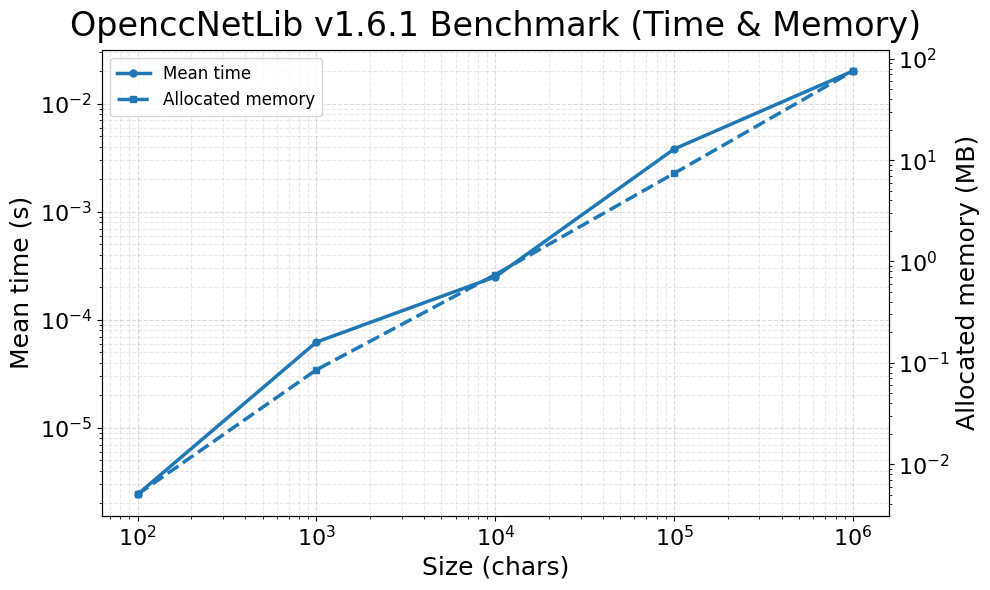
Benchmarked under normal desktop usage (IDE, background apps running) to reflect realistic performance.
| Item | Value |
|---|---|
| BenchmarkDotNet | v0.15.8 |
| OS | Windows 11 (Build 26200.8655, 25H2) |
| CPU | Intel Core i5-13400 (10C/16T @ 2.50 GHz) |
| .NET SDK | 10.0.301 |
| Runtime | .NET 10.0.9 (X64 RyuJIT x86-64-v3) |
| Iterations | 10 (1 warm-up) |
| Method | Size | Mean | Error | StdDev | Min | Max | Rank | Gen0 | Gen1 | Gen2 | Allocated |
|---|---|---|---|---|---|---|---|---|---|---|---|
| BM_Convert_Sized | 100 | 2.430 µs | 0.014 µs | 0.009 µs | 2.421 µs | 2.445 µs | 1 | 0.504 | – | – | 5.15 KB |
| BM_Convert_Sized | 1,000 | 62.305 µs | 0.435 µs | 0.228 µs | 62.013 µs | 62.769 µs | 2 | 8.545 | – | – | 87.33 KB |
| BM_Convert_Sized | 10,000 | 250.230 µs | 10.490 µs | 6.939 µs | 243.349 µs | 261.130 µs | 3 | 75.195 | 17.090 | – | 759.18 KB |
| BM_Convert_Sized | 100,000 | 3.807 ms | 74.178 µs | 49.064 µs | 3.755 ms | 3.905 ms | 4 | 808.594 | 335.938 | 117.188 | 7,580.92 KB |
| BM_Convert_Sized | 1,000,000 | 20.040 ms | 435.267 µs | 287.902 µs | 19.572 ms | 20.399 ms | 5 | 7,687.50 | 1,406.25 | 625.000 | 77,511.33 KB |
- 100 chars → ~2.4 µs
- 1,000 chars → ~62 µs
- 10,000 chars → ~0.25 ms
- 100,000 chars → ~3.8 ms
- 1,000,000 chars (1M) → ~20.0 ms
- Benchmarks include real-world system noise (IDE, background services), not isolated lab conditions.
- v1.6.1 performs in broadly the same range as v1.5.0, with modest improvements at several input sizes.
- This is notable because v1.6.1 also includes hundreds of added or updated dictionary entries and several new
Taiwan, Hong Kong, and Japanese dictionary slots. Comparable throughput with the expanded dictionary data is
consistent with the engine's
StarterUniondesign: O(1) per-starter metadata narrows candidate lengths and skips impossible lookups before probing dictionaries. - The benchmark measures
S2T, so it does not exercise every new regional slot. Conversion plans select only the dictionary groups required for each configuration, whileUnionCachereuses the prebuiltStarterUnionfor each semantic slot; unrelated dictionaries therefore do not enlarge theS2Thot path. - Internal diagnostics found no measurable large-input overhead from optional IDS preservation when no IDS operators are present, confirming efficient short-circuiting and ordinary-text rejection.
- Managed allocations are slightly lower at every measured size (approximately 1–3% lower than v1.5.0).
- Minor variance at larger sizes is expected due to OS scheduling and GC activity.
- The 100,000-character timing should not be read as a direct regression: the v1.5.0 measurement had much higher variance, and both runs were taken under normal desktop load.
- Two outliers were removed from the 1,000-character benchmark by BenchmarkDotNet.
OpenccNetLib 1.6.1 maintains the production-grade performance established in v1.5.0, with comparable overall timings and a small improvement in managed memory usage. It continues to deliver predictable throughput under realistic workloads while preserving deterministic conversion results.
-
🚀 High Performance (Real-World Tested)
Processes 1M characters in ~20.0 ms under normal desktop load (IDE, background apps). Sustains tens of millions of chars/sec on a mid-range CPU (Intel i5-13400). -
📉 Slightly Improved Memory Efficiency
- managed allocations are approximately 1–3% lower than v1.5.0 across the tested sizes
- uses about 75.7 MB for a 1M-character conversion
- preserves the established performance profile without a memory regression
-
📚 Expanded Dictionaries, Preserved Throughput
- adds or updates hundreds of dictionary entries and introduces new regional dictionary slots
- retains performance close to v1.5.0 despite the broader dictionary coverage
StarterUnionuses O(1) per-starter metadata to reject impossible candidate lengths early- per-slot
UnionCachereuse keeps accelerator construction and memory duplication low - conversion plans isolate unrelated dictionary slots from the active conversion hot path
-
📌 Predictable, Linear Scaling
Both time and memory usage scale linearly with input size:- consistent latency for small and large inputs
- stable throughput for batch and streaming workloads
- no unexpected slow paths
-
⚙️ Optimized Conversion Core
Built on a highly efficient pipeline:- fast Union-based lookup for candidate filtering
- minimal branching for non-matching paths
- streamlined control flow for better CPU utilization
- allocation-aware design for sustained performance
-
📈 Stable GC Behavior
- allocations mainly come from output buffers
- low GC pressure in typical workloads
- remains stable even for large inputs (≥1M chars)
-
🏁 Production-Ready Throughput
Designed for real applications:- performs consistently outside benchmark isolation
- suitable for CLI, GUI, and backend services
- reliable under multitasking environments
-
💾 Memory Characteristics
- scales proportionally with input size
- no abnormal spikes or hidden overhead
- predictable usage for large document processing
Note:
Internal caching and optimized data structures ensure consistently fast conversions
across repeated calls and multiple instances.
-
Opencc(string config = null)
Creates a new converter using a configuration name (e.g.,"s2t","t2s").
This overload is compatible with existing code but requires string-based config. -
Opencc(OpenccConfig configEnum)
Creates a new converter using the strongly-typedOpenccConfigenum
(e.g.,OpenccConfig.S2T,OpenccConfig.T2S).
Recommended for all new code because it avoids magic strings.
-
string Convert(string inputText, bool punctuation = false)
Convert text according to the current config and punctuation mode. -
string S2T(string inputText, bool punctuation = false) -
string T2S(string inputText, bool punctuation = false) -
string S2Tw(string inputText, bool punctuation = false) -
string Tw2S(string inputText, bool punctuation = false) -
string S2Twp(string inputText, bool punctuation = false) -
string Tw2Sp(string inputText, bool punctuation = false) -
string S2Hkp(string inputText, bool punctuation = false) -
string Hk2Sp(string inputText, bool punctuation = false) -
string S2Hk(string inputText, bool punctuation = false) -
string Hk2S(string inputText, bool punctuation = false) -
string T2Tw(string inputText) -
string T2Twp(string inputText) -
string Tw2T(string inputText) -
string Tw2Tp(string inputText) -
string T2Hk(string inputText) -
string Hk2T(string inputText) -
string T2Jp(string inputText) -
string Jp2T(string inputText)
Opencc supports both string-based and enum-based configuration APIs.
Internally, all configurations are stored as a strongly typed OpenccConfig identifier;
string APIs are provided for backward compatibility and convenience.
Recommended: Use the
OpenccConfigenum–based APIs whenever possible.
String-based APIs are fully supported but are considered legacy-style convenience helpers.
-
string Config { get; set; }
Gets or sets the current conversion configuration using a canonical string
(for example,"s2t","tw2sp").
Invalid values automatically fall back to"s2t"and update the internal error status. -
void SetConfig(string config)
Sets the conversion configuration using a string name.
Comparison is case-insensitive and ignores surrounding whitespace.
Falls back to"s2t"if the value is invalid. -
void SetConfig(OpenccConfig configEnum)
Sets the conversion configuration using a strongly typedOpenccConfigenum value.
This is the preferred and recommended approach for type safety, IDE support, and interop scenarios (P/Invoke, JNI, bindings). -
string GetConfig()
Returns the current configuration as a canonical lowercase string
(for example,"s2tw"). -
OpenccConfig GetConfigId()
Returns the current configuration as anOpenccConfigenum value.
This reflects the authoritative internal configuration state. -
string GetLastError()
Returns the most recent configuration-related error message, if any.
Anullvalue indicates that no configuration error is currently recorded.
The following static helpers are provided for validation, parsing, and discovery of supported configurations:
-
static bool TryParseConfig(string config, out OpenccConfig result)
Attempts to parse a configuration string into the correspondingOpenccConfigenum value.
Comparison is case-insensitive and ignores leading or trailing whitespace.
Returnsfalseif the input isnull, empty, or not a recognized configuration. -
static bool IsValidConfig(string config)
Determines whether the specified string represents a supported OpenCC configuration. -
static IReadOnlyCollection<string> GetSupportedConfigs()
Returns a read-only collection of all supported configuration names
(canonical lowercase strings).
The returned collection is stable and does not allocate on each call. -
static int ZhoCheck(string inputText)
Detects whether the input text is likely:2→ Simplified Chinese1→ Traditional Chinese0→ Neither / unknown
-
string NormalizeCompat(string text)Normalizes mapped CJK Compatibility Ideographs with the built-in Unicode compatibility table. Use this as an optional pre-processing step beforeConvert(...)when input may contain forms such as金. Unmapped text is preserved unchanged.
OpenccNetLib exposes dictionary provider APIs for advanced scenarios such as custom dictionaries, generated dictionary artifacts, test fixtures, and tooling. Most applications can use the built-in dictionary without calling these APIs.
-
static void UseCustomDictionary(DictionaryMaxlength customDictionary)Sets the active conversion dictionary provider to a customDictionaryMaxlengthinstance and clears cached conversion plans. Call this once during application startup, before creating converters that should use the custom dictionary. Treat the chosen dictionary as the shared application provider; if it must change, recreate existingOpenccinstances after setting the new provider. -
static void UseDefaultDictionary()Restores the active provider to the built-in dictionary and clears cached conversion plans. -
static void UseDictionaryFromPath(string dictionaryRelativePath)Loads OpenCC text dictionary files withDictionaryLib.FromDicts(dictionaryRelativePath)and activates the result. -
static void UseDictionaryFromJsonString(string jsonString)Deserializes aDictionaryMaxlengthJSON payload and activates it as the custom dictionary provider.
-
static DictionaryMaxlength Provider { get; }Returns the shared built-in dictionary instance. -
static ConversionPlanCache PlanCache { get; }Returns the active global conversion plan cache. -
static DictionaryMaxlength GetActiveProvider()Returns the dictionary instance currently supplied by the active provider delegate. -
static DictionaryMaxlength New()Returns the built-in dictionary and resets the active provider to the built-in dictionary. -
static void SetDictionaryProvider(DictionaryMaxlength dictionary)Sets the active dictionary provider to a fixedDictionaryMaxlengthinstance and publishes a fresh plan cache. -
static void ResetDictionaryProviderToDefault()Restores the active dictionary provider to the built-in dictionary and publishes a fresh plan cache.
static DictionaryMaxlength FromDicts(string relativeBaseDir = "dicts", IDictionary<DictSlot, string> overrides = null, IDictionary<DictSlot, string> appends = null)
Loads OpenCC text dictionary files, optionally replacing slots with overrides or extending slots with appends.
-
static DictionaryMaxlength WithCustomDicts(DictionaryMaxlength dict, IEnumerable<CustomDictSpec> specs)Applies post-load customization to an already loaded dictionary provider. Each spec targets oneDictSlot, reads optionalPathsand/orPairs, and applies them withCustomDictMode.AppendorCustomDictMode.Override. -
static DictionaryMaxlength FromJson(string relativePath = "dicts/dictionary_maxlength.json")Loads and normalizes a JSON dictionary payload. -
static DictionaryMaxlength DeserializedFromJson(string path)Compatibility wrapper aroundFromJson(path). -
static DictionaryMaxlength FromCbor(string relativePath = "dicts/dictionary_maxlength.cbor")Loads and normalizes a CBOR dictionary payload. -
static DictionaryMaxlength LoadJsonCompressed(string path)Loads and normalizes a Zstandard-compressed JSON dictionary payload.
The serialization helpers accept an optional DictionaryMaxlength dictionary = null parameter. When omitted, they load
from the default OpenCC text dictionary sources with FromDicts().
-
static void SerializeToJson(string path, DictionaryMaxlength dictionary = null)Writes a dictionary to indented JSON. -
static void SerializeToJsonUnescaped(string path, DictionaryMaxlength dictionary = null)Writes indented UTF-8 JSON without escaping non-ASCII characters. -
static void SaveCbor(string path, DictionaryMaxlength dictionary = null)Writes a dictionary as CBOR. -
static byte[] ToCborBytes(DictionaryMaxlength dictionary = null)Returns a CBOR-encoded dictionary payload. -
static void SaveJsonCompressed(string path, DictionaryMaxlength dictionary = null)Writes a dictionary as Zstandard-compressed JSON.
var dict = DictionaryLib.FromDicts(
    appends: new Dictionary<DictSlot, string>
    {
        [DictSlot.STPhrases] = "./UserDict.txt"
    });

DictionaryLib.SerializeToJson("./custom-dictionary.json", dict);
DictionaryLib.SaveCbor("./custom-dictionary.cbor", dict);
DictionaryLib.SaveJsonCompressed("./custom-dictionary.zstd", dict);- All configuration inputs ultimately resolve to a single internal
OpenccConfigidentifier. - Invalid configuration values never throw; they safely fall back to
"s2t". - Enum-based APIs are future-proof and align with the C API, Rust core, and other language bindings.
- Dictionaries are loaded and cached on first use.
- Data files are expected in the
dicts/directory (seeDictionaryLibfor details).
Description:
  Generate OpenccNetLib dictionary files.

  Examples:
    OpenccNet dictgen
      Generate default Zstd dictionary (dictionary_maxlength.zstd)

    OpenccNet dictgen -f cbor
      Generate CBOR dictionary for interop

    OpenccNet dictgen -f json --unescape
      Generate readable JSON dictionary without \uXXXX escapes


Usage:
  OpenccNet dictgen [options]

Options:
  -f, --format <format>            Dictionary format: zstd|cbor|json [default: zstd]
  -o, --output <output>            Output filename. Default: dictionary_maxlength.<ext>
  -b, --base-dir <base-dir>        Base directory containing OpenCC-style .txt dictionary sources (for dictgen) [default: dicts]
  -u, --unescape                   For JSON format only: write readable Unicode characters instead of \uXXXX escapes
  -D, --custom-dict <custom-dict>  Load custom dictionary: <slot>:<mode>:<path>. Example: hkphrasesrev:append:my_hk_dict.txt
  -?, -h, --help                   Show help and usage information
Description:
  Convert text using OpenccNetLib configurations.

Usage:
  OpenccNet convert [options]

Options:
  -i, --input <input>               Read original text from file <input>
  -o, --output <output>             Write original text to file <output>
  -c, --config <config> (REQUIRED)  Conversion configuration.
                                    Valid options: s2t, t2s, s2tw, tw2s, s2twp, tw2sp, s2hkp, hk2sp, s2hk, hk2s, t2tw, tw2t, t2twp, tw2tp, t2hk, hk2t, t2jp, jp2t
  -p, --punct                       Punctuation conversion.
  --detofu <detofu>                 Apply tofu-safe fallback after conversion: all, ext-b, ext-c, ext-d, ext-e, ext-f, ext-g, ext-h, ext-i
  --detofu-file <detofu-file>       Load additional DeTofu fallback mappings from a UTF-8 text file. Custom mappings override built-in mappings (requires --detofu)
  -I, --keep-ids                    Preserve Unicode IDS expressions during conversion.
  -n, --norm-compat                 Normalize CJK Compatibility Ideographs before conversion.
  -D, --custom-dict <custom-dict>   Load custom dictionary: <slot>:<mode>:<path>. Example: hkphrasesrev:append:my_hk_dict.txt
  --in-enc <in-enc>                 Encoding for input: UTF-8|UNICODE|GBK|GB2312|BIG5|Shift-JIS [default: UTF-8]
  --out-enc <out-enc>               Encoding for output: UTF-8|UNICODE|GBK|GB2312|BIG5|Shift-JIS [default: UTF-8]
  -?, -h, --help                    Show help and usage information
Example: append a custom Hong Kong phrase dictionary for hk2sp.
data/my_hk_dict.txt:
# Custom Dictionary

細路哥	小男孩
echo "這個細路哥很靈活" | ./OpenccNet convert -c hk2sp --custom-dict hkphrasesrev:append:data/my_hk_dict.txt
这个小男孩很灵活
✅ Conversion (hk2sp): <stdin> → <stdout>Description:
Convert Office documents or Epub using OpenccNetLib.
Usage:
OpenccNet office [options]
Options:
-i, --input <input> Input Office document <input>
-o, --output <output> Output Office document <output>
-c, --config <config> (REQUIRED) Conversion configuration.
Valid options: s2t, t2s, s2tw, tw2s, s2twp, tw2sp, s2hkp, hk2sp, s2hk, hk2s, t2tw, tw2t, t2twp, tw2tp, t2hk, hk2t, t2jp, jp2t
-p, --punct Enable punctuation conversion.
-f, --format <format> Force Office document format: docx | xlsx | pptx | odt | ods | odp | epub
-k, --keep-font Preserve font names in Office documents [default: true]. Use --keep-font:false to disable.
-q, --quiet Suppress status and progress output; only errors will be shown.
-D, --custom-dict <custom-dict> Load custom dictionary: <slot>:<mode>:<path>. Example: hkphrasesrev:append:my_hk_dict.txt
-?, -h, --help Show help and usage information
Description:
  Convert a PDF to UTF-8 text using PdfPig + OpenccNetLib, with optional CJK paragraph reflow.

Usage:
  OpenccNet pdf [options]

Options:
  -i, --input <input>              Input PDF file <input.pdf>
  -o, --output <output>            Output text file <output.txt>
  -c, --config <config>            Conversion configuration.
                                   Valid options: s2t, t2s, s2tw, tw2s, s2twp, tw2sp, s2hkp, hk2sp, s2hk, hk2s, t2tw, tw2t, t2twp, tw2tp, t2hk, hk2t, t2jp, jp2t
  -p, --punct                      Enable punctuation conversion.
  -H, --header                     Add [Page x/y] headers to the extracted text.
  -r, --reflow                     Reflow CJK paragraphs into continuous lines.
  -C, --compact                    Use compact reflow (fewer blank lines between paragraphs). Only meaningful with --reflow.
  -q, --quiet                      Suppress status and progress output; only errors will be shown.
  -e, --extract                    Extract text from PDF only (no OpenCC conversion).
  -n, --norm-compat                Normalize CJK Compatibility Ideographs before conversion.
  -D, --custom-dict <custom-dict>  Load custom dictionary: <slot>:<mode>:<path>. Example: hkphrasesrev:append:my_hk_dict.txt
  -?, -h, --help                   Show help and usage information
OpenccNet pdf uses a text-based PDF extraction engine (PdfPig) and is intended for digitally generated PDFs (
e-books, research papers, reports).
- ✅ Works best with selectable text
- ❌ Does not perform OCR on scanned/image-only PDFs
- ❌ Visual layout (columns, tables, figures) is not preserved
The --reflow option applies a CJK-aware paragraph reconstruction pipeline, designed for Chinese novels, essays,
and academic text.
Reflow attempts to:
- Join artificially wrapped lines
- Repair cross-line splits (e.g.
面+容→面容) - Preserve headings, short titles, dialog markers, and metadata-like lines
- Reflow is heuristic-based
- It is not suitable for:
- Poetry
- Comics / scripts
- Highly informal or experimental layouts
- Web novels often use inconsistent formatting and may require tuning
When used together with --reflow, --compact:
- Reduces excessive blank lines
- Produces denser, book-like paragraphs
- Is recommended for long-form reading or further text processing
--compacthas no effect unless--reflowis enabled.
Using --header inserts markers such as:
=== [Page 12/240] ===
This is useful for:
- Debugging extraction issues
- Locating original PDF pages
- Avoiding empty or ambiguous page boundaries
--quiet suppresses:
- Progress bars
- Status messages
- Informational logs
Only errors will be printed.
Recommended for batch processing or script integration.
- Output text is always written as UTF-8
- Line endings follow the host platform
If you need other encodings, convert the output text using standard tools after extraction.
Simple PDF → Traditional Chinese text
OpenccNet pdf -i input.pdf -o output.txt -c s2t -r
Compact novel conversion with page markers
OpenccNet pdf -i novel.pdf -o novel.txt -c s2tw -r --compact -H
Batch / automation use
OpenccNet pdf -i file.pdf -o out.txt -c t2s -r -q
- OpenccNetLibGui : A GUI application for
OpenccNetLib, providing a user-friendly interface for Traditional/Simplified Chinese text conversion.
- This project is licensed under the MIT License. See the LICENSE file for details.
See THIRD_PARTY_NOTICES.md for bundled OpenCC lexicons (Apache License 2.0).
OpenccNet is not affiliated with the original OpenCC project, but aims to provide a compatible and high-performance solution for .NET developers.