Leonardo Noering - To improve the knowledge

Using this repo to improve the knowledge
- Use this command to install the first time.
bin/magento setup:install --base-url="http://localhost/" --db-host="db" --db-name="magento" --db-user="magento" --db-password="magento" --admin-firstname="admin" --admin-lastname="admin" --admin-email="user@example.com" --admin-user="admin" --admin-password="admin123" --language="en_US" --currency="USD" --timezone="America/Sao_Paulo" --use-rewrites="1" --backend-frontname="adminaccess" --opensearch-host="opensearch" --opensearch-port="9200" --opensearch-enable-auth="false" --opensearch-username="" --opensearch-password="" --base-url-secure="https://localhost/" --search-engine="opensearch" --session-save="redis" --session-save-redis-host="redis" --session-save-redis-port="6379" --session-save-redis-password="" --session-save-redis-timeout="2.5" --session-save-redis-persistent-id="" --session-save-redis-db="2" --session-save-redis-compression-threshold="2048" --session-save-redis-compression-lib="gzip" --session-save-redis-log-level="4" --session-save-redis-max-concurrency="6" --session-save-redis-break-after-frontend="5" --session-save-redis-break-after-adminhtml="30" --session-save-redis-first-lifetime="600" --session-save-redis-bot-first-lifetime="60" --session-save-redis-bot-lifetime="7200" --session-save-redis-disable-locking="0" --session-save-redis-min-lifetime="60" --session-save-redis-max-lifetime="2592000" --cache-backend="redis" --cache-backend-redis-server="redis" --cache-backend-redis-db="0" --page-cache="redis" --page-cache-redis-server="redis" --page-cache-redis-db="1"-- URL SET -- ADMIN USER -- SEARCH -- CACHE (Default caching, Page Cache, Session)
- Disable the two factor auth
bin/magento module:disable {Magento_AdminAdobeImsTwoFactorAuth,Magento_TwoFactorAuth}Digital Ocean

- Create one droplet with centos 9.
- Access the console by web interface.
- Droplets > [ Choice your droplet ] > Access > Recovery Console
- Change configs at ssh to accept login.
- PermitRootLogin yes
- PasswordAuthentication yes
vi /etc/ssh/sshd_config- Restart ssh service
service sshd restart- Now access by ssh from your machine.
- Will need create 4 droplets.
- PHP/NGINX OR APACHE
- OPENSEARCH
- DATABASE
- REDIS (Session and cache)
- Create the web user
useradd web- Set the password to this user
passwd web- Update
sudo yum check-update- Install
curl -fsSL https://get.docker.com/ | sh- Start the docker
sudo systemctl start docker- Check it's working
sudo systemctl status docker- Enable to start the docker on reboot.
sudo systemctl enable docker- I created one linux user to not use root every time. (I created the user web)
sudo usermod -aG docker web- Copy the markshust/docker-magento existing projects.
curl -s https://raw.githubusercontent.com/markshust/docker-magento/master/lib/template | bash- Droplets communications.
- I used the Firewall from Digital Ocean panel to limit the access. (External Access) Creting sprecific rules to droplets.
- I used the root user to run because the permissions, after that to shared to container app, I change the owner to web.
- Install
sudo yum install git- Config
git config --global user.name "Deployer"
git config --global user.email "lnoering@gmail.com"- Run this commands at the server
mkdir /home/web/app/code
mkdir /home/web/app/code/magento.git
cd /home/web/app/code/magento.git
git init --bare- Set the post-receive hook to git
mkdir /home/web/app/code/checkout
cd /home/web/app/code/magento.git/hooks
touch post-receive
chmod +x post-receive
vim post-receive- Copy the data of post-receive from .configs/git bare/post-receive
- Create one ssh-key at server (user web)
ssh-keygen -t ed25519 -C "your_email@example.com"- Add the key to the agent ssh. (not the .pub)
eval "$(ssh-agent -s)"
ssh-add ~/.ssh/<key-created>- Copy the pub key
cat ~/.ssh/<key-created>.pub- Add to the github deploy key. (Enable the write)
-
https://github.com/\<repo-user>/<remo-name>/settings/keys
In my case:
-
- Creating one remote at your machine to deploy.
git remote add deploy ssh://web@dropletserver:22/home/app/code/magento.git- The command to deploy. (we will use the master to deploy)
git push deploy masterGit Flow
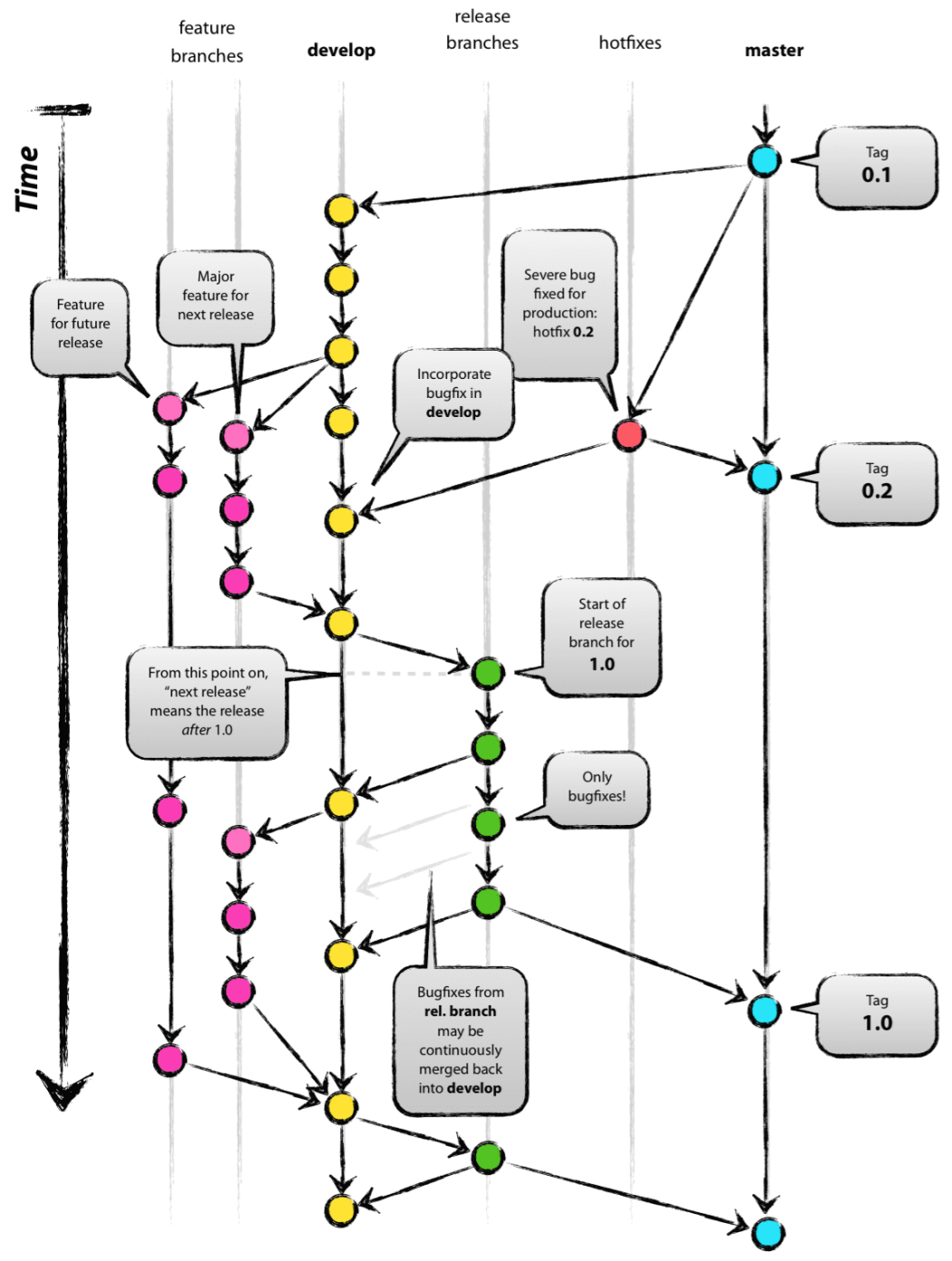
- Proccess to work with branchs
To do
To do
To do
To do
To do
*using the docker from - markoshust/magento-nginx