Delta Arrow Reader is a read-only Rust library that streams Delta Lake data as Arrow batches, with optional SQL through DataFusion.


The Delta Arrow Reader documentation has guided examples and design details.
Delta Arrow Reader is meant for Rust services, command-line tools, and data pipelines that read Delta Lake tables. It is a good fit when:
- You need to read a large table without holding all of it in memory.
- You want to process each batch as soon as it arrives.
- Your application already works with Arrow data.
- You want to run SQL through DataFusion.
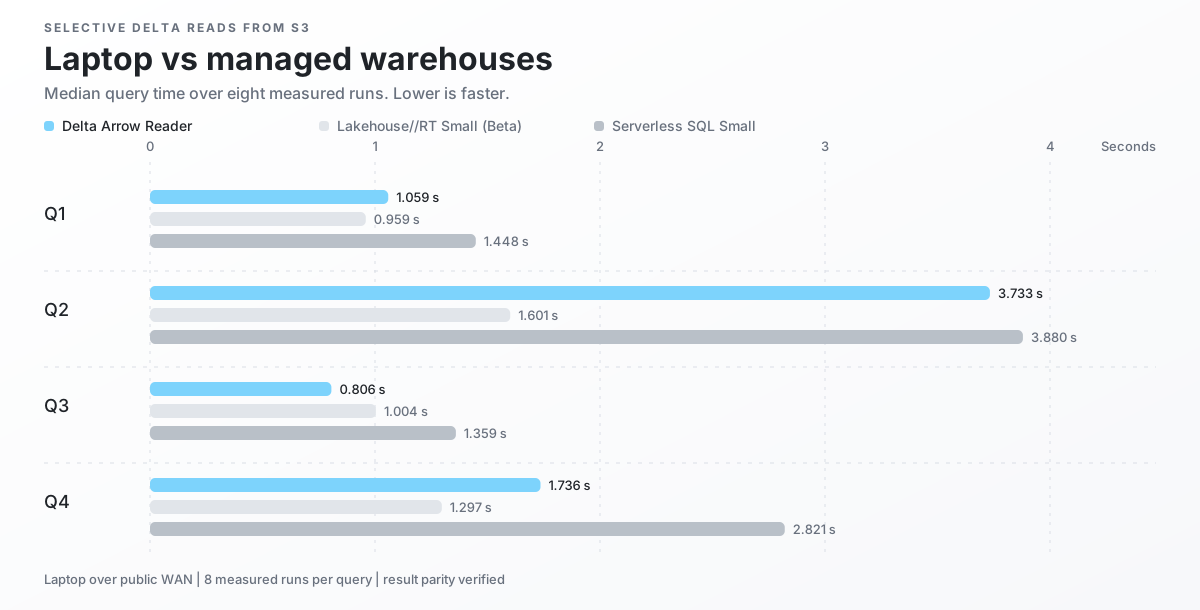
These were ordinary application reads: each query pulled a small result from a much larger Delta table in S3. We reused an existing production sample instead of designing a workload around this reader.
Running from a laptop over the public internet, Delta Arrow Reader beat Databricks Serverless SQL Small on all four queries. It also beat Lakehouse//RT Small (Beta) once and finished within 33.8% on two more.
The same-machine comparison was not close. Delta Arrow Reader beat delta-rs on all four queries, by as much as 71.75 times, while delta-rs used 6.4 times as much peak memory.
The anonymized case study publishes every measured run, the query shapes, remote byte counts, cache checks, and limitations.
Tested August 31, 2026. Databricks notes that the performance and supported features of Lakehouse//RT (Beta) may change before general availability.
Delta Arrow Reader has one job: read Delta tables and stream Arrow batches. The alternatives below do much more, and their Delta paths carry that extra weight.
Spark is where Delta Lake grew up, and Trino is a proven distributed query engine. If a cluster is already part of your system, either can fit well. If you only need a small, single-node read service, neither does. You would still carry a JVM, a full query runtime, and the operational machinery of a distributed system just to stream Arrow batches.
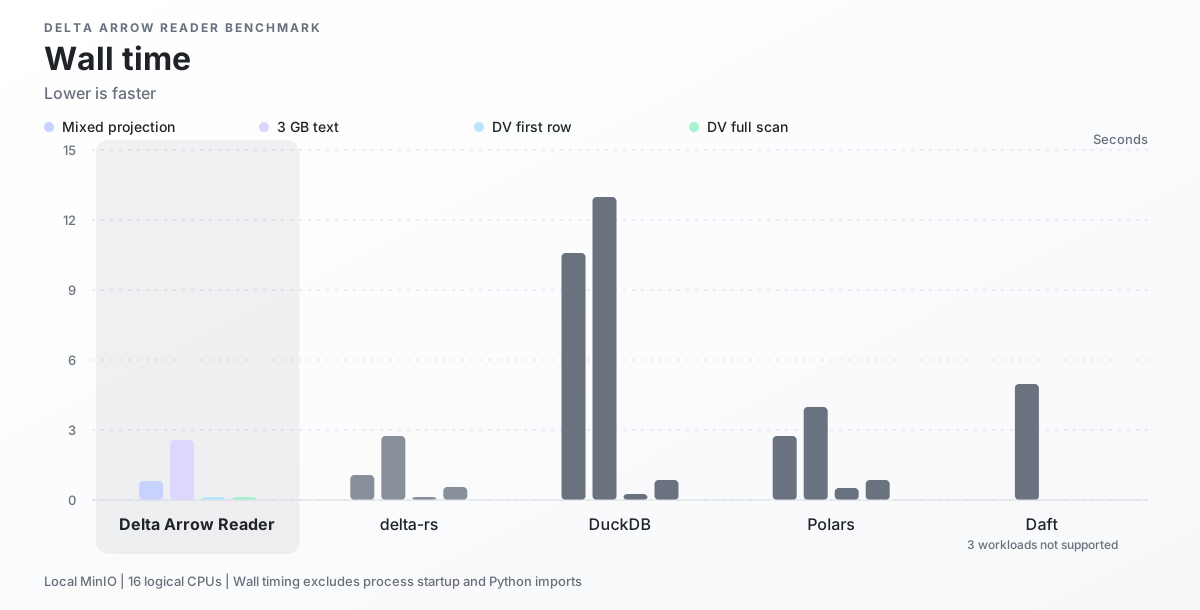
DuckDB, Polars, and Daft aim to be one engine for many formats. For Delta reads, the results were poor. DuckDB took 5.1-13.1 times as long as Delta Arrow Reader, and Polars took 1.6-22.7 times as long. Daft managed only the text projection out of four workloads; it took 2.0 times as long and rejected the deletion-vector tables. All three also used more memory in every comparable run. See the benchmark setup and complete results.
delta-rs is the closest alternative, but it also covers the full Delta lifecycle, including writes. Delta Arrow Reader narrows that scope to asynchronous reads, bounded memory, Arrow streaming, and efficient deletion vectors. Across the two projection workloads, Delta Arrow Reader ranged from roughly even with delta-rs to finishing 25% sooner. On deletion-vector tables, delta-rs took 3.7 times as long to return one live row and 4.8 times as long to scan the full table.
That gap matters because Databricks now recommends deletion vectors for most tables and is rolling out automatic enablement for new tables.
Add the reader, Tokio, and the futures utilities used by the example:
cargo add delta-arrow-reader futures-util
cargo add tokio --features macros,rt-multi-thread
For DataFusion, follow the DataFusion installation instructions to add the matching dependencies.
Load a table and consume its batches from asynchronous code:
use delta_arrow_reader::DeltaTableBuilder;
use futures_util::TryStreamExt;

# async fn read_table() -> Result<(), Box<dyn std::error::Error>> {
let table = DeltaTableBuilder::new("/tmp/example-delta-table")
    .load_table()
    .await?;
let mut batches = table.scan().build().await?.into_stream();

while let Some(batch) = batches.try_next().await? {
    println!("rows={}", batch.num_rows());
}
# Ok(())
# }
Loading a table selects the latest or requested version and reads its schema. By default, the reader evaluates Delta scan metadata, which it uses to choose files, each time it builds a scan. For repeated queries against the same loaded table, eager scan-metadata initialization caches that metadata in memory when the table loads. Later scans can reuse the cache through either the streaming API or DataFusion. Each scan still reads its Parquet data separately when it runs.
The streaming reader quickstart shows how to select columns, filter rows, limit results, and inspect metrics.
Enable the datafusion feature to query a Delta table through a DataFusion
SessionContext. Registration gives an already loaded table a name in
DataFusion. It does not change when the reader evaluates scan metadata, and
Parquet data is read only when DataFusion executes a query.
The DataFusion quickstart walks through registration and a first SQL query. It also shows how to reuse scan metadata across SQL queries.
The reader can load the latest or a selected table snapshot. It supports column selection, row filters, result limits, deletion vectors, bounded read scheduling, and optional DataFusion integration.
It does not write Delta tables, manage transactions, create a Tokio runtime, or provide Delta Funnel orchestration, reporting, or Python APIs.
- Streaming reader quickstart
- DataFusion quickstart
- Architecture
- Execution options
- Scan metrics
- Reader benchmarks
- Rust API reference
For local checks and documentation setup, see the development guide.