
DataFusion SQL in.
Native TDS bulk load out.
Observed: 13.4M rows in ~14 minutes vs. a ~2 hour Spark/JDBC path.
Read the Delta Funnel documentation.




Note
Delta Funnel is early project code. The Rust crate is available on crates.io, and the Python package is available on PyPI.
Use Delta Funnel when:
- SQL Server writes are the bottleneck.
- Spark is too much machinery for a focused export.
- You want SQL transforms over Delta Lake without a cluster.
- You want Rust or Python orchestration with reports and tracing.
For Rust, add the delta-funnel crate:
cargo add delta-funnelFor Python, add the deltafunnel package:
uv add deltafunnelfrom deltafunnel import Session
ado_connection_string = (
"server=tcp:localhost,1433;"
"database=warehouse;"
"User ID=etl_user;"
"Password=REPLACE_ME;"
"encrypt=true;"
"TrustServerCertificate=yes"
)
session = Session(default_mssql_connection_string=ado_connection_string)
# Register the Delta table as "orders" so SQL can reference it.
orders = session.delta_lake("file:///path/to/orders-delta", name="orders")
# Build a lazy DataFusion SQL query. No rows are read yet.
daily_orders = session.table_from_sql("""
select customer_id, order_date, total_amount
from orders
where order_date >= date '2026-01-01'
""")
# Preview executes the DataFusion query with a limit; notebooks render it as a table.
daily_orders.preview(limit=20)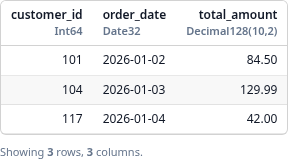
# Write executes the query and loads the result into SQL Server.
report = daily_orders.write_to_mssql(
    schema="dbo",
    table="daily_orders",
    load_mode="create_and_load",  # "replace" also supports a missing target
    # dry_run=True,  # validate the load plan without writing rows
)
For private S3 sources, SQL Server load modes, dry runs, and reports, see the
private S3 sources,
SQL Server guide, and
dry runs and reports.
For workflows that write several related tables in one run, use
Table.to_mssql(...) to create output specs and Session.write_all(...) to
execute them together. Shared lazy SQL dependencies can be cached during the
workflow so common upstream work is not repeated for each output.
See the
multiple outputs and shared caching
guide for setup, dry runs, cache options, and failure behavior.
use delta_funnel::{
    DeltaFunnelRuntime, DeltaFunnelSession, DeltaSourceConfig, LoadMode,
    MssqlConnectionConfig, MssqlOutputTarget, MssqlTargetConfig,
    MssqlTargetTable, OutputWritePlan, RunMode, SessionOptions,
};

fn main() -> Result<(), Box<dyn std::error::Error>> {
    let ado_connection_string = concat!(
        "server=tcp:localhost,1433;",
        "database=warehouse;",
        "User ID=etl_user;",
        "Password=REPLACE_ME;",
        "encrypt=true;",
        "TrustServerCertificate=yes",
    );

    let default_connection = MssqlConnectionConfig::new(ado_connection_string)?
        .with_display_label("warehouse");
    let mut session = DeltaFunnelSession::new(
        SessionOptions::new().with_default_mssql_connection(default_connection),
    )?;
    let runtime = DeltaFunnelRuntime::new()?;

    // Register the Delta table as "orders" so SQL can reference it.
    let _orders = session.delta_lake(DeltaSourceConfig::new(
        "orders",
        "file:///path/to/orders-delta",
    ))?;

    // Build a lazy DataFusion SQL query. No rows are read yet.
    let daily_orders = runtime.table_from_sql(
        &mut session,
        r#"
        select customer_id, order_date, total_amount
        from orders
        where order_date >= date '2026-01-01'
        "#,
    )?;

    // Preview executes the DataFusion query with a limit.
    let preview = runtime.preview_table(&session, &daily_orders, 20)?;
    println!("{}", preview.text());

    // Write executes the query and loads the result into SQL Server.
    let target = MssqlTargetConfig::new(MssqlTargetTable::new("dbo", "daily_orders")?)
        .with_load_mode(LoadMode::CreateAndLoad);
    let output = OutputWritePlan::new(
        daily_orders,
        MssqlOutputTarget::new("daily_orders", target, RunMode::Execute),
    );
    let report = runtime.write_to_mssql(&session, &output)?;

    println!("wrote output {}", report.output_name());
    Ok(())
}
For a guided version of this workflow, see the
Rust quickstart.
For the full Rust API, see
docs.rs/delta-funnel and the
query_load_dry_run example.
For local builds and test setup, see the
local development guide.