PropView is an application that runs completely on the client-side, being powered by React JS. It was made as a demonstration of my ability to implement React JS to create a small, yet dynamic, application, using purely client-side code (JS, SASS, etc.).
The application itself, is a property viewing utility, that is designed to take in a property address, and return results and listing information based on the address given. It also implements a GPS feature, that gets the user's current location, and displays information of the address he/she is currently at.
The project was done it about 3 weeks time, with the first week being design/proof of concept. Weeks 2 and 3 were dedicated towards development, with work consisting of parsing through property data, creating load indiciators, getting results through GPS, and more.
Overall, I enjoyed the project a lot. I learned a lot about working with third-party APIs, as well as working with Real-Estate data. Fallbacks for incomplete data was definitely a challenge I had, but found a lot of useful tips and tricks to make sure the application kept providing content.
For this requirement, I chose to go with React as my front-end framework. Though I had an option to use Vue, Angular, or any other front-end framework, my choice in React stemmed from my wanting to become more proficient at it.
I accomplished this by using the OnBoard, Zillow, and Google Maps API end-points. For OnBoard, I was tapping into 4 end-points total, with Zillow and Google Maps using 2. I ended up using a total of 6 end-points for the property data in order to provide an overlap for missing data. This helped extremely with an increase in successful data I was recieving for properties, making more data available to the user.
When the user makes a search, the screen is filled with an overlay, along with an animated GIF showing that their search is in progress. When the data is loaded, the state updates view with the newely recieved data, and the overlay disappears.
The way I setup the states, was by having my routes setup in the App.js file. App.js is in charge of loading the two pages, "Landing.js" and "Property.js", depending on the state of App.js. Once the user is on the Property.js component, every search that is made is used to update the state of Property.js, updating the view with the data that is retrieved from the APIs.
- JS (ES6)
- SASS / CSS
- HTML
- React JS
- axios (HTTP client for API calls)
- currency-formatter
- xml-js (XML to JS Object converter)
- parse-address
- gh-pages
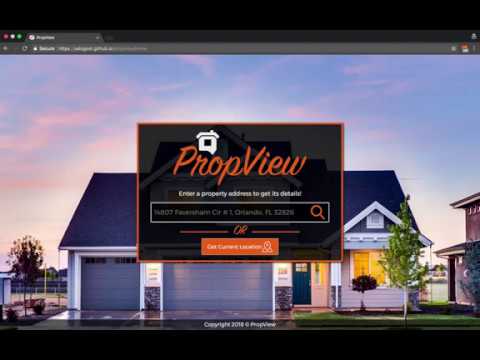
Landing page of the site that provides a randomized background image on every load. This page gives the search actions for the users to find property data for inputed addresses, or their current location.


To install and run this project locally, you'll need to have Node Package Manager (npm) installed on your local machine.
To download this repo, run:
git clone https://github.com/salogost/propview.git
To install Node packages
npm install
Lastly run:
npm run