Context: A custom VBA-based User Defined Function (UDF) designed to bridge a gap in native Excel functionality: the inability to extract cell comments (threaded or classic) directly into a cell using a formula.
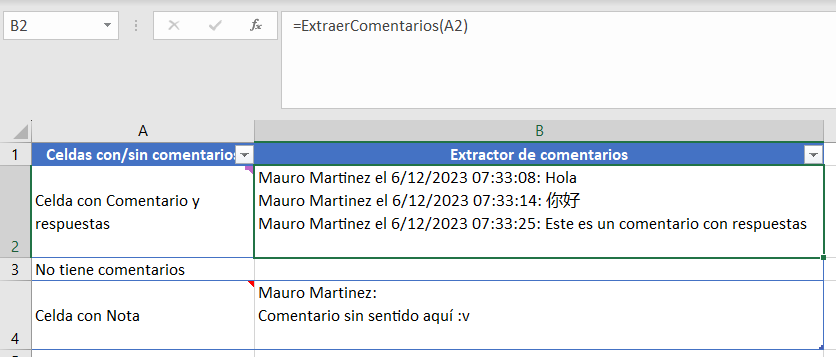
Note: As seen in the image above, the function is versatile and supports both threaded conversations (Office 365) and classic notes, ensuring no data is left behind regardless of the Excel version used. What's moer, when there are no comments, it will leave the cell empty, no errors.
This script creates a new Excel function: =ExtraerComentarios().
It works just like any native formula (SUM, VLOOKUP), but its purpose is to pull text data from metadata (comments) into the grid, making it searchable and exportable.
You don't need to be a developer to use this. Just follow these steps:
- Get the Code: Open the
.basfile in this repository and copy the script (from the second line onwards). - Open VBA Editor: In your Excel file, right-click the Sheet tab name and select "View Code" (or press
ALT + F11). - Insert Module: Go to the top menu:
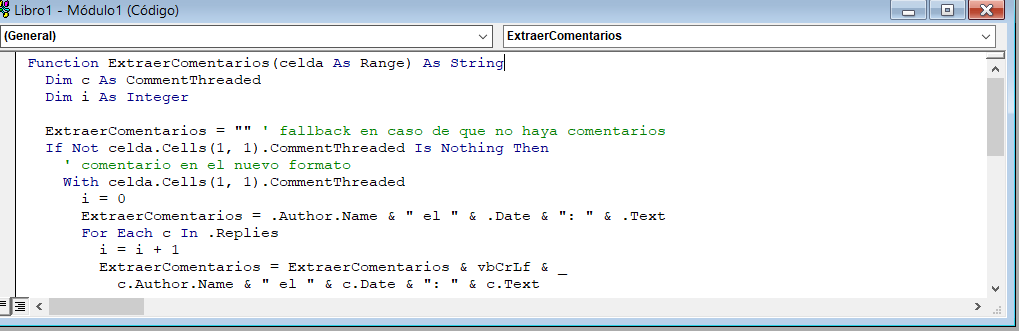
Insert>Module. - Paste: Paste the copied script into the new module window.
- Save & Return: Close the VBA window to return to your Excel sheet.
- Apply: Use the function in any cell:
=ExtraerComentarios(A1)(where A1 is the cell containing the comments).
- Full Support: Handles both modern Threaded Comments and legacy Notes.
- UDF Integration: Behaves like a native Excel function once installed.
- Bulk Processing: Extract data from hundreds of cells simultaneously by dragging the formula.
Visual representation of the implementation within the VBA Editor:
Note: Remember to save your Excel file as Excel Macro-Enabled Workbook (.xlsm) to keep the function working.