
A professional pharmacy and medicine e-commerce scalable server-side application.
CHEMIST BD SERVER is a full-featured backend API for a pharmacy e-commerce platform. The platform supports seamless medicine browsing, cart management, and order processing using modern backend technologies.
🌐 Frontend Live URL: https://chemistbd-client.vercel.app
🌐 Backend Live URL: https://chemist-bd-server.onrender.com
🌐 Frontend Github URL: https://github.com/mazharul90007/chemist-bd
📚 API Documentation: Postman Documentation
[CUSTOMER, SELLER, ADMIN]
- Signup & Login (PUBLIC)
- Session Management (AUTHENTICATED USER)
- Email Verification (CUSTOMER, SELLER)
- Update Profile (ALL LOGGEDIN USER)
- Create Medicine (SELLER, ADMIN)
- Get all Medicines (PUBLIC)
- Get a Specific Medicine by Id (PUBLIC)
- Update a Specific Medicine (SELLER)
- Delete Medicine (SELLER, ADMIN)
- Create Category (ADMIN)
- Get All Categories (PUBLIC)
- Add Item to Cart (CUSTOMER)
- Get My Cart (CUSTOMER)
- Update Cart Item Quantity (CUSTOMER)
- Remove Item from Cart (CUSTOMER)
- Create Order from Cart (CUSTOMER)
- Get My Orders (CUSTOMER)
- Get Seller-Specific Orders (SELLER)
- Update Order Status (SELLER, ADMIN)
- Cancel Order (CUSTOMER)
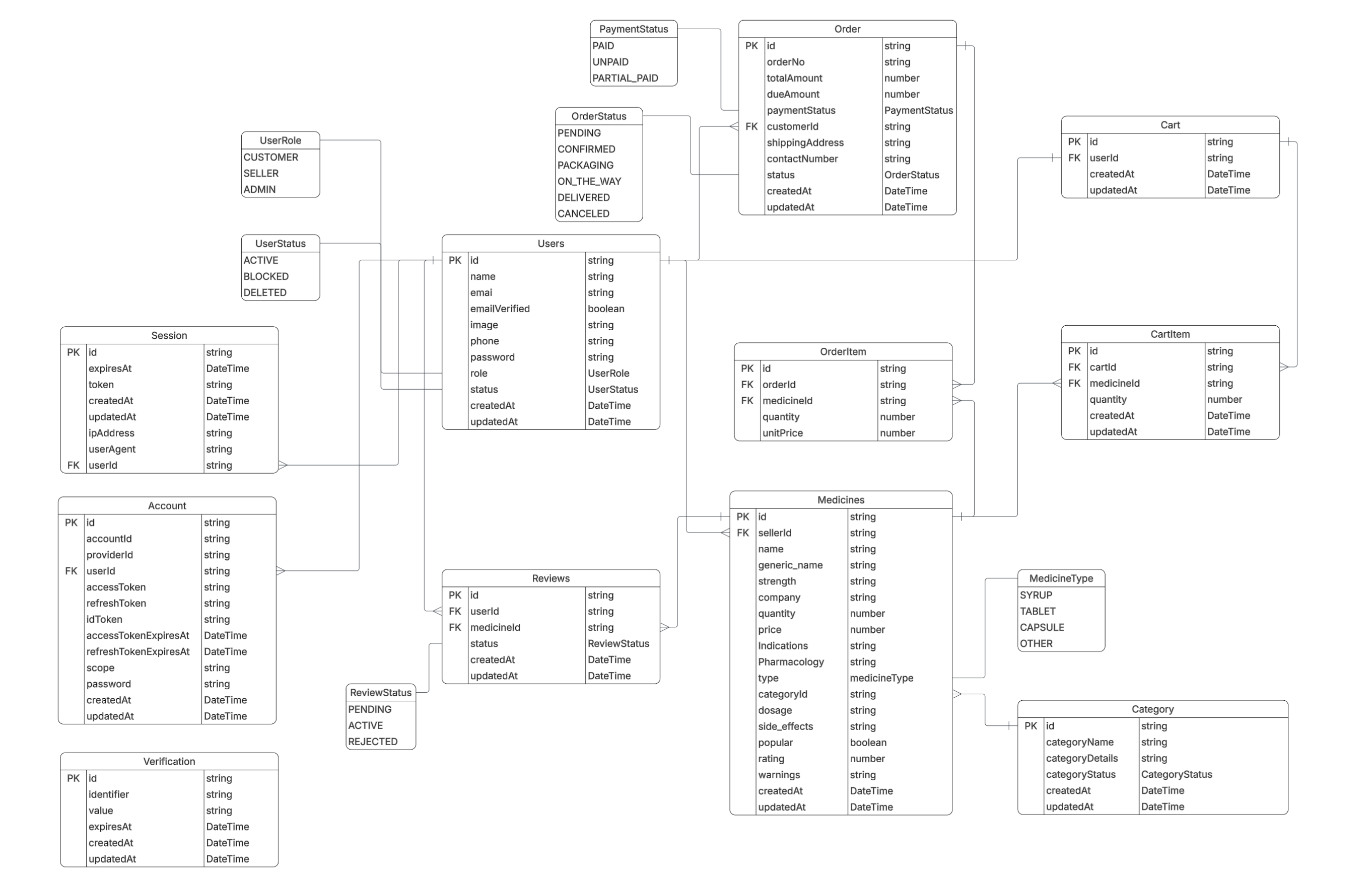
- Node.js - Runtime environment
- Express.js (v5.2.1) - Web framework
- TypeScript - Type-safe JavaScript
- PostgreSQL (Neon) - Relational database
- Prisma (v7.4.0) - ORM (Object–Relational Mapping) tool
- Better-Auth - Secure authentication and session management
- JWT - Secure token-based access
- Nodemailer - Email service for notifications
- Http-status - Utility for HTTP status codes
- Cors & Cookie-parser - Middleware for security and cookie handling
- Dotenv - Environment variable management
- Vercel - Cloud deployment platform
Before you begin, ensure you have the following installed:
- Node.js (v18 or higher)
- npm or pnpm package manager
- PostgreSQL database (local or remote/Neon)
- Git
git clone https://github.com/mazharul90007/chemist-bd-server.git
cd chemist-bd-serverUsing npm:
npm installCreate a .env file in the root directory with your variables (refer to .env.example if available):
DATABASE_URL="postgresql://user:password@localhost:5432/chemistbd"
BETTER_AUTH_SECRET="your_better_auth_secret"
BETTER_AUTH_URL="http://localhost:4000"
APP_URL="http://localhost:3000"
APP_USER="your-email@gmail.com"
APP_PASS="your-app-password"Generate Prisma Client
npx prisma generateRun Migrations
npx prisma migrate dev --name initnpm run buildRun the server in development mode with hot-reload:
npm run devThe server will start on http://localhost:4000 (or your configured PORT).
- Build the project:
npm run build- Start the server:
npm run startPOST /sign-up- Register a new user.POST /sign-in- Authenticate and receive session.GET /me- Get current user profile (Authenticated).GET /user/:id- Get specific user details (Admin).
GET /- List all categories (Public).POST /- Create a new category (Admin).
GET /- List all medicines with filters (Public).GET /:id- Get specific medicine details (Public).POST /- Create a new medicine listing (Seller/Admin).GET /seller-medicines- View my medicine listings (Seller).PATCH /:id- Update medicine data (Seller).DELETE /:id- Remove a medicine (Seller/Admin).
GET /- View my persistent cart (Customer).POST /add/:id- Add medicine to cart (Customer).PATCH /update-quantity/:id- Change quantity (Customer).DELETE /remove/:id- Remove item from cart (Customer).
POST /create- Place an order from cart (Customer).GET /- View my order history (Customer).GET /all- View all orders in system (Admin).GET /seller-orders- View orders for products I'm selling (Seller).GET /:id- Get specific order details (Customer).PATCH /:id- Update order status (Seller/Admin).PATCH /cancel/:id- Cancel an order (Customer).
GET /users- List all users (Admin).PATCH /users/:id- Update user status/block user (Admin).
For detailed API documentation, request/response examples, and testing, visit: Postman Documentation
ISC
Mazharul Islam Sourabh
Feel free to fork this project and submit pull requests. For major changes, please open an issue first to discuss what you would like to change.
For support, please contact the development team.