CAD system for righteous zen programmers
ZenCad is a system for using the OpenCascade geometry core in an OpenSCAD-like script style. So, it's openscad idea, python language and opencascade power in one.
-
Published manual. The checkout guide describes the current source, with a full thematic operation reference and illustrations.
-
Articles:
-
Community chat (Telegram): https://t.me/zencad
sudo apt update
sudo apt install libglu1-mesa libxcb-cursor0 libxcb-icccm4 \
  libxcb-image0 libxcb-keysyms1 libxcb-randr0 libxcb-render-util0 \
  libxcb-shape0 libxcb-xfixes0 libxcb-xinerama0 libxcb-xkb1 \
  libxkbcommon-x11-0
The current Qt backend uses X11. On a Wayland desktop, an XWayland session must be available.
The default installation uses the prebuilt cadquery-ocp-novtk wheel from
PyPI. It does not use conda, download OCCT at import time, or install VTK.
python3 -m pip install "zencad[gui]"
zencad
For headless geometry use:
python3 -m pip install zencad
ZenCad requires 64-bit CPython 3.10-3.14. The geometry-only installation has
prebuilt wheels for Windows x86-64, macOS 11+ x86-64/arm64, and Linux
x86-64/aarch64 with glibc 2.31 or newer. The gui extra is available on
Windows x86-64, macOS x86-64/arm64, and Linux x86-64; PyQt5 does not currently
publish Linux aarch64 wheels.
ZenCad 2 uses stable domain handles at the public root. Geometry operations are
module functions and domain methods; Context selects deferred/immediate and
cache policy without duplicating the CAD API:
import zencad

context = zencad.Context.deferred(cache=True)
shape = context.call(zencad.box, 10).fillet(1)
print(shape.mass().value())
native_shape = shape.native()
For debugging, tests, and agent runs, evaluation can be made immediate without changing the public result types:
zencad.configure(cache_enabled=False)
zencad.set_evaluation_mode("immediate")  # set in the script header
shape = zencad.box(10).fillet(1)  # every operation runs on this line
The mode applies to the script until explicitly changed. The equivalent
headless command is zencad inspect model.py --eager --no-cache.
The former Runtime, zencad.lazy, and .unlazy() API is not part of ZenCad
2.
To run ZenCad from a Linux or macOS source checkout:
./start.shThe script finds a supported Python, creates venv, installs the project with
its GUI dependencies, and forwards any arguments to ZenCad. Once the
environment is up to date, ./start.sh --skip-install starts it without
running pip again.
The PyPI OCP wheel currently targets 64-bit Windows.
To run ZenCad from a source checkout, open PowerShell in the repository and use:
.\start.ps1The script creates venv, installs the project with its GUI dependencies,
and starts ZenCad. Arguments are forwarded to ZenCad; for example:
.\start.ps1 .\zencad\examples\0.Base\helloworld.py
.\start.ps1 -SkipInstall
For an editable development installation without the startup script, install
the gui extra explicitly:
python -m pip install -e ".[gui]"
python -m zencad
python -m pip install -e . installs only the headless geometry dependencies
and is not sufficient to launch the GUI.
ZenCad 2.0.0 is published on PyPI. Native checks have passed on Linux, Windows and macOS. Linux standalone build and run instructions are in tools/standalone/README.md. Older standalone Windows downloads belong to ZenCad 1.
Main project repo:
https://github.com/mirmik/zencad
Related repos:
https://github.com/mirmik/evalcache
#!/usr/bin/env python3
#coding: utf-8

from zencad import *

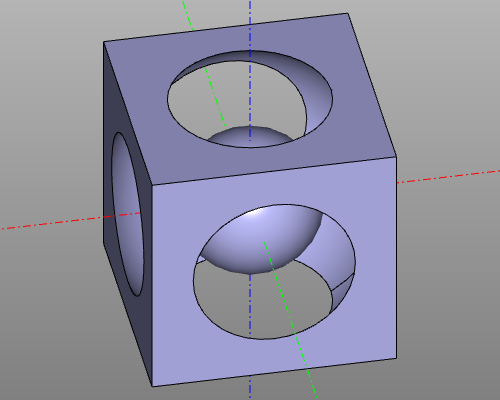
model = box(200, center = True) - sphere(120) + sphere(60)

display(model)
show()
Result:
Agents and build scripts can inspect a model without opening the editor or creating a Qt application:
housing = box(20, 10, 4)
display(housing, name="housing")
show()
zencad inspect model.py --json
zencad inspect model.py --output model-report.json
zencad inspect model.py --eager --no-cache --json
zencad inspect model.py --tree
zencad inspect model.py --graph-json computation.jsonThe versioned JSON report contains stable scene object IDs, optional names,
presentation transforms, bounding boxes, BRep topology counts, area/volume,
mesh statistics, payload digests, and structured validity results. Model
stdout and stderr are redirected to the command's stderr, so --json keeps
stdout machine-readable. See
the inspect format and exit-code reference.
The computation view exposes stable EvalCache DAG IDs, shared dependencies,
cache/evaluation state, source locations, and failed paths without transporting
geometry payloads or importing Qt.
Named objects and the payload-free SceneSnapshot.manifest() contract are
described in the scene manifest reference.
zencad check turns inspection facts into assertions with stable exit codes:
zencad check model.py --valid --solid
zencad check model.py \
  --volume 950:1050 --area 400:450 \
  --bbox-size 9:11,19:21,4:6 --json
Checks target the visible result, aggregate multiple objects deterministically,
and report expected, actual, and tolerance for every condition. Exit code
7 means the model ran successfully but an assertion failed; script, geometry,
timeout, and usage failures retain distinct codes. See
the check contract.
The GUI installation can render a script without opening the editor:
zencad render model.py --output preview.png
zencad render model.py --output views.png \
  --views iso,front,top,right --size 640x480 \
  --mode shaded-with-edges --background '#303030'
The fixed views are iso, front, back, left, right, top, and
bottom. --view and its --views alias may be repeated or comma-separated.
--size is the size of each tile; multiple views are placed in a
row-major, near-square contact sheet in the requested order. Other options are
--mode shaded|shaded-with-edges|wireframe, --axes, --margin, and
--timeout. Every render uses an orthographic camera and a fresh FitAll, so
saved editor camera state does not affect the image. Animated show() sessions
are rejected because they do not have one final static scene.
The same operation is available from Python (protect the entry point with the
usual if __name__ == "__main__" guard because model evaluation uses an
isolated child process):
from zencad import render_script

if __name__ == "__main__":
    result = render_script(
        "model.py",
        "preview.png",
        views=("iso", "front"),
        size=(640, 480),
    )
    print(result.path, result.image_size)
Rendering uses the native OCCT/OpenGL viewer and therefore needs the gui
extra. Windows and macOS use their normal desktop display. On desktop Linux it
uses X11/XWayland; on a server or in CI, install Xvfb and run:
LIBGL_ALWAYS_SOFTWARE=1 xvfb-run -a zencad render model.py -o preview.pngZenCad's Python code is MIT-licensed. Bundled example assets have separate licences: Ubuntu Mono uses the Ubuntu Font Licence, and Low-Poly Bulbasaur by flowalistik uses CC BY-NC-SA 4.0, including its noncommercial and share-alike conditions.