Nanite-style virtualized geometry renderer on DirectX 12 (built on Microsoft MiniEngine).
Nyx is a personal research project focused on extreme-scale geometry rendering: continuous LOD, GPU-driven culling, mesh-shader dispatch, and demand-driven geometry streaming.
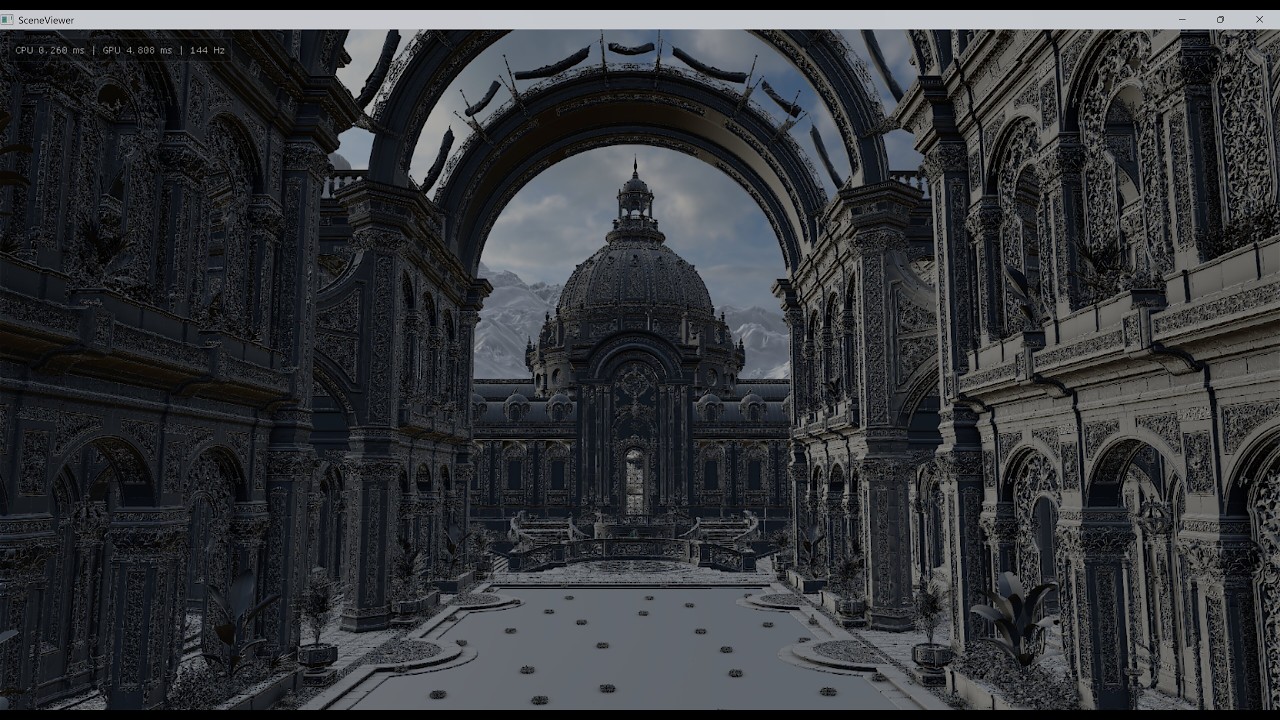
The current stress test scene is Zorah (NVIDIA), with:
- 1,639,668,228 unique triangles
- 18,949,504,889 instanced triangles
Test platform for the screenshots/video below: i7-14700KF + RTX 4070 Ti SUPER, rendered at 4K.
Demo video:
4K • 144Hz • 18.9B Instanced Triangles • RTX 4070 Ti SUPER
Screenshots:
Lit mode

Meshlet mode

Triangle mode


- Nanite-style meshlet hierarchy with DAG/BVH traversal
- GPU-driven rendering via indirect
DispatchMesh - Two-pass frustum + HZB occlusion culling
- Visibility buffer pipeline, then resolve to deferred GBuffer
- Dynamic geometry streaming with residency/address table updates
- Async page IO + LZ4-compressed geometry pages
- Runtime Slang shader compilation and reflection-driven root signatures/bindings
- Runtime debug/tuning UI (pixel error, culling freeze, debug modes)
- Windows 10/11
- Visual Studio 2022 with the Desktop development with C++ workload
- DX12 GPU with Mesh Shader support
- NuGet package restore enabled
Slang and DXC are included under MiniEngine/ThirdParty; no separate shader compiler installation is required.
Recommended for large scenes:
- High-VRAM GPU
- 32 GB+ RAM (48 GB+ recommended for rebuilding very large assets)
- NVMe SSD
- Large free disk space
- Open
MiniEngine/SceneViewer/SceneViewer.sln - Select
Release | x64 - Build and run
SceneViewer
The build automatically copies the Slang runtime, Slang standard module, dxcompiler.dll, and dxil.dll to the application output directory.
By default, SceneViewer loads:
Assets/bunny/bunny.gltf
Nyx uses the bundled Slang and DXC toolchain to compile Shader Model 6.6 DXIL at runtime. Slang reflection is used to generate root signatures and bind shader parameters by name.
Packaged builds load shaders and includes from their bundled MiniEngine tree. Local builds fall back to the repository source tree.
Building Zorah cache locally can be time-consuming and memory-intensive. If you only want to run the demo, use the prebuilt files:
After download, extract/copy the files to:
MiniEngine/SceneViewer/Assets/zorah_main_public/
Then run:
.\SceneViewer.exe -model .\Assets\zorah_main_public\zorah_main_public.gltfFrom the SceneViewer output directory, examples:
Typical path (default MiniEngine layout):
MiniEngine\Build\x64\Release\Output\SceneViewer\
.\SceneViewer.exe -model .\Assets\bunny\bunny.gltf
.\SceneViewer.exe -model .\Assets\Jinx\scene.gltf -instances 3600
.\SceneViewer.exe -model .\Assets\bunny\bunny.gltf -rebuild 1
Arguments:
-model <path>: glTF/glb scene path-instances <N>: instance count (clamped to1..1000000)-rebuild 1: force rebuild.minicache
W A S D/Q E: move- Mouse: look
- Mouse wheel: movement speed scale
Shift: fine movement toggleBackspace: engine tuning/debug UI
- Parse scene/material/camera/animation data
- Build meshlets and meshlet groups
- Iteratively simplify groups for multi-level LOD
- Build hierarchy nodes and metadata
- Pack geometry pages
- Compress pages with LZ4
- Save metadata + blob to
.mini
- Instance culling
- DAG/hierarchy culling (frustum + HZB)
- Build indirect mesh dispatch args
- Mesh shader pass 0
- Export depth and generate HZB
- Repeat cull + mesh shader pass 1
- Resolve visibility buffer to GBuffer
- Deferred lighting + post effects
- Page size: 256 KB
- Chunk size: 256 MB
- GPU request mask readback + async page load + LZ4 decompress + upload
- Language: C++20
- Graphics API: DirectX 12
- Shader language/compiler frontend: Slang 2026.10
- DXIL compiler backend: DXC 2026-05-27
- Shader Model: 6.6
- Agility SDK package:
Microsoft.Direct3D.D3D12 1.616.1 - Meshlet defaults: max vertices 128, max triangles 128, group size 32, BVH node children 8
MiniEngine/Core: engine core and rendering systemsMiniEngine/Model: model conversion, meshlets, culling, streaming, shadersMiniEngine/SceneViewer: runtime appMiniEngine/SceneViewer/Assets: sample and stress scenes
- To load custom glTF assets, place them under
MiniEngine/SceneViewer/Assetsand pass the path with-model. - This project uses MiniEngine conventions (right-handed coordinate handling inside the renderer path).
- Large-scene build time depends heavily on CPU, storage bandwidth, and available memory.
- Unreal Engine Nanite talks and publications
- Microsoft MiniEngine
- meshoptimizer
- lz4
- cgltf
- imgui
- Slang
- DirectX Shader Compiler
- Inspiration references: nanite-webgpu, vk_lod_clusters
- Nyx source code: MIT License (
LICENSE) - Third-party components: original licenses (
THIRD_PARTY_NOTICES.md) - Scene assets may have separate licenses and restrictions; verify before redistribution
love.jingjing.forever.1314@gmail.com