KeyDrop-BOT is a bot designed to interact with the KeyDrop platform, automate and perform tasks related to giveaways. It can automatically join giveaways based on the set interval. This project includes a client-side JavaScript script and a server-side C# app application, which work together to perform the desired tasks.
This bot supports any language and currency. However, if you encounter any issues or buggy behavior, please try switching to English and EUR.
The script should accept multiple price formats. If you experience problems, use the following format:
- Do not use commas to separate thousands (e.g., write 10000 instead of 10,000).
- Use a period (.) as the decimal separator for decimal numbers (e.g., 12.50).
The app may work but is currently not officially supported. If you encounter issues, switch the script to Standalone Mode.
-
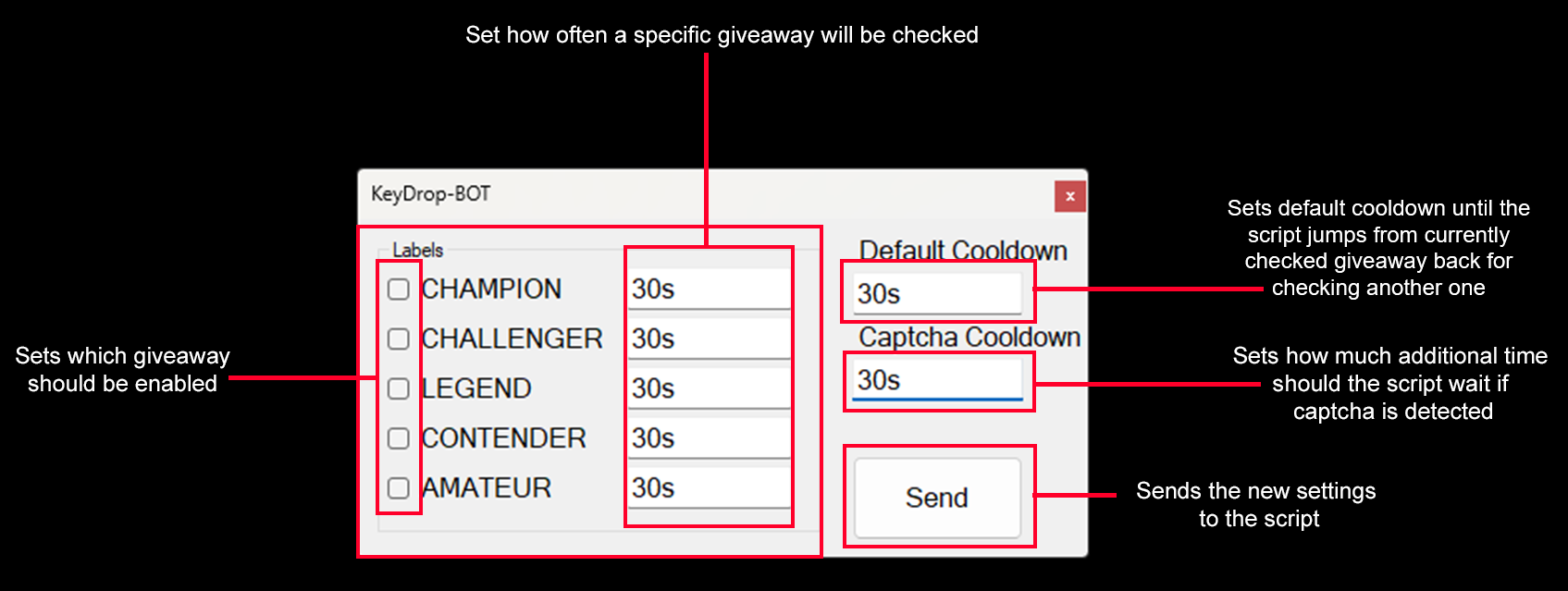
Server-side C# Application: The server handles settings, interacting with the Client-side JavaScript. It hosts a WebSocket server that allows users to set parameters like cooldowns, giveaways to join, and other configuration options.
-
Client-side JavaScript: The client script, running through Tampermonkey, automates interactions on the KeyDrop website. It listens for settings from the server and performs automated tasks on the KeyDrop website.
-
Release Pipeline: The release pipeline, powered by GitHub Actions, automates the building and releasing of the latest versions of both the server-side application and the client-side script.
KeyDrop-BOT/
├── .github/
│   └── workflows/
│       └── build-and-release.yml    # GitHub Actions workflow for building and releasing
├── app/
│   └── Guidzgo.sln                 # C# Solution file for the server-side application
├── script/
│   └── giveaway_bot.user.js        # The main JavaScript client script
├── .gitignore                      # Git ignore configuration
├── README.md                       # Project readme (this file)
If you need help you can contact me, my contact info is here https://www.favoslav.cz
Use this if you only want the script and don’t need the C# app!
- Required:
KeyDropBOT_client.js(the Tampermonkey script)
Instructions:
- Refer to Script Instructions
Settings
🛑 Click on the gear icon for settings (for standalone mode the button should say "Standalone")
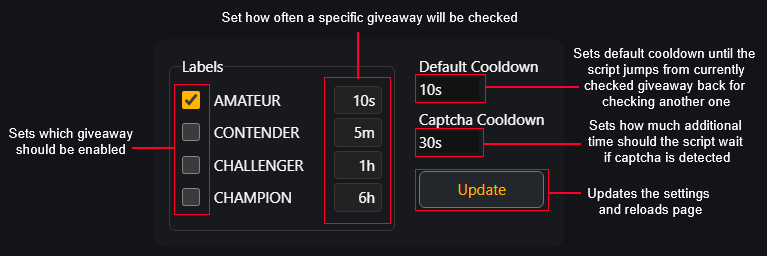
This setting will appear on keydrop site after the script is installed
Use this if you want advanced features and remote control!
- Required:
KeyDropBOT_client.js(the Tampermonkey script)KeyDropBOT_server.exe(the C# server application)
Instructions:
- Refer to App Instructions
Settings
🛑 For server mode the button should say "App Control"
This button will appear on keydrop site after the script is installed
You can jump between Standalone Mode and Server Mode anytime! If you need help, just contact me
-
Download the latest
KeyDropBOT_client.jsfrom releases. -
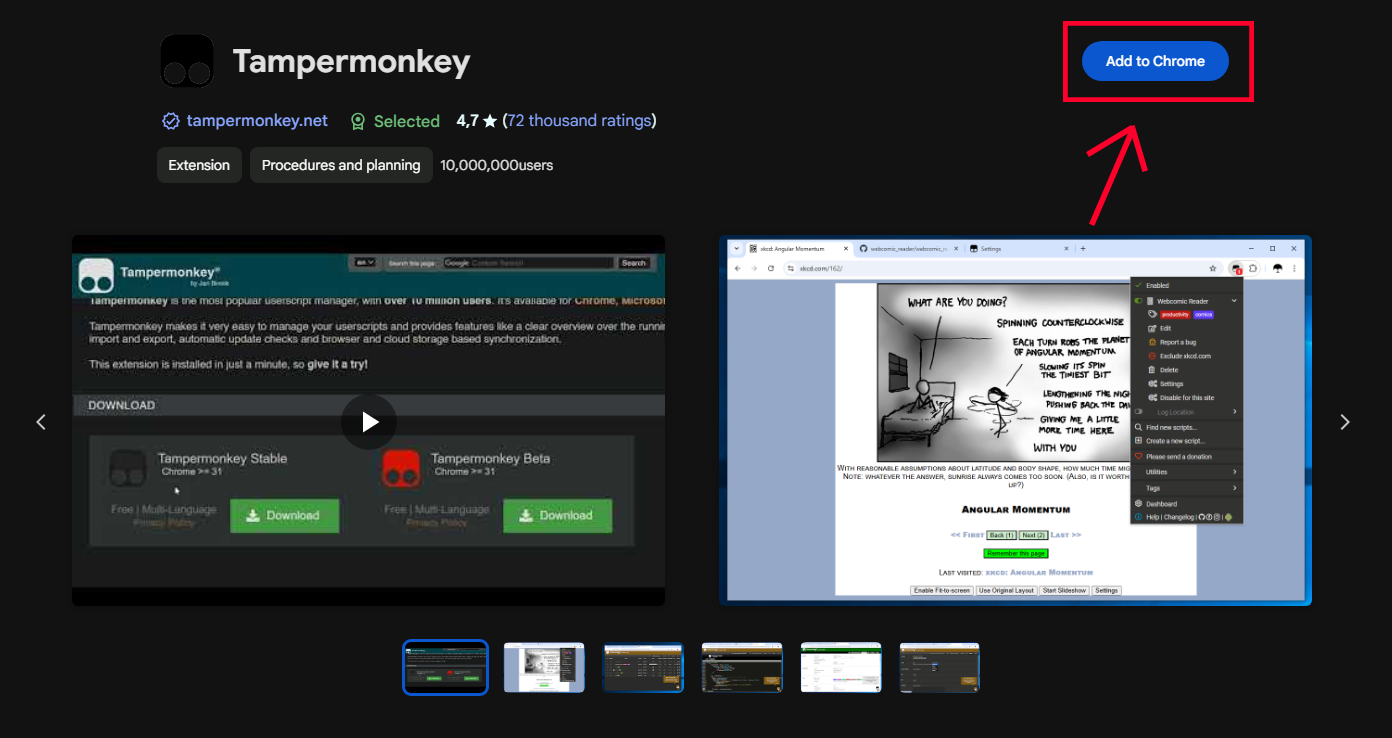
Install Tampermonkey:
You need to enable Developer mode so Tempermonkey works properly
2.1. for Chrome
Open this page: Chrome://extensions And on the top right you see the toggle button to enable the "Developer mode".
2.2. For other browsers
Search it on the internet or follow the tempermonkey guide how to enable dev mode for your browser, if you need help you can contact me, my contact info is here https://www.favoslav.cz
-
Find Tampermonkey in extensions:
-
Pin Tampermonkey:
-
Click on the pinned extension and go to the dashboard:
-
Go to Utilities:
-
Import the downloaded
KeyDropBOT_client.jsfile: -
Install the script:
-
Then go to KeyDrop, click on the extension, and you should see the script. Activate it and refresh your page with F5.
-
(This should be optional, if you experience issues with captcha try installing this) You also need this extension NopeCHA Chrome. For other browser search "your browser nopecha extension" eg. "firefox nopecha extension"
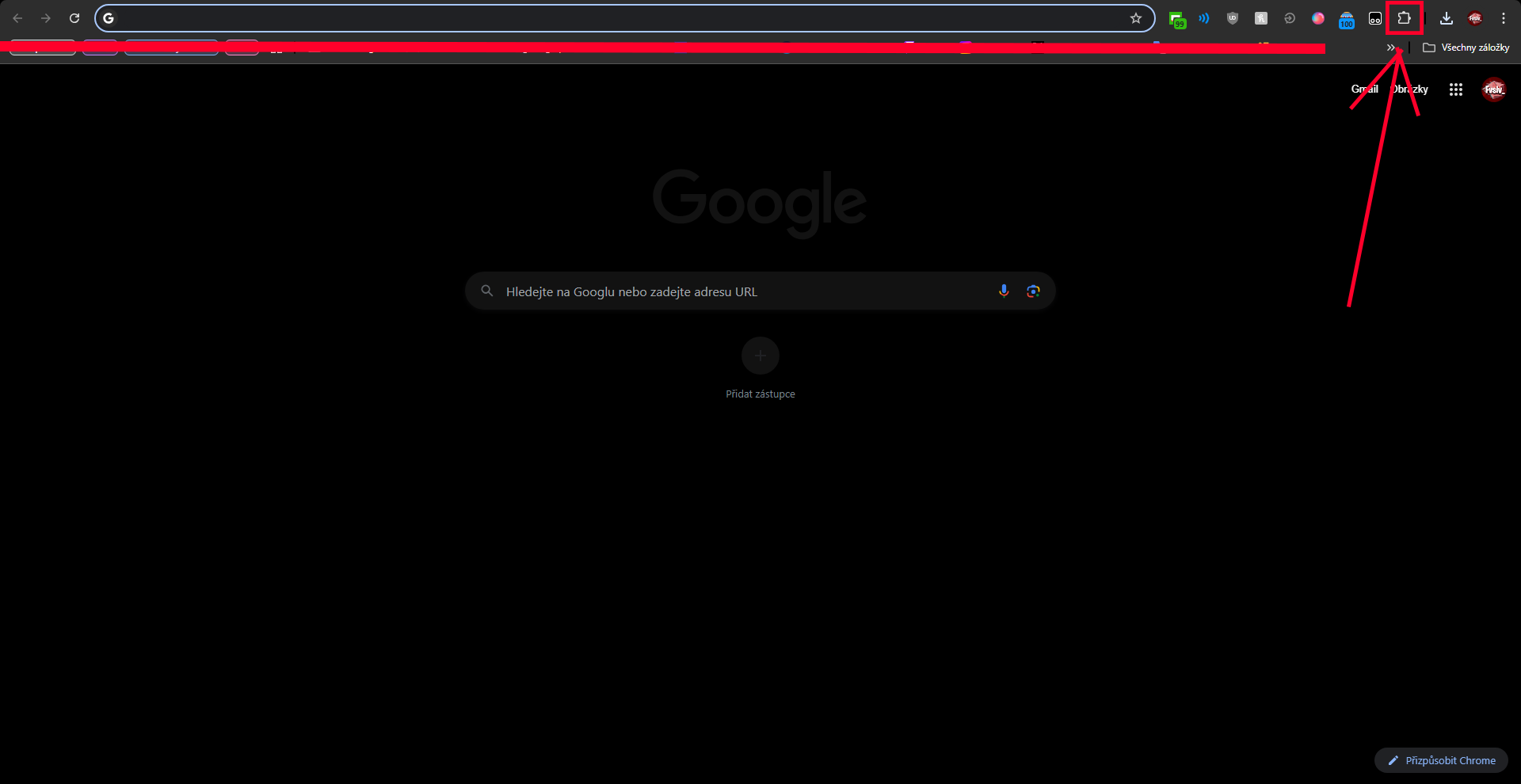

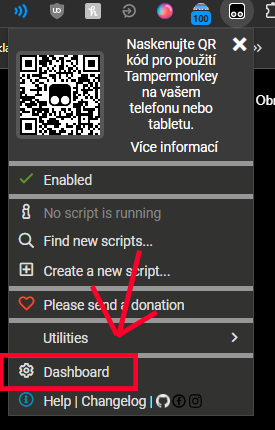

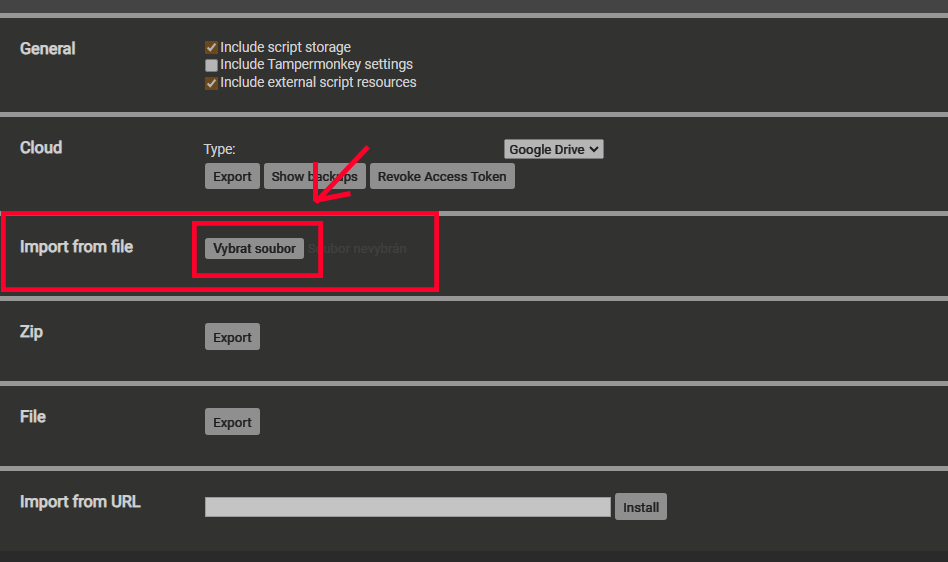
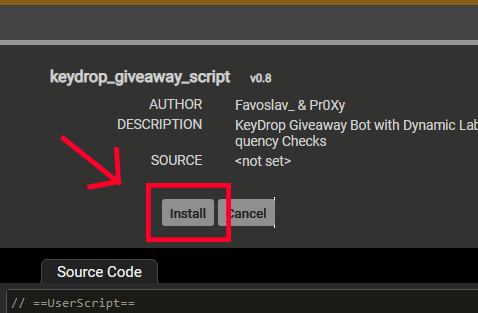
-
Download the latest
KeyDropBOT_server.exefrom releases. -
Find the downloaded exe file and run it.
2.0 Why does this happen?
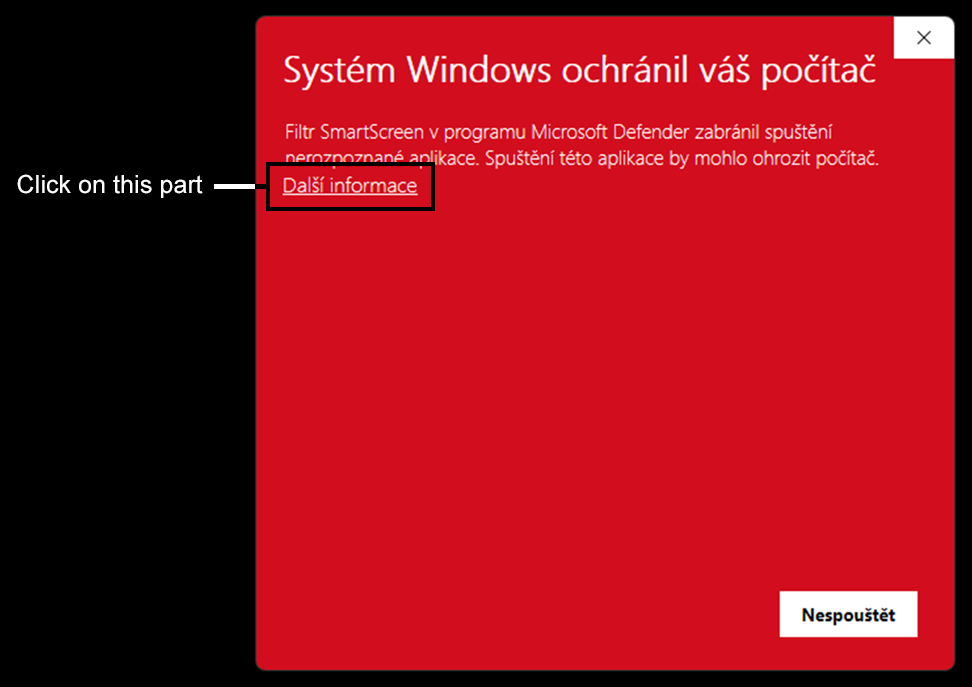
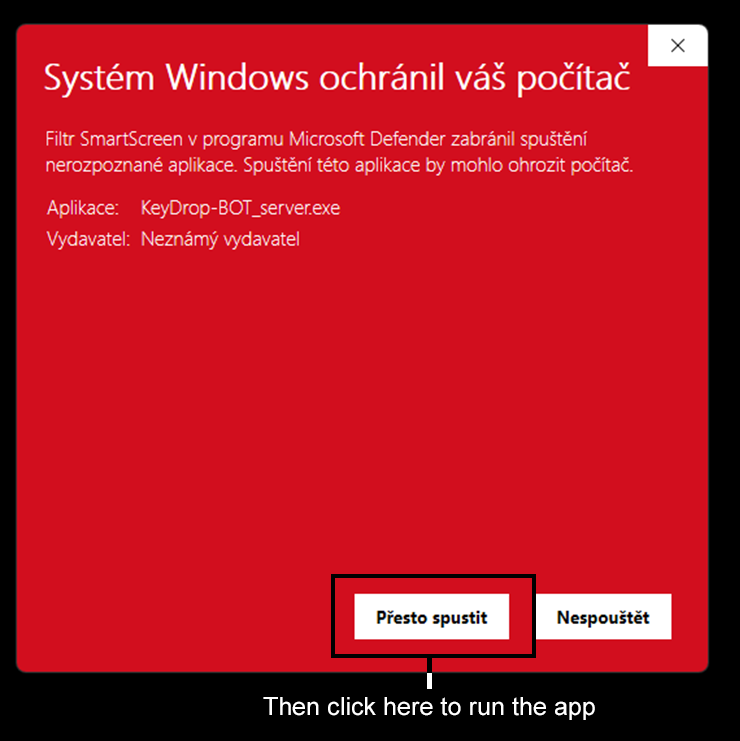
- Windows Defender may block the application due to it being signed but not by a well-known authority. In this case, you can click on "More info" and then "Run anyway".
2.1. Click on the "More information" button:
2.2. Click on the "Run Anyway" button:
-
How does the app work?:
This project is licensed under the MIT License - see the LICENSE file for details.
-
Referral
Click here to visit KeyDrop with my referral code! -
KO-FI