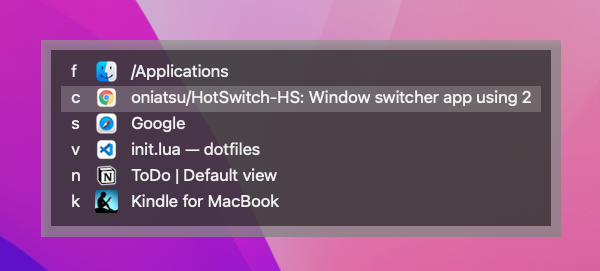
HotSwitch-HS is a Hammerspoon module for macOS that gives you fast, predictable window switching.
It supports two main modes:
- Window-assigned key mode — Register a window-assigned key to each window once. Then open the panel and press that key to jump to the window instantly. The key never changes, so you can switch without thinking.
- AltTab mode — Hold a modifier (e.g.
option) and presstabrepeatedly to cycle through windows. Release the modifier to focus.
1. Install Hammerspoon
Hammerspoon is a macOS automation tool that lets you write Lua scripts to control windows, hotkeys, and system events. HotSwitch-HS runs as a Hammerspoon module — Hammerspoon must be installed and running for it to work.
git clone https://github.com/oniatsu/HotSwitch-HS.git ~/.hammerspoon/hotswitch-hsRegister a window-assigned key to each window. Use it (e.g. command + . → s) to focus it instantly. The key is always the same — no searching, no thinking.
Add to ~/.hammerspoon/init.lua:
local hotswitchHs = require("hotswitch-hs/hotswitch-hs")
hotswitchHs.enableAutoUpdate() -- optional: auto-update via git pull
hs.hotkey.bind({"command"}, ".", hotswitchHs.togglePanel)
Any keybind works for the trigger:
hs.hotkey.bind({"command"}, ".", hotswitchHs.togglePanel)     -- command + .
hs.hotkey.bind({"command"}, ";", hotswitchHs.togglePanel)     -- command + ;
hs.hotkey.bind({"control"}, "space", hotswitchHs.togglePanel) -- control + space
hs.hotkey.bind({"command", "shift"}, "a", hotswitchHs.togglePanel) -- command + shift + a

-- These are NOT valid — macOS reserves them:
-- hs.hotkey.bind({"command"}, "tab", hotswitchHs.togglePanel)
-- hs.hotkey.bind({"command"}, "space", hotswitchHs.togglePanel)
See hs.hotkey.bind() reference for details.
command + tab (requires Karabiner-Elements)
macOS reserves command + tab, so Hammerspoon cannot intercept it directly. Use Karabiner-Elements to remap it to a free key:
~/.config/karabiner/karabiner.json:
{
    "from": {
        "key_code": "tab",
        "modifiers": { "mandatory": [ "command" ] }
    },
    "to": [ { "key_code": "f13" } ],
    "type": "basic"
}~/.hammerspoon/init.lua:
hs.hotkey.bind({}, "f13", hotswitchHs.togglePanel)Press command + tab to open/close the panel, then use Tab and Return to navigate.
| Key | Action |
|---|---|
| Your trigger key | Open / close the panel |
Space |
Toggle registration mode |
Tab or Down |
Select next window |
Shift+Tab or Up |
Select previous window |
Return |
Focus the selected window |
Delete |
Remove the window-assigned key from the selected window |
Escape |
Close the panel |
[a-zA-Z0-9], -, [, ], ., / |
Focus the window (or register the key in registration mode) |
- Open the panel (press your trigger key).
- Select a window with
Tabor arrow keys. - Press
Spaceto enter registration mode. - Press any character key — that key is now assigned to this window.
Once registered, a key is reserved and will not appear as an auto-generated key for other windows. To remove a registration, select the window and press Delete.
- Open the panel (press your trigger key, e.g.
command + .). - Press the window-assigned key for the target window.
The window-assigned key is always the same. That is what makes this mode the fastest.
Auto-generated keys: Before you register any keys, HotSwitch-HS assigns keys automatically so you can start using it right away. Registering your own window-assigned keys is recommended for maximum speed.
Hold a modifier key and press a key repeatedly to cycle through windows. Release the modifier to focus the selected window. Windows are ordered by most-recently-focused.
cycleWithModifier handles key repeat and modifier-release detection entirely within Hammerspoon. Any non-reserved modifier+key combination works — for example:
local hotswitchHs = require("hotswitch-hs/hotswitch-hs")

-- option + tab / option + shift + tab
hs.hotkey.bind({"option"}, "tab", function() hotswitchHs.cycleWithModifier({"option"}, "tab") end)
hs.hotkey.bind({"option", "shift"}, "tab", function() hotswitchHs.cycleWithModifier({"option", "shift"}, "tab") end)

-- command + . / command + shift + .
hs.hotkey.bind({"command"}, ".", function() hotswitchHs.cycleWithModifier({"command"}, ".") end)
hs.hotkey.bind({"command", "shift"}, ".", function() hotswitchHs.cycleWithModifier({"command", "shift"}, ".") end)- Forward key (
tab/.) — cycle forward - Backward key with
shift— cycle backward - Release the modifier — focus the selected window
command + tab cycling (requires Karabiner-Elements)
macOS reserves command + tab, so Hammerspoon cannot intercept it directly. Use Karabiner-Elements to remap it, then bind in Hammerspoon for full AltTab-style cycling.
~/.config/karabiner/karabiner.json:
[
    {
        "description": "command key release → commitCycle (f14)",
        "from": { "key_code": "left_command" },
        "to": [ { "key_code": "left_command" } ],
        "to_after_key_up": [ { "key_code": "f14" } ],
        "type": "basic"
    },
    {
        "description": "cmd+tab → cycleNext (f15)",
        "from": {
            "key_code": "tab",
            "modifiers": { "mandatory": [ "command" ] }
        },
        "to": [ { "key_code": "f15" } ],
        "type": "basic"
    },
    {
        "description": "cmd+shift+tab → cyclePrevious (f16)",
        "from": {
            "key_code": "tab",
            "modifiers": { "mandatory": [ "command", "shift" ] }
        },
        "to": [ { "key_code": "f16" } ],
        "type": "basic"
    }
]~/.hammerspoon/init.lua:
hs.hotkey.bind({}, "f14", hotswitchHs.commitCycle)
hs.hotkey.bind({}, "f15", hotswitchHs.cycleNext, nil, hotswitchHs.cycleNext)
hs.hotkey.bind({}, "f16", hotswitchHs.cyclePrevious, nil, hotswitchHs.cyclePrevious)
command + tab— cycle forwardcommand + shift + tab— cycle backward- Release
command— focus the selected window
Note: The
to_after_key_uponleft_commandfires on every command key release, not only after cmd+tab.commitCycleis a no-op unlesscycleNextorcyclePreviouswas called first, so spurious firings (e.g. after cmd+c) are harmless.
Switch to the next or previous window immediately, without opening the panel. Windows are ordered by most-recently-focused.
hs.hotkey.bind({"option"}, "n", hotswitchHs.switchToNextWindow)
hs.hotkey.bind({"option"}, "p", hotswitchHs.switchToPreviousWindow)switchToNextWindow()— focus the second most-recently-used windowswitchToPreviousWindow()— focus the least-recently-used window (cycles in reverse)
Add any of these to ~/.hammerspoon/init.lua.
hotswitchHs.enableAutoUpdate()Updates HotSwitch-HS via git pull automatically when needed.
hotswitchHs.setAutoGeneratedKeys({"1", "2", "3", "4", "5", "6", "7", "8", "9", "0"})Defines which keys are auto-assigned to windows before you register your own. Default keys are here.
hotswitchHs.enableAllSpaceWindows()By default, only windows in the current space are shown. This shows windows from all spaces.
hotswitchHs.addJapaneseKeyboardLayoutSymbolKeys()Adds Japanese keyboard layout symbols as registerable keys.
hotswitchHs.setPanelToAlwaysShowOnPrimaryScreen()By default the panel appears on the screen containing the currently focused window. This forces it to the primary screen instead.
hotswitchHs.setLogLevel("nothing") -- default
-- can be 'nothing', 'error', 'warning', 'info', 'debug', or 'verbose'
On macOS Ventura 13.x, printing many logs in Hammerspoon console causes slowness (Hammerspoon bug). The default is nothing.
- Keybind not working? Open Hammerspoon Console (menubar icon →
Console...) and check for error messages. - Still broken? Update HotSwitch-HS:
cd ~/.hammerspoon/hotswitch-hs && git pull
Reload Hammerspoon config to fix it. This is likely a Hammerspoon bug.
Tip: add a reload keybind for quick recovery:
hs.hotkey.bind({"command", "option", "control"}, "r", hs.reload)
hs.alert.show("Hammerspoon is reloaded")When Finder has multiple windows open, HotSwitch-HS shows only the most recently focused one. Selecting it focuses Finder via hs.application.launchOrFocusByBundleID, which brings whatever window Finder considers frontmost.
Root cause — stale subscription cache: HotSwitch-HS uses hs.window.filter with a windowVisible event subscription for performance. When Finder windows are merged into a tab group, Finder does not fire the proper accessibility notification (AXUIElement hidden/destroyed event). As a result, the filter's internal cache retains the now-phantom window objects from before the merge, and they continue to appear as real entries. There is no reliable way from within Hammerspoon to tell a phantom cache entry apart from a real window without a fresh accessibility query, and fresh queries defeat the subscription-cache performance benefit.
Focusing quirk: Even if phantom entries could be filtered, window:focus() internally calls becomeMain() (sets AXMain = true), which causes Finder to jump to the first tab instead of the tab that was active before switching away. Alternative APIs (raise() + application:activate()) avoid the tab reset but did not reliably resolve the phantom-entry problem.
Until a clean solution exists within Hammerspoon's window filter API, the panel is limited to showing one Finder window.
Recommended workaround: Use Finder's tab feature to keep all folders in a single window. With all folders open as tabs, HotSwitch-HS can reach Finder in one keystroke, and you can switch folders within Finder using its own tab bar or command + { / command + }.
cd ~/.hammerspoon/hotswitch-hs
git pull
rm -rf ~/.hammerspoon/hotswitch-hs
- Hammerspoon
- Edit
.luafiles. - Reload Hammerspoon config and verify behavior.
- Check latest git tag:
git describe --tags --abbrev=0 - Add a new git tag and push it.
- Pay attention to Lua's garbage collection.
- v2.5.3: Updater fixes
- Fix false update notifications when local version is ahead of the latest GitHub tag (add semver comparison)
- v2.5.2: Reduce cycle panel show delay
- Reduce panel show delay from 0.1s to 0.05s for snappier response
- v2.5.1: CycleMode improvements
- Support focusing a window-assigned key during cycling (pressing an assigned key while cycling now focuses that window directly)
- v2.5.0: Rename public API for consistency
openOrClose()→togglePanel()openOrSelectWithModifier()→cycleWithModifier()openOrSelectNext()/openOrSelectPrevious()→cycleNext()/cyclePrevious()focusOpenOrSelectNextWindow()→commitCycle()openOrClose()is kept as a backward-compatible alias- Fix focusing non-standard windows (AXDialog / AXFloating, e.g. iTerm2 Settings)
- Show fixed "Finder" label instead of window title for Finder entries in the panel
- Updater: switch to tags API and include CHANGELOG in update notification
- Revert showing all Finder windows (only the most recently focused Finder window is shown)
- v2.4.2: Add
switchToPreviousWindow()hotswitchHs.switchToPreviousWindow()— focus the least-recently-used window (reverse ofswitchToNextWindow)
- v2.4.1: Bug fixes
- Show all Finder windows in the switcher panel (previously only one was shown)
- Fix AltTab-style cycling: handle key input during deferred panel open, reset selection position on new cycle, prevent timer leaks, guard canvas before panel is shown
- v2.4.0: Add AltTab-style cycling API
cycleNext()/cyclePrevious()— cycle forward/backward through windowscommitCycle()— focus selected window on modifier releasecycleWithModifier(modifiers, key)— all-in-one cycling with automatic modifier release detection
- v2.3.4: Modify focusing a Finder window
- v2.2.6: Add a utility method
hotswitchHs.switchToNextWindow()— focus the next most-recently-used window without opening the panel
- v2.2.5: Add option to always show the panel on primary screen
hotswitchHs.setPanelToAlwaysShowOnPrimaryScreen()
- v2.1.5: Change saving keys to use bundleID instead of app name
- If you used this app before this version, you need to register keys again.
- v2.1.0: Add auto updater
hotswitchHs.enableAutoUpdate()
- v2.0.0: Connect Git tag with GitHub Release
- v1.17: Add auto generated keys
- v1.4: Change app info text to app icon on panel
- v1.0: First release