A demo of the A2UI protocol running side-by-side on Android (Kotlin / Jetpack Compose chrome + WebView-hosted Lit components) and the web (the same Lit components, no hybrid). A streaming Python backend (Anthropic Claude Sonnet 4.6 + tool use) drives both clients with the exact same A2UI fragments — so every UI you see was authored once and rendered identically on both platforms.
The use case is a "Lumen Concierge" gift-shopping flow: the agent picks products, asks clarifying questions, places an order, and confirms — all via streamed A2UI components, not text.
High-fidelity prototype, not a production app.
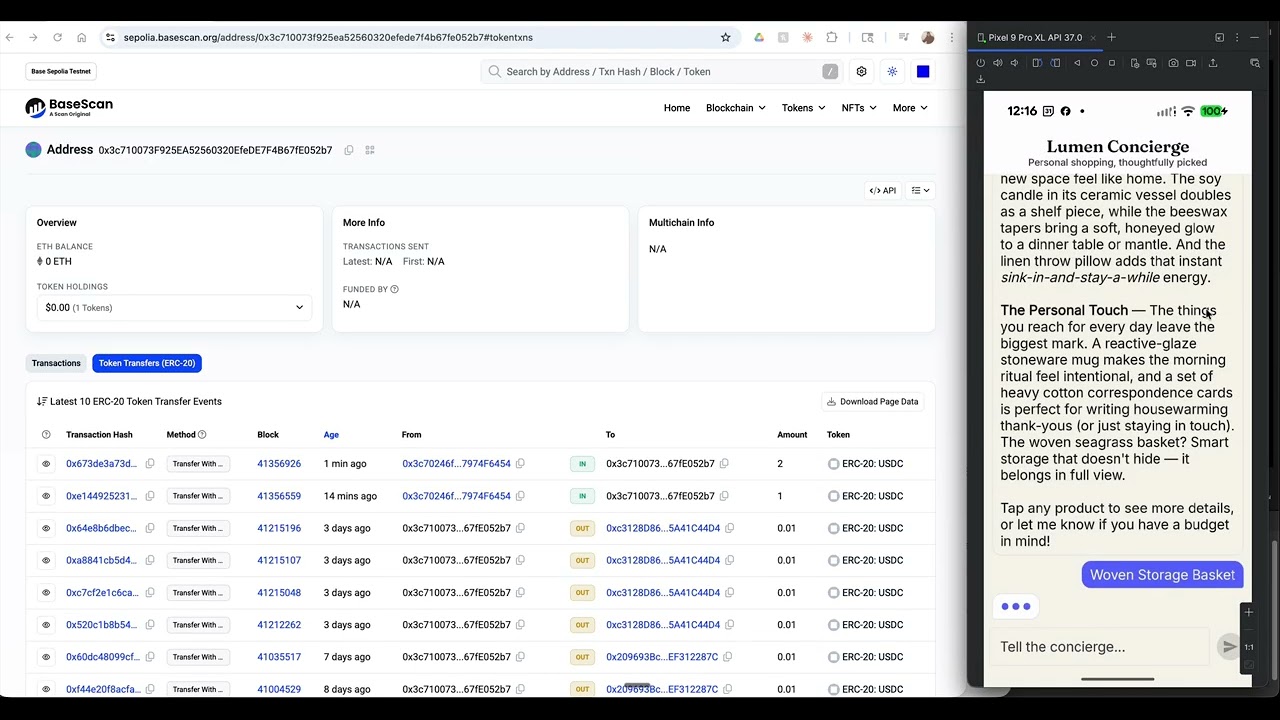
▶ On-chain settle — Android, BaseScan, MetaMask, split-screen — the AI agent pays the wallet on the left with real Base Sepolia USDC, in real time. StrongBox-bound EIP-3009 signing → public x402 facilitator → on-chain confirmation.
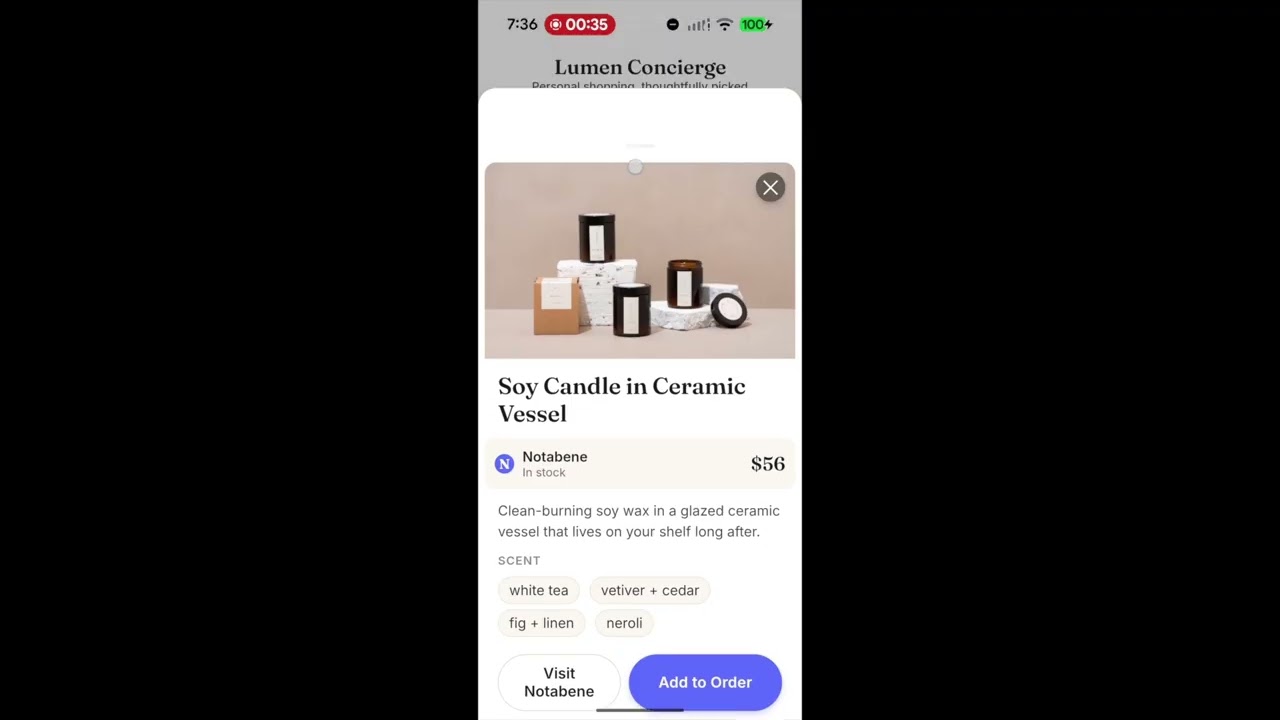
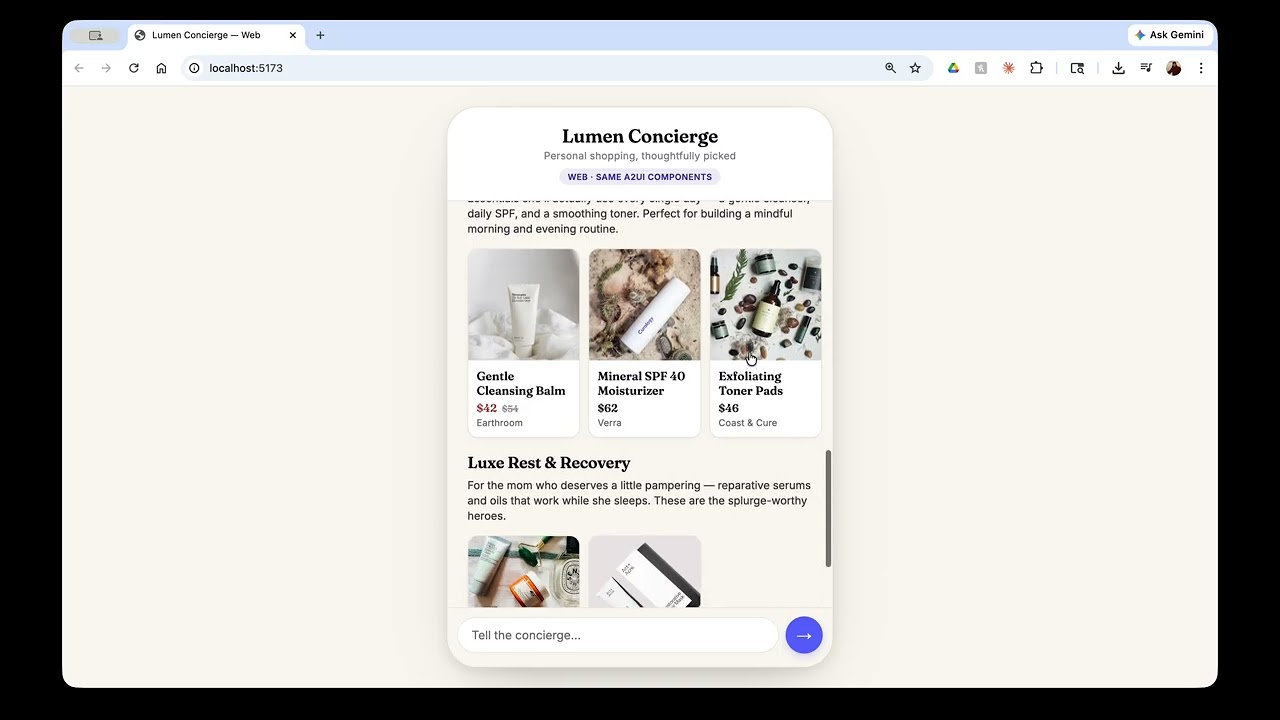
Earlier walkthroughs (mock settlement) — same Lit components, two surfaces, no rewrites between them:
 |
 |
|---|---|
| ▶ Android walkthrough — Compose chrome + Lit components in a WebView. | ▶ Web walkthrough — same Lit bundle, browser-native. |
The same demo runs in several settlement modes, all on one codebase. Each is a
config flip — same app, same components, same agent. The matrix below tracks
what's on main versus what's still on a branch.
| Variation | Branch / flag | Settlement | Authorization |
|---|---|---|---|
| Default shopping | main |
mocked x402 challenge | per-cart tap |
| x402 on-chain (Base Sepolia) | main + X402_SETTLE_REAL=1 |
real EIP-3009 → public x402 facilitator | per-cart tap + StrongBox biometric |
| AP2 HITL (in progress) | explore/ap2 |
x402 settlement | cryptographic Cart Mandate (per-cart sign) |
| AP2 non-HITL (planned) | TBD | x402 settlement | Intent Mandate (delegated, no per-cart consent) |
The Android app can perform real Base Sepolia USDC settlements. Tap Pay
→ biometric prompt → a StrongBox-bound private key signs an EIP-3009
transferWithAuthorization → the backend forwards the signed envelope to the
public x402 facilitator → on-chain tx settles → the confirmation card surfaces
the real BaseScan link.
To enable, add the env vars to backend/.env:
X402_SETTLE_REAL=1
X402_PAY_TO_ADDRESS=0x...               # recipient wallet you control
# Demo cap — clamps every cart's settled total to this dollar amount,
# so a single faucet drip (5-10 USDC) covers many orders. The catalog
# pricing stays realistic; only the on-chain amount is capped. Off by
# default; recommended for testnet demos.
X402_DEMO_MAX_PRICE=2

# Optional overrides:
# X402_NETWORK=base-sepolia
# X402_CHAIN_ID=84532
# X402_USDC_ADDRESS=0x036CbD53842c5426634e7929541eC2318f3dCF7e
# X402_FACILITATOR_BASE=https://www.x402.org/facilitator
Fund the payer wallet — the address the Android client derives from its StrongBox-bound seed on first wallet creation. It's printed in the backend log the first time you tap Pay, on a line that looks like:
[x402] envelope from='0x3c70...6454' to='0x...' value='1000000' sig=0x...
Send Base Sepolia USDC to that from address with the
Coinbase Developer Platform faucet
(select Base Sepolia → USDC → paste the payer address). EIP-3009 is
gas-abstracted: the facilitator pays gas, so the payer only needs USDC — no
Base Sepolia ETH required.
Verify:
- The confirmation card carries a tappable "View on BaseScan" row.
- Or open the recipient's incoming-transfers page directly:
https://sepolia.basescan.org/address/<X402_PAY_TO_ADDRESS>#tokentxns
Under the hood:
backend/src/concierge/payments.py— challenge construction, canonical facilitatorpaymentPayload/paymentRequirementsbody,/verifybefore/settle.app/.../x402/SecureWallet.kt— AES-256-GCM-wrapped seed in the Android Keystore (StrongBox-backed where the device supports it, TEE otherwise), Class-3 biometric per signing op.app/.../x402/X402Signer.kt— EIP-712 hashing via web3j'sStructuredDataEncoderand secp256k1 sign viaSign.signMessage.
- One agent, two surfaces. Same
/chatSSE stream feeds an Android app and a web app. - Five A2UI components, all written once in Lit, used by both clients:
chip-group,card-grid(horizontal swipe rail),product-detail,form(toggles + saved-address pills),confirmation-card. - Hybrid Compose chrome on Android. The chat shell, top bar, input row, thinking dots,
and bubble entry/exit motion are pure Compose; only the A2UI bubble itself is a WebView.
Bubbles spring into view, the
product-detailarrival is emphasized, and the previous card-grid fades back to demote it. - Bridge parity. The same
window.AndroidBridgeinterface (onAction,log,reportSize) that Android exposes is synthesized on the web build, so component code doesn't branch.
[ Android device — Kotlin / Jetpack Compose ]            [ Web browser ]
  ChatScreen (Compose)                                     index.html (~250 LOC)
    ├── TopAppBar / theme / Scaffold                         ├── chat shell + SSE parser
    ├── LazyColumn of bubbles                                └── synthesizes window.AndroidBridge
    │     ├── UserBubble        (Compose)
    │     ├── AgentTextBubble   (Compose, MarkdownText)
    │     ├── ThinkingDots      (Compose, infinite anim)
    │     └── AgentA2uiBubble   ← AndroidView { WebView } host.html → Lit components
    └── InputRow (Compose)
                       │
                       └── HTTPS POST /chat (text/event-stream)
                                   ▼
[ Backend — Python / FastAPI / sse-starlette ]
  /chat       — accepts user message, streams text + a2ui events
  GiftAgent   — Anthropic SDK, Claude Sonnet 4.6, tool-use loop
  Tools       — search_catalog, get_product, place_order,
                present_chips, present_products, present_product_detail,
                present_form, present_confirmation
  catalog.json — curated mock product catalog
The Lit components live in host-bundle/src/components/. The Vite build bundles them into
a single IIFE (a2ui-host.iife.js). Two delivery modes:
- Android —
npm run build:androidcopies the bundle andindex-android.htmlintoapp/app/src/main/assets/, whereWebView.loadUrl("file:///android_asset/host.html")picks them up. - Web —
npm run devservesindex.html(the full chat shell) atlocalhost:5173, proxying/chatand/healthto the Python backend at:8000.
a2ui-concierge/
├── backend/        Python / FastAPI agent (uv-managed)
├── host-bundle/    Vite project — Lit components + dual entry points (Android, web)
├── app/            Android Studio project (Kotlin / Jetpack Compose)
└── docs/           Spec, plan, runbook, smoke checklist, A2UI shapes reference
- An Anthropic API key (the agent uses Claude Sonnet 4.6).
- Backend: Python 3.11+,
uv. - Host bundle: Node 18+ and
npm. - Android: Android Studio Hedgehog or newer, JDK 17,
adbon PATH, an emulator or a physical device with USB debugging. - Web: any modern browser.
The backend delegates credential verification to a FastMCP sidecar that runs on port 3001. Start it first:
cd mcp
uv sync
uv run python server.py
You should see FastMCP output indicating it's listening on http://0.0.0.0:3001/mcp.
In a separate terminal:
cd backend
echo "ANTHROPIC_API_KEY=sk-ant-..." > .env       # gitignored
uv sync --all-extras
uv run uvicorn concierge.app:app --port 8000 --host 0.0.0.0
/health should now return {"status":"ok"}.
By default the backend expects the MCP server at http://localhost:3001/mcp. Override with
MCP_URL=http://... in backend/.env if you run them on different hosts.
cd host-bundle
npm install
npm run dev
Open http://localhost:5173. The Vite dev server proxies /chat to the backend
automatically — no extra configuration needed. Try: "a necklace under 200 for my sister".
The default BACKEND_BASE_URL in androidApp/build.gradle.kts
points to http://10.0.2.2:8000, which is the emulator's alias for the host loopback. No
extra configuration needed.
cd host-bundle && npm install && npm run build:android
cd ../app && ./gradlew installDebug
adb shell am start -n com.diegoz.a2uiconcierge/.MainActivityForward the backend port to the device, then build and install as above:
adb reverse tcp:8000 tcp:8000Then change BACKEND_BASE_URL in androidApp/build.gradle.kts to http://localhost:8000
and rebuild:
cd host-bundle && npm run build:android
cd ../app && ./gradlew installDebugIf you can't use USB, set BACKEND_BASE_URL in androidApp/build.gradle.kts to your
machine's LAN IP (e.g. http://192.168.1.x:8000) and rebuild. The backend already binds to
0.0.0.0 so it's reachable over the local network — check your firewall if connections fail.
After any change to a Lit component, re-run npm run build:android and reinstall the APK
to refresh the WebView assets. The Compose-side code reloads via Android Studio in the
normal way.
cd host-bundle && npm install && npm run build:android   # reuses the same Lit bundle
cd ../app && ./gradlew :shared:linkDebugFrameworkIosSimulatorArm64
open iosApp/iosApp.xcodeproj
Run the iosApp scheme in Xcode on a Simulator. The default BACKEND_BASE_URL in
MainViewController.kt
is http://localhost:8000, which routes to the host machine from the simulator automatically.
For a physical iOS device, change the constant to your machine's LAN IP before building.
You should have the latest version of the Multipaz TestApp (or any other wallet app that supports presentation using W3C DC API) on your device
You can download the multipaz testapp from here.
A 90-second walkthrough lives in docs/runbook.md. Short version:
- "Find me a necklace under $200 for my sister" → card-grid arrives.
- Tap a card → product-detail bubble pops in (with an emphasized spring entrance; the previous card-grid bubble dims to demote it).
- "Add it to my order" → form arrives (gift-wrap toggle + saved-address pills).
- Tap Place order → confirmation-card pops in with a haptic tap.
- Spec:
docs/superpowers/specs/2026-05-07-a2ui-android-shopping-demo-design.md - Plan:
docs/superpowers/plans/2026-05-07-a2ui-android-shopping-demo.md - A2UI fragment shapes:
docs/a2ui-shapes.md - Runbook:
docs/runbook.md - Smoke checklist:
docs/smoke-checklist.md
- Catalog is a mock JSON file; ordering writes to memory only.
- Single conversation per session id; no persistence.
- iOS support is in progress on this branch (
feat/migrate-kmp); not yet merged tomain. - WebView clipping math depends on
devicePixelRatio; tested on Pixel 9 Pro XL.
Demo / prototype. No license attached; treat as source-available reference, not OSS.