
Collection of tools to simplify the users contribution to and interaction with large knowledge graphs / linked-data-platforms (reference implementation: OpenSemanticLab)
Features in work:
- RAG-and Graph-RAG
- panel ui component that executes client-side toolcalls
- Wrapper for an OpenAI-API providing providing schema based (see OO-LD) structured output, file-based context and web search (osw-openai-api-wrapper)
BatteryKnowledgeBase-Walkthrough-LLM.mp4
RAG and GraphRAG enhanced search interface
2025-01-23.05-28-05_Chatbot_Create-Printer_cut.mp4
Panel ui component that executes client-side toolcalls: Search the right concept schema and open the auto-generated form editor
KI_Formulareditor_x2.mp4
AI assisted form-completion based on a uploaded data sheet
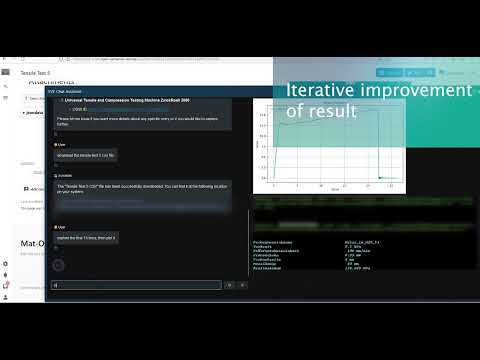
LLM Agentic with Code Generation for Scientific Data Analysis
git clone https://github.com/opensemanticworld/osw-chatbot
cd osw-chatbot
cp .env.example .env
adapt .env then run
docker compose up osw-chatbotor
docker compose up osw-openai-api-wrappergit clone https://github.com/opensemanticworld/osw-chatbot
cd osw-chatbot
cp .env.example .env
uv sync
uv run playwright install-deps && uv run playwright installuv sync installs the dev dependency group (pytest) as well. Note this is a
PEP 735 dependency group, not a setuptools
extra, so pip install -e .[dev] will not pick it up.
modify and run
src/osw_chatbot/main.py
for integration into OpenSemanticLab see Extension:Chatbot
panel serve publishes the app under the name of its script, so the url to
point $wgChatbotPopupAssistentConfig['iframe_src'] at ends in /main,
e.g. https://osw-chatbot.your-domain.com/main.
Every browser session gets its own ChatSession (toolcalling/agent.py): its
own frontend widget, tool set, agent executor and chat history. Nothing is
shared between concurrent users - in particular a client-side tool call is
delivered only to the browser that triggered it.
The chat history is persisted in the browser, per wiki user. The chatbot runs
in a third-party iframe where localStorage is partitioned or blocked, so it
asks the wiki page to store it (chatbot_storage_get / _set / _remove
postMessages, handled by the Chatbot extension, which namespaces the key with
the wiki id and the logged-in user name). If the wiki does not answer - e.g. an
older version of the extension - it falls back to the iframe's own
localStorage, and if that is blocked the chat still works, just without
persistence.
The extension mints a short lived HMAC token (action=chatbottoken, signed
with $wgChatbotSecret) and appends it to the iframe url; auth.py validates
it as a Panel --auth-module. Set the same value as CHATBOT_SHARED_SECRET
here. Leave it empty to keep the backend open.
src/osw_chatbot/tests/harness/ stands in for the MediaWiki page: it embeds
the chatbot in two iframes side by side and answers every client-side tool
from a fixture, so the browser half can be exercised without a wiki.
uv run python src/osw_chatbot/tests/harness/serve.py   # http://localhost:8099
# or
docker compose --profile test up osw-chatbot-harness
Each pane picks its own user (alice, bob, or anon - the last one sends
user.id = null, the case that used to crash where_am_i). What it makes
visible:
- session isolation - a tool call triggered in pane A must appear only in pane A's log. Before the per-session refactor it showed up in both.
- history - same user in both panes shares the stored conversation, two different users do not. Reload a pane to check the conversation is restored.
- origin validation - the header dropdown controls how the harness treats
incoming messages (
laxreproduces the old wildcard behaviour). To exercise the backend side, start it withPARENT_ORIGINset to something other than the harness origin: it then refuses to exchange messages at all, while still rendering. - forged replies - the button posts a
function_call_resultwith an unknown id; the backend must ignore it.
/token?user=Alice mints a token when CHATBOT_SHARED_SECRET is set, the same
way action=chatbottoken does on the wiki.
uv run pytest src/osw_chatbot/tests/test_session.py     # unit
docker compose --profile test up -d osw-chatbot-harness
docker compose exec osw-chatbot uv run python \
    src/osw_chatbot/tests/harness/integration_test.py \
    --harness http://osw-chat-harness:8099/ [--with-llm]
The integration test drives the harness with Playwright and asserts what each
pane actually received: that a tool call reaches only the pane that triggered
it, that a stored conversation comes back after a reload without a duplicate
greeting, that one wiki user never sees another's history, and that a backend
pinned to a different PARENT_ORIGIN stays silent while still rendering. It
starts its own panel serve on a spare port,
because BOKEH_ALLOW_WS_ORIGIN is pinned to the public hostname in a
deployment and a browser loading the app from localhost would otherwise get a
403 on the websocket upgrade. Without --with-llm it only runs the checks that
need no model call.
Two things to know when writing assertions against the app: Panel renders into
shadow DOM, so body.inner_text() is empty - use get_by_text, which pierces
open shadow roots. And after reloading a pane, wait for the second
storage_get in that pane's log before asserting, otherwise the locators still
resolve against the previous document.
LLM_PROVIDER=openai uses the OpenAI compatible surface of Microsoft Foundry
(https://<resource>.services.ai.azure.com/openai/v1), LLM_PROVIDER=claude
uses the Anthropic Messages surface of the same resource
(https://<resource>.services.ai.azure.com/anthropic). See .env.example.
modify and run
src/osw_chatbot/structured_output/api.py
for integration into OpenSemanticLab see Extension:MwJson