English | 日本語
A VS Code Dark Modern-inspired theme for Ghidra 12.1.2 PUBLIC.
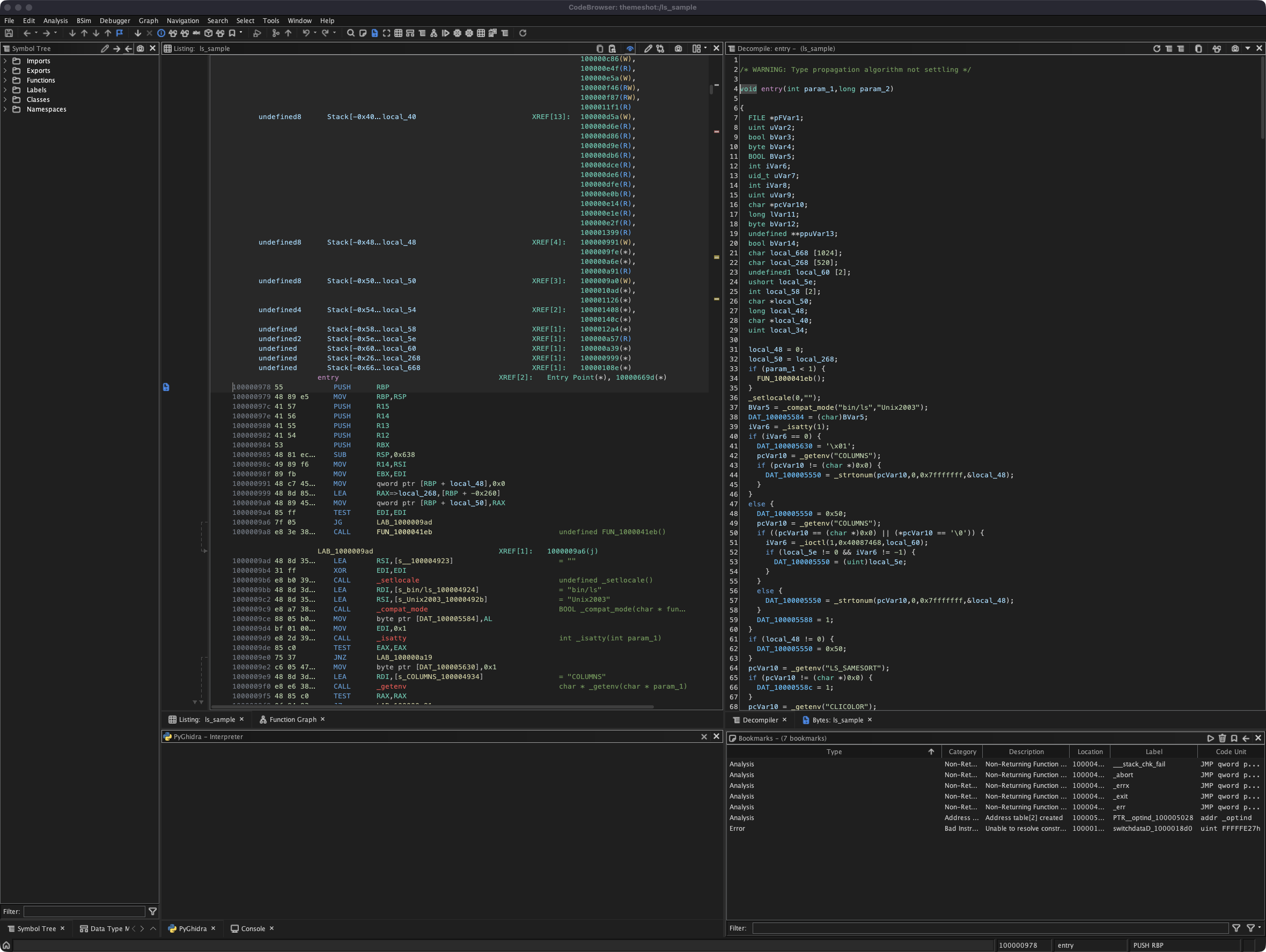
This package is made from a Ghidra theme file and external icon assets. It installs into the Ghidra user settings directory and does not modify Ghidra's application directory, jar files, or signed binaries.
themes/vscode-dark-modern.themeimages/vscode/codicons/install.ps1install.shtools/(icon mapping and generation scripts; not needed to install)
images/vscode/codicons/ contains the PNG icons referenced by the theme through [EXTERNAL]images/vscode/codicons/..., plus the Codicons license files.
The quickest, cross-platform way — no manual copying, no shell scripts:
- Download
dist/vscode-dark-modern.theme.zipfrom this repository. - In Ghidra, open
Edit->Theme->Import.... - Select the downloaded
vscode-dark-modern.theme.zip.
Ghidra extracts the bundled icons into your user settings directory and registers the theme in one step. Restart Ghidra if some UI parts do not update immediately.
This zip is a native Ghidra theme bundle (a .theme file plus its icons). Rebuild it after editing the theme with:
./tools/build-theme-zip.shThe script installers below remain available if you prefer copying the files yourself.
For Windows and Ghidra 12.1.2 PUBLIC, run PowerShell from this repository directory:
Set-ExecutionPolicy -Scope Process -ExecutionPolicy Bypass
.\install.ps1
The installer copies the theme into:
%APPDATA%\ghidra\ghidra_12.1.2_PUBLIC
Manual Windows installation:
$GhidraUserDir = Join-Path $env:APPDATA 'ghidra\ghidra_12.1.2_PUBLIC'

New-Item -ItemType Directory -Force -Path "$GhidraUserDir\themes" | Out-Null
New-Item -ItemType Directory -Force -Path "$GhidraUserDir\images\vscode\codicons" | Out-Null

Copy-Item .\themes\vscode-dark-modern.theme -Destination "$GhidraUserDir\themes\" -Force
Copy-Item .\images\vscode\codicons\* -Destination "$GhidraUserDir\images\vscode\codicons\" -Recurse -Force
If you use a different Ghidra version, replace ghidra_12.1.2_PUBLIC with your Ghidra user directory name.
To install into a custom Ghidra user settings directory:
.\install.ps1 -GhidraUserDir '<Ghidra user settings directory>'On macOS, the installer defaults to:
$HOME/Library/ghidra/ghidra_12.1.2_PUBLIC
On Linux, the installer defaults to:
${XDG_CONFIG_HOME:-$HOME/.config}/ghidra/ghidra_12.1.2_PUBLIC
git clone https://github.com/pinksawtooth/VS_Code_dark_modern_theme.git
cd VS_Code_dark_modern_theme
./install.sh
You can also override the target directory when running the installer:
GHIDRA_USER_DIR="<Ghidra user settings directory>" ./install.sh- Start or restart Ghidra.
- Open
Edit->Theme. - Select
VS Code Dark Modern. - Restart Ghidra if some UI parts do not update immediately.
Pull the latest version and run the installer again:
Windows:
git pull
.\install.ps1
macOS or Linux:
git pull
./install.sh$GhidraUserDir = Join-Path $env:APPDATA 'ghidra\ghidra_12.1.2_PUBLIC'
Remove-Item "$GhidraUserDir\themes\vscode-dark-modern.theme" -Force
Remove-Item "$GhidraUserDir\images\vscode\codicons" -Recurse -ForceRestart Ghidra and choose another theme afterward.
Use the same Ghidra user settings directory that was used during installation.
macOS:
GHIDRA_USER_DIR="$HOME/Library/ghidra/ghidra_12.1.2_PUBLIC"

rm -f "$GHIDRA_USER_DIR/themes/vscode-dark-modern.theme"
rm -rf "$GHIDRA_USER_DIR/images/vscode/codicons"
Linux:
GHIDRA_USER_DIR="${XDG_CONFIG_HOME:-$HOME/.config}/ghidra/ghidra_12.1.2_PUBLIC"

rm -f "$GHIDRA_USER_DIR/themes/vscode-dark-modern.theme"
rm -rf "$GHIDRA_USER_DIR/images/vscode/codicons"
Restart Ghidra and choose another theme afterward.
- Ghidra stores user-installed themes under the user settings directory. On Windows, Ghidra's default settings directory is
%APPDATA%\ghidra\ghidra_<version>. - On macOS, Ghidra's default settings directory is
$HOME/Library/ghidra/ghidra_<version>. - On Linux, Ghidra's default settings directory is
${XDG_CONFIG_HOME:-$HOME/.config}/ghidra/ghidra_<version>. - Even if Ghidra itself is installed in a separate application directory, copy this theme to the user settings directory so Ghidra can discover it.
- This theme intentionally stays within Ghidra's theme system.
- It does not modify Ghidra jars, application files, or signed files.
- It was tested with Ghidra 12.1.2 PUBLIC. It also covers the theme keys new in 12.1.x (debugger breakpoint timeline, split active/inactive docking tabs, byte viewer edit cursors) while keeping the older 12.0.x keys, so it still loads on Ghidra 12.0.4.
- Colors follow the official VS Code Dark Modern palette:
#1F1F1Feditor,#181818chrome,#2B2B2Bborders,#313131inputs, and#0078D4accent. - Icons are mapped by meaning, not by guesswork.
tools/icon-map.pypairs each Ghidra concept with the codicon VS Code itself uses for the same thing — e.g. the debugger toolbar shows the realdebug-continue/debug-pause/debug-step-*glyphs, an enabled breakpoint is a filled red dot, and Version Tracking accept/reject are a green check / red cross. - To regenerate the assets:
python3 tools/build-theme.pyrewrites the theme'sicon.*lines and the render manifest, thenCODICONS_SRC=<codicons>/src/icons ./tools/generate-icons.shrenders the PNGs from the@vscode/codiconsSVG sources (requires ImageMagick with librsvg).