This project is for demonstration purposes only! Not licensed for reuse.
The project was developed (on register level only) and tested on https://www.thinkercad.com . I did the project as a mid-term assignment, which was graded at the end of the semester.
Challenge: Build an Arduino-based smart sprinkler system that automatically controls irrigation based on soil moisture levels.
The soil moisture sensor has a slider that allows adjusting the value within the set limits. The moisture's lower and upper limits can be adjusted, and if the moisture level falls below the minimum threshold, the motor needed for irrigation is activated, and the LED starts flashing red. The UART menu system is controlled by three buttons. The "Menu" button allows switching between menu options, while the "Up" and "Down" buttons are used to adjust the threshold values.
- Arduino UNO
- ATmega
- LCD 16 x 2: displays the menu (UART)
- motor: off/on
- soil condition
- Pushbutton (3): controlls the UART menu
- up
- down
- menu
- Soil Moisture Sensor
- Relay SPDT: contolls dc motor (start/stop)
- DC Motor: provides the irrigation
- 5 V, 100 mA Solar Cell: powering the whole system
- Voltage Multimeter
- 250 ohm Potentiometer
- 1 k ohm Resistor
- Red LED: turn on when the dc motor is on
- 120 ohm Resistor
- use of digital outputs
- Arduino IDE and Thinkercad management
- basic wiring diagram reading and implementation
- https://ww1.microchip.com/downloads/en/DeviceDoc/Atmel-7810-Automotive-Microcontrollers-ATmega328P_Datasheet.pdf
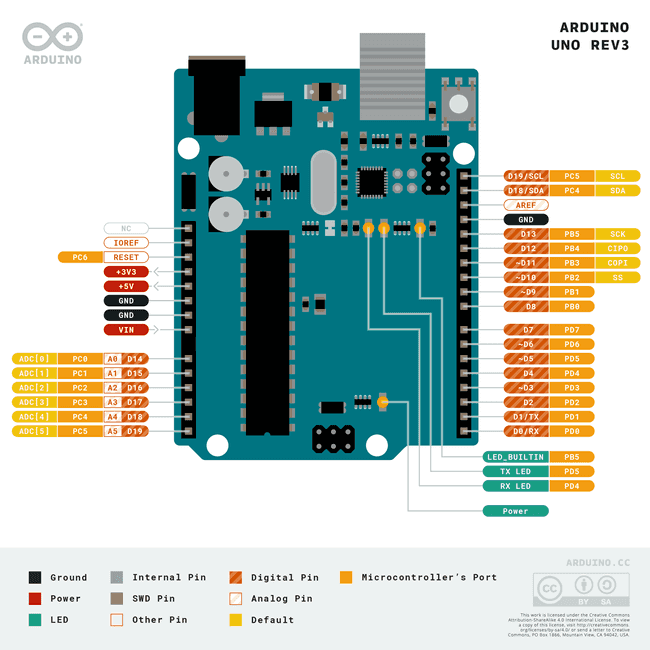
- https://docs.arduino.cc/static/6ec5e4c2a6c0e9e46389d4f6dc924073/a6d36/Pinout-UNOrev3_latest.png
- Course materials (for C programming) provided via Moodle (not publicly available)
While not flawless, this project received positive feedback from my instructor. It reflects an early stage in my learning journey and helped deepen my interest in coding.