Real-time bidirectional sync between Autodesk Revit and a web-based 3D viewer.
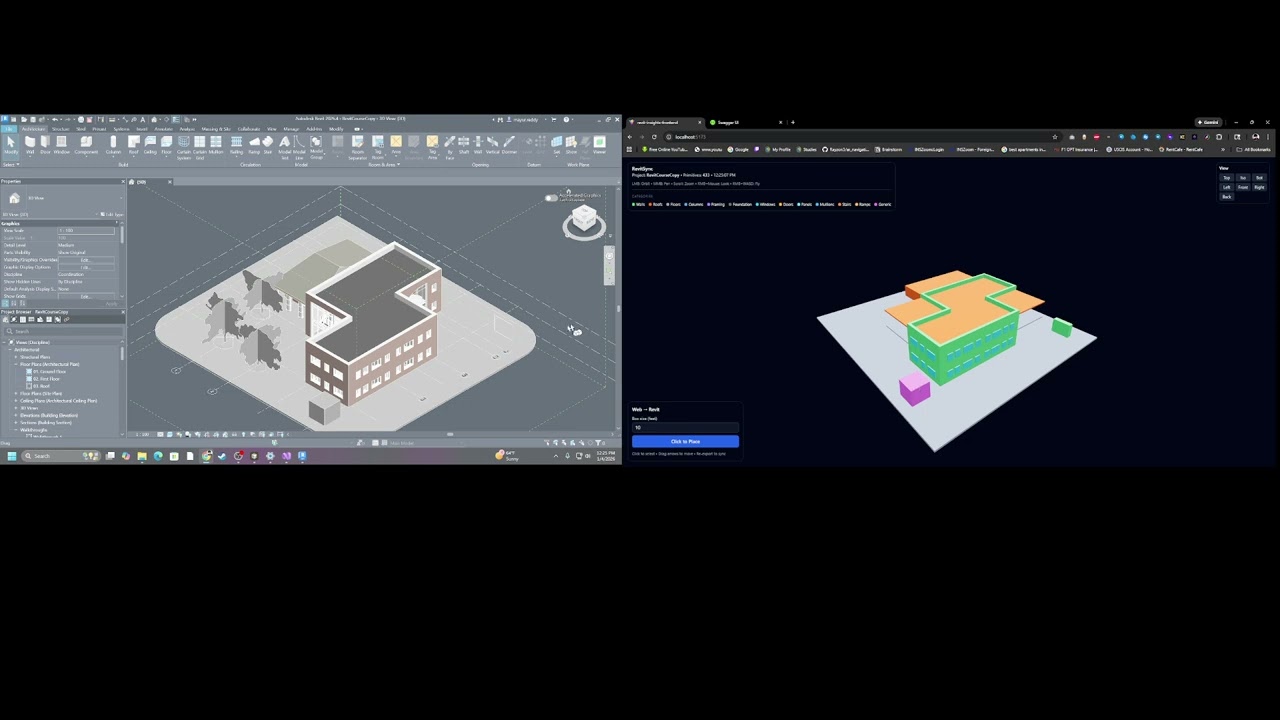
- Geometry Export: Extract bounding boxes from 13 Revit categories
- Auto-Sync: DocumentChanged event triggers automatic export
- Selection Sync: Revit selection highlighted in web viewer (cyan)
- Properties Panel: View Family, Type, Level, Area, Volume in browser
- Category Colors: Each category has distinct color for visualization
- Click-to-Place: Add boxes in browser, appear as DirectShapes in Revit
- Drag-to-Move: Reposition web-created elements with transform handles
- Delete Elements: Remove web-created elements from both sides
- Selection Sync: Click element in web, highlights and zooms in Revit
Walls, Roofs, Floors, Structural Columns, Structural Framing, Structural Foundation, Windows, Doors, Curtain Wall Panels, Curtain Wall Mullions, Stairs, Ramps, Generic Model
| Component | Technology |
|---|---|
| Revit Add-in | C# / .NET Framework 4.8 / Revit API 2024+ |
| Backend API | ASP.NET Core 9, In-memory storage, REST |
| Frontend | React 18, TypeScript, Three.js (React Three Fiber), TanStack Query, TailwindCSS |
┌─────────────────────────────────────────────────────────────────────────────┐
│                              REVIT ADD-IN                                    │
│  ┌──────────────┐  ┌──────────────┐  ┌──────────────┐  ┌──────────────┐    │
│  │    App.cs    │  │  Geometry    │  │   Command    │  │  AutoExport  │    │
│  │  (Startup)   │  │  Exporter    │  │   Poller     │  │   Handler    │    │
│  └──────────────┘  └──────────────┘  └──────────────┘  └──────────────┘    │
│         │                 │                 │                 │             │
│         └─────── DocumentChanged / Idling ──┴──── ExternalEvent ────────────┘
└─────────────────────────────────────────────────────────────────────────────┘
                     │ POST /geometry              │ GET /commands/next
                     ▼                             ▲
┌─────────────────────────────────────────────────────────────────────────────┐
│                           ASP.NET CORE BACKEND                               │
│  ┌────────────────────────────────┐    ┌────────────────────────────────┐  │
│  │     GeometryController         │    │     CommandsController         │  │
│  │  POST /api/geometry            │    │  POST /api/commands            │  │
│  │  GET  /api/geometry/latest     │    │  GET  /api/commands/next       │  │
│  └────────────────────────────────┘    └────────────────────────────────┘  │
│           ConcurrentDictionary                    ConcurrentQueue           │
└─────────────────────────────────────────────────────────────────────────────┘
                     │ GET /geometry/latest        │ POST /commands
                     ▼                             ▲
┌─────────────────────────────────────────────────────────────────────────────┐
│                          REACT FRONTEND                                      │
│  ┌────────────────────────────────┐    ┌────────────────────────────────┐  │
│  │    useLatestGeometry           │    │    useEnqueueCommand           │  │
│  │    (polls every 2s)            │    │    (mutation hook)             │  │
│  └────────────────────────────────┘    └────────────────────────────────┘  │
│  ┌──────────────────────────────────────────────────────────────────────┐  │
│  │                    LiveGeometryView (Three.js)                        │  │
│  │   3D Canvas  │  Properties Panel  │  Control Panel  │  Category Legend│  │
│  └──────────────────────────────────────────────────────────────────────┘  │
└─────────────────────────────────────────────────────────────────────────────┘
- Revit → Web: Geometry exported via POST, frontend polls GET every 2s
- Web → Revit: Commands queued via POST, add-in polls GET every 500ms
- Latency: ~500ms-2s
- Autodesk Revit 2024+ (tested with 2024, 2025, 2026)
- .NET 9 SDK (for backend)
- Node.js 18+ (for frontend)
- Visual Studio 2022 (for Revit add-in)
cd backend/RevitSync.Api
dotnet run
Runs on http://localhost:5245 | Swagger UI at http://localhost:5245/swagger
cd frontend/revit-sync-frontend
npm install
npm run dev
Runs on http://localhost:5173
- Open
revit-addin/RevitSync.Addin/RevitSync.Addin.slnin Visual Studio - Build the solution (post-build copies DLL automatically)
- Create a
.addinmanifest file (see below) - Restart Revit
Create RevitSync.addin in %APPDATA%\Autodesk\Revit\Addins\2026\:
<?xml version="1.0" encoding="utf-8"?>
<RevitAddIns>
  <AddIn Type="Application">
    <Name>RevitSync</Name>
    <Assembly>RevitSync.Addin.dll</Assembly>
    <FullClassName>RevitSync.Addin.App</FullClassName>
    <AddInId>7AF9D8DB-6CEA-4E88-98FE-B2ED1BF112C3</AddInId>
    <VendorId>RevitSync</VendorId>
  </AddIn>
</RevitAddIns>- Open Revit with a project containing walls, floors, roofs, etc.
- Click "Export Geometry" in the RevitSync ribbon panel
- Open browser at
http://localhost:5173 - Explore the model - orbit, pan, zoom the 3D view
- Click elements to see properties in the side panel
- Click "Select in Revit" to highlight and zoom in Revit
- Select in Revit - element highlights cyan in web viewer
- Place boxes - click "Click to Place" → click on ground
- Move boxes - select web-created box → drag transform arrows
- Delete boxes - select → click Delete button
Changes sync automatically via DocumentChanged event (no manual re-export needed).
| Endpoint | Method | Description |
|---|---|---|
/api/geometry |
POST | Ingest geometry snapshot from Revit |
/api/geometry/latest |
GET | Get latest snapshot (supports ETag caching) |
/api/commands |
POST | Queue command for Revit |
/api/commands/next |
GET | Dequeue next command (polled by Revit) |
| Type | Description |
|---|---|
ADD_BOXES |
Create DirectShape boxes in Revit |
DELETE_ELEMENTS |
Delete elements by ID |
MOVE_ELEMENT |
Move element to new position |
SELECT_ELEMENTS |
Select and zoom to elements |
MIT