



A zero-dependency Python library for ANSI coloring and smart CLI icons with automatic environment detection.
| ASCII Icons | Nerd Font Icons | Unicode Icons |
|---|---|---|
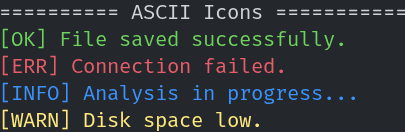 |
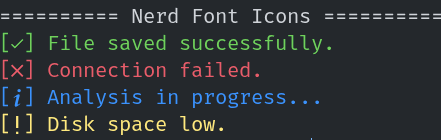 |
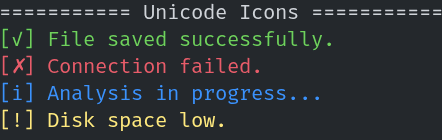 |
RazTint supports:
- Zero Dependencies: Built entirely with the Python standard library.
- Smart Icon Sets: Automatically degrades from Nerd Fonts → Unicode → ASCII based on the environment.
- Automatic Detection: Detects
NO_COLOR,TERM, andisattyto enable/disable features appropriately. - Windows Support: Automatically enables Virtual Terminal (VT) processing on Windows systems using
ctypes. - Type Hinted: Fully typed for excellent IDE support and autocompletion.
- Configurable: Granular control via Environment Variables.
This library is suitable for CLIs, logs, and tools that need portable, readable terminal output.
RazTint is intentionally minimal and zero-dependency.
If you need a lightweight alternative to colorama or rich for:
- Simple CLI tools
- Scripts
- Logging utilities
- Cross-platform terminal output
RazTint gives you:
- Zero dependencies
- Automatic icon fallback (Nerd → Unicode → ASCII)
- Automatic color detection
- Configurable behaviour with environment variables
- Very small runtime overhead
-
Zero Dependencies: Built entirely with the Python standard library.
-
Smart Icon Sets: Automatically degrades from Nerd Fonts → Unicode → ASCII based on the environment.
-
Automatic Detection: Detects NO_COLOR, TERM, and isatty to enable/disable features appropriately.
-
Windows Support: Automatically enables Virtual Terminal (VT) processing on Windows systems using ctypes.
-
Type Hinted: Fully typed for excellent IDE support and autocompletion.
-
Configurable: Granular control via Environment Variables.
pip install raztintpipx install raztintgit clone https://github.com/razbuild/raztint.git
cd raztint
pip install -e . # -e allows you to modify the source code in placeTo install Nerd Fonts, visit the official website.
You can import functions directly for quick usage, or instantiate the class for more control.
The easiest way to use RazTint is importing the pre-instantiated helpers:
from raztint import green, red, ok, err, info, warn

# Coloring text
print(green("Success! The operation completed."))
print(red("Critical Error: Database not found."))

# Using Icons (Auto-adapts to Nerd Font/Unicode/ASCII)
print(f"{ok()} File saved successfully.")
print(f"{err()} Connection failed.")
print(f"{info()} Analysis in progress...")
print(f"{warn()} Disk space low.")Useful if you need to toggle color support dynamically within an application instance or want a scoped instance.
from raztint import RazTint

tint = RazTint()

# Toggle features manually if needed
tint.set_color(False)

print(tint.blue("This will be plain text now because color is disabled."))from raztint import tint
print(tint.red("text"))
print(tint.ok(), "hello")from raztint import ok, err, warn, info
print(ok(), "Operation completed")
print(err(), "An error happened")
print(warn(), "Be careful")
print(info(), "For your information")RazTint attempts to make your CLI look as good as possible by detecting the font capabilities of the terminal.
| Mode | ok | err | warn | info | Condition |
|---|---|---|---|---|---|
| Nerd | [] | [] | [] | [] | Detected Nerd Font via Env/Registry |
| Std | [✓] | [✗] | [!] | [i] | UTF-8 supported, no Nerd Font |
| ASCII | [OK] | [ERR] | [WARN] | [INFO] | Fallback |
Note: Icons may not render correctly in GitHub preview depending on your browser font.
RazTint determines the best available icon and color mode using the following rules:
-
Nerd Font Mode:
- Enabled if:
RAZTINT_USE_NERD_ICONSenvironment variable is set to1,true,yes, oron, ORNERDFONTSorNERD_FONTSenvironment variable is set, ORFONT_NAMEorTERM_FONTenvironment variable contains "nerd" or "nf-", OR- A Nerd Font is detected via system checks:
- Linux: Uses
fc-list(fontconfig) to check installed fonts - macOS: Checks via
system_profilerand font directories (~/Library/Fonts,/Library/Fonts) - Windows: Checks
C:\Windows\Fontsdirectory via PowerShell
- Linux: Uses
- Enabled if:
-
Standard Unicode Mode:
- Enabled when UTF-8 encoding is available AND
RAZTINT_NO_NERD_ICONSis set (explicitly disables Nerd Fonts), OR- Nerd Fonts are not detected and not forced via
RAZTINT_USE_NERD_ICONS
-
ASCII Mode:
- Used when:
- Output encoding is not UTF-8 (cannot encode Nerd Font or Unicode characters), OR
- System encoding test fails for Unicode characters
- Used when:
You can control RazTint behavior using environment variables. This is useful for CI/CD pipelines or user overrides.
| Environment Variable | Value | Description |
|---|---|---|
NO_COLOR |
any | Disables all color output (standard specification). |
RAZTINT_NO_COLOR |
any | Specific override to disable RazTint colors. |
RAZTINT_FORCE_COLOR |
1, true, yes, on |
Forces color output even if not a TTY. |
RAZTINT_USE_NERD_ICONS |
1, true, yes, on |
Forces the use of Nerd Font icons. |
RAZTINT_NO_NERD_ICONS |
1, true, yes, on |
Disables Nerd Font detection (falls back to Standard Unicode mode). |
from raztint import tint
tint.set_color(False)NO_COLOR=1
RAZTINT_USE_NERD_ICONS=1
RAZTINT_FORCE_COLOR=1
RAZTINT_NO_NERD_ICONS=1
The following functions return strings wrapped with ANSI styling when supported:
-
black(text) -
red(text) -
green(text) -
yellow(text) -
blue(text) -
magenta(text) -
cyan(text) -
white(text) -
gray(text)
Internally, these use tint.color().
These return appropriate status symbols based on environment detection:
-
ok()- Returns a success icon (green checkmark) -
err()- Returns an error icon (red cross) -
warn()- Returns a warning icon (yellow exclamation) -
info()- Returns an info icon (blue 'i')
RazTint selects the best available style in this order:
- Nerd Font icons (if installed)
- Unicode icons (if UTF-8 is supported)
- ASCII fallback
When using the RazTint class directly, you have access to additional methods:
Low-level method to apply ANSI color codes to text. Returns the text with ANSI escape sequences when color is enabled, otherwise returns plain text.
Parameters:
text: The text to colorizefg_code: ANSI color code (e.g., "31" for red, "32" for green)
Example:
from raztint import RazTint

tint = RazTint()
colored = tint.color("Hello", "31") # Red textEnable or disable color output programmatically.
Parameters:
enabled:Trueto enable colors,Falseto disable
Example:
from raztint import RazTint

tint = RazTint()
tint.set_color(False)  # Disable colors
print(tint.red("This will be plain text"))Boolean indicating whether color output is currently enabled. This is automatically set based on environment detection but can be modified via set_color().
Current icon mode being used. Possible values:
"nerd"- Nerd Font icons"std"- Standard Unicode icons"ascii"- ASCII fallback icons
RazTint intelligently detects and adapts to the environment:
Color support is determined by checking (in order):
NO_COLORorRAZTINT_NO_COLORenvironment variables (disables colors)RAZTINT_FORCE_COLORenvironment variable (forces colors)- Whether output is connected to a TTY (
sys.stdout.isatty()) - On Windows: Attempts to enable Virtual Terminal processing
TERMenvironment variable (must not be "dumb")
If color is not supported, all color functions return plain text.
Icon mode is determined by checking (in order):
- Encoding capability (can the system encode Nerd Font characters?)
RAZTINT_USE_NERD_ICONSorRAZTINT_NO_NERD_ICONSenvironment variables- System-level Nerd Font detection (see Detection Logic section)
- Falls back to Standard Unicode or ASCII based on encoding support
If unsupported, RazTint transparently falls back to non-colored text and simpler icons.
MIT License