







Unofficial standalone Scrypted Tuya / Smart Life camera plugin & companion Home Assistant WebRTC-to-RTSP bridge.
Extracted from plugins/tuya and significantly extended with:
- Maximum quality selection — requests the highest writable quality advertised by each camera before RTSP allocation.
- Smart Life P2P bridge — companion Home Assistant add-on with a custom C++ WebRTC-to-RTSP streaming engine.
This project is unofficial and is not affiliated with or endorsed by Scrypted or Tuya.
- Tuya and Smart Life camera discovery via MQTT.
- Cloud RTSP camera streaming.
- Maximum advertised video-quality selection with safe fallback.
- Tuya doorbell ring notifications.
- Motion events on supported devices.
- Camera indicator and floodlight controls when exposed by the device.
- QR-code login flow (Tuya / Smart Life app — no developer keys required).
For cameras that stream at low resolution via Tuya Cloud RTSP (or not at all), use the companion add-on in the bridge/ folder. It runs a custom C++ streaming engine that:
- Authenticates via Smart Life QR code (scanned once from the Web UI).
- Opens a WebRTC P2P session to the camera using the Tuya protocol.
- Re-streams it as a standard RTSP feed on your local network.


- Settings → Add-ons → Add-on Store → ⋮ → Repositories
- Add
https://github.com/resonaura/scrypted-tuya - Install Tuya Camera Bridge → Start
- Open the Web UI (ingress or
http://<ha-host>:6767) - Create a profile → scan the QR code in Smart Life
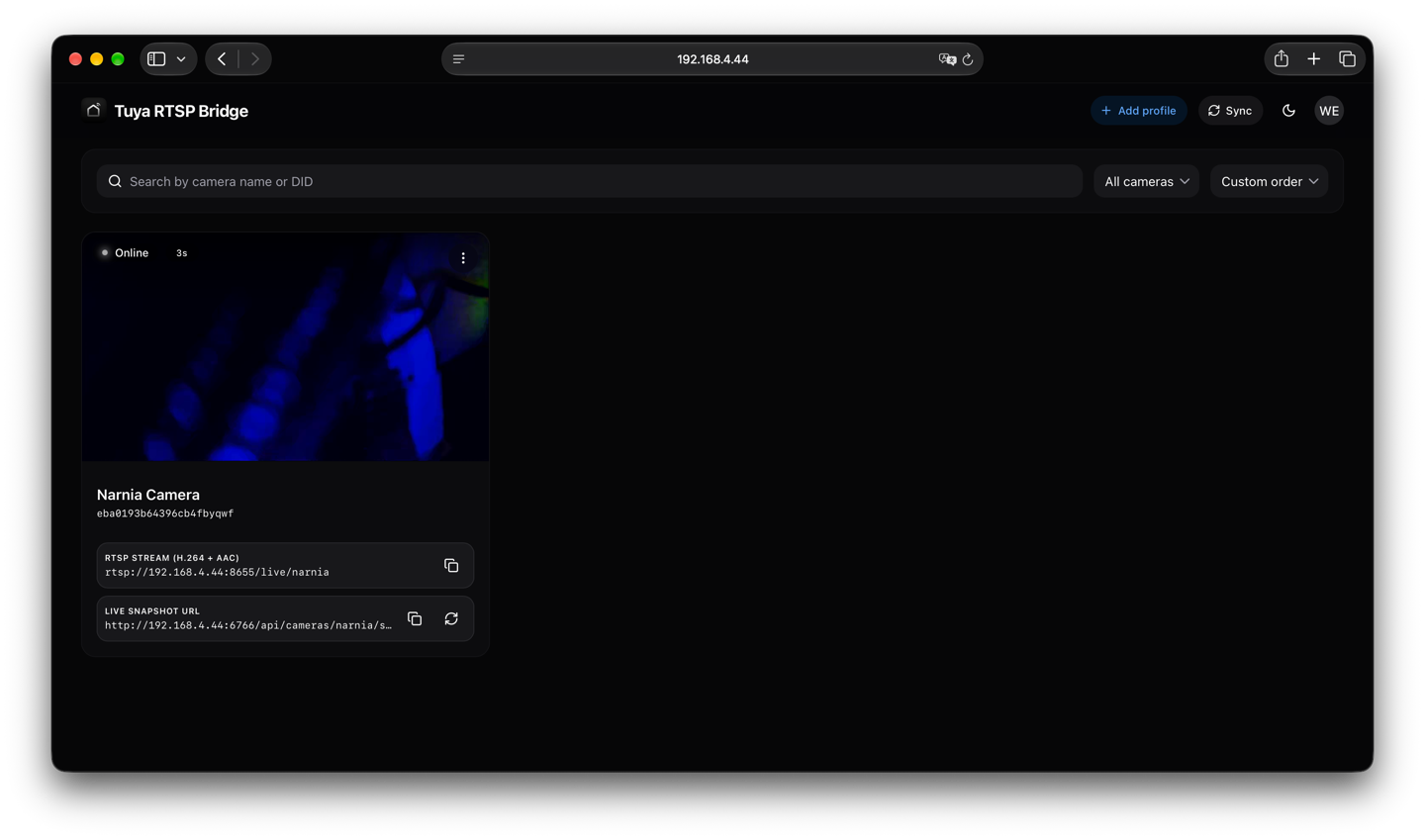
- Copy the RTSP URL shown on the camera card, e.g.
rtsp://<ha-host>:8655/<CameraName> - In Scrypted → camera settings → Smart Life P2P HD RTSP URL → paste URL
The Scrypted plugin continues handling discovery, motion, doorbell events and controls. Video comes from the P2P bridge.
You can run the Tuya Camera Bridge on any Linux/macOS machine with Docker:
Clone the repository and run:
git clone https://github.com/resonaura/scrypted-tuya.git
cd scrypted-tuya/bridge
docker compose up -d --build
Example docker-compose.yml:
services:
  tuya-bridge:
    build:
      context: .
      dockerfile: Dockerfile
    container_name: tuya-bridge
    restart: unless-stopped
    # CRITICAL: host network mode is required for camera P2P WebRTC / UDP discovery
    network_mode: host
    environment:
      - PORT=6766
      - WEB_PORT=6767
      - RTSP_BASE_PORT=8655
      # Optional: set LAN IP explicitly if auto-detection fails:
      # - RTSP_HOST=192.168.1.50
      - LOG_LEVEL=info
    volumes:
      - ./data:/data/tuya-bridge
- ./config:/config/tuya-bridgedocker run -d \
--name tuya-bridge \
--restart unless-stopped \
--network host \
-v $(pwd)/data:/data/tuya-bridge \
-v $(pwd)/config:/config/tuya-bridge \
ghcr.io/resonaura/tuya-rtsp-bridge:latestAfter starting, open http://<host-ip>:6767 in your browser.
| Port | Protocol | Purpose |
|---|---|---|
6766 |
TCP | REST / WebSocket API |
6767 |
TCP | Web UI dashboard |
8655+ |
TCP/UDP | RTSP streams (one per camera, starting at 8655) |
The recommended login method is the QR-code flow from the Tuya or Smart Life application. The legacy Tuya Developer Account login remains available for existing configurations.
Requirements: Node.js, npm, a Scrypted server for deployment.
npm ci
npm run typecheck
npm run build
The plugin archive is generated at out/plugin.zip.
The original Tuya plugin was written by the Scrypted contributors. This standalone fork is based on upstream commit abd37e4.
The bridge add-on was originally inspired by DanEng1982/tuya-rtsp-bridge. We are grateful for their pioneering work. The current add-on is a full from-scratch rewrite with a custom C++ engine, NestJS backend, and React frontend.
See UPSTREAM-LICENSE-NOTICE.md. Review upstream terms before redistributing.