
Rippletide adds an authority layer that validates, constrains, or blocks agent actions at runtime before they impact real systems or customers.
Web Platform · GitHub · Documentation · Discord


This repository is your starting point for Rippletide — Eval, Context Graph MCP, and Coding Agents.
Core Modules:
| # | Module | What it does |
|---|---|---|
| 1 | Agent Evaluation - CLI | Validate before you ship |
| 2 | Context Graph - MCP | Give your agents persistent memory across sessions |
| 3 | Coding Agents | A persistent memory layer for Claude |
Decision Runtime — Enterprise Only. Build deterministic agents with less than 1% hallucination rate. Contact us to learn more.
Rippletide adds an authority layer that validates, constrains, or blocks agent actions at runtime before they impact real systems or customers.
| Without Rippletide | With Rippletide | |
|---|---|---|
| Hallucinations | Variable, hard to control | Less than 1% by design |
| Memory | Lost between conversations | Persistent context graph |
| Guardrails | Prompt-based, easy to bypass | Engine-level, 100% compliance |
| Explainability | Black box | Every decision is traceable |
| Evaluation | Manual spot checks | Automated, CI-ready testing |
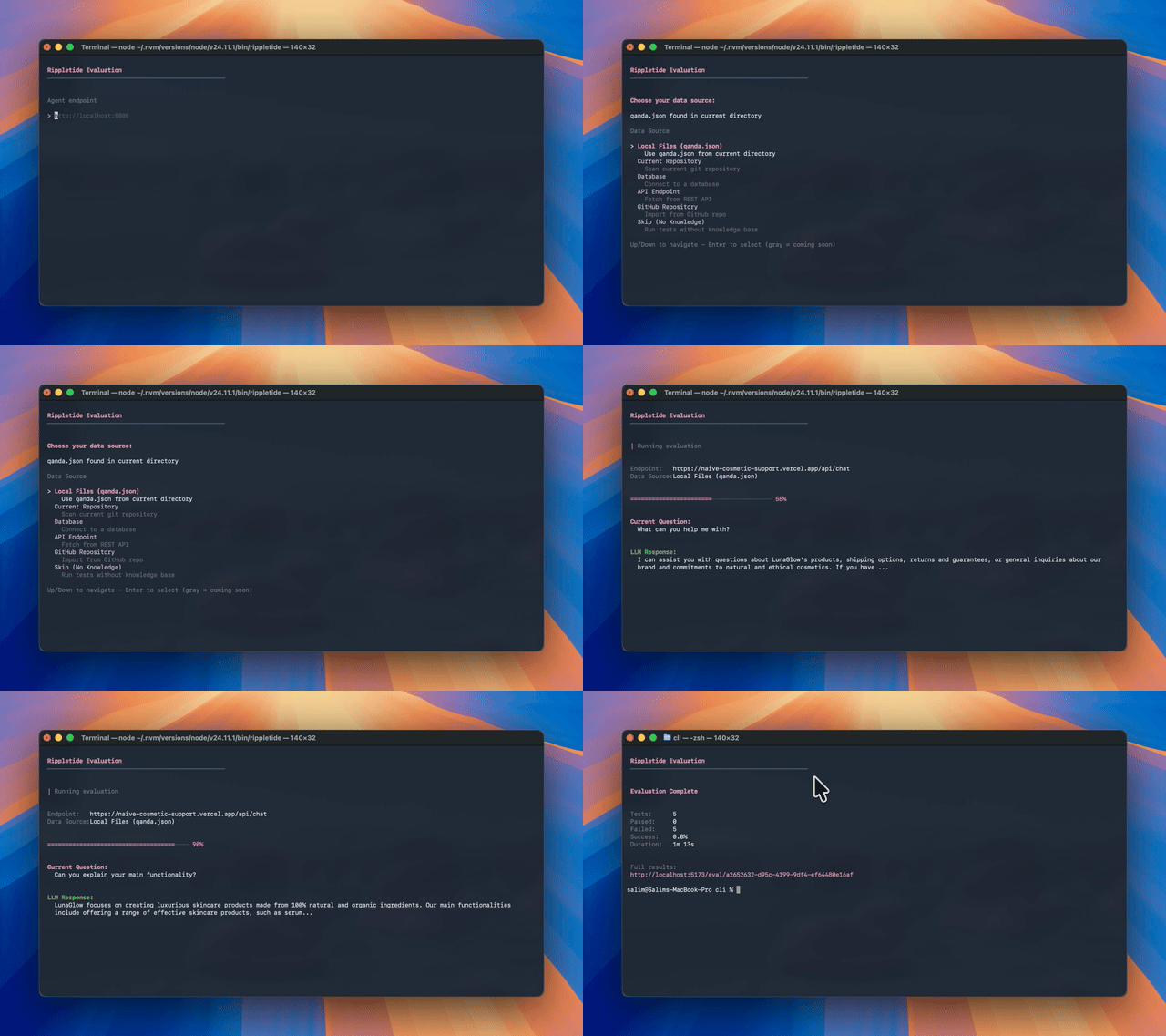
Eval is the entry point to Rippletide. Before adding memory or decision runtime, start by testing what your agent already does. Plug your agent into our CLI and Rippletide auto-generates test questions to evaluate its responses. Rippletide spots hallucinations by fact-checking each output and suggests improvements when sources are missing.
When to use it: Before every deployment, in CI pipelines, and during development to catch regressions.
Install globally via npm:
npm install -g rippletideOr use directly with npx:
npx rippletideSimply run:
rippletideYou'll be prompted for:
- Agent endpoint — Your API URL (e.g.
http://localhost:8000) - Knowledge source — Choose between files, Pinecone, or PostgreSQL
The CLI will then:
- Load your test questions
- Send them to your agent
- Show real-time progress
- Display evaluation results with pass/fail and justifications
rippletide eval [options]| Option | Description | Example |
|---|---|---|
-t, --template <name> |
Use a pre-configured template | rippletide eval -t banking_analyst |
-a, --agent <url> |
Agent endpoint URL | rippletide eval -a localhost:8000 |
-k, --knowledge <source> |
Knowledge source: files, pinecone, or postgresql | rippletide eval -k pinecone |
--debug |
Show detailed error information | rippletide eval --debug |
-h, --help |
Show help message | rippletide --help |
Local Files (default):
rippletide eval -a localhost:8000Reads Q&A pairs from qanda.json in the current directory.
Pinecone:
rippletide eval -a localhost:8000 -k pinecone \
  -pu https://db.pinecone.io \
  -pk pcsk_xxxxx
PostgreSQL:
rippletide eval -a localhost:8000 -k postgresql \
-pg "postgresql://user:pass@localhost:5432/db"For non-standard APIs:
rippletide eval -a localhost:8000 \
  -H "Authorization: Bearer token, X-API-Key: key" \
  -B '{"prompt": "{question}"}' \
-rf "data.response"| Option | Description |
|---|---|
-H, --headers |
Custom headers (comma-separated) |
-B, --body |
Request body template (use {question} placeholder) |
-rf, --response-field |
Path to response in JSON (dot notation) |
Pre-built configurations for common agent use cases:
| Template | Description |
|---|---|
banking_analyst |
Financial Q&A agent |
customer_service |
Support agent testing |
blog_to_linkedin |
Content repurposing agent |
luxe_concierge |
Luxury services agent |
local_dev |
Local development agent |
openai_compatible |
OpenAI-compatible endpoints |
project_manager |
Project management agent |
rippletide eval -t customer_serviceA persistent memory layer for your AI agents. Connect any MCP-compatible client (Cursor, Claude Desktop, Claude Code) and your agent can remember facts, decisions, and context across sessions.
Add this to your MCP client config:
{
  "mcpServers": {
    "rippletide": {
      "type": "url",
      "url": "https://mcp.rippletide.com/mcp?agentId=your-agent-id"
    }
  }
}
Get your agentId from the Rippletide platform.
| Client | Config location |
|---|---|
| Cursor | ~/.cursor/mcp.json |
| Claude Desktop | MCP settings in the app |
| Claude Code | .mcp.json at project root |
→ MCP docs
Give Claude Code a shared, persistent memory. Store your team's conventions once — naming rules, architecture decisions, error handling policies — and every Claude session pulls from the same source automatically.
npx rippletide-codeOne command to authenticate, scan your repo, select rules, and install hooks. Every Claude Code session in this project will have access to your rules from that point on.
If you need to point the CLI at a specific coding-agent backend, set one base URL and the CLI will derive the related endpoints from it:
RIPPLETIDE_API_URL="https://coding-agent.up.railway.app" npx rippletide-codeThe CLI now has two setup flows.
Individual
- Start the CLI and choose
1. Individual workspace - The CLI uses the standard Rippletide cloud login flow
- After login, rules sync with the individual workspace
Enterprise
- Point the CLI at a client-hosted coding-agent backend:
RIPPLETIDE_API_URL="https://company-coding-agent.internal" npx rippletide-code- Start the CLI and choose
2. Enterprise backend - The CLI stores that backend as the active coding-agent backend for later runs
- The enterprise backend handles uploads, rule extraction, and Anthropic-backed processing
In practice:
- Individual = Rippletide cloud auth + cloud workspace
- Enterprise = company backend + enterprise-local coding-agent flow
For the maintainer release flow for the internal CLI channel, see context-graph/CLI_RELEASE_FLOW.md.
| Feature | What it does |
|---|---|
| Rule enforcement | Rules are injected into every prompt. Code that violates a rule is blocked before it hits the file. Claude auto-rewrites until it complies. |
| Rule management | Add, edit, or delete rules in natural language. No config files. Changes take effect immediately. |
| Rule sharing | Send your rule set to a colleague with invite-rules <email>. They type receive-rules <otp> and get a conflict report with new rules, duplicates, and contradictions. |
| Planning | /plan generates an implementation plan and reviews it against your rules. Violations are revised automatically until the plan passes. |
| Team governance | Create a team, push your rules, and have every engineer sync from the same source. Read-only mode lets engineers inherit standards without modifying them. |
| Action | Command |
|---|---|
| Share rules | invite-rules <email> |
| Receive rules | receive-rules <otp> |
| Create team | create-team <name> |
| Join team | join-team <name> [approver_email] |
| Approve member | approve-join <team> <otp> <email> |
| Push to team | push-rules <team> |
| Sync from team | sync-rules <team> |
| Read-only connect | npx rippletide-code --read-only |
Rippletide only relies on the context available inside your local Claude Code workflow — your current chat session and your CLAUDE.md. Your codebase is not centrally analyzed. Rippletide stores only the extracted rules, not project content.
The Rippletide Platform brings everything together. Build agents without writing code, connect your knowledge sources, set guardrails that the LLM cannot override, and see exactly how your agent reasons through every decision — all in one place.
- Visual Agent Builder — configure agents without code
- Knowledge Connectors — import from Amazon Bedrock, PDFs, or manual Q&A
- Knowledge Visualization — see your agent's full knowledge graph
- Guardrail Configuration — rules enforced at runtime, not in the prompt
rippletide/
├── agent-evaluation/       # TypeScript CLI for agent evaluation
│   ├── bin/rippletide      # CLI entry point
│   ├── src/                # Source (api, components, errors, utils)
│   └── templates/          # Pre-built agent configs
├── context-graph/          # Rust MCP server for coding agents
│   ├── src/                # Rust source
│   └── npm/                # Multi-platform binary packages
└── docs/                   # Documentation site (Mintlify)
git clone https://github.com/rippletideco/rippletide.git

# Agent Evaluation CLI
cd rippletide/agent-evaluation
npm install
npm run build
npm run eval         # run development version

# Context Graph MCP server
cd rippletide/context-graph
cargo build --release
We welcome contributions. Please read our Contributing Guidelines, Code of Conduct, and Security Policy before opening a PR.
- Discord: Join our community
- GitHub Issues: Report bugs
- Docs: docs.rippletide.com
Built with ❤️ by the Rippletide team