
Open-source PDF SDK for React.
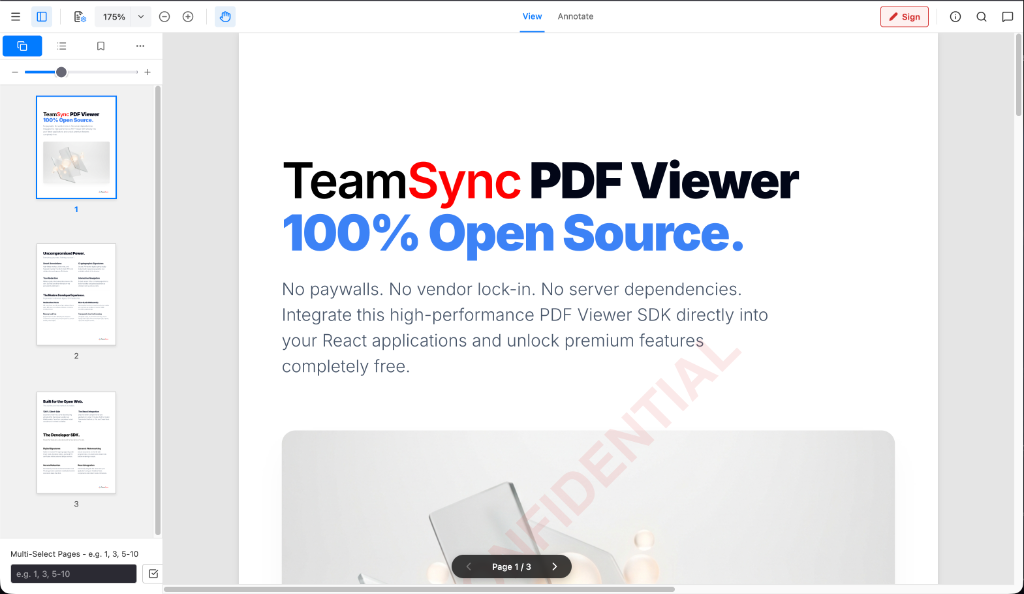
✨ Annotations 🔐 Permanent redaction 🔎 PDF search 🕵️ PII detection 💧 Watermarking ⚛️ React 19 📦 TypeScript 🌐 Client-side





Try the Interactive Live Demo or integrate the high-performance PDF Viewer SDK into your React applications.
Traditional commercial PDF viewers force developers into expensive per-domain licenses, opaque sales calls, and heavy server-side processing dependencies. TeamSync PDF Viewer is built from the ground up to solve these pain points.
- 💰 Zero-Cost, Transparent Licensing: Uncapped usage, no per-server fees, and no commercial paywalls. 100% free and open-source under CPAL 1.0.
- ⚡ 100% Client-Side WebAssembly: Documents never leave the browser sandbox. Process, redact, and render PDFs entirely.
- 🔌 Universal WebViewer API: Clean, intuitive
WebViewer({...})API interface that makes integrating into your web applications effortless. - 🎨 Headless & Customizable: Built for modern React 19 SPA lifecycles. No bloated iFrames to fight—customize toolbars, sidebars, context menus, and controls natively.
Install the package into your React / TypeScript project:
# Using npm
npm install teamsync-pdf-viewer

# Using yarn
yarn add teamsync-pdf-viewer

# Using pnpm
pnpm add teamsync-pdf-viewerIf installing from GitHub Packages registry:
- Create or update your
.npmrcfile:@angelbot-ai:registry=https://npm.pkg.github.com - Install via npm:
npm install teamsync-pdf-viewer
Explore detailed SDK guides, parameter options, code snippets, and architecture deep dives:
- 🏠 Wiki Home: Main documentation index & overview.
- 🚀 Getting Started Guide: Installation, CDN, and framework setups.
- ⚙️ API Reference & Options: Complete parameter list for
WebViewerOptions&SDKPermissions. - 🎨 Annotations & Markup Guide: Freehand drawing, vector shapes, callouts & links.
- 🛡️ Redactions & PII Sanitization Guide: Binary redactions, regex PII scanning & discard options.
- 💧 Forensic Watermarking Guide: Dynamic single and tiled watermark setup.
- 🔌 Plugin Architecture Guide: Writing custom extension plugins.
Everything you need to build collaborative, secure document workflows.
- Full Drawing Toolkit: Freehand ink (
brush), highlighters, geometric shapes (rectangles, ellipses), arrows, and lines. - Notes & Callouts: Sticky notes, callout text boxes with directional arrows, and text annotations.
- Interactive Hyperlinks: Create internal page-jump links (
#page=N) or external web URL links directly on document selections.
- Binary-Level Data Obliteration: We don't just place black boxes over text—redactions are permanently rasterized and burned into the underlying PDF vector structure.
- Text Layer Sanitization: Redacted text is automatically stripped from the DOM
textLayerand PDF content streams, preventing copy/paste extraction and search indexing. - Automatic Regex Redactions: Programmatically locate and redact sensitive PII (Aadhaar numbers, SSNs, credit cards, dates of birth) in a single click.
- Discard Unapplied Redactions: Easily discard individual pending redactions or bulk-discard all unapplied redaction marks before committing.
- Retina 60 FPS Zoom & Pan: High-DPI
devicePixelRatioscaling eliminates blurred text. Micro-debounced rendering enables buttery-smooth 60 FPS trackpad pinching and 360° mouse drag panning. - Contextual Document Search: Instant client-side text search with real-time match highlighting, result jumping, and match counting.
- Programmatic, non-destructive watermarks rendered on the fly (single centered or full-page tiled) with customizable text, color, opacity, font size, and rotation.
Drop the SDK into any container element with a single function call:
import { WebViewer } from 'teamsync-pdf-viewer';
import 'teamsync-pdf-viewer/style.css';

WebViewer({
  initialDoc: '/sample.pdf',
  initialScale: 1.0, // 100% natural size
  enableAnnotations: true,
  permissions: {
    canRedact: true,
    canAddAnnotations: true
  },
  watermark: {
    text: 'CONFIDENTIAL',
    mode: 'single',
    size: 48,
    opacity: 0.1,
    color: '#dc2626'
  }
}, document.getElementById('viewer-container')).then((instance) => {
  console.log('TeamSync PDF Viewer is ready!', instance);

  // Export annotated PDF buffer
  instance.Core.documentViewer.getDocument().getFileData().then((pdfBytes) => {
    console.log('Exported PDF byte length:', pdfBytes.length);
  });
});For native React integration, use the <DocumentViewer /> component:
import { DocumentViewer } from 'teamsync-pdf-viewer';
import 'teamsync-pdf-viewer/style.css';

function App() {
  return (
    <div style={{ width: '100vw', height: '100vh' }}>
      <DocumentViewer
        initialDoc="/contract.pdf"
        scale={1.0}
        enableAnnotations={true}
        permissions={{ canRedact: true }}
      />
    </div>
  );
}git clone https://github.com/angelbot-ai/TeamSync-PDF-Viewer.git
cd TeamSync-PDF-Viewer
npm installnpm run devOpen http://localhost:5173 in your browser to launch the live SDK viewer.
TeamSync PDF Viewer features a decoupled Plugin Architecture. Core PDF rendering, smart annotations, redaction engines, and search remain lightweight and modular in the main engine, while enterprise extensions plug in as independent modules.
┌─────────────────────────────────────────────────────────┐
│              TeamSync PDF Viewer Core                   │
│   (Page Rendering, Annotations, Redactions, Search)     │
└───────────────────────────┬─────────────────────────────┘
                            │ Plugins Registry API
┌───────────────────────────▼─────────────────────────────┐
│                   Custom Extension                      │
│      (Custom Modals, Action Buttons, Export Hooks)      │
└─────────────────────────────────────────────────────────┘
- Core Engine: HTML5, TypeScript, WebAssembly (PDF.js + pdf-lib)
- UI & State: React 19, Lucide Icons, Pure CSS Modules
- Build System: Vite 8 & Oxlint (Sub-500ms tree-shakable builds)
TeamSync-PDF-Viewer/
├── src/
│   ├── components/       # Native React UI (Header, DocumentViewer, Sidebars, Modals)
│   ├── hooks/            # Search & Keyboard shortcut hooks
│   ├── utils/            # Redaction algorithms & vector helpers
│   ├── plugins/          # Plugin API interfaces & registry
│   ├── index.ts          # Main SDK package exports
│   ├── main.tsx          # WebViewer SDK entry point & public API bridge
│   └── App.tsx           # Demo Application Shell
├── public/               # Static PDF assets & PDF.js workers
└── docs/images/          # High-res UI documentation screenshots
Distributed under the CPAL 1.0 (Common Public Attribution License).
100% Free and Open Source for personal and commercial usage.