#Introduction:
Nowadays, every technical field is trying to style human life at ease. With the rapid growth in the use of the internet and the technologies associated with it, several opportunities are coming up in the web or mobile application. This is made possible through the use of an electronic payment system. It is possible for everyone to order any goods from anywhere on the internet and have the goods delivered to his/her home. Basically, ''Food Ordering System" can be defined as:
A simple and convenient way for the customers to purchase food online, without having to go to the restaurant.
This system is very useful to those who are very busy at work or in-home and do not have the time to go outside or cook food. Customers don't really need to have the technical knowledge to operate it. Because it is designed in a very modest way.
Therefore, as per this system, the customer visits the restaurant's app or website, browses through the various food items available there, and goes ahead and selects and purchases the items he or she needs. These items will then be delivered to the customer at his or her doorstep. Payments for such online orders can be made through debit cards, cash on delivery.
In short, it's easy, convenient, completely transparent software and a customer-friendly food ordering system.
The system will become an important tool for a restaurant to improve the management aspect. This can be done by the use of a computer system to connect each and every transaction instead of manually recording data on it. It can assist the user to concentrate on their other activities rather than concentrate on record keeping. Thus, it will help the organization in better utilization of resources. Page Break
#Scope
Can be useful for restaurants to increase their sales. Can be helpful for a customer to get food to deliver in the safe environment of a home. Discount and can be available for the customers.
User Friendly and Easy To Use : Customer panel features allow users to find and order their favourite foods with just a few clicks.
Order Details: You can Keep Track of your Order. You can Remove your food items.
Review Section : Customer can share their Experience/Opinion by rating the app.
Banners : Today’s special dishes and offers are displayed.
Printable Invoice:
Users can print/download invoice.
#Project Design:
In this phase, a logical system is built which fulfils the given requirements. The design phase of software development deals with transforming the customer's requirements into a logically working system. Normally, design is performed in the following two steps:
- Primary Design Phase:
In this phase, the system is designed at the block level. The blocks are created based on analysis done in the problem identification phase. Different blocks are created for different functions emphasis is put on minimizing the information flow between blocks. Thus, all activities which require more interaction are kept in one block.
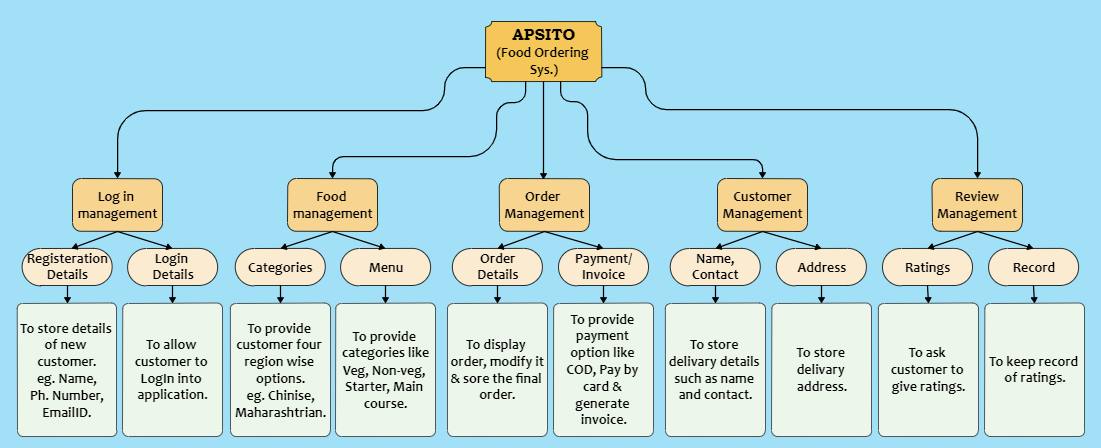
- Secondary Design Phase:
In the second phase, the detailed design of every block is performed.
General tasks involved in the project design process are following: Design various blocks for overall system processes. Design smaller, compact, and workable modules in each block. Design various database structures. Specify details of programs to achieve the desired functionality. Design the form of inputs and outputs of the system. Perform documentation of the design. System reviews.
User Interface Design:
User Interface Design is concerned with the dialogue between a user and the computer. It is concerned with everything from starting the system or logging into the system to the eventual presentation of desired inputs and outputs. The overall flow of screens and messages is called a dialogue.
The following steps are guidelines for User Interface Design: The system user should always be aware of what to do next. The screen should be formatted so that various types of information, instructions, and messages always appear in the same general display area. Message, instructions, or information should be displayed long enough to allow the system user to read them. Use display attributes sparingly. Default values for fields and answers to be entered by the user should be specified. A user should not be allowed to proceed without correcting an error. The system user should never get an operating system message or fatal error.
Registration Page: New users can enter their details and email and create his account. The ‘Register’ button will direct the user to the Login page.

Figure 2.1 : Registration/SignUp Page.
Login Page: Registered users and Admins can log in through this page. The ‘Login’ button will take them to home page/Admin page.

Figure 2.2 : LogIn Page.
Home Page: Customer can select his favourite categories. Banners displaying offers and a special menu are present.

Figure 2.3 : Home Page.
Menu Page: Users can choose from verities like Veg, Non-veg, Starters, and Main course. ‘Add’ button adds selected item into order list. Users can also travers through other categories.

Figure 2.4 : Menu Page.
Order Details Page: Selected items are displayed along with GST added total amount. Users can remove items. Customer details are stored. Two payment modes are available ( COD & Pay by card). Users can avail offers by clicking on ‘Apply Offer’ button.

Figure 2.5 : Order/Customer Details Page.
Card Detail Page: New user can add his card details such as card number and expiry date. If the card is already added they can skip this process by clicking on ‘Skip’ button.

Figure 2.6 : Card Details Page.
Payment Page: The user should enter correct card details to make payment.

Figure 2.7 : Payment Page.
Invoice Page: Invoice is generated and user can either print it or download it in pdf form.

Figure 2.8 : Invoice Page.

Figure 2.9 : Print Invoice.
Review/Rating Page: User can share their experience by rating the app. This rating method differs from traditional method as artistic emojis are used.

Figure 2.10 : Review Page.
Admin Page: Existing Admin can add new Admin if needed. Detailed information of orders placed till now is displayed. Also ratings are displayed along with time stamp.

Figure 2.11 : Admin’s Page.