API Guide: Available Endpoints & Usage
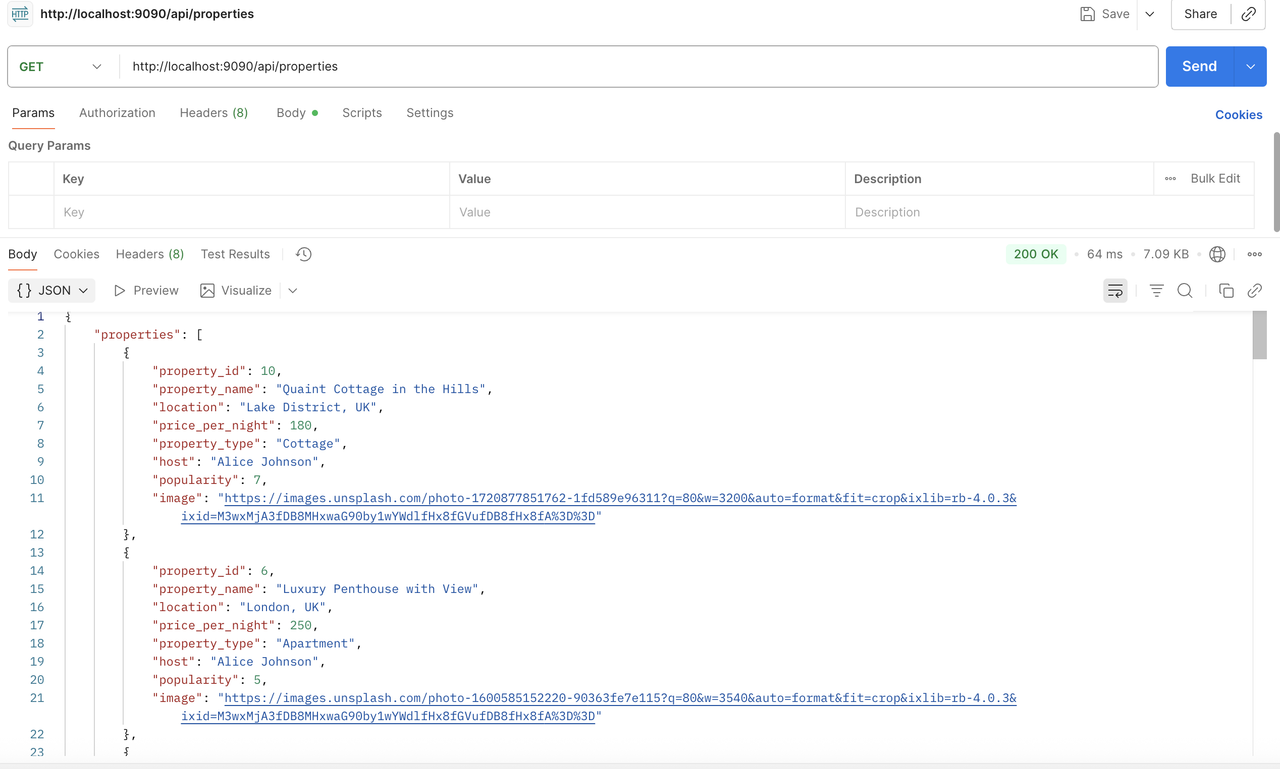
Below is a screenshot showing the API request and response in Postman:
AirbNC is a RESTful backend API for a property rental application. Built with Node.js, Express, and PostgreSQLThe API supports property listings, user management, bookings and reviews, and provides the backend services for the AirbNC React frontend.
Database: PostgreSQL / Supabase Deployment: Render
The frontend is maintained in a separate repository. Link: https://github.com/sandra395/AirbNC-frontend
🏠 Property listings and property management 👤 User management 📅 Booking functionality ⭐ Property reviews 🔗 RESTful API endpoints 🗄️ PostgreSQL database integration 🧪 Unit and integration testing
Node.js | Express.js | PostgreSQL | Supabase | Jest | REST API
Node.js - server-side JavaScript runtime Express.js - REST API framework PostgreSQL - relational database Supabase - hosted PostgreSQL database Jest - unit and integration testing
The API follows a RESTful, resource-based architecture using standard HTTP methods and structured endpoints.
The API provides endpoints for resources including:
Users | Properties | Bookings | Reviews
API requests can be tested using Postman.
Example GET /users request and response:
Install all project dependencies:
npm installCreate two local databases: airbnc_test and airbnc. A setup script is provided:
npm run setup-dbsCreate the required .env.test and .env.development files.
.env.test
PGDATABASE=airbnc_test.env.development
PGDATABASE=airbncMake sure environment files are included in .gitignore.
The test database is automatically seeded when running the test suite.
To seed the development database, run:
npm run seedStart the server locally:
npm run devThen open http://localhost:9090 in your browser or an API client (e.g., Postman) to explore the endpoints.
Once the databases are ready, run:
npm testThe AirBNC backend is deployed and live at: https://portfolio-xxtl.onrender.com
Feel free to test endpoints directly from this URL—no local setup required.
AirbNC Frontend (https://github.com/sandra395/AirbNC-frontend)
The React frontend consumes this API to provide the complete property booking experience.