
A developer dependency package that provides a web-based SQLite workbench for Flutter and pure Dart apps during development. Works with both sqflite (mobile) and sqflite_common_ffi (desktop).
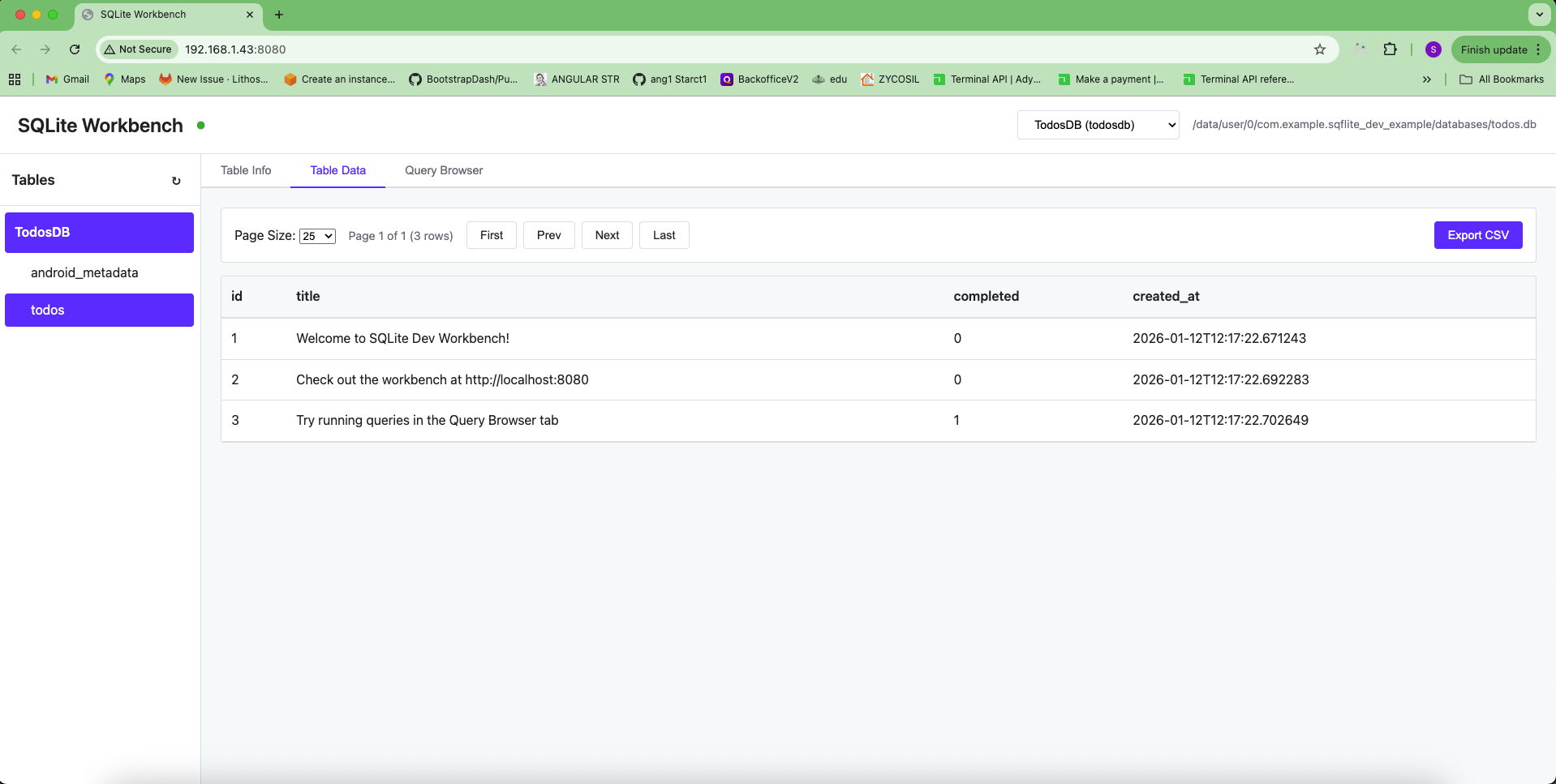
This package is only for development use. Add it to your dev_dependencies, not dependencies. It will not be included in production builds.
- MySQL Workbench-style tab system: open multiple tables and queries as independent tabs
- Dark mode with Ctrl+D toggle (persisted)
- SQL autocomplete for table names, column names, keywords, and functions
- Right-click context menu: copy column names, row data (JSON/CSV/TSV), cell values
- Click-to-sort columns, quick filter, NULL value styling
- Sidebar table search (Ctrl+K) with row count badges
- Row detail slide-over panel
- Export to CSV and JSON
- Destructive query protection (DROP, DELETE without WHERE)
- Resizable sidebar, breadcrumb navigation, toast notifications
- Keyboard shortcuts: Ctrl+T (new query), Ctrl+W (close tab), Ctrl+Enter (run query)
- Works on both mobile (iOS/Android) and desktop (Linux/Windows/macOS) platforms
- Web-based workbench accessible from any device on your network
- Mobile (iOS/Android/macOS): Use with
sqflitepackage - Desktop (Linux/Windows/macOS/Web): Use with
sqflite_common_ffipackage
Add this package to your dev_dependencies in pubspec.yaml:
dev_dependencies:
  sqflite_dev: ^2.3.0
Then run:
flutter pub getNote: Make sure you also have either sqflite (for mobile) or sqflite_common_ffi (for desktop) in your dependencies section.
This is the easiest way, similar to sqflite_orm's webDebug option:
import 'package:flutter/foundation.dart';
import 'package:sqflite/sqflite.dart'; // or sqflite_common_ffi for desktop
import 'package:sqflite_dev/sqflite_dev.dart';

void main() async {
  WidgetsFlutterBinding.ensureInitialized();

  // For desktop platforms, initialize FFI first
  // import 'package:sqflite_common_ffi/sqflite_ffi.dart';
  // sqfliteFfiInit();
  // databaseFactory = databaseFactoryFfi;

  // Open your database
  final db = await openDatabase(
    'my_database.db',
    version: 1,
    onCreate: (db, version) {
      // Your schema creation code
    },
  );

  // Enable workbench (automatically disabled in release builds)
  db.enableWorkbench(
    webDebug: !kReleaseMode, // Automatically disabled in release mode
    webDebugPort: 8080,
    webDebugName: 'MyAppDB',
  );

  runApp(MyApp());
}You can also enable the workbench manually:
import 'package:sqflite/sqflite.dart';
import 'package:sqflite_dev/sqflite_dev.dart';

void main() async {
  WidgetsFlutterBinding.ensureInitialized();

  // Open your database
  final db = await openDatabase('my_database.db');

  // Enable workbench (only works in debug mode)
  db.enableWorkbench();

  runApp(MyApp());
}import 'package:flutter/foundation.dart';
import 'package:sqflite_common_ffi/sqflite_ffi.dart';
import 'package:sqflite_dev/sqflite_dev.dart';
void main() async {
// Initialize FFI
sqfliteFfiInit();
databaseFactory = databaseFactoryFfi;
// Open your database
final db = await openDatabase('my_database.db');
// Enable workbench (automatically disabled in release builds)
db.enableWorkbench(
webDebug: !kReleaseMode, // Automatically disabled in release mode
webDebugPort: 8080,
webDebugName: 'MyDatabase',
);
runApp(MyApp());
}You can register multiple databases - they will all be accessible through the same web portal:
import 'package:flutter/foundation.dart';
import 'package:sqflite_dev/sqflite_dev.dart';

// Register multiple databases
final db1 = await openDatabase('main.db');
db1.enableWorkbench(
  webDebug: !kReleaseMode,
  webDebugName: 'MainDB',
  webDebugPort: 8080,
);

final db2 = await openDatabase('cache.db');
db2.enableWorkbench(
  webDebug: !kReleaseMode,
  webDebugName: 'CacheDB',
  webDebugPort: 8080, // Same port - all databases share the same server
);

final db3 = await openDatabase('user.db');
db3.enableWorkbench(
  webDebug: !kReleaseMode,
  webDebugName: 'UserDB',
  webDebugPort: 8080,
);
All databases will be accessible through the same web portal. Use the database selector dropdown in the header to switch between them. Each database can have its own custom name for easy identification.
For best practices, use kReleaseMode to automatically disable the workbench in release builds:
import 'package:flutter/foundation.dart';
import 'package:sqflite_dev/sqflite_dev.dart';

// Enable workbench only in debug/profile builds
db.enableWorkbench(
  webDebug: !kReleaseMode, // Automatically disabled in release builds
  webDebugPort: 8080,
  webDebugName: 'MyDatabase',
);
This ensures the workbench is never enabled in production builds, even if you forget to set webDebug: false.
By default, the workbench runs on port 8080. You can change it:
// Using enableWorkbench directly
db.enableWorkbench(webDebugPort: 3000);

// Or using WorkbenchHelper
WorkbenchHelper.autoEnable(db, webDebugPort: 3000);
If the port is already in use, the server will try the next available port.
Once you run your app in debug mode, the workbench server will start automatically. You'll see output in your console:
═══════════════════════════════════════════════════════════
sqflite_dev: Workbench server started!
  Local:   http://localhost:8080
  Network: http://192.168.1.100:8080
═══════════════════════════════════════════════════════════
- Local: Access from the same device running the app
- Network: Access from any device on the same network (your development PC, other devices, etc.)
- Click any table to open it in its own tab
- Open multiple query tabs with
Ctrl+Tor the+button - Close tabs with
Ctrl+Wor middle-click - Each tab has independent state (pagination, sort, filter)
- Table tabs (blue indicator) and query tabs (green indicator) in one unified bar
- Data view: Paginated grid with click-to-sort columns, quick filter, zebra striping
- Structure view: Schema, indexes, CREATE TABLE statement with type/PK/NOT NULL badges
- Toggle Data/Structure per tab independently
- Export current page as CSV or JSON
- SQL editor with autocomplete (table names, column names, keywords, functions)
- Execute full query or selected text with
Ctrl+Enter - Tab key indentation, query history, execution time display
- Destructive query confirmation (DROP, DELETE without WHERE, TRUNCATE)
- Auto-refresh open table tabs after DML statements
- Copy single column name or all column names
- Copy column data for current page
- Copy row as JSON, CSV, or tab-separated values
- Copy cell value (also via double-click)
- Dark mode (
Ctrl+D) persisted to localStorage - Sidebar table search (
Ctrl+K) with row count badges - Row detail panel (click row number)
- Resizable sidebar with drag handle
- Toast notifications for all operations
- Connection status monitoring
- ✅ Should be in
dev_dependencies(excluded from production builds) - ✅ Accessible only on your local network
- ✅ User controls enablement via
webDebugparameter - ✅ Recommended: Use
webDebug: !kReleaseModeto automatically disable in release builds ⚠️ Never use in production - this is a development tool only⚠️ Always setwebDebug: falseor use!kReleaseModein production code - even though it's in dev_dependencies, be explicit
- Make sure
webDebug: trueis set when callingWorkbenchHelper.autoEnable()orenableWorkbench() - Check that the package is in
dev_dependencies - Verify the port isn't blocked by a firewall
- Ensure the database is opened before calling
enableWorkbench()orWorkbenchHelper.autoEnable()
- Ensure both devices are on the same network
- Check the network IP address shown in the console output
- Verify your firewall allows connections on the port
- On mobile devices, make sure the device and your PC are on the same Wi-Fi network
- The web UI is now embedded in the package (no external files needed)
- If you see connection errors, check the browser console for details
- Make sure you're accessing the correct URL (check console output for the exact address)
- Make sure the database is opened and registered
- Try refreshing the tables list using the refresh button (↻) in the sidebar
- Check the browser console for errors
- Verify the database has tables (empty databases won't show tables)
This package is licensed under the MIT License. See the LICENSE file for details.
Contributions are welcome! Please feel free to submit issues or pull requests.