-- Semantic LOG ExtRaction Templating (SLOGERT) --
SLOGERT aims to automatically extract and enrich low-level log data into an RDF Knowledge Graph that conforms to our LOG Ontology. It integrates
- LogPai for event pattern detection and parameter extractions from log lines
- Stanford NLP for parameter type detection and keyword extraction, and
- OTTR Engine for RDF generation.
- Apache Jena for RDF data manipulation.
We have tested our approach on text-based logs produced by Unix OSs, in particular:
- Apache,
- Kernel,
- Syslog,
- Auth, and
- FTP logs.
In our latest evaluation, we are testing our approach with the AIT log dataset, which contains additional logs from non-standard application, such as suricata and exim4. In this repository, we include a small excerpt of the AIT log dataset in the input folder as example log sources.
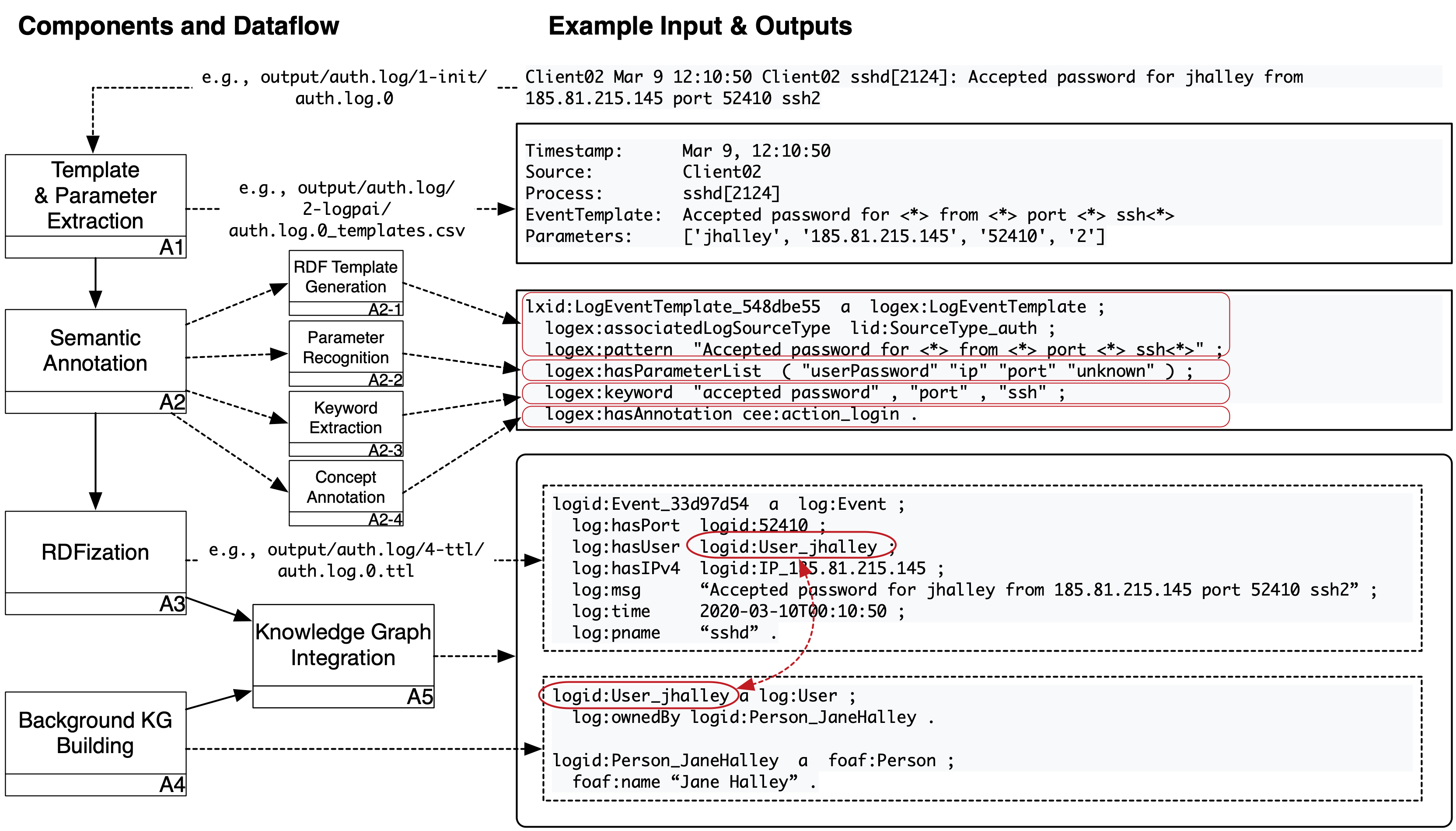
**Figure 1**. SLOGERT KG generation workflow.
SLOGERT pipeline can be described in several steps, which main parts are shown in Figure 1 above and will be described as the following:
- Load
config-ioandconfig.yaml - Collect target
log filesfrom theinput folderas defined inconfig-io. We assume that each top-level folder within input folder represent a single log source - Aggregate collected log files into single file.
- Add log-source information to each log lines,
- If log lines exceed the configuration limit (e.g., 100k), split the aggregated log file into a set of
log-files.
Example results of this step is available in output/auth.log/1-init/ folder
- Initialize
extraction_template_generatorwithconfig-ioto register extraction patterns - For each
log-filefromlog-files- Generate a list of
<extraction-template, raw-result>pairs usingextraction_template_generator
- Generate a list of
NOTE: We use LogPAI as extraction_template_generator
Example results of this step is available in output/auth.log/2-logpai/ folder
- Load existing
RDF_templateslist - Load
regex_patternsfromconfiglist for parameter recognition - Initialize
NLP_engineengine - For each
extraction-templatefrom the list of<extraction-template, raw-result>pairs- Transform
extraction-templateinto anRDF_template_candidate - if
RDF_templatesdoes not containRDF_template_candidate- [A2.1 - RDF template generation]
- For each
parameterfromRDF_template_candidate- If
parameterisunknown- [A2.2 - Template parameter recognition]
- Load
sample-raw-resultsfromraw-results - Recognize
parameterfromsample-raw-resultsusingNLP_engineandregex_patternsasparameter_type - Save
parameter_typeinRDF_template_candidate
- Load
- [A2.2 - end]
- [A2.2 - Template parameter recognition]
- If
- [A2.3 - Keyword extraction]
- Extract
template_patternfromRDF_template_candidate - Execute
NLP_engineengine on thetemplate_patternto retrievetemplate_keywords - Add
template_keywordsas keywords inRDF_template_candidate
- Extract
- [A2.3 - end]
- [A2.4 - Concept annotation]
- Load
concept_modelcontaining relevant concept in the domain - For each
keywordfromtemplate_keywords- for each
conceptinconcept_model- if
keywordcontainsconcept- Add
conceptas concept annotation inRDF_template_candidate
- Add
- if
- for each
- Load
- [A2.4 - end]
- add
RDF_template_candidatetoRDF_templateslist
- For each
- [A2.1 - end]
- [A2.1 - RDF template generation]
- Transform
NOTE: We use Stanford NLP as our NLP_engine
Example results (i.e., RDF_templates) of this step is available as output/auth.log/auth.log-template.ttl
- Initialize
RDFizer_engine - Generate
RDF_generation_templatefromRDF_templateslist - for each
raw_resultfromraw_resultslist- Generate
RDF_generation_instancesfromRDF_generation_templateandraw_result - Generate
RDF_graphfromRDF_generation_instancesandRDF_generation_templateusingRDFizer_engine
- Generate
NOTE: We use LUTRA as our RDFizer_engine
Example RDF_generation_template and RDF_generation_instances are available in the output/auth.log/3-ottr/ folder.
Example results of this step is available in the output/auth.log/4-ttl/ folder

Figure 2. SLOGERT KG generation algorithms.
For those that are interested, we also provided an explanation of the KG generation in a form of Algorithm as shown in the Figure 2 above.
Prerequisites for running SLOGERT
Java 11(for Lutra)Apache MavenPython 2withpandasandpython-scipyinstalled (for LogPai)- the default setting is to use
pythoncommand to invoke Python 2 - if this is not the case, modification on the
LogIntializer.javais needed.
- the default setting is to use
We have tried and and tested SLOGERT on Mac OSX and Ubuntu with the following steps:
- Compile this project (
mvn clean installormvn clean install -DskipTestsif you want to skip the tests) - You can set properties for extraction in the config file (e.g., number of loglines produced per file). Examples of config and template files are available on the
src/test/resourcesfolder (e.g.,auth-config.yamlfor auth log data). - Transform the CSVs into OTTR format using the config file. By default, the following script should work on the example file. (
java -jar target/slogert-<SLOGERT-VERSION>-jar-with-dependencies.jar -c src/test/resources/auth-config.yaml) - The result would be produced in the
output/folder
Slogert configuration is divided into two parts: main configuration config.yaml and the input parameter config-io.yaml
There are several configuration that can be adapted in the main configuration file src/main/resources/config.yaml. We will briefly described the most important configuration options here.
- logFormats to describe information that you want to extract from a log source. This is important due to the various existing logline formats and variants. Each logFormat contain references to the ottrTemplate to build the
RDF_generation_templatefor RDFization step. - nerParameters to register patterns that will used by StanfordNLP for recognizing log template parameter types.
- nonNerParameters to register standard regex patterns for template parameter types that can't be easily detected using StanfordNLP. Both nerParameters and nonNerParameters are contains reference for ottr template generation.
- ottrTemplates to register
RDF_generation_templatebuilding block necessary for the RDFization process.
The I/O configuration aim to describe log-source specific information that are not suitable to be added into config.yaml. An example of this IO configuration is src/test/resources/auth-config.yaml for auth log. We will describe the most important configuration options in the following:
- source: the name of source file to be searched for in the input folder.
- format: the basic format of the log file, which will be used by
extraction_template_generatorin process A1. - logFormat: types of the logfile. this value of this property should be registered in the
logFormatswithinconfig.yamlfor SLOGERT to work. - isOverrideExisting: whether SLOGERT should use load
RDF_templatesor to override them. - paramExtractAttempt: how many log lines should be processed to determine the
parameter_typeof aRDF_template_candidate. - logEventsPerExtraction: how many log lines should be processed in a single batch of execution.