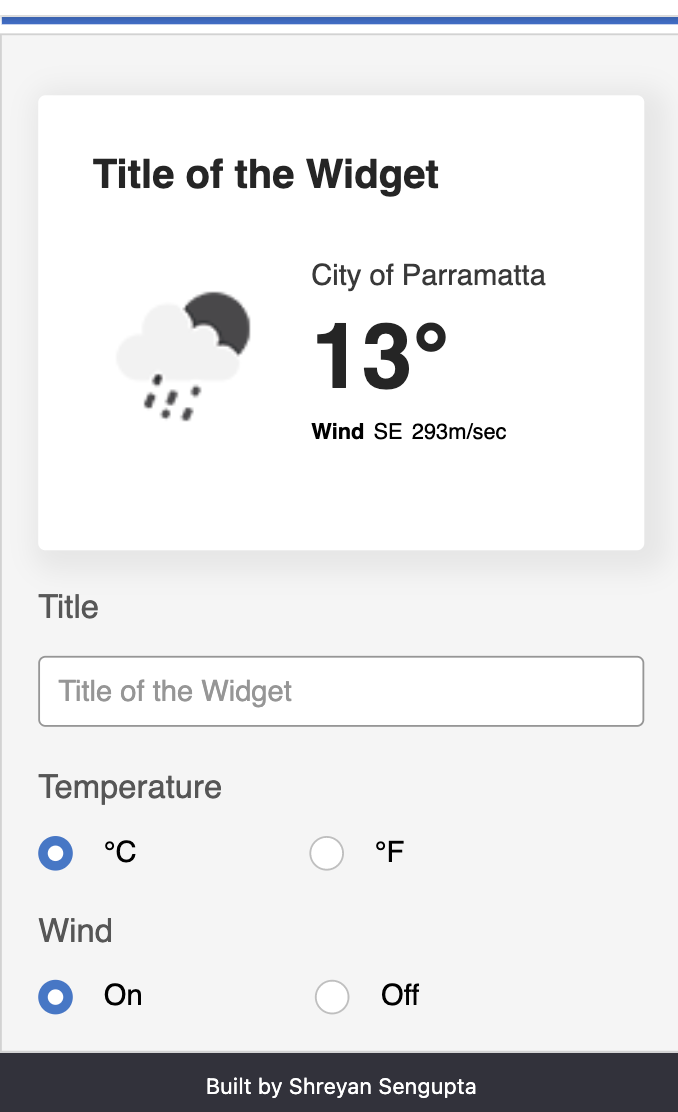
This is a simple weather app that pull in user's browser location using navigator.geolocation and display reelvant weather conditions for the
fetched location.
This framework delivers the common tooling and code structures I found myself wanting day to day, so that you have a strong foundation when starting the next project.
#How to start the app
-
Please clone the repository from the github url provided.
-
Run a
yarn installto install all the dependencies. -
Run
yarn starton where the project was cloned.
Prerequisites
-
Have node and yarn installed on your machine for everything to work.
-
Version no requirement come up in the console , incase the end system doesnt meet the versioning requirements
The Tools of Trade
It's 2021 and there are a whole wealth of tooling options for React, but these are the staples for every project I have worked on.
✔️ Typescript - Because I can't trust you to code alone
✔️ Emotion.js - Imagine if CSS got better? Now here we are.
✔️ Prettier/Eslint/Stylelint - Don't you dare touch these configs
✔️ Storybook - This will change your life, take the time to learn all it's possibilities
✔️ React Hooks - Hello functional components and simple state management
✔️ Code Scaffolding - Why do the same thing more than once? Make it a node command
The UI
A simple control panel to content author parts of widget that displays the weather information
The GPS location has to be turned on and the site has to be given permission in order for the widget to function properly
Custom scaffolding
In /tools you'll find scaffolding code which you SHOULD customise.
Out of the box you can run yarn scaffold <ComponentName> to automate component creation, keeping consistency and speeding up development.
Update the code template of scaffoldUtils/Component to suit your project needs and if you want You can add the same flow for Routes/Api's, whatever you like, just follow the same structure as the component folder.
VS Code Extensions
To have the best experience with this framework and the tools in general, you need to have the right setup, so let me share some relevant ones (Alphabetical):
- Bracket Pair Colorizer 2: Unique colours for matching brackets
- Color Highlight: Highlights web colors inline
- ESLint: You know what this does
- Prettier: Same as above
- Stylelint: And again
- Vscode-icons: One of the best icon themes
- Vscode-styled-components: Helps syntax highlting with CSS in JS
-
Font sizes and line-heights have been assumed visually.
-
The website is responsive upto 320px(mobiles) and above.
-
The layout changes to naturally stack below 768px which is considered mobile territory to fit in content and leave the user with a good UI experience.
-
The stacking order is reversed to provide the useful information to users.
-
The geolocation takes some time to bring in the lattitude and longitude and hence a loading state is provided to cater for basic accessibility requirement of letting the users know where the content is meant to appear.
-
The header and footer are just visual gimmicks to create a wholesome page experience.
-
All the components are pretty dumb components, the states of which is controlled by the HOME Route.
-
Hooks has been used to align with the latest development done by React.
-
React has been chosen to deliver the whole web app.
-
Paddings/Margins have also been assumed visually to match the UI requirement.
-
Negative margins are not super ideal, however has still been used to position the weather condition image as the image is not in the best ideal dimension as retrieved from the OpenWeather API.
-
The web app is built to make an api call each time the user chooses different
temperatureunits as the api returns a couple of data in different formats. To always the display the most current weather info. -
The repository also packs storybook which can used to display bespoke standalone components. However as part of this challenge only the weather widget is built to just display the entire picture. (Props havent been passed to storybook yet).
-
The widget caters for the basic keyboard controls and screen-reader accessibility requirement because why not.