

Simple side scroller game
It's that time of the year again, special Stars are falling through the skies. littering precious stars of sorts over the lands. Collect these special stars to auction them off at the upcoming MEGA STAR BAZZAR. The more stars collected, the more gold can be gained. Think about the children at the orphanage.
Player will be moving across screen collecting stars fallen from the sky, each star has a different score. Collect as much stars as humanly possible to earn points! But watch out for the pesky 7 month cat ghost, they are here to steal your stars away, they can't resist shiny stuff.
TL;DR Collect stars and avoid cat ghost.
Play it here !!! https://sillyadventures.github.io/project-1/
                        ."      _.---_
                       / |     /___--"
                       |/
           __--=======-+"..-..
         //           /\  "-__\
       //  __         \/
     //   //\\
_-==//==-.|| || _---_    .     -      .-==-.   .-._
./   //     ||// //   \\   ||   | \    //    || //   \\
  //     .||  ||     |\./\\  /|^\\  ||-===-" //     ||
 //        \=//\=___=//^  \\//   \-/ \\=...="/       \==-.
//
.
- Flower
Here I created a constructor with the purpose to create flowers of different properties. Each time a flower is create, it will have a particular set of properties that is unique to one of the 5 classes created. In here I use (this) to bind the values needed to each flower created at the interval.
- fall
fall () {
  var position = this.element.position()
  this.element.css('top', position.top + this.speed)
  if (position.top > '600') {
    this.element.remove()
  }
}
Here I am making the fall effect, coming from the top of the game screen, then removing them when they hit a certain height. This will stop them from falling all the way down the page.
- leaderBoard
var highScoreArr = JSON.parse(localStorage.getItem('HighScore'))
  highScoreArr.sort((a, b) => b - a)
var storage = window.localStorage
Creating a localstorage to hold highscores. scores in the array are taken out as a string, JSON.parse will change it to an object. Then only can the sorting from High to low scores be done.
if (!highScoreArr.includes(score)) {
  highScoreArr.push(score)
  localStorage.setItem('HighScore', JSON.stringify(highScoreArr))
If highScoreArr does !NOT is the same as in the array, it will be pushed into it. Using JSON.stringify to make highScoreArr a string so it can be stored in the local storage. local storage does not accept objects, just strings.
$highscore.text(`HighScore: ${highScoreArr[0]}
                 HighScore: ${highScoreArr[1]}
                 HighScore: ${highScoreArr[2]}`)
Scores are updated each time the game is played, showing only index[0,1,2] means only the top 3 scores will be shown.
- startGame() & gameOver()
$startbtn.one('click', () => {
  $clickme.css('display', 'none')
  create = setInterval(createFlower, 50)
  $timer = $('.timer')
  timerInt = setInterval(() => {
    timer = timer - 1
    $timer.text('Time: ' + timer)
    if (timer <= 0) {
      gameOver()
    }
  }, 1000)
})
Start button to start the game, when clicked, start screen is removed, timer begins at 30seconds, the interval for creating flowers begins. at each second interval, timer reduces by 1, and gameOver() is called.
$allFlowers.remove()
clearInterval(create)
clearInterval(find)
clearInterval(timerInt)

$gameStart.css('display', 'block')
$highscore.css('display', 'block')
$gameOverScreen.text(`Score: ${score}`)
$highscore.text(`HighScore: ${highScoreArr[0]}
                 HighScore: ${highScoreArr[1]}
                 HighScore: ${highScoreArr[2]}`)

$('.playerOne').css('backgroundImage', 'url(./assets/images/superPink2.gif)')
When gameOver() is called, game will clear all intervals, not allowing timer and flowers to fall. It will change background and show the top 3 highscores.
- detech()
function detect () {
  var $playerOne = $('.playerOne')
  var $playerPos = $playerOne.position()
  var $score = $('.score')

  for (var key in flowerList) {
    var $flower = flowerList[key].element
    var $flowerPos = $flower.position()

    if ($playerPos.left <= $flowerPos.left + $flower.width() &&
    $playerPos.left + $playerOne.width() >= $flowerPos.left &&
    $playerPos.top <= $flowerPos.top + $flower.height()) {
      var indiFlower = flowerList.splice(key, 1)

      score += indiFlower[0].points
      timer += indiFlower[0].sec
      $score.text(`Score: ${score}`)

      indiFlower[0].element.remove()
    }
  }
}
Getting the positions for both player and the flowers(stars). var $flower = flowerList[key].element, means the the exact star in the array of flowers on screen that touches the player. That flower is then spliced into a new array indiFlower[], score and time is taken from it, and is removed from the array. the removal of it makes sure that when the calculation of score happens, it does not key in multiple score & time.
- Day 1
- Able to make it rain randomly all over the map.
- flowers are removed just before bottom line, does not go all the way down.
- Make create player at start of game
- Player move left and right.
- Player does not leave game screen area.
- Day 2
- Did collision, player and flower able to detect each other.
- collision able to give the correct values, but multiple times.
- collision able to give correct values once, and removed from game.
- added "time" value, "speed" value, different images to the stars.
- made gameover functiom
- started on CSS for the game.
- Day 3
- added restart function.
- added more aesthetics to game.
- added highscore function .
- added leaderboard function.
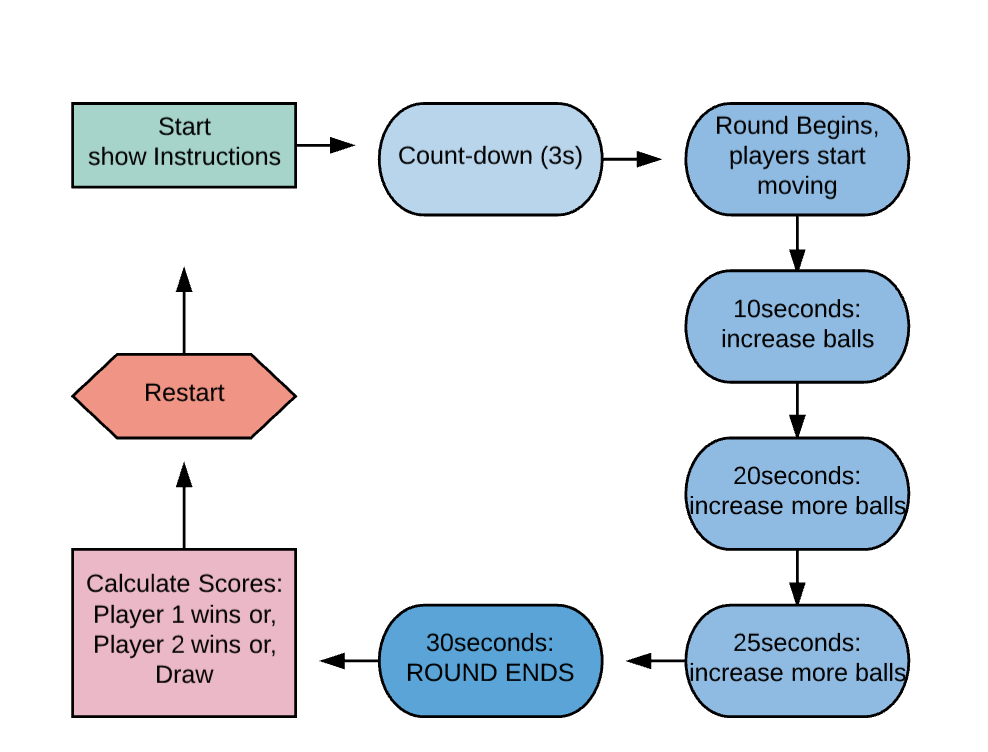
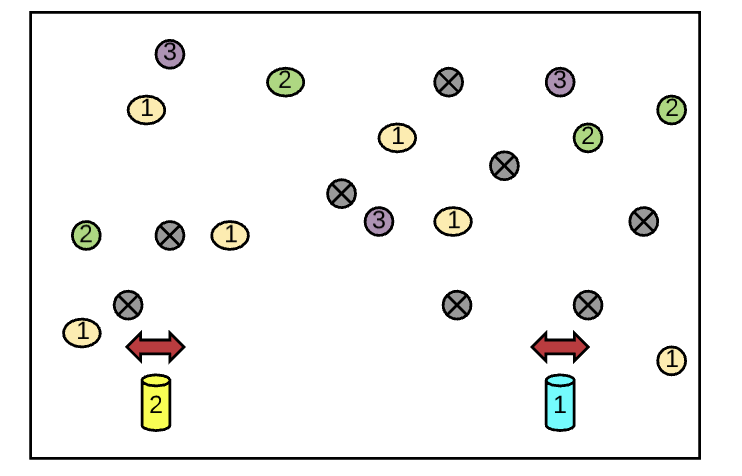
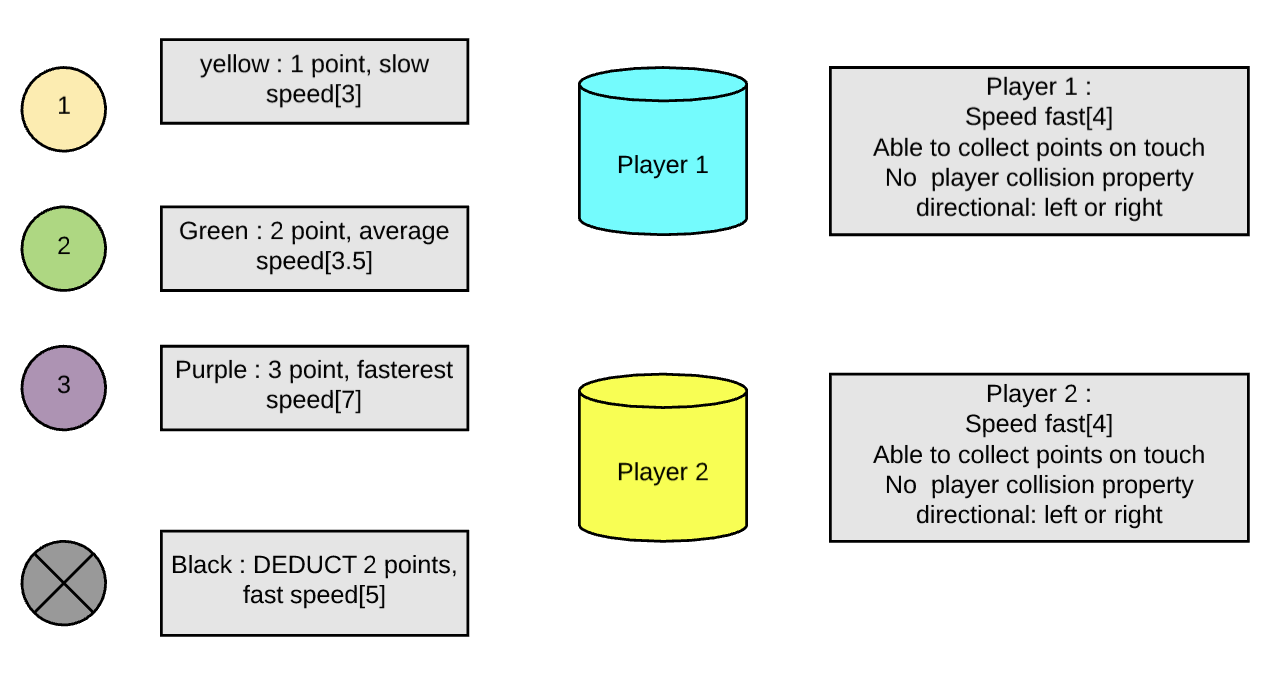
Create a Player 2 option for friends to join in the fun!
Hit box collision for both players, able to push or stun the other one away, a Jump ability.
Create different levels with obstacles.
Have different avatars for players to choose from.
Create original sprites of game.
Introduce hit animations, gaining star animations and sound.
- MDN Javascript Docs (a great reference for all things Vanilla Javascript)
- jQuery Docs (if you're using jQuery)
- GitHub Pages (for hosting your game)
- How to write readme - Markdown CheatSheet (for editing this readme)
- How to write a good readme for github repo! (to make it better)

-
Project Workflow: Did you complete the user stories, wireframes, task tracking, and/or ERDs, as specified above? Did you use source control as expected for the phase of the program you’re in (detailed above)?
-
Technical Requirements: Did you deliver a project that met all the technical requirements? Given what the class has covered so far, did you build something that was reasonably complex?
-
Creativity: Did you add a personal spin or creative element into your project submission? Did you deliver something of value to the end user (not just a login button and an index page)?
-
Code Quality: Did you follow code style guidance and best practices covered in class, such as spacing, modularity, and semantic naming? Did you comment your code as your instructors have in class?
-
Deployment: Did you deploy your application to a public url using GitHub Pages?
-
Total: Your instructors will give you a total score on your project between:
Score Expectations 0 Incomplete. 1 Does not meet expectations. 2 Meets expectations, good job! 3 Exceeds expectations, you wonderful creature, you!
This will serve as a helpful overall gauge of whether you met the project goals, but the more important scores are the individual ones above, which can help you identify where to focus your efforts for the next project!