by Sivan Adler, David Floyd, and Eli Cleavland
A project created during our time at the Flatiron School
- React
- Ruby on Rails
- Deezer API
- Custom CSS
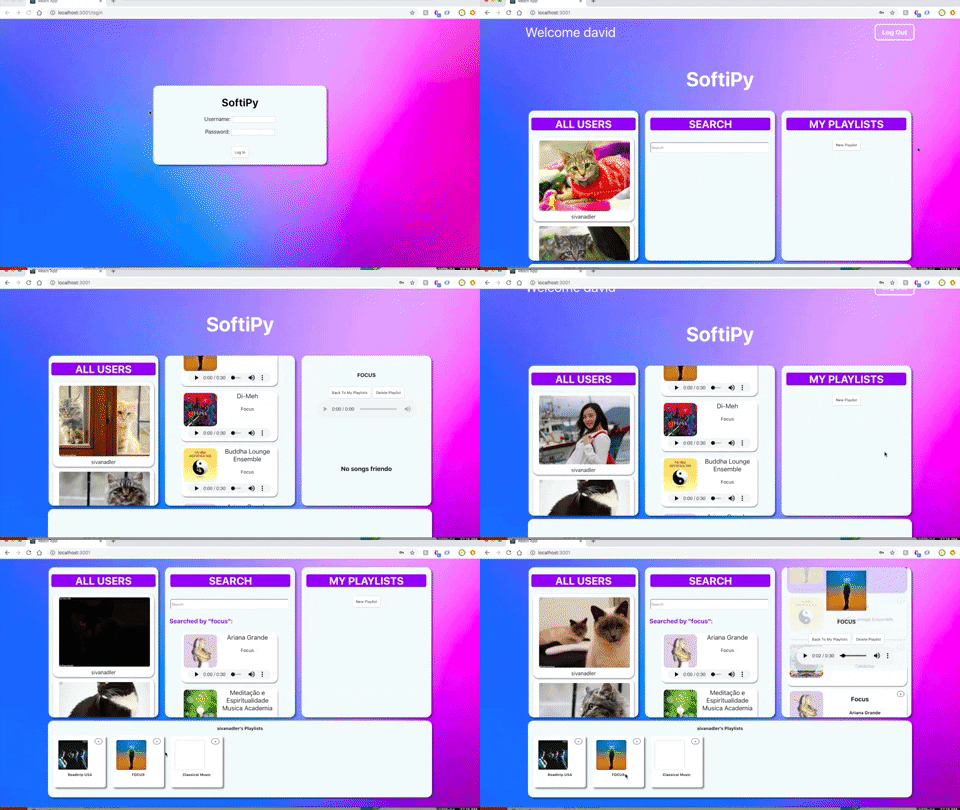
SoftiPy is a music streaming service and playlist building application, built on a React front end and a Ruby on Rails back end. Upon login, a User will see their dashboard, where they can see all of the users, a search bar, and a list of their own playlists. We used Deezer's open source song API in order to allow for a user to search for any song by the keyword of their choosing. Users can also create and edit playlists by dragging songs into the desired playlist. Users are also able to click on any other user and see their playlists, and add it into their own playlists, allowing them to edit that playlist without affecting the original users playlist.
- Clone down this repository to your local machine.
- Clone down the front-end repository to your local machine.
- Run
bundle installin your terminal after cloning down the backend repository. - Before launching the app, you'll need to launch our database. In your terminal for the backend repository, run
rails db:createandrails db:migrate. - Run
rails sin that same terminal session to launch our server. - Once your server is running, run
npm installin your terminal for the front-end cloned repository. - Once you have installed the npm packages installed and you've started your rails server, run
npm startin your terminal for the front-end repository. You will be prompted to start your server on another port (since your backend is already running). Typeyto continue.
- Fork and clone this repository.
- Fork and clone the front-end repository .
- Create your feature branch
git checkout -b my-new-feature. - Commit your changes
git commit -m 'Add some feature'. - Push to the branch
git push origin my-new-feature. - Create a new Pull Request.