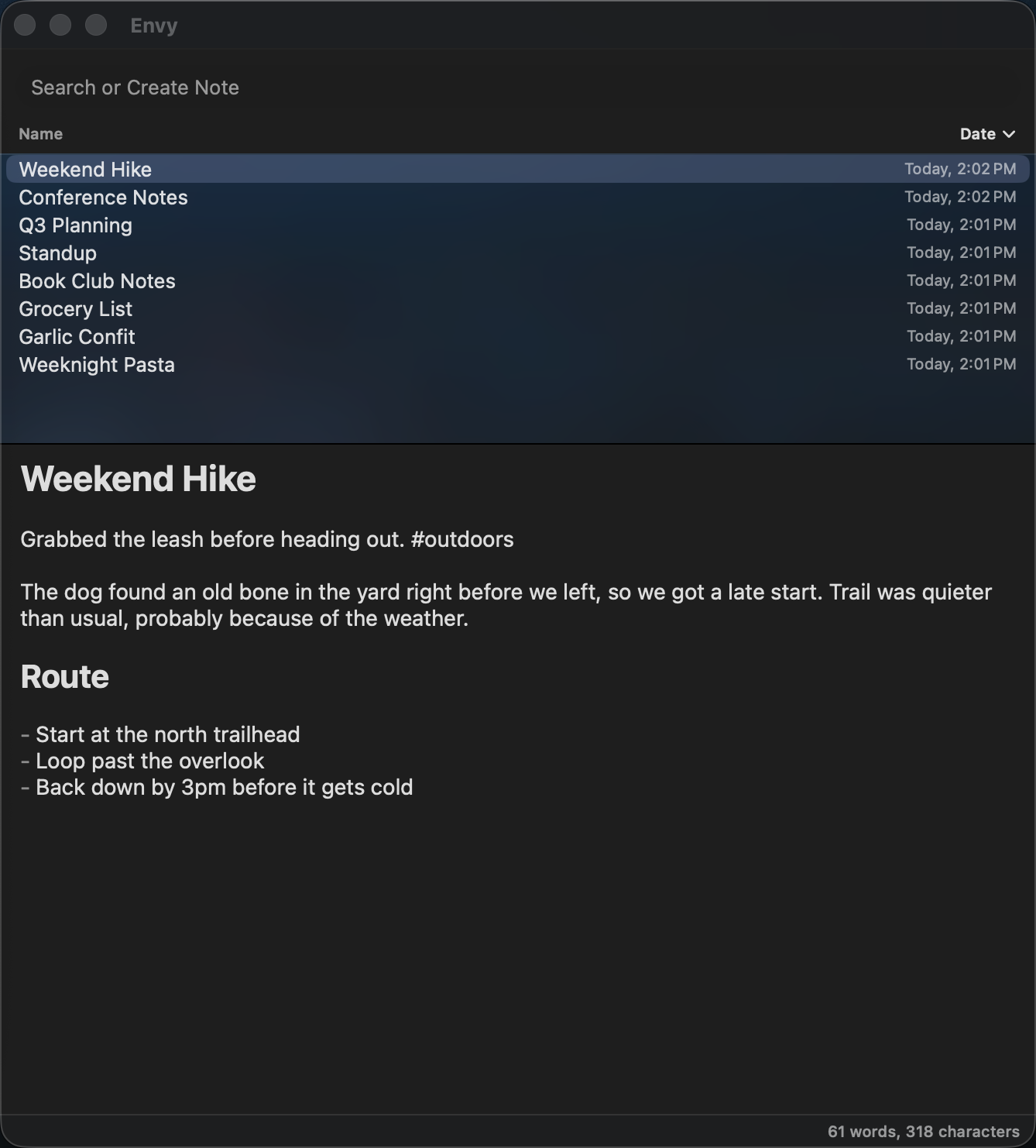
A flat-file, frictionless note-taking application for macOS. One search box, instant results, and notes stored as plain .md files you can grep, sync, or edit with anything else you like.
Built by Skyler Schoos.
Get the latest signed, notarized build at envynote.app — click "Download for Mac" for a ready-to-run .dmg. Envy updates itself after that (Envy menu → "Check for Updates…"), so there's no need to come back here for new versions.
This repository is published for source transparency. The code is proprietary (see License) — Envy isn't intended to be built or packaged by anyone but its maintainer, so there are deliberately no build instructions here.
- Instant search-driven workflow — type to filter notes as you type; press Return to open the top match or create a new note from your search text if nothing matches. Stays fast at scale — tested up to 15,000 notes in one folder.
- Flat-file storage — every note is a plain
.mdfile on disk, kept in one folder called The Index. No database, no proprietary format. - Live markdown styling — headings, bold, italic, strikethrough, inline/fenced code, lists (bulleted, numbered, nested), task checkboxes, footnotes, and blockquotes all render directly in the editor as you type, no separate preview mode. A plain-text mode toggle shows the raw markdown instead when you want it.
- Wiki-links — link notes with
[[Note Title]]; ⌘-click to follow a link, which creates the target note on the spot if it doesn't exist yet. Option-click instead to preview it in a small floating panel without leaving where you are. - Note embeds —
![[Note Title]]embeds another note's live content right there instead of just linking to it. Edit either copy and both stay in sync; collapse it down to just the link when you don't need it expanded. - Due dates — write
@04-16-26(or@mondayfor the next Monday,@today) anywhere in a note and Envy picks it up automatically, shown as a color-coded pill. Searchdue:today,due:overdue,due:week, an exact date, or exclude with-due:. Click a due date (or check off a task-list box containing one) to retire it. - Tags — write
#taganywhere in a note and Envy picks it up automatically, rendered bold with a tinted background. Searchtag:name(or exclude with-tag:name) to filter by it, with ghost-text autocomplete against tags you've already used. - Templates — type
template:in the search box to browse and open a template live and editable; "Create Note from Template" starts a new note from it, with{{date}},{{time}}, and{{title}}filled in automatically. - Trash, not gone for good — Deleted notes go to a
Trashfolder in The Index (it syncs with your notes), restorable with⌘⇧⌫or browsable withtrash:. Settings controls how often it gets swept into the real macOS Trash. - Interlinks — the footer shows the notes connected to the one you're viewing, expandable into three side-by-side columns: notes it links out to, notes that link to it (backlinks), and "Suggested" links — other notes you've mentioned by name but not yet linked, each a click away from being wired up.
- Renaming updates links — rename a note and every
[[link]]and![[embed]]pointing to it across your vault is rewritten to the new name automatically, so nothing breaks. - AI provenance — AI provenance signatures in notes are left as plain text; the in-app badge is off pending a redesign.
- Pinning — pin a note (
⌥⌘P) to keep it at the top of the list regardless of sort, or pin one note to the menu bar icon so a click opens it directly instead of summoning the app. - Scattered multi-word search — search several words at once and Envy finds notes containing all of them anywhere in the text; comma-separate groups (
dog, cat) to search for either instead of both. - Live external-edit detection — editing a note in another app while it's open in Envy updates it automatically, with the changed portion briefly flashing so you don't miss it.
- Fully remappable shortcuts — every keyboard shortcut in the app, including the global summon hotkey, can be customized in Settings → Shortcuts.
- Global hotkey & menu bar access —
⌥⌘↩shows or hides Envy from anywhere, even when another app is focused. The menu bar icon does the same on click, or opens your pinned note instead if you have one. - Themes & appearance — a gallery of ready-made themes (Tokyo Night, Dracula, Monokai, Solarized, and more), every color individually editable, adjustable window blur, note list density, an interface text-size slider for the app's chrome, and independent System/Light/Dark mode.
- Quality-of-life text tools — emoji shortcodes (
:smile:), arrow ligatures (->becomes→), auto-pairing brackets, and Bold/Italic shortcuts that wrap or unwrap selected text. - Open at login — optional toggle to launch Envy automatically when you log in.
By default, notes live in ~/Documents/Envy — a single folder called The Index, created automatically on first launch along with a welcome note covering the basics. Point it somewhere else any time in Settings → General.
Every shortcut below can be remapped in Settings → Shortcuts.
| Keys | Action |
|---|---|
⌥⌘↩ |
Show or hide Envy — works from any app |
⌥⌘↓ |
Show or hide your pinned note — works from any app |
⌘L |
Jump to the search box from anywhere in the app |
⌘⇧N |
New note from template |
⌘⌫ |
Delete the selected note |
⌘⇧⌫ |
Restore the most recently deleted note(s) |
⌥⌘P |
Pin or unpin the selected note |
⌥⌘⇧P |
Unpin the note pinned to the menu bar — works from any app |
⌘⇧B |
Toggle the interlinks list in the footer |
⌘-click a [[link]] |
Open the linked note (creates it if it doesn't exist) |
⌥-click a [[link]] |
Preview the linked note without leaving where you are |
↑ / ↓ |
Move the highlighted note while searching |
⇧↑ / ⇧↓ |
Extend the selection to the next / previous note |
↩ |
Open the highlighted note, or create one from your search text |
⌘↩ |
Center the window on screen |
⌘⇧L |
Toggle horizontal / vertical layout |
⌘⇧P |
Toggle plain-text mode |
⌥↓ / ⌥↑ |
Move focus between search, list, and editor |
⌘B / ⌘I |
Bold / italicize the selected text |
⌘+ / ⌘- / ⌘0 |
Zoom the note text in, out, or reset it |
⌘, |
Settings |
Sources/EnvyCore— the note model andNoteStoredata layer (platform-agnostic)Sources/Envy— the SwiftUI appSources/IconGenerator— standalone tool that renders the app iconSources/EnvySelfCheck— a manual assertion-based check suite (used in place of Swift Testing, which doesn't run reliably without a full Xcode install)
Proprietary. All rights reserved. See LICENSE.
Envy is built with help from Claude Code. Architecture, feature decisions, and design direction are the maintainer's; a large share of the implementation, debugging, and this documentation were done in collaboration with Claude.
Guys, I am not a programmer or engineer by trade so this is my only option. I just wanna make cool stuff that I use every day. If you really don't like AI usage, don't use my apps. I promise that I work really hard to make them great, anyway.