


A visual canvas for coding agents. Your agent shows you interactive HTML — design options, forms, previews, dashboards — in your browser, and your clicks flow straight back into the conversation. Works with Claude Code, Cursor, Codex, or any MCP client.
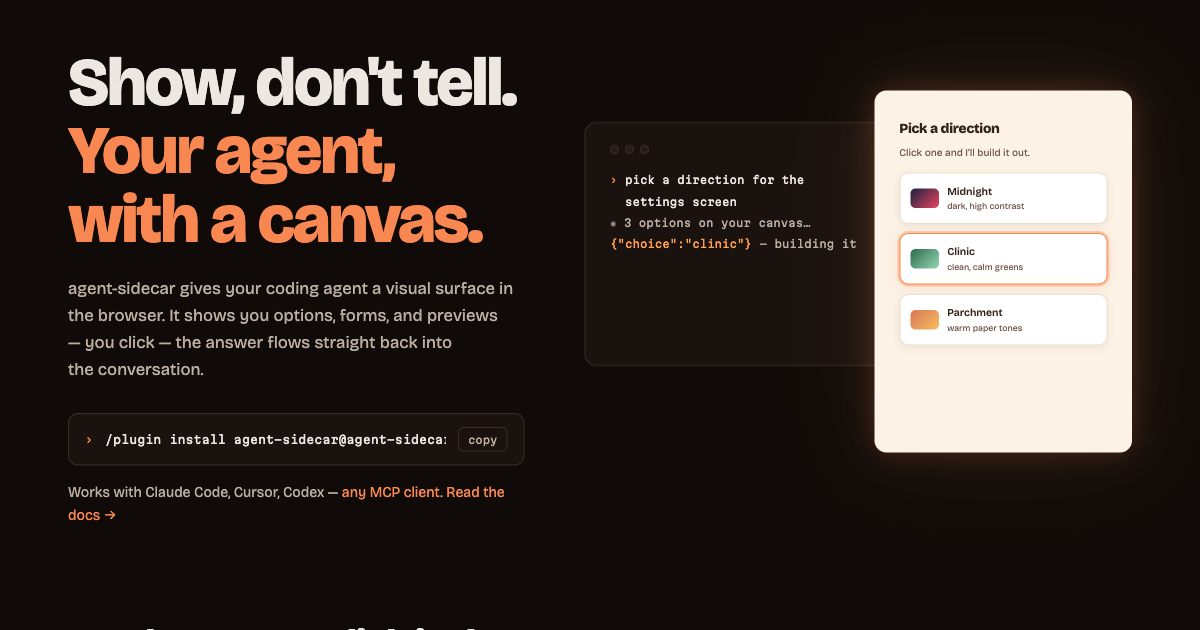
"Show me three layout options for the settings screen" → three clickable mockups appear on the canvas → you click one → Claude continues with your choice.
agent-sidecar is an MCP server plus a local canvas server, packaged as a Claude Code plugin — and usable from any MCP client. One canvas server runs per machine and every agent session attaches to it, so all your sessions share one browser tab and you switch between them in the sidebar. It needs no push mechanism (works on orgs where Claude Code channels are blocked): the browser-to-agent return path is a long-poll the server turns into ordinary tool output.
Website & full docs → agent-sidecar.vercel.app (documentation)
Requires Node 20+ on your PATH — nothing else. In any Claude Code session:
/plugin marketplace add smarchetti/agent-sidecar
/plugin install agent-sidecar@agent-sidecar
The plugin ships its own bundle and runs it in place, so installing touches no registry and works offline.
Restart Claude Code, then ask for something visual: "show me three layout options for a pricing page on the canvas." The browser opens, the artifact renders, and clicking it answers Claude.
agent-sidecar is a standard MCP stdio server, so any MCP client can run it — the plugin is just Claude Code packaging. Point your agent at:
{ "mcpServers": { "agent-sidecar": { "command": "npx", "args": ["-y", "agent-sidecar"] } } }On a locked-down network, npm i -g agent-sidecar once and use
{ "command": "agent-sidecar" } instead — that skips the registry on every launch.
| Agent | Config file |
|---|---|
| Cursor | .cursor/mcp.json (project) or ~/.cursor/mcp.json (global) |
| VS Code (Copilot) | .vscode/mcp.json — same entry under a "servers" key |
| Codex CLI | ~/.codex/config.toml — [mcp_servers.agent-sidecar] with command/args |
| Gemini CLI | ~/.gemini/settings.json |
| Windsurf | ~/.codeium/windsurf/mcp_config.json |
Everything transfers: the tools, the canvas, the token auth, the .sidecar/ files. Two Claude-flavored details to know: the injected browser helper is still named claude.send(), and the background-watcher pattern requires an agent that can run shell commands in the background — the blocking await_interaction tool works everywhere.
One canvas server, any number of agent sessions:
Claude Code (project A) ⇄ MCP/stdio ⇄ ┐
Claude Code (project B) ⇄ MCP/stdio ⇄ ┤→ agent-sidecar server ⇄ HTTP 127.0.0.1:8765 ⇄ browser canvas
Cursor      (project A) ⇄ MCP/stdio ⇄ ┘   (one detached process)   │
                                                                  └── POST /api/webhook ← CI, scripts, anything
- Claude shows —
create_artifactputs a complete HTML document on the canvas (SSE-live; updates hot-reload). Artifacts belong to the session that made them. - You click — every artifact gets a
claude.send(payload)helper injected. It crosses a postMessage bridge out of the sandboxed iframe; the canvas shell forwards it to the webhook with the server token. - Claude continues — either a blocking
await_interactioncall returns your payload in-turn (quick decisions), or a backgroundcurl /api/waitwatcher re-invokes Claude when you click (long waits, Claude keeps working meanwhile).
Interactions are routed back to the session that owns the artifact you clicked, so parallel sessions never read each other's answers. Each session's interactions are appended to its own project's .sidecar/interactions.jsonl — a durable, tail -f-able audit log.
The sidebar is a tree: repo → worktree → session → artifacts. Each session is labelled with its git branch and lists its own artifacts nested beneath it, so you can see everything on the canvas at once and jump straight to any artifact — collapse any level with its ▾ to get it out of the way.
Grouping follows your actual checkouts, not directory names. Two git worktree checkouts of one repo nest under a single repo (identified by the main worktree's git dir, and named from the origin remote when there is one), so parallel work on the same project reads as one thing instead of unrelated projects. The worktree level only appears when a repo has more than one checkout — a plain single-checkout repo stays flat. A session in a directory that isn't a repo at all still gets its own group, marked dir.
Light and dark. The canvas follows your system theme; the sun/moon control in the top bar pins whichever you prefer, and it's remembered per browser. Artifacts themselves stay light in both — an artifact is the agent's own document, not part of the shell.
Two view modes, toggled in the top bar or with t: single shows one artifact filling the stage, timeline stacks every artifact of the session in one scroll — oldest first, numbered, each in its own card — for reviewing a whole session's worth of work at once. Cards size themselves to their content (each artifact reports its own height, since the canvas can't measure a sandboxed frame), clamped so a one-liner still reads as a card and a very long artifact scrolls inside its own. Buttons work in every card, not just the focused one, and each card's answers are attributed to that card. The choice is remembered per browser.
A status bar along the bottom reports the connection, the server address, live/total sessions, artifact and queued-reply counts, and the running version. A session that ends stays on the canvas (dimmed) so you can still read what it produced, until you dismiss it. When an artifact arrives in a session you're not looking at, that session gets a badge and a clickable toast — the view never jumps out from under an interaction you're in the middle of.
The server outlives your agent sessions, and exits on its own after 30 minutes with no sessions and no open canvas tab. To manage it directly:
npx agent-sidecar --status   # server, sessions, artifact counts
npx agent-sidecar --stop     # shut it down
npx agent-sidecar --serve    # run it in the foreground (debugging)
(Installed as a plugin, the same commands are node ~/.claude/plugins/cache/agent-sidecar/agent-sidecar/*/dist/sidecar.js --status.)
MCP tools — create_artifact, update_artifact, await_interaction (blocking, artifact_id filter), get_interactions (drain), list_artifacts, remove_artifact.
HTTP — GET / canvas · GET /events SSE · GET /artifact/:id · POST /api/webhook (token) · GET /api/wait?session=… long-poll (token) · POST /api/restart (token) · GET /health.
Files — machine-wide state in ~/.agent-sidecar/ (server.json coordinates, state.json canvas contents, server.log); per-project state in .sidecar/ (session.json coordinates for external callers, interactions.jsonl). Env: SIDECAR_PORT (default 8765), SIDECAR_HOME, SIDECAR_IDLE_EXIT_MS.
External systems push events in by reading the coordinates from either file:
url=$(jq -r .url .sidecar/session.json); token=$(jq -r .token .sidecar/session.json)
sid=$(jq -r .sessionId .sidecar/session.json)   # omit to land on the session you're viewing
curl -X POST -H "X-Sidecar-Token: $token" -d "build failed on main" "$url/api/webhook?session=$sid"
Full parameter tables, artifact-authoring patterns, and the security model are in the docs.
Localhost-only binding; a random token (stored 0600 in ~/.agent-sidecar/server.json) required on every /api/* endpoint (defeats cross-site POSTs from web pages at localhost); artifacts run in an opaque-origin sandboxed iframe with no access to the token, the canvas shell, storage, or same-origin network — claude.send() is their only output channel. Don't tunnel or port-forward the server: anything that reaches the webhook is eventually placed in front of Claude. Details.
bun install
bun test                              # 55 end-to-end tests over real MCP stdio
bun run test:node                     # the same suite against the built bundle under node
claude --mcp-config dev.mcp.json      # run your working copy live (disable the plugin first)
Bun is the tooling, not the runtime: src/ uses only node: builtins so the shipped bundle runs under plain Node, and CI runs the suite both ways. Tests run against an isolated server (SIDECAR_HOME + a random port), so they never touch the one you're using.
Source: src/sidecar.ts (CLI entry) · src/server.ts (the singleton canvas server) · src/client.ts (server discovery + session link) · src/mcp.ts (the tools) · src/shared.ts (paths and types) · src/canvas.html (the browser shell, inlined into the bundle). dist/sidecar.js is committed, because the plugin runs it in place out of the plugin directory — rebuild it in any commit touching src/, or CI will fail. Releases: bump version in package.json, .claude-plugin/plugin.json, and VERSION in src/shared.ts, retitle the CHANGELOG section, bun run build, then push and tag vX.Y.Z — GitHub Actions tests, publishes to npm with provenance, and cuts the release.
MIT