Create main.yml#3
Conversation


|
Nice, you just added an action block to your workflow file! Here are some important details about why each part of the block exists and what each part does.
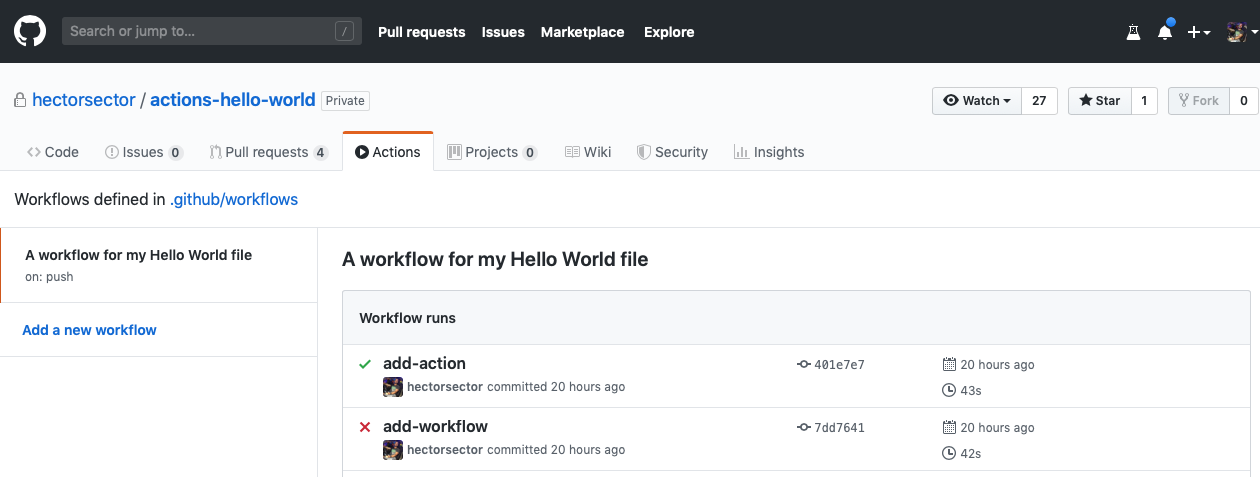
Your action has been triggered!Your repository now contains an action (defined in the This action will run any time a new commit is created or pushed to the remote repository. Since you just created a commit, the workflow should have been triggered. This might take a few minutes since it's the first time running in this repository. Seeing your Action in actionThe status of your action is shown here in the pull request (look for All checks have passed below), or you can click the "Actions" tab in your repository. From there you will see the actions that have run, and you can click on the action's "Log" link to view details.
Step 6: Trigger the workflow⌨️ Activity: See your action trigger the workflowYou've done the work, now sit back and see your action trigger the workflow! I will respond when I detect your action has run and reported a status.
|
|
Almost there, but the workflow didn't run. Here's some possible reasons why:
Troubleshooting stepsCheck out the action's output in the Actions tab. You can also use the following to help you troubleshoot: For
|
| Problem | Solution |
|---|---|
entrypoint.sh isn't executable. |
In your shell, run chmod +x action-a/entrypoint.sh on this branch and push it up to GitHub. |
The file isn't called entrypoint.sh (case sensitive). |
Rename the file using the UI or your CLI. |
The directory action-a doesn't exist. |
Create the action-a folder and move entrypoint.sh to action-a. |
The entrypoint.sh file isn't inside the action-a folder. |
Move entrypoint.sh to action-a. |
For /action-a/Dockerfile
| Problem | Solution |
|---|---|
The file isn't called Dockerfile (case sensitive). |
Rename the file using the UI or your CLI. |
The directory action-a doesn't exist. |
Create the action-a folder and move the Dockerfile to action-a. |
The Dockerfile isn't inside the action-a folder. |
Move the Dockerfile to action-a. |
For .github/workflows/main.yml
| Problem | Solution |
|---|---|
There's some problem with your syntax in main.yml. |
Copy and paste the code exactly as is shown in this PR (check for extra spaces, symbols) or see if an error appears in the action logs. |
The file isn't called main.yml (case sensitive). |
Rename the file using the UI or your CLI. |
The directory .github/workflows doesn't exist. |
Create the .github/workflows folders and move main.yml to .github/workflows. |
The main.yml file isn't inside the .github/workflows folder. |
Move main.yml to .github/workflows. |
Next time you commit, your action will try to run. I'll respond when that occurs.
1 participant

No description provided.