A professional desktop tool for executing MT5 trading scripts instantly — built for traders who can't afford to be slow.




"Market is crashing. You need to close everything. Now."
You open MT5 — close position 1, close position 2, cancel order 1, cancel order 2...
By the time you're done, the damage is done.
MT5 Auto Scripts gives you a single button to close every open position and cancel every pending order across your entire account — instantly, with a clean confirmation flow and real-time feedback.
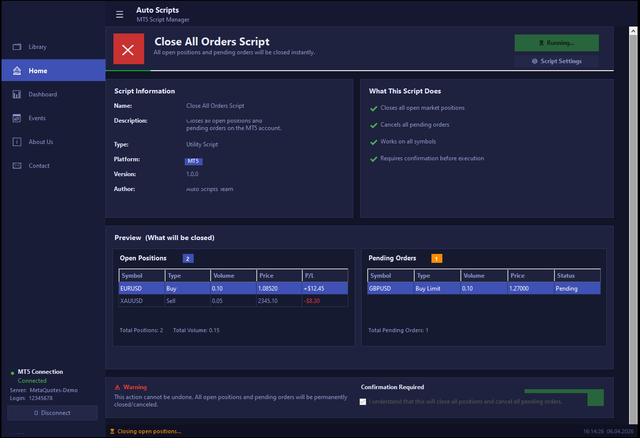

Close All Orders Script connects to your active MT5 session and performs the following in sequence:
- Reads all open market positions from the account
- Sends a close request for each position at the current market price
- Reads all pending orders (limit, stop, stop-limit)
- Cancels every pending order individually
- Verifies each closure and reports the final result
The entire process takes a few seconds and gives you step-by-step progress feedback throughout.
| Feature | Description |
|---|---|
| Close All Positions | Closes every open market position regardless of symbol, direction, or volume |
| Cancel All Pending Orders | Removes all limit, stop, and stop-limit orders from the account |
| Multi-Symbol Support | Works across forex pairs, metals, indices, crypto — any instrument on your MT5 broker |
| Pre-Execution Preview | Before running, the app shows a full table of every position and order that will be affected |
| Confirmation Requirement | The Run button stays disabled until you explicitly check the confirmation box — no accidents |
| Live Connection Status | Sidebar shows your MT5 server name, login ID, and live connection state at all times |
| Animated Progress Bar | Each step of the script is shown in real time: connect → close positions → cancel orders → verify → done |
| Disconnect / Reconnect | Toggle your MT5 connection directly from the sidebar without restarting the app |
| Real-Time Status Bar | Bottom bar shows the current operation and a live clock |
This tool handles irreversible trading actions, so it was designed with several layers of protection:
- Confirmation gate — the Run button is visually disabled and non-clickable until the user ticks the acknowledgement checkbox
- Order preview — a full grid of all open positions and pending orders is displayed before any action is taken, so you always know exactly what will be closed
- Connection check — if MT5 is disconnected, the script refuses to run and shows a warning in the status bar
- Warning banner — a clearly visible red warning reminds the user that the action cannot be undone
- No auto-run — the script never runs automatically; every execution requires a manual trigger
Requirements:
- Windows 10 or 11
- .NET 6 or higher
- MetaTrader 5 terminal installed and logged in
- Visual Studio 2022 (to build from source)
Steps:
# Clone the repository
git clone https://github.com/your-username/mt5-auto-scripts.git

# Open the solution in Visual Studio 2022
# File → Open → WinFormsApp1.sln

# Build and run — press F5
No external NuGet packages required. The project builds and runs out of the box on any Windows machine with .NET 6+.
- Launch the application
- Check the sidebar — confirm MT5 shows Connected with your server and login details
- Review the Open Positions and Pending Orders tables in the Preview section
- Read the warning, then tick the confirmation checkbox
- Click Run Script
- Watch the progress bar — the status bar will update at each step
- When complete, all positions will show Closed and all pending orders will show Cancelled
- Close All Orders Script
- Close by Symbol — close only positions on a specific instrument (e.g. XAUUSD only)
- Close by Direction — close only Buy positions, or only Sell positions
- Close by Loss — automatically close any position in drawdown beyond a set threshold
- Scheduled Execution — trigger a close script at a specific time
- Telegram Notification — send a message to your Telegram after execution completes
Have a script idea? Open an issue and describe what you need.
Pull requests are welcome. For significant changes, please open an issue first to discuss the approach.
1. Fork the repository
2. Create a feature branch:  git checkout -b feature/close-by-symbol
3. Commit your changes:      git commit -m "Add: close by symbol script"
4. Push to your fork:        git push origin feature/close-by-symbol
5. Open a Pull Request
If this saved you from a bad trade, consider leaving a star — it helps other traders find this tool.

MT5 Auto Scripts · Built for traders, by traders · v1.0.0