


A Typst CV template inspired by LianTze Lim's AltaCV (LaTeX). Data-driven via a JSON Resume-style dict; configurable theme, labels, and sections.
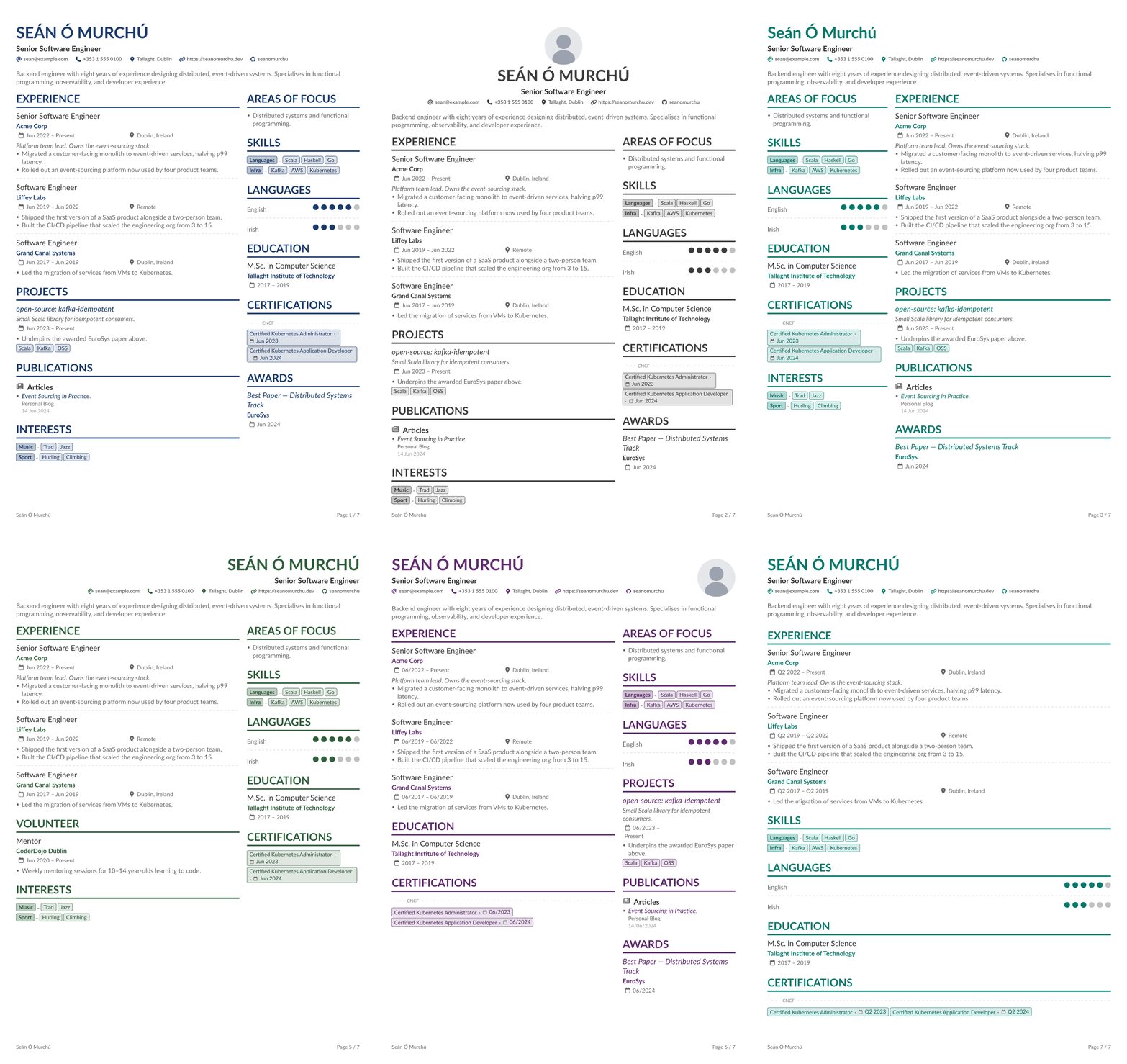
- Data-driven from a JSON Resume dict — round-trips your
resume.json, with a small set of practical extensions (focusAreas, numeric languagerating, publicationtypegrouping). - Single-column ATS mode (
columnRatio: 1) for parser-friendly output, alongside the default two-column layout — and inverted layouts (narrow side panel on either side). - Six built-in accent palettes (
teal,navy,crimson,forest,plum,charcoal) plus anyrgb(...)value. - Full label localisation via inline dict or TOML file — every display string the template emits is overridable, with a worked Irish translation under
examples/labels-ga.toml. - PDF metadata baked in — title, author, subject, keywords (auto-derived from skills), and document date populate from the same data dict.
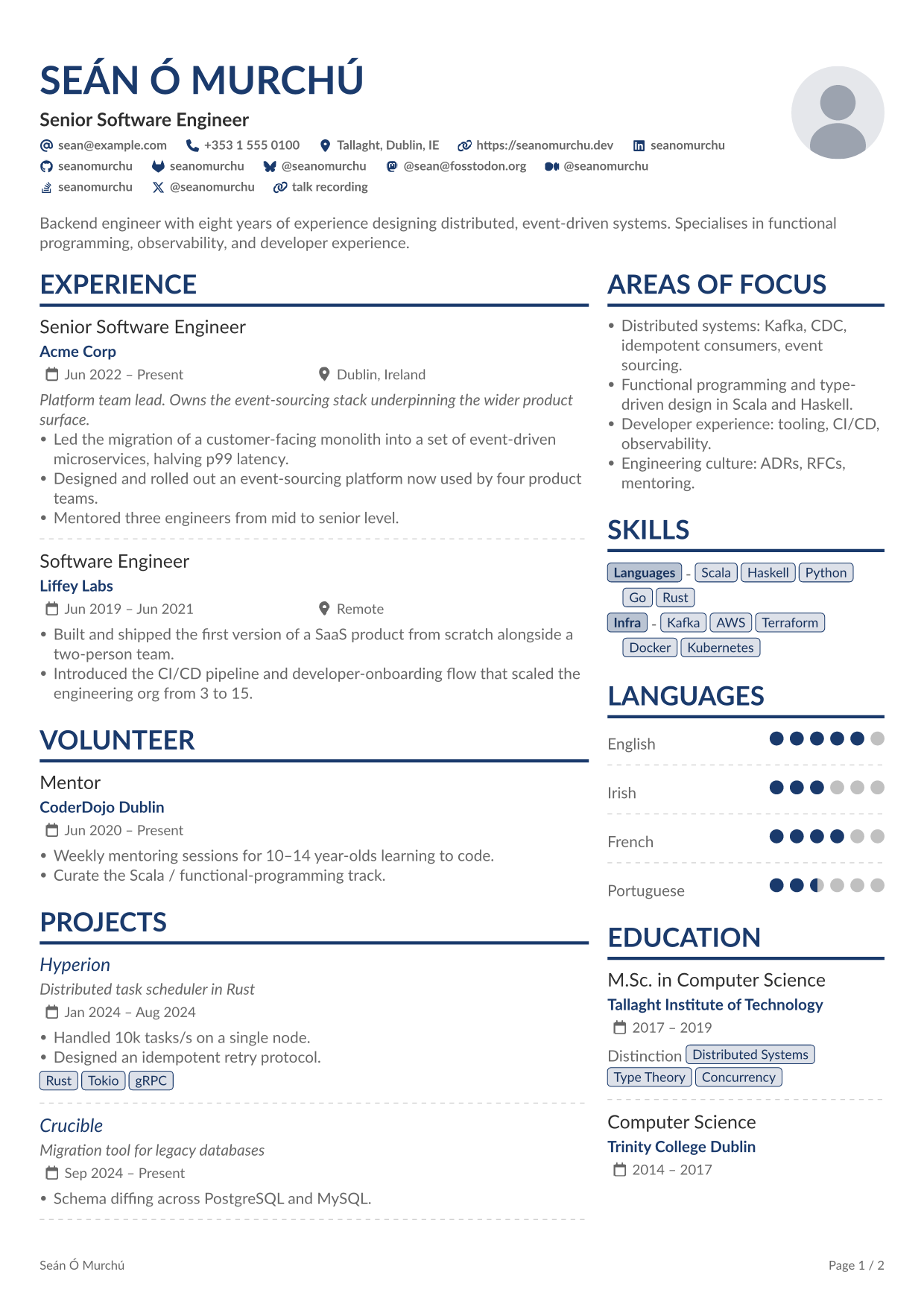
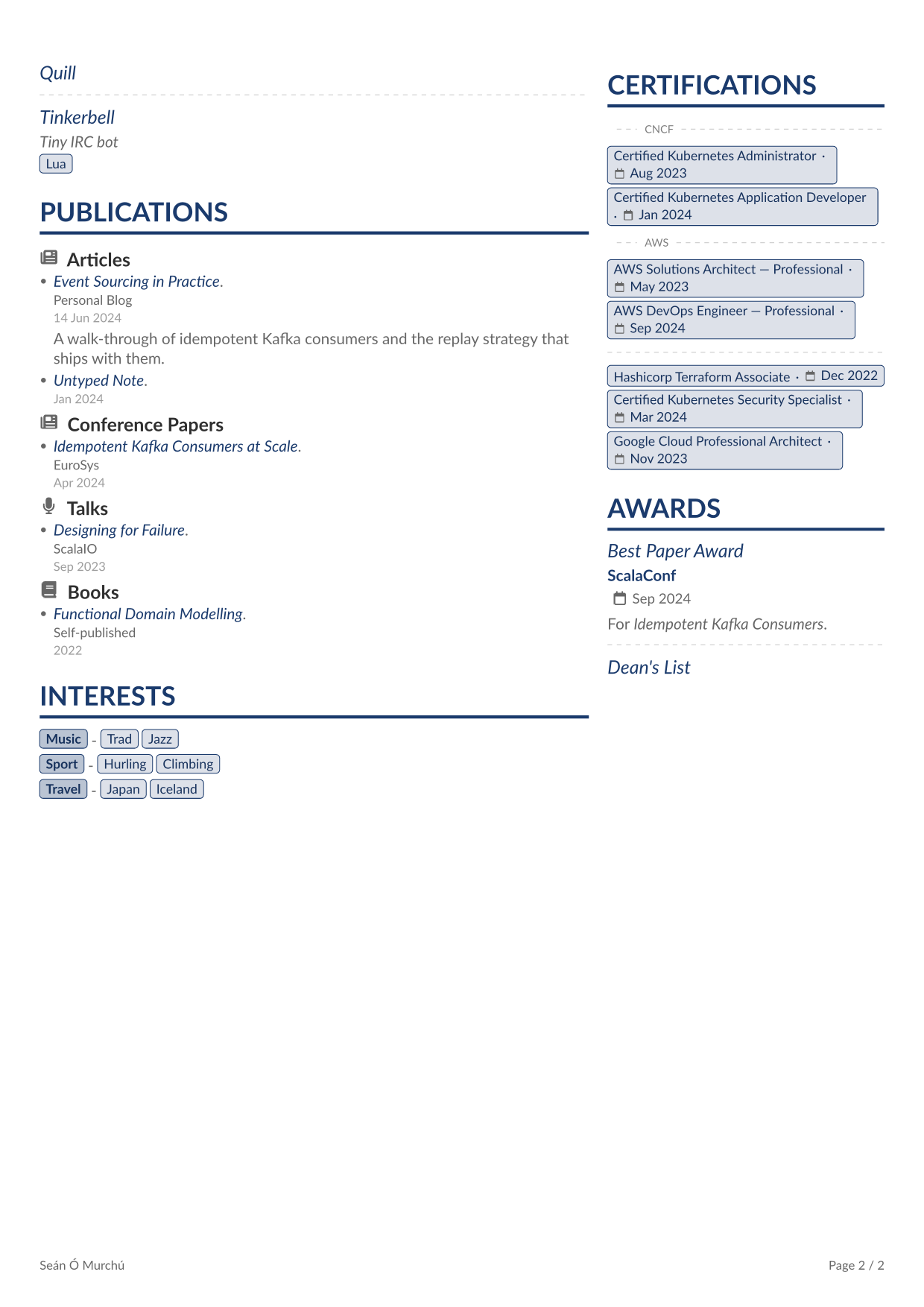
Every documented section rendered in a single multi-page CV. Source: examples/example_full.typ; rendered output: examples/example_full.pdf.
| Page 1 | Page 2 |
|---|---|
 |
 |
Scaffold a new project from the template:
typst init @preview/altacvOr #import it from an existing .typ:
#import "@preview/altacv:1.1.0": alta // x-release-please-versionThe default font is Lato. The Typst web app has it preinstalled — local users need it on the system font path, or pass preferences.font to override.
- Web app: works out of the box.
- Local (Linux):
sudo apt-get install fonts-lato(or your distro's equivalent). - Local (macOS/Windows): download from Google Fonts and install.
- Other fonts: any installed system font works —
#alta(cv, preferences: (font: "Inter")).
Run typst fonts to list what Typst can see on your system.
#import "@preview/altacv:1.1.0": alta // x-release-please-version

#let cv = (
  basics: (
    name: "Jane Doe",
    label: "Senior Software Engineer",
    summary: [Backend engineer with eight years' experience…],
    email: "jane@example.com",
    phone: "+353 1 555 0100",
    location: "Dublin, Ireland",
    profiles: (
      (network: "LinkedIn", username: "janedoe",     url: "https://linkedin.com/in/janedoe"),
      (network: "GitHub",   username: "janedoe",     url: "https://github.com/janedoe"),
      (network: "Website",  username: "janedoe.dev", url: "https://janedoe.dev"),
    ),
  ),
  work: (
    (
      name: "Acme Corp",
      url: "https://acme.example.com", // optional — wraps the company name in a link
      position: "Senior Software Engineer",
      location: "Dublin, Ireland",
      startDate: "Jan 2022",
      // omit endDate → renders as "Present"
      highlights: ([Led the migration…], [Designed the platform…]),
    ),
  ),
  skills: (
    (name: "Languages", keywords: ("Scala", "Python")),
    (name: "Infra",     keywords: ("Kafka", "AWS", "Kubernetes")),
  ),
  languages: (
    (language: "English", fluency: "Native"),
    (language: "Irish",   fluency: "Professional Working"),
  ),
  // … education, certificates, publications
)

#alta(cv)
template/cv.typ is the starter typst init copies into a user's project — also the canonical demo that produces examples/cv.png and the Universe thumbnail.png. examples/example_full.typ is the multi-page demo that exercises every section and input form (see Gallery for the rendered output). Edge cases (publication grouping, fractional language ratings, custom preferences) are exercised by fixtures under tests/.

The cv dict follows JSON Resume with three practical extensions:
focusAreas: top-level array of prose items, rendered as a bulleted "Areas of Focus" section. An altacv addition, distinct from JSON Resume'sinterests(structured{name, keywords}— also supported).languages[].rating: numeric 0–preferences.maxRating(default 5). JSON Resume uses afluencystring; supplyingratingenables half-dot precision and wins overfluencyif both are present. Fractions must be in 0.5 increments (anything else panics — the renderer only expresses full or half dots).publications[].type: optional grouping key (e.g."Articles","Books","Talks"). Entries sharing atypecluster under a subheading rendered verbatim from the string; entries withouttypefall underlabels.articles. Localise vialabels.articlesor by supplying already-translatedtypevalues.
An empty or missing endDate renders as Present (localisable via labels.present).
ISO 8601 date strings ("2024", "2024-06", "2024-06-15" — the JSON Resume canonical shape) are formatted according to preferences.dateFormat (default "long": e.g. "Jun 2024"). Strings that don't parse as ISO (e.g. "Jan 2022", "May 2016 – Jul 2017") pass through verbatim, so pre-formatted data keeps rendering identically.
Top-level keys recognised: basics, focusAreas, work, volunteer, skills, languages, education, certificates, awards, projects, publications, interests, meta (PDF metadata only — see PDF metadata). Sections with empty input are skipped — no orphan headings.
basics.url (JSON Resume's "personal homepage" field) renders in the contact bar with the generic link icon, alongside email, phone, location, and profiles. It's distinct from a basics.profiles entry with network: "Website" (a profile on a third-party site); supply both if you want both rendered.
JSON Resume fields accepted but not yet rendered by this template:
- top-level:
references volunteer[].summary,volunteer[].urlprojects[].entity,projects[].type,projects[].rolesmeta.canonical,meta.version
These are silently ignored, so a verbatim resume.json round-trips without panicking. Open or upvote an issue if you need one rendered.
basics.location accepts a plain string or JSON Resume's structured dict {address, postalCode, city, countryCode, region}. A string flows verbatim into the contact bar and maps deep link. A dict is collapsed by joining city, region, countryCode with ", ", skipping missing fields (so (city: "Dublin", region: "Leinster", countryCode: "IE") → Dublin, Leinster, IE; (city: "Tokyo") → Tokyo). address and postalCode are accepted for resume.json round-tripping but not rendered — a CV header isn't a mailing label. The joined string also drives the maps link, so display and link stay in sync. Unknown keys panic.
Setting basics.image adds a circular portrait to the header. Move it with preferences.imagePosition ("left" / "right" for the two-column header, or "center" to stack it above/below the text block via preferences.imageStackOrder). Size via preferences.imageSize (default 6em); the image is fit with cover and clipped to a circle, so rectangular sources crop centred rather than distort. Two ways to supply the source:
// Recommended: load the bytes in your own typ file — path resolution
// happens at your call site, so relative paths "just work".
basics: (
  image: read("avatar.png", encoding: none),
  ...
)

// Alternative: a root-relative path (leading "/", anchored to the
// `--root` dir passed to `typst compile`). Paths without a leading
// "/" resolve relative to an internal package file and are not portable.
basics: (
  image: "/avatar.png",
  ...
)
JSON Resume's spec calls for a URL here, but Typst does not fetch remote URLs at compile time — vendor the asset locally.
Each per-section entry below follows JSON Resume's schema. Tables show the practical subset rendered. Where dates appear, startDate / endDate follow the same conventions (omit endDate → "Present"); summary accepts a string or [...] content for markup like emphasis.
| Field | Type | Effect |
|---|---|---|
position |
string | Job title. Entry heading. |
name |
string | Company / employer, accent colour beneath the title; wrapped in a link when url is supplied. |
url |
string | Wraps name in a link (visual treatment unchanged — bold accent, no italic / underline). |
location |
string | Rendered alongside the date range via the location-icon row. |
startDate / endDate |
string | Date range. |
summary |
string or content | Italic preamble between the date row and the highlights list. |
description |
string or content | Alternative spelling used by some exporters — rendered identically to summary, but summary wins when both are supplied. |
highlights |
array of content | Bulleted list of accomplishments. |
url is an altacv extension on top of JSON Resume.
| Field | Type | Effect |
|---|---|---|
title |
string | Award name. Entry heading; linked to url when supplied. Missing / empty title → entry silently skipped. |
awarder |
string | Granting organisation, accent colour beneath the title. |
date |
string | Single date (not a range). Calendar-icon row. |
url |
string | Wraps the title in an accent-coloured link — for a paper, conference page, or write-up. |
summary |
string or content | Paragraph below the date. |
| Field | Type | Effect |
|---|---|---|
name |
string | Project title. Heading; linked to url when supplied. Missing / empty name → entry silently skipped. |
description |
string | Italic subtitle under the title, body colour. |
url |
string | Wraps the title in an accent-coloured link. |
startDate / endDate |
string | Date range. |
highlights |
array of content | Bulleted list of accomplishments. |
keywords |
array of strings | Row of pill tags below the highlights. |
Same shape as work[], but with organization in place of name.
| Field | Type | Effect |
|---|---|---|
position |
string | Role title. Entry heading. |
organization |
string | Granting organisation, accent colour beneath the position. |
location |
string | Rendered next to the date range. |
startDate / endDate |
string | Date range. |
highlights |
array of content | Bulleted list of accomplishments. |
By default volunteer renders in the left column directly below work, so it reads as a continuation of the experience block. Move it via preferences.leftColumnSections / preferences.rightColumnSections.
| Field | Type | Effect |
|---|---|---|
institution |
string | School name. Accent-bold beneath the qualification title; wrapped in a link to url when supplied. |
url |
string | Wraps the institution name in an accent-bold link (styling preserved, just clickable). |
studyType |
string | Qualification (e.g. "M.Sc. in Computer Science"). Entry heading. Falls back to area if absent. |
area |
string | Field of study. Used as the heading only when studyType is missing. |
startDate / endDate |
string | Date range. |
score |
string | Grade / classification, plain line below the date range. |
courses |
array of strings | Row of pill tags below the score (same treatment as skills[].keywords and projects[].keywords). |
type is an altacv extension on top of JSON Resume.
| Field | Type | Effect |
|---|---|---|
name |
string | Publication title. Bullet body; linked to url when supplied, italicised when not. |
publisher |
string | Subtitle below the title, body colour at 0.85em. |
releaseDate |
string | Single date (not a range). Below the publisher in a lighter shade. |
url |
string | Wraps the title in an accent-coloured link. |
summary |
string or content | Paragraph below the date. |
type |
string | Optional grouping key (see Data schema for the cluster behaviour). |
All fields are optional — omitted fields drop their line.
| Field | Type | Effect |
|---|---|---|
name |
string | Certificate name. Rendered as a pill tag; linked to url when supplied. Missing / empty name → entry silently skipped. |
issuer |
string | Granting organisation. When preferences.groupCertificates is true, certs from the same issuer cluster into a single pill row prefixed by a darker issuer-label pill; singletons pool into a trailing unlabelled group. |
date |
string | Single date. Small body-coloured text inline to the right of the pill, sharing the same baseline. |
url |
string | Wraps the pill in a link to the credential. |
Same {name, keywords} shape as skills[], and rendered with the same pill-tag layout (name as a label-tag, each keywords entry as a regular tag). Use for personal interests / hobbies; reach for focusAreas instead when you want prose-style bullets.
| Field | Type | Effect |
|---|---|---|
name |
string | Category label, leading "label" pill on the row. |
keywords |
array of strings | Items in the category. Entries with an empty keywords array are silently skipped. |
interests: (
  (name: "Music", keywords: ("Trad", "Jazz")),
  (name: "Sport", keywords: ("Hurling", "Climbing")),
)The network field of each basics.profiles entry is matched case-insensitively against a vendored icon set. Built-in networks: Bluesky, GitHub, GitLab, Link, LinkedIn, Mastodon, Medium, Stackoverflow, Twitter (alias: X), Website. Use Link as a generic fallback for any URL without a brand. Unknown networks panic with a list of the supported set. To add another, drop its SVG (with fill="#666666" baked in) into icons/ and register it in _network_icon_sources in internal/icons.typ.
The rendered PDF carries metadata in its document properties — what your OS shows in "Get Info" / "Properties" and what indexing services read. Fields are populated from the data dict; each is only written when its source is non-empty.
| PDF field | Source | Notes |
|---|---|---|
| Title | basics.name + " --- CV" |
Always set. |
| Author | basics.name |
Always set; canonical (ignores preferences.uppercaseName). |
| Subject (description) | basics.summary |
Same content rendered in the document header. |
| Keywords | skills[].keywords |
Flattened across every skill group, de-duplicated, insertion order preserved. |
| Date (CreationDate / ModDate) | meta.lastModified |
ISO 8601 — YYYY-MM-DD or YYYY-MM-DDTHH:MM:SSZ; only the calendar part is used. Falls back to compile time when absent or unparseable. |
To also surface "last updated" in the rendered document, set preferences.lastModifiedFooter: true.
meta: (
  lastModified: "2026-06-12", // → PDF date + optional footer
  // canonical / version: accepted, currently unrendered
)#alta(cv, labels: (:), preferences: (:))cv is the data dict; labels and preferences are partial dicts that shallow-merge over the built-in defaults (unknown keys panic — catches typos).
Every theme, font, layout, and behaviour knob lives in preferences. Override any subset.
| Key | Default | Effect |
|---|---|---|
font |
"Lato" |
Primary font family. Must be installed. |
bodySize |
10pt |
Base text size. Sub-elements scale via em-multipliers. |
paper |
"a4" |
Paper size string passed to Typst's set page(paper: ...). "a4", "us-letter", "a5", "us-legal", and the rest of Typst's named papers. |
margin |
(x: 0.9cm, y: 1.5cm) |
Page margins. Anything set page(margin: ...) accepts. |
accent |
palettes.teal |
Theme colour for headings, accent rules, tags, dots. Use a built-in preset — palettes.{teal,navy,crimson,forest,plum,charcoal} — or any rgb(...) value. |
groupCertificates |
true |
When true, cluster 2+ certs from the same issuer under a darker issuer-label pill; singletons pool into a trailing unlabelled group. When false, render flat — each cert next to its own issuer label. Certs with no issuer render unlabelled either way. |
imageSize |
6em |
Diameter of the circular portrait. Ignored when no basics.image. |
imagePosition |
"right" |
Portrait position in the header — "left" / "right" (two-column header) or "center" (own centred row, stacked with the text block). Ignored when no basics.image. |
imageStackOrder |
"above" |
When imagePosition is "center": "above" / "below" the name/label/contact block. Ignored otherwise. |
headerTextAlign |
"left" |
Horizontal alignment of the header text (name, label, contact bar). One of "left", "right", "center". Applies whether or not basics.image is set. |
uppercaseName |
true |
When true (matching AltaCV's visual ancestor), basics.name renders in uppercase. Set to false for scripts where uppercase is a different glyph set (Turkish dotless-i, etc.), scripts with no case, or when the loud look isn't wanted. |
lastModifiedFooter |
false |
When true and meta.lastModified is set, renders a small right-aligned <labels.lastModified>: <meta.lastModified> line in the page footer (timestamp passed through verbatim). PDF metadata is enriched independently — see PDF metadata. |
dateFormat |
"long" |
How ISO 8601 dates are rendered wherever the template surfaces a date (startDate, endDate, awards[].date, publications[].releaseDate, …). Non-ISO strings pass through verbatim regardless. Accepted: "long" ("Jun 2024" / "15 Jun 2024", month names from labels.months), "short" ("06/2024" / "15/06/2024"), "iso" (passthrough), a bracketed template in Typst's datetime.display() syntax (e.g. "[day padding:none] [month repr:short] [year]" → "15 Jun 2024"; tokens year/month/day with padding: and repr:long/repr:short/repr:numerical, where month repr:long/short localises via labels.months), or a closure parts => str receiving (year, month, day) (month / day are none for year-only / year-month inputs). |
linkContactInfo |
true |
Whether contact-bar entries are wrapped in deep links (mailto:, tel:, the configured maps URL for location, the supplied URL for basics.url and each profile). Accepts a boolean (uniform across channels) or a partial dict keyed by "email", "phone", "location", "url", "profiles" (omitted channels stay linked). E.g. linkContactInfo: (phone: false) linkifies everything except the phone. Unknown channel keys panic. |
mapsProvider |
maps-providers.google |
URL template for the basics.location deep link. {q} is replaced with the URL-encoded location at render time. Use a built-in — maps-providers.{google,apple,bing,duckduckgo,osm} — or any URL template string. Pass none to suppress the link (icon + plain text still render). Strings missing {q} panic; non-string / non-none values panic. |
columnRatio |
0.65 |
Left-column width as a fraction of the page, in (0, 1]. The right column gets the remainder minus a fixed gutter. Use 1 - r to invert the layout, or 1 for a single-column layout. |
pageFooter |
none |
Optional page footer. none — no footer. "auto" — multi-page documents only, basics.name flush left and Page N / M flush right, 0.8em body colour. Any content value ([…], align(...), etc.) — rendered verbatim on every page. Anything else panics. When non-none, takes precedence over lastModifiedFooter; combine the "last updated" line yourself in a content footer if you want both. |
leftColumnSections |
("work", "volunteer", "projects", "publications") |
Sections to render in the left column, in order. Defaults put long-form / bulleted sections on the wider left. |
rightColumnSections |
("focusAreas", "skills", "languages", "education", "certificates", "awards", "interests") |
Sections to render in the right column, in order. Defaults put compact / horizontal sections (pill rows, dot ratings, short metadata) on the right. |
maxRating |
5 |
Number of dots on the language fluency scale. Positive integer. Default matches LinkedIn's 0–5 scale (and the built-in fluency string map); set to 6 for CEFR (A1–C2), 4 for ILR-style 0–4, etc. Fluency strings stay anchored to the 0–5 LinkedIn scale, so non-5 maxRating requires numeric languages[].rating values. |
Both column arrays draw from the same section keys: "work", "volunteer", "focusAreas", "skills", "languages", "education", "certificates", "awards", "projects", "publications", "interests". Sections omitted from both are not rendered even if their data is present; sections listed in both render twice. Unknown keys panic. Renderers are width-agnostic — combined with columnRatio, this enables layouts like an inverted CV where the side-panel sections take the narrow left column.
Example — reorder the right-column sections + tweak theme + use US Letter:
#import "@preview/altacv:1.1.0": alta, maps-providers, palettes // x-release-please-version

#alta(cv, preferences: (
  paper: "us-letter",
  accent: palettes.navy,
  groupCertificates: false,
  imageSize: 7em,
  linkContactInfo: false,           // contact bar as plain text
  mapsProvider: maps-providers.osm, // OpenStreetMap for `basics.location`
  // Move education above skills; hide publications.
  rightColumnSections: ("focusAreas", "education", "skills", "languages", "certificates"),
))
Example — invert the template (side panel on the narrow left, experience on the wide right):
#alta(cv, preferences: (
  // columnRatio is the LEFT column's width; 0.35 = complement of the default 0.65.
  columnRatio: 0.35,
  leftColumnSections: ("focusAreas", "skills", "languages", "education", "certificates"),
  rightColumnSections: ("work", "publications"),
))
Example — opt out of links per channel (everything stays linked except phone):
#alta(cv, preferences: (
  linkContactInfo: (phone: false),
))Set columnRatio: 1 to collapse the grid to a single full-width column — useful for ATS parsers that struggle with multi-column PDFs. Sections from both leftColumnSections and rightColumnSections stream top-to-bottom in left-then-right order. With the defaults: work → volunteer → projects → publications → focusAreas → skills → languages → education → certificates → awards → interests.
#alta(cv, preferences: (columnRatio: 1))Reorder by overriding either array; both are concatenated in order:
#alta(cv, preferences: (
  columnRatio: 1,
  leftColumnSections: ("work", "education"),
  rightColumnSections: ("skills", "languages", "certificates"),
))
Drop the portrait via basics.image: none for a fully text-only header.
All display strings the template emits. Override any subset via labels:; the rest fall back to English defaults. Unknown keys panic. Use for translation or local renaming.
Label keys match the JSON Resume section keys (work, certificates, …) — the data-field name and the heading-override key are the same. The default values still read "Experience" and "Certifications" — that's editorial.
| Key | Default |
|---|---|
work |
"Experience" |
volunteer |
"Volunteer" |
focusAreas |
"Areas of Focus" |
skills |
"Skills" |
languages |
"Languages" |
education |
"Education" |
certificates |
"Certifications" |
publications |
"Publications" |
awards |
"Awards" |
projects |
"Projects" |
interests |
"Interests" |
articles |
"Articles" |
present |
"Present" |
lastModified |
"Last updated" |
months |
("Jan", "Feb", "Mar", "Apr", "May", "Jun", "Jul", "Aug", "Sep", "Oct", "Nov", "Dec") |
publicationIcons |
(:) |
labels.months is the twelve abbreviated month names (January–December). Consumed by the dateFormat: "long" formatter and the [month repr:long] / [month repr:short] template tokens. Override to localise; must keep length 12.
labels.publicationIcons maps publications[].type values to icon names. Built-in defaults (case-insensitive, singular and plural both accepted):
type value |
Icon |
|---|---|
article / articles / blog post / blog posts |
newspaper |
book / books |
book |
talk / talks / presentation / presentations |
microphone |
paper / papers / conference paper / conference papers |
newspaper |
| anything else | file |
The supplied dict layers over the defaults rather than replacing them — override only to add a custom type or remap a built-in.
Example — German, plus renaming "Skills" to "Core Technologies":
#alta(cv, labels: (
  work:         "Berufserfahrung",
  focusAreas:   "Schwerpunkte",
  skills:       "Core Technologies",
  languages:    "Sprachen",
  education:    "Ausbildung",
  certificates: "Zertifikate",
  publications: "Veröffentlichungen",
  present:      "Heute",
  months: ("Jan", "Feb", "Mär", "Apr", "Mai", "Jun", "Jul", "Aug", "Sep", "Okt", "Nov", "Dez"),
))The defaults live in internal/labels-en.toml — a plain resource file a translator can be handed without learning Typst syntax. For full translations, copy that file, translate the values, and load it at the call site with the built-in toml(...):
// Inline partial overrides — best for one-off renames or a few keys.
#alta(cv, labels: (work: "Berufserfahrung", skills: "Core Technologies"))

// File-based — best for full translations or strings owned by a translator.
#alta(cv, labels: toml("labels-ga.toml"))
toml(...) resolves the path relative to the calling .typ file, so the translation lives next to the CV source. The returned dict flows through the same labels: argument and shallow-merges over the English defaults — unknown keys still panic, partial files still work. See examples/labels-ga.toml and the demo CV in examples/example_ga.typ for a worked Irish translation.
alta() uses these internally; importing them lets you compose a custom section (or preview a single helper in isolation):
| Helper | Purpose |
|---|---|
icon(name, size: auto, shift: auto, fill: auto) |
Render a vendored SVG. name is any key from the built-in icon set (utility or network). |
name(body) |
Bold accent-coloured line — the company / institution row under a role. |
term(period, location: none) |
Two half-width boxes for a date range and optional location, each with a leading icon. |
rating(label, value) |
Label on the left, filled / half-filled / empty dots on the right. value is numeric 0–preferences.maxRating (default 5); fractions must be in 0.5 increments (2.3 panics). Drives the language fluency dots; works for any row on the configured scale. Shares a name with the languages[].rating data field — the function isn't auto-fed; pass the value explicitly. |
tag(body, label: false, trailing: true) |
Pill-style tag. label: true for a darker, bold "category" variant. trailing: false suppresses trailing horizontal space — use for the last tag in a row so it doesn't push the next line's leading edge inward. |
divider() |
Dashed grey rule used between entries within a section. |
styled-link(content, dest: none) |
Accent-coloured italic styling for entry titles (publications, awards, projects). Wraps in a link when dest is supplied. |
palettes |
Dict of curated accent presets — teal, navy, crimson, forest, plum, charcoal. Use as accent: palettes.navy. |
maps-providers |
Dict of map deep-link URL templates — google, apple, bing, duckduckgo, osm. Use as mapsProvider: maps-providers.osm. |
#import "@preview/altacv:1.1.0": alta, tag, divider, palettes, maps-providers // x-release-please-versionThe contact bar is rendered from basics.email, basics.phone, basics.location, basics.url, basics.profiles. Visual separators are stripped from the tel: dialable part. Suppress or swap deep links via preferences.linkContactInfo and preferences.mapsProvider.
typst compile --root . examples/example_full.typ examples/example_full.pdfTo regenerate the preview artifacts (the canonical cv render, the animated GIF that cycles through preference variations, the multi-page gallery PNGs, and the Universe package-card thumbnail):
make cv             # examples/cv.pdf + examples/cv.png from template/cv.typ
make example-full   # examples/example_full.pdf + examples/example_full-{1,2,…}.png
make thumbnail      # thumbnail.png (Universe package card, 250 PPI)
make preview-gif    # examples/preview.gif (requires ffmpeg)
The GIF is sourced from examples/preview-frames.typ — one page per variation, stitched by ffmpeg with palettegen / paletteuse for higher-quality colour quantisation. Add a frame by appending a preferences dict to the frames array in that file.
- LianTze Lim — AltaCV (LPPL). The visual ancestor: the two-column layout, accent palette, and section structure originate in LianTze's LaTeX class.
- George Honeywood — alta-typst (MIT, © 2023). Prior Typst implementation; the grid layout, pill tags, and half-fill skill dots originate there.
MIT. Copyright © 2023 George Honeywood, © 2026 Shane Murphy.