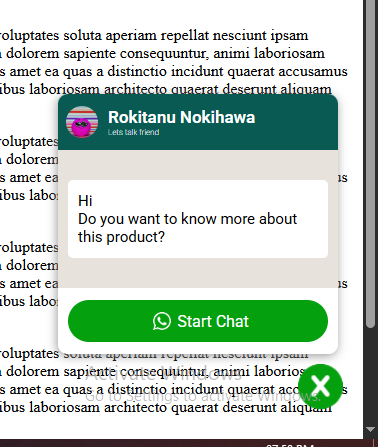
WhatsApp© is one of the popular way of communication, and many wants to have an interactive way for website visitors to message them on WhatsApp© easily. WABox is an easy way to implement it. Instead of adding just a button to go to your WhatsApp©, it offers an interactive chat like window, with a custom message of your choice.

- Easy to implement
- Customizable message window
- Message customization for WhatsApp©
- Support modern browsers
We tested WABox on jQuery 4.0. It may support lower versions of jQuery, we have not tested yet. Other than jQuery no other libraries needed to run WABox.
Download the folder and link the following two files from dist folder.
<link rel="stylesheet" href="dist/jquery.wabox.min.css">
<script src="dist/jquery.wabox.min.js"></script>
In your webpage html, after linking jQuery and both of the above mentioned files, include the following fragment of code.
<script>
    $(function(){
        $('body').wabox({
            'chat-watsapp-number': '900000000000',
            'chat-message': 'Hi<br>Do you want to know more about this product?',
            'chat-name': 'Your Name',
            'chat-logo': 'https://images.pexels.com/photos/31687772/pexels-photo-31687772.png',
            'chat-sub-heading': 'Lets talk friend'
        })
    })
</script>
This plugin support following parameters. You can change the output of WABox by setting these parameters.
chat-watsapp-number: The whatsapp number where you want the message to reach. Dont put +, -, ( etc. Just put the phone number. Default value ''.
chat-window-open: Set this to true if you want to show the message box from start. Else false (default value), to show the message box on click of the WhatsApp© button on page.
chat-message: The message you want to show and send as WhatsApp© message. Default message "Hi lets talk".
btn-label: Change the wide WhatsApp© button label on the chat window.
btn-bottom-gap: The gap from the bottom of the page and the floating WhatsApp button. Default value '20'. Don't mention any units such as 'px'.
chat-logo: The image you want to show as user logo. Default is the plugin logo.
chat-name: Set the chatting agent name. Default is 'Agent'.
chat-sub-heading: The sub-heading text to show below the chatting agent name. Default is 'Chat with us'.
I have plans for upgrading this plugin with more functionalities. If you found any issues please report in this repo, I will try to fix them in next release.