symposia has been integrated into sPhil, so see the sPhil repo for further development.
Everything else here will now be archived for reference.
0.0. Once you have access to the repo on github, fork and/or clone it into a folder where you keep your projects.
0.1. Then cd symposia to get into the project directory.
0.2. Make your own development branch git branch dev-<your-name> (example: git branch dev-tim).
0.3. Set the newly made development branch as the current active branch, run git checkout <your-branch-name>.
0.4. In future, when getting the latest changes from the main development branch, run git merge dev whilst on your development branch to incorporate the changes into your branch.
1.0. Once inside, run npm i (alias npm install) to install all the packages. This will create the /node_modules folder.
2.0. After installation, run touch .env (or ni .env if you use Powershell or some windowsy thing).
2.1. Then, run cp env.example .env to copy the example env file.
2.2. Open the newly created .env file and check that it's populated. Ask Filip/Firgrep directly for the missing values.
3.0. Run npx prisma generate to generate the prisma client, this will be important for keeping your local types up to date with the database schema.
4.0 stripe listen --forward-to 127.0.0.1:3000/api/stripe-webhook To enable local testing with webhook for stripe.
9.9. Finally, to start a local development server, run npm run dev and open up http://localhost:3000 on your favorite browser.
- Whenever you make any edits to the source files while the server is running, the server will pick up those changes and output them immediately. This is extremely handy during development, as you can input code and hit
ctrl+kthens(save-all) and view directly your latest changes. - To terminate the server, hit
ctrl+con your keyboard whilst in the terminal where the server runs, inputywhen prompted to terminate batch job.
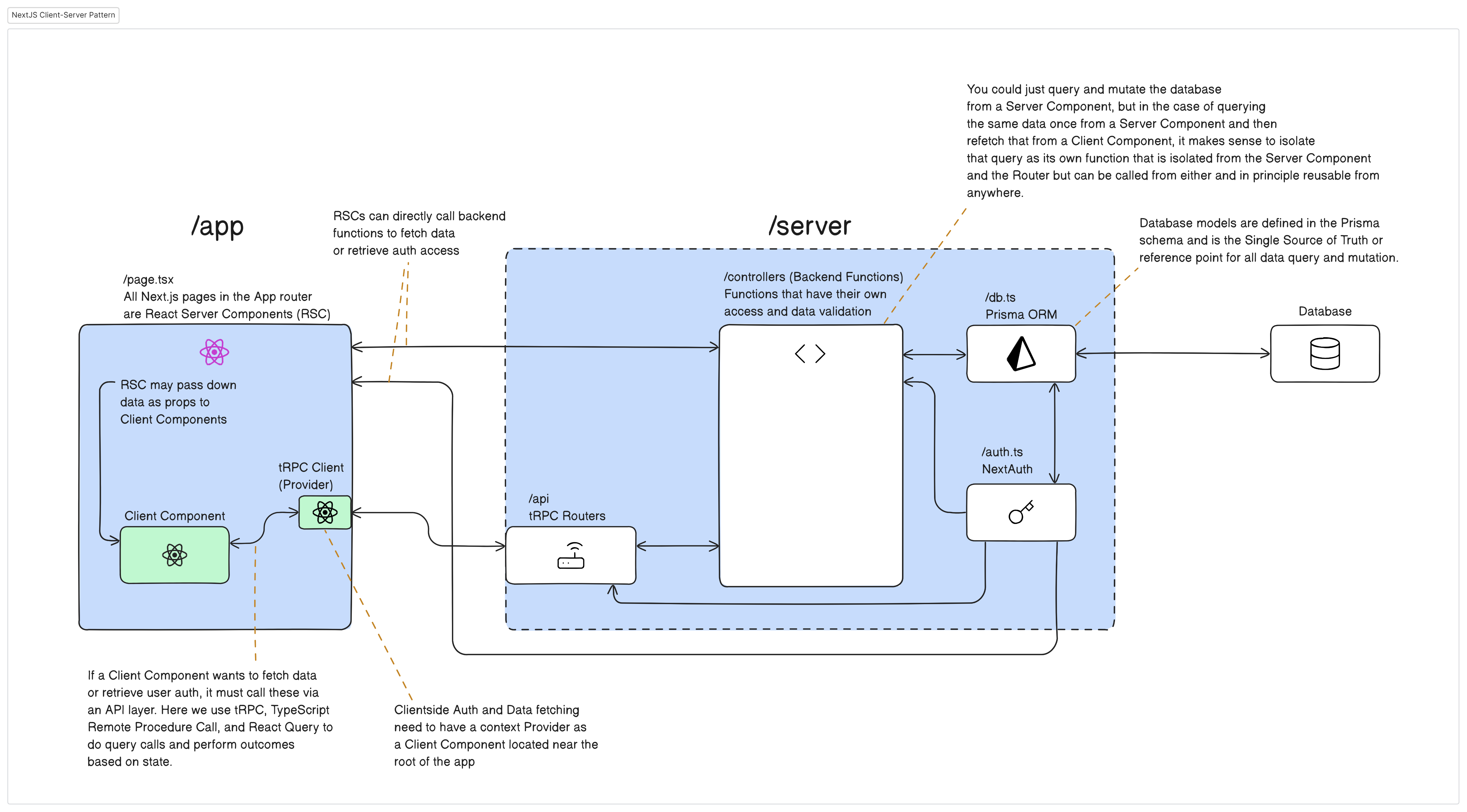
A high-level abstraction of the relationship between Client- and Server Components and how they interact with the backend. (Subject to change.)
/
├───logs
├───prisma
├───public
|   └───static
|
├───src
|   ├───app
|   |   ├───(admin)
|   |   ├───(user)
|   |   ├───api
|   |   |   ├───auth
|   |   |   └───trpc
|   |   |   error.tsx
|   |   |   favicon.ico
|   |   |   globals.css
|   |   |   page.tsx
|   |
|   ├───components
|   |
|   ├───config
|   |
|   ├───lib
|   |
|   ├───server
|   |   ├───api
|   |   |   ├───routers
|   |   |   |   routersRoot.ts
|   |   |   |   trpc.ts
|   |   |
|   |   ├───controllers
|   |   |   auth.ts
|   |   |   db.ts
|   |
|   └───utils
|
|   .env
|   .env.example
/Project root directory.logsVarious text and resources directory.prismaPrisma directory, holds the.prismaschema database models. This is the source of truth for all data. Through the Prisma Client, the application gains type-safety of the db models.public/*Any public static content or resources (images, videos, etc) for the app.srcMain source code directory.appSpecialized next.js "app router" directory. Creates routes based on directory name. E.g.app/editor/page.tsxequals tohttps://webapp.com/editorin the browser.(directory)Skips routing mechanism. This is useful if we want to group several routes under a common idea._directoryAlso will be ignored by the router (and sub-directories as well)directoryAny directories and sub-directories under theapp/will be made into a route insofar as it contains apage.tsxfileapiSpecial directory for API endpointsauth/*Endpoint for nextAuth authenticationtrpc/*Endpoint for TypeScript Remote Procedure Call, allowing for the front end to make calls to the server for data
error.tsxSpecial next.js error file that is displayed whenever there is an error (is only superseeded by othererror.tsxnested closer to the point of error origin)globals.cssRoot CSS config file.layout.tsxSpecial next.js layout file. Anything put here will "trickle down" into any sub-directories. Extremely useful for application-wide logic. Next.js also allows us to make nested layout files that will affect any sub-directories below then, such that we can e.g. have one application-wide general layout and another nested layout for admin related matters or one for user related matters.page.tsxThe entry-point for the route. In the next.js app router (which is what we're using), in contrast to the pages router, all page files are React Server Components, which means that they are non-interactive React components but with direct access to the server (no need for an API). For any clientside interactivity (typical React components), these need to be imported and outputted as part the pages/Server Component's return.
componentsHome of (most) React components, both client and server, seperated into sub-folders by concern when necessary.configVarious application-wide configuration files.libWhen particular configuration is needed with certain libraries, such as generating clients and making React context providers, this is the directory for that.nextAuthClientside configuration for nextAuth.trpcClientside configuration for tRPC.
serverMain directory for all pure serverside matters.apiServerside entry-point for api calls, specifically related to tRPC.routersRouters directory for tRPC (similar to Express.js routers).routersRoot.tsAny routers in therouters/directory must be registered here.trpc.tstRPC configuration file.
controllersDirectory for pure backend functions. Only these are allowed to interact with the database, storage, etc. Any Server Components/pages.tsx that want to interact with the database, storage, mdx, etc. must go through these, and any Client Components must first pass via tRPC, which in turn calls these functions. Specific adapter controllers are prefixed by what they interface with, such asdbfor database, andgcfor storage, and so on. When an operation requires multiple adapters, such as database and storage, or requires some organization before calling the adapter-specific controllers, a higher order controller is called - these are prefixed withorder. In general, any controller function may call any other controller function as needed. The idea is that we group together all backend work in one place, that way we won't do double work when we have the same operation that needs to be done by both Client- and Server Components.auth.tsnextAuth configuration file.bucket.tsConfiguration file for a specific bucket from Google Cloud Storage.db.tsPrisma Client configuration file.mdxCompiler.tsMDX Compiler configuration file.
utilsApplication-wide utility functions directory..envDO NOT COMMIT TO GIT Environmental variables. If the requisite variables are not populated, parts of the app won't work..env.exampleExample file of.envbut without sensitive values.package.jsonTop-level dependencies and configurations of the project.
Please review our guidelines concerning naming conventions for branches and commit messages in ./GIT-ETIQUETTE.md.