This repository is a practical Pytest + Jira integration example using @testream/pytest-reporter. It shows how to run Pytest locally and in GitHub Actions, then upload test results to Testream so they appear in Jira.
If you are searching for "Pytest Jira reporter", "Pytest GitHub Actions Jira integration", or "send Pytest test results to Jira", this repo is the implementation template.
- Python-first setup: Uses a standard Python project layout (
src/,tests/,requirements.txt). - CI-ready: Includes a working GitHub Actions workflow.
- Real triage flow: Intentional failing tests demonstrate how failures surface in Testream/Jira.
- Secure secrets handling: Workflow uses
secrets.TESTREAM_API_KEY(no hardcoded API keys).
Testream is an automated test management and reporting platform for Jira teams. It ingests test results from frameworks like Pytest, Cypress, Playwright, Jest, and Vitest, then provides failure analysis, trends, and release visibility inside Jira.
If this sample repository is not the framework you need, browse all native reporters in the Testream docs: https://docs.testream.app/.
Click to see how Testream turns raw CI test results into actionable Jira insights (failures, trends, and release visibility):
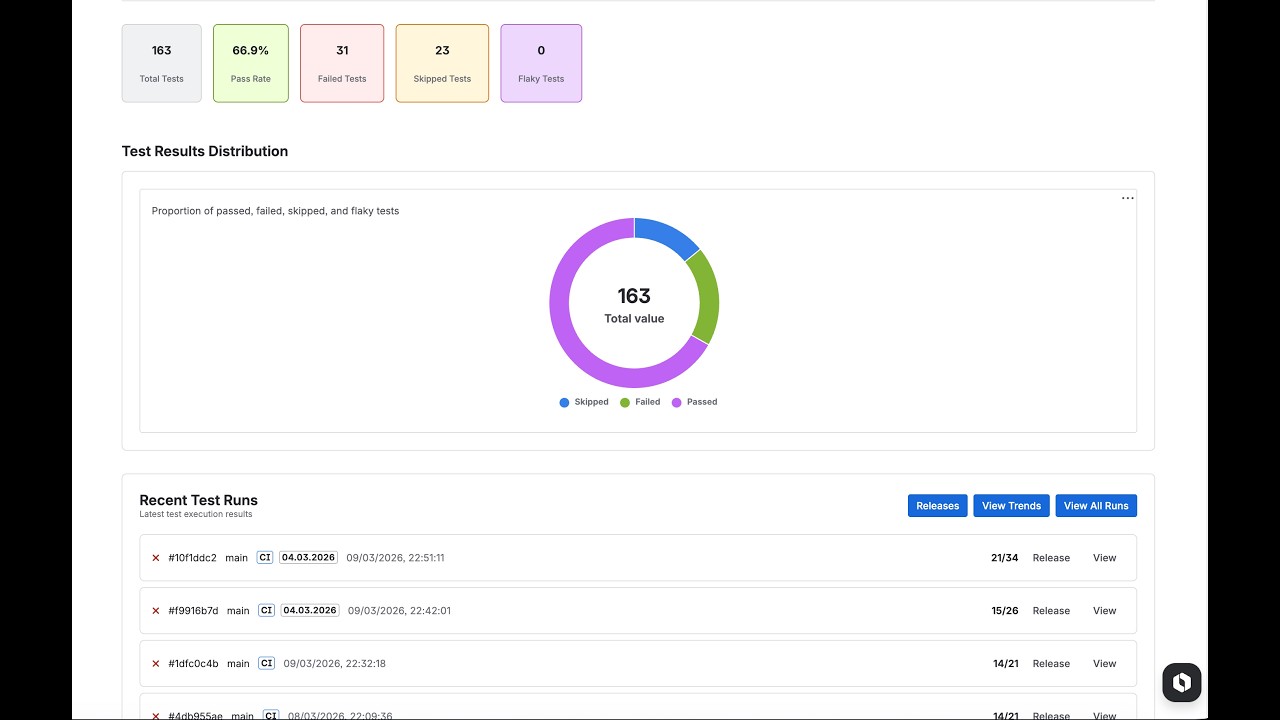
Install the Testream Automated Test Management and Reporting for Jira app in your Jira workspace to view uploaded runs.
src/
  cart.py            - Cart logic
  discount.py        - Discount utilities
  product.py         - Product model
tests/
  test_cart.py       - Passing tests + 1 intentional failure
  test_discount.py   - Passing tests + 1 intentional failure
  test_product.py    - Passing tests + 1 intentional failure
  conftest.py        - Import path bootstrap for src/
.github/workflows/pytest.yml
requirements.txt
pytest.ini
.env.example
The intentional failures exist so you can verify how errors are shown in Testream/Jira.
- Sign in at testream.app.
- Create a project.
- Copy your API key.
python3 -m venv .venv
source .venv/bin/activate
pip install -r requirements.txtcp .env.example .env
source .envSet at least:
TESTREAM_API_KEY=<your key>npx @testream/pytest-reporter \
-k "$TESTREAM_API_KEY" \
--test-environment local \
--app-name pytest-jira-reporter-example \
--test-type unitWithout an API key, you can still run tests directly:
python -m pytestThis sample uses the CLI flow from @testream/pytest-reporter. The command:
- Runs
pytest - Writes JUnit XML
- Converts to CTRF
- Uploads to Testream
Reporter docs: https://docs.testream.app/reporters/pytest
The workflow at .github/workflows/pytest.yml runs on push, pull request, and manual dispatch.
Add this repository secret:
Settings -> Secrets and variables -> Actions -> New repository secret
| Name | Value |
|---|---|
TESTREAM_API_KEY |
Your Testream API key |
The workflow uses:
TESTREAM_API_KEY: ${{ secrets.TESTREAM_API_KEY }}TESTREAM_APP_VERSIONequivalent via${{ github.sha }}TEST_ENVequivalent via--test-environment ci
After connecting your Testream project to Jira, you get:
- Dashboard views for pass/fail health
- Failed test details with stack traces
- Trend analytics across runs
- Jira issue creation from failures with context included
- Ensure
TESTREAM_API_KEYis set in your shell. - Re-source
.envif values changed.
- Confirm
TESTREAM_API_KEYexists in repository secrets. - For fork PRs, check whether secrets are available to workflow runs.
This sample includes intentional failing tests for demonstration. Remove or fix those tests when you want fully green pipelines.
It is an example designed to be copied and adapted. The workflow and secret handling are production-oriented.
They demonstrate failure triage in Jira/Testream.
Yes. Run python -m pytest and skip the reporter command.
- Testream app: https://testream.app
- Testream Automated Test Management and Reporting for Jira: https://marketplace.atlassian.com/apps/3048460704/testream-automated-test-management-and-reporting-for-jira
- Pytest reporter docs: https://docs.testream.app/reporters/pytest
- Pytest docs: https://docs.pytest.org/