See your water-softener salt level in Home Assistant and know when it is time to refill.


Install SaltWatch in your browser
SaltWatch is a local, purpose-built monitor for a water-softener brine tank. An M5Stack distance sensor mounted under the lid measures the salt surface and turns that distance into a calibrated level from 0–100%.
Once connected through ESPHome, Home Assistant shows the current distance, estimated salt level, low-salt warning, calibration state, and sensor health. These appear as native entities that can be placed on a dashboard or used in your own automations and notifications. SaltWatch explicitly marks failed or outdated measurements as unavailable, so an old reading cannot quietly look current after a blocked or disconnected sensor.
The ToF sensor mounts under the lid and faces the salt. Its thin Grove cable runs through the lid's existing hinge clearance to the ATOM Lite outside the tank. This installation needs no drilled hole or rubber grommet; check that the lid opens and closes without pinching, rubbing, or pulling the cable.
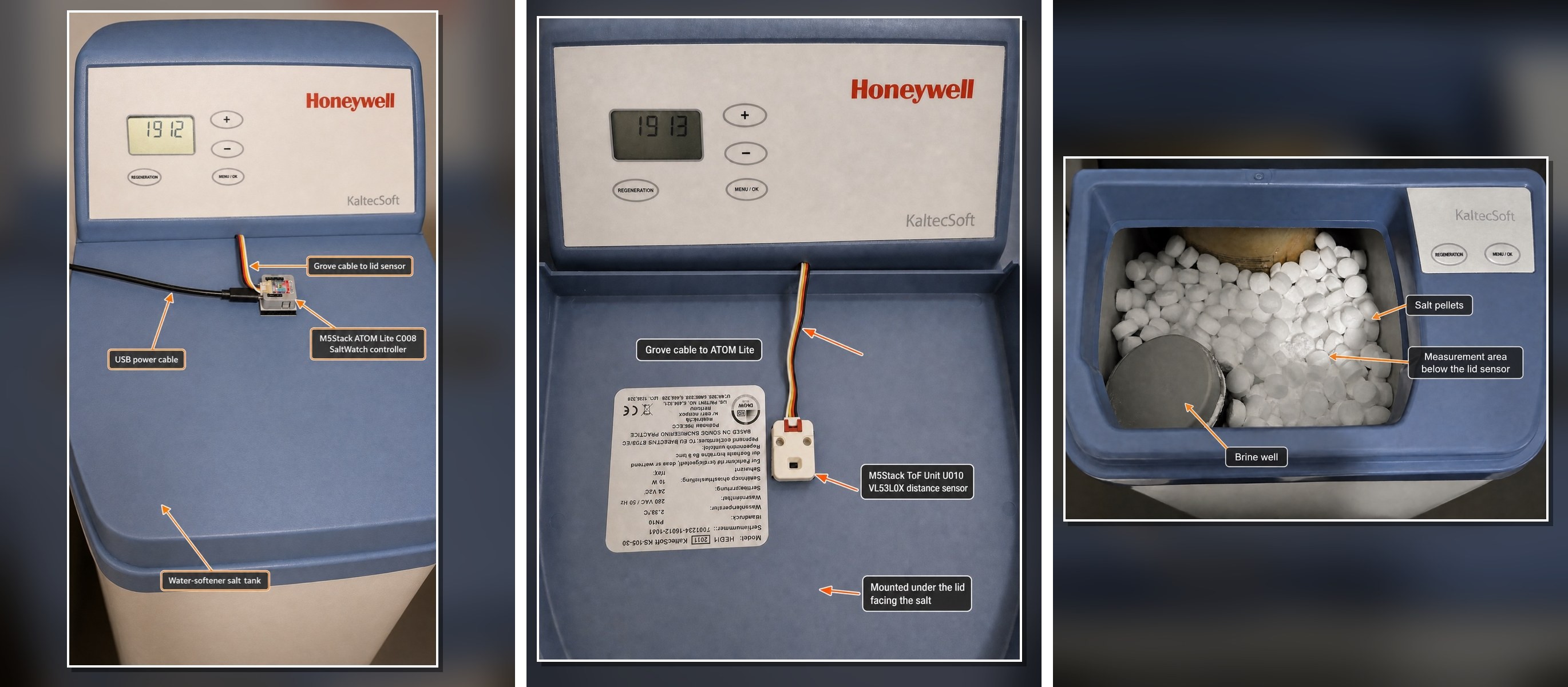
Select the gallery to enlarge it.

Recommended Home Assistant card: SaltWatch Card is the preferred dashboard card for SaltWatch. It brings the current level, refill forecast, low-salt threshold, and device status together in one clear view. The card is available through HACS and includes a graphical editor for straightforward dashboard setup.
- Why SaltWatch
- Installation at a glance
- Hardware
- Quick start
- Calibration
- Home Assistant entities
- Testing without hardware
- Forecast
- Notifications
- Trustworthy failure behavior
- Local web interface and updates
- Documentation
- Supported hardware and firmware
- License
A softener can keep running after the salt is nearly gone, and a failed sensor can look deceptively normal if its last reading remains visible. SaltWatch is designed around those two problems:
- see the current lid-to-salt distance and estimated salt percentage;
- get a stable low-salt warning with hysteresis;
- calibrate full and empty levels from Home Assistant;
- distinguish low salt from invalid calibration and sensor failure;
- remove stale measurements automatically when valid readings stop; and
- continue measuring when Home Assistant is offline.
The firmware also learns the tank's rate of decline and estimates when it will reach the low-salt threshold. The estimate runs on the device, survives normal restarts, and never overrides measurement or fault safety.
| Part | Purpose |
|---|---|
| M5Stack ATOM Lite C008 | SaltWatch controller outside the tank |
| M5Stack ToF Unit U010 with VL53L0X | Distance sensor beneath the lid |
| Included HY2.0-4P Grove cable | Connects the sensor to the controller |
| USB-C data cable and 5 V USB power supply | Initial browser installation and everyday power |
| 3M Dual Lock SJ3550 or equivalent removable mounting strips | Secures the sensor and controller while allowing removal |
The ToF Unit mounts inside the lid and points down at the salt. The ATOM Lite stays outside the tank. No drilling is needed when the Grove cable fits safely through an existing hinge or lid gap. See the hardware and acceptance guide before permanent installation.
- Open the SaltWatch web installer in desktop Chrome or Microsoft Edge.
- Connect the ATOM Lite directly to the computer with a USB data cable. The C008 normally enters programming mode automatically.
- Select Connect and install SaltWatch, choose the serial port, and approve the installation.
- Enter the 2.4 GHz Wi-Fi credentials when prompted.
- Open the local interface at the address shown by the installer. No login is required.
- Select Add to Home Assistant when the installer offers it, or add the discovered ESPHome integration under Settings → Devices & services. This provisions the unique API encryption key on the device.
- Optional: to manage a custom configuration, open ESPHome Device Builder and select Adopt. Keep the API encryption key and install the adopted configuration wirelessly. Official release updates do not require adoption.
- Install the sensor in the lid and complete both calibration steps below.
No command line, local ESPHome installation, OTA password, or web-server password is required for this route. For alternative installation and update methods, see the installation guide.
Salt Level remains unavailable until both calibration points are completed. This prevents placeholder values from appearing as a believable percentage.
- Fill the tank to its normal desired full level and close the lid normally.
- Wait two to three minutes for Distance to Salt to settle.
- Press Set Current Distance as Full in Home Assistant or the local web UI.
- At the lowest useful salt level, close the lid normally.
- Wait for Distance to Salt to settle.
- Press Set Current Distance as Empty.
- Confirm Calibration Required turns off and Salt Level becomes available.
Empty means the lowest useful and reliably measurable level, not necessarily the physical bottom of the tank. Both distances can also be entered manually. See the calibration and operation guide for validation rules, manual calibration, and low-salt behavior.
| Entity | Purpose |
|---|---|
| Distance to Salt | Median-filtered distance from the lid to the salt surface in centimetres. |
| Salt Level | Calibrated and clamped estimate from 0–100%. |
| Estimated Days Until Low Salt | Device-native estimate of when the warning threshold will be reached; unavailable until the trend is trustworthy. |
| Forecast Status | Explains whether the estimate is learning, available, confirming a refill, or blocked. |
| Forecast Details | Gives a short reason or learning-progress message when the estimate is not yet available. |
| Last Recorded Refill | Timestamp of the most recent automatically confirmed or manually recorded refill; unavailable until the first refill is recorded. |
| Salt Status | Initializing, Sensor Fault, Calibration Required, Low Salt, or Good. |
| Low Salt | Problem indicator that includes five percentage points of hysteresis. |
| Sensor Fault | Reports missing, timed-out, invalid, or out-of-range measurements. |
| Calibration Required | Reports incomplete, reversed, out-of-range, or insufficient calibration. |
| Calibration Details | Explains exactly why calibration is incomplete or invalid. |
| Full Distance | Persistent full-level calibration value. |
| Empty Distance | Persistent empty-level calibration value. |
| Low Salt Threshold | Persistent warning threshold; default 20%. |
| Low Salt LED Alert | Optional onboard LED warning, following Low Salt and its configured threshold; off by default. |
| Low Salt LED Brightness | Brightness of the onboard warning LED, adjustable from 1–100%; defaults to 30% and is remembered. |
| Set Current Distance as Full | Captures the current filtered distance as full. |
| Set Current Distance as Empty | Captures the current filtered distance as empty. |
| Record Salt Refill | Starts a new forecast cycle after a small or unusual refill that was not detected automatically. |
| Firmware Version | Installed SaltWatch release; also shown under Device Maintenance in the web interface. |
| SaltWatch Firmware Update | Checks for official releases every six hours; installs only when requested. |
| WiFi Signal | Standard ESPHome diagnostic signal strength. |
| Last Valid Measurement Age | Diagnostic age of the most recent accepted sensor reading; disabled by default. |
| Forecast Confidence | Optional evidence-quality diagnostic; disabled by default. |
Entity identifiers are kept stable so firmware updates do not create duplicates in Home Assistant. Default display names may be clarified between releases; Home Assistant preserves any names you customize yourself.
Every SaltWatch node automatically appends the final three bytes of its MAC
address to its technical ESPHome name, for example saltwatch-a1b2c3. This
keeps discovery, hostnames, and Home Assistant device relationships unique when
more than one SaltWatch is installed. The Home Assistant device can still be
renamed to a friendly location such as SaltWatch Utility Room.
saltwatch-emulator.yaml creates a virtual device for testing SaltWatch Card on
a macOS or Linux computer. It uses ESPHome's host platform and exposes the card's
salt-level, status, forecast, and threshold entities with the same names and
device relationship as the physical monitor. It does not emulate the sensor,
calibration controls, LED, web interface, or firmware updater.
From a local checkout with ESPHome installed, run:
esphome run saltwatch-emulator.yamlIn Home Assistant, open Settings → Devices & services → Add integration →
ESPHome, enter the computer's LAN address, and keep the default API port
6053. Host-based ESPHome nodes are not discovered automatically. The local
firewall must allow Home Assistant to reach that port.
The resulting SaltWatch Emulator device provides controls for salt level,
salt status, forecast days, forecast status, forecast details, and the low-salt
threshold. Set either simulated numeric value to -1 to make its corresponding
sensor unavailable and test fault, calibration, initialization, or forecast
learning displays. The emulator remains available only while its process is
running and should be used on a trusted development network.
Estimated Days Until Low Salt answers when you are likely to need more salt, not merely how much is present today. It is built into SaltWatch: no Home Assistant package, YAML editing, helper entities, or restart is needed.
SaltWatch learns from up to 28 trustworthy daily values, rejects sparse or noisy data, and confirms refill-like rises before starting a new cycle. A first estimate normally needs at least seven days and two percentage points of real decline. After it learns a completed cycle, that past rate lets the estimate resume immediately after future refills while new evidence accumulates. See how forecasting works, including status meanings, refill handling, confidence, and limitations.
Last Recorded Refill remembers when SaltWatch most recently started a new forecast cycle because a refill was confirmed automatically or the Record Salt Refill button was accepted. It is informational only and never changes the forecast calculation. A possible refill does not update the timestamp until its second six-hour value confirms the rise. If Home Assistant time is temporarily unavailable during a manual refill, the forecast cycle still starts immediately and the timestamp is completed at the next successful time synchronization.
For a local visual warning, enable Low Salt LED Alert under Low Salt Alert in the device's web interface, or in the SaltWatch device's configuration entities in Home Assistant. The ATOM Lite's built-in LED blinks red while Low Salt is active, using your Low Salt Threshold and its existing hysteresis. Adjust Low Salt LED Brightness in the same web section or in Home Assistant's device configuration settings, from 1–100% (default 30%). Brightness changes apply while blinking without changing its rhythm. Both settings are remembered and work without Home Assistant or Wi-Fi; the alert is off by default. An unlit LED does not confirm sensor health; faults and invalid calibration suppress this low-salt warning.
The optional Home Assistant blueprint follows Salt Status priority so fault, calibration, and low-salt conditions cannot generate competing alerts. It also supports device-named forecast and recovery messages plus one optional persistent-low reminder. It imports through the Home Assistant UI and requires no package or restart. See notification setup.
SaltWatch accepts only finite readings from 5–120 cm and feeds only valid measurements into its five-sample median. Independent startup and measurement watchdogs ensure that a disconnected, blocked, or malfunctioning sensor cannot leave an old distance displayed indefinitely.
When measurement fails, Distance to Salt and Salt Level become unavailable, Sensor Fault turns on, Low Salt turns off, and Salt Status becomes Sensor Fault. Valid measurements recover automatically. Calibration persists across normal restarts and sensor recovery.
The detailed filtering, timeout, status-priority, persistence, and recovery design is documented in the technical reference.
Once SaltWatch is connected to Wi-Fi, open its local address, such as
http://saltwatch-a1b2c3.local/, or its IP address in your browser. Use the web
interface to check the salt level, calibrate the sensor, track refill estimates,
and adjust the low-salt threshold and LED alert brightness.
Device Maintenance shows the installed Firmware Version and the SaltWatch Firmware Update control. Both are also available in Home Assistant. SaltWatch checks for new releases every six hours. You choose when to install; updates never install automatically.
To install a downloaded firmware file, use Firmware Upload, directly below
Device Maintenance. Select the OTA .bin file and click Update.
Home Assistant may also show a separate Firmware entity from ESPHome Device Builder, normally disabled. It builds firmware from your adopted configuration. Use SaltWatch Firmware Update for official releases, and Device Builder for customized firmware or recovery.

The web interface and all OTA paths intentionally have no password. Anyone who can reach the device can change calibration or replace its firmware. Keep SaltWatch on a trusted, preferably isolated IoT network, never expose it to the internet, and restrict access with firewall rules when possible. Home Assistant API communication is encrypted after Device Builder adoption.
- Installation and updates — browser installation, Device Builder adoption, manual builds, and OTA updates
- Hardware installation and acceptance — mounting, wiring, care, and the complete hardware test checklist
- Calibration and operation — full/empty calibration, manual values, thresholds, hysteresis, and normal use
- Salt forecast — built-in learning, refill handling, confidence, statuses, and limitations
- Home Assistant notifications — optional one-click blueprint setup and testing
- Technical reference — measurement pipeline, failure handling, persistence, status rules, entities, and limitations
- Development and validation — repository structure, build commands, CI, release artifacts, and validation results
- Changelog
SaltWatch is built for the M5Stack ATOM Lite C008 using the m5stack-atom
board definition, ESP-IDF, GPIO26/GPIO32 I²C, and the VL53L0X at address 0x29
in long-range mode. Release builds are validated with ESPHome 2026.9.0 and
ESP-IDF 5.5.5.