Single-file immediate-mode UI library for banked 1-bit displays.
nc_ui.h is a C++ library for building graphical user interfaces on monochrome displays that use a vertical-bank memory layout. It provides a retained box tree with automatic layout, input handling, signal propagation, animation, and clipping.
A built-in 5 * 7 pixel font is provided taken from http://www.aplomb.nl/TechStuff/graph_lcd_MvN/sed1531_graph_lcd/sed1531_graph_lcd.html
The library has no platform dependencies. It operates on a caller-provided framebuffer
and makes no system calls, heap allocations, or I/O of any kind. All state is held in a
single UIState struct. Multiple instances are supported, enabling independent UIs on separate displays within the same project.
Display dimensions are specified at runtime through UIInit, so a single compilation can drive displays of different sizes.
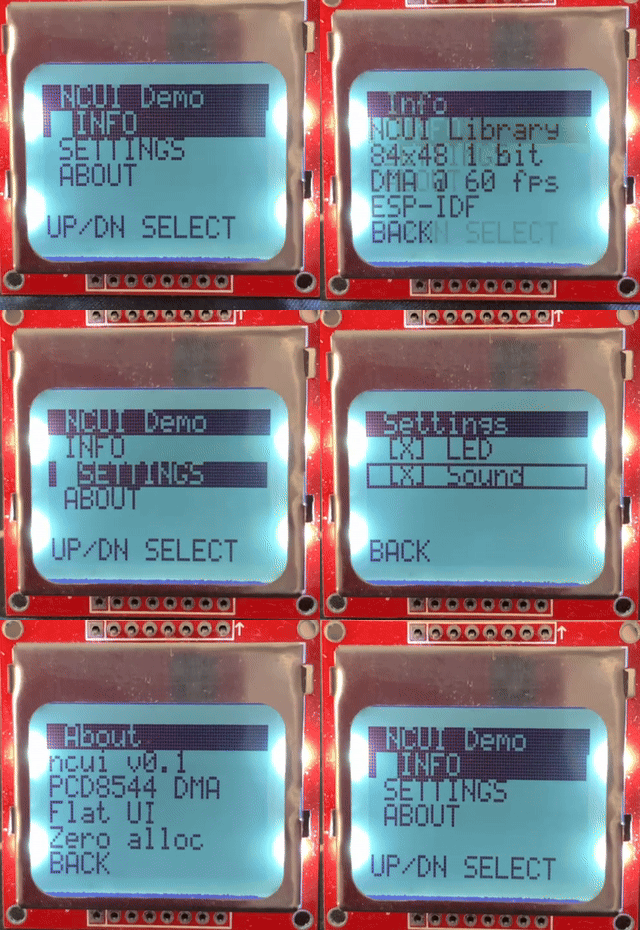
This is a demo running on an ESP32-WROOM-32 board and using a PCD8544 display. The frame rate of the GIF does not do the demo justice, the animations are alot smoother when looking at the display in front of you.
Copy nc_ui.h into your project.
In one C++ source file, define NCUI_IMPLEMENTATION before including the header:
#define NCUI_IMPLEMENTATION
#include "nc_ui.h"
All other files that need the API include the header without the define.
Tip
To confine all symbols to a single translation unit, NCUI_STATIC can be defined
alongside NCUI_IMPLEMENTATION.
The following macros can be defined before including the header to replace default dependencies:
| Macro | Default | Purpose |
|---|---|---|
NCUI_MEMSET(dst, val, sz) |
memset |
Memory fill |
NCUI_MAX(a, b) |
Ternary max | Maximum of two values |
NCUI_MIN(a, b) |
Ternary min | Minimum of two values |
NCUI_NO_STDLIB |
Undefined | Suppresses <stdint.h> and <string.h> includes |
NCUI_ATTR |
Undefined | Add attributes to function definitions such as IRAM_ATTR if using esp32 |
NCUI_MAX_BOXES |
32 | Maximum number of boxes in a UI hierarchy |
NCUI_MAX_EVENTS |
8 | Maximum number of events that can be queued in a single frame/tick |
NCUI_BOX_HASH_SLOTS |
16 | Maximum number of slots in box hash table |
NCUI_STALE_FRAMES |
2 | Lifetime (frames or ticks) of a box or animation before being auto-released |
NCUI_MAX_STACK_DEPTH |
8 | Maximum nesting of box attributes (e.g. PreferredWidth) in a UI hierarchy |
NCUI_MAX_ANIMATIONS |
32 | Maximum number of animations in a UI hierarchy |
NCUI_ANIMATION_HASH_SLOTS |
16 | Maximum number of slots in animation hash table |
UIState ui;

UIInit(&ui, 84, 48);  // PCD8544 (Nokia 5110)

u8 framebuffer[84 * 6]; // width * ceil(height / 8)Every frame follows the same pattern: begin a build, declare the UI tree, end the build, then draw.
UIBeginBuild(&ui);
// ... declare boxes here ...
UIEndBuild(&ui);

DrawUI(&ui, framebuffer);

// send framebuffer to display hardware
The UI_BUILD_SCOPE macro wraps this into a single scope:
UI_BUILD_SCOPE(&ui) {
    // ... declare boxes here ...
}
DrawUI(&ui, framebuffer);Push input events before the build cycle. Events are consumed during UIEndBuild.
UIPushEvent(&ui, UI_EVENT_PRESS, UI_INPUT_SELECT);
// ... next frame ...
UIPushEvent(&ui, UI_EVENT_RELEASE, UI_INPUT_SELECT);
Navigation focus is managed through HotKey and ActiveKey on UIState.
Set HotKey to the key of the currently focused box.
The library handles press/release/click signal generation from there.
Boxes receive their preferred size from the size stacks. Four sizing modes are available:
| Macro | Meaning |
|---|---|
UI_PX(n) |
Fixed pixel count |
UI_TEXT() |
Sized to fit the box's string content |
UI_PCT(f) |
Fraction of parent size (0.0 - 1.0) |
UI_CHILDREN() |
Sum of children along layout axis, max of children on cross axis |
Push sizes onto the stack using the scoped macros:
UIPreferedWidth(&ui, UI_PCT(1.0f)) {
    UIPreferedHeight(&ui, UI_PX(10)) {
        UILabel(&ui, "Full width label");
    }
}Children are laid out along the parent's child layout axis.
Default is AXIS_2D_Y (vertical stacking). Use UIChildLayoutAxis to change it:
UIChildLayoutAxis(&ui, AXIS_2D_X) {
    UILabel(&ui, "Left");
    UILabel(&ui, "Right");
}UIButton, UIBuildBox, and UIBuildBoxFromStr return a UISignal.
Test it with the signal macros:
UISignal sig = UIButton(&ui, "OK");

if (UI_CLICKED(sig)) {
    // handle click
}
Available signal tests: UI_PRESSED, UI_RELEASED, UI_CLICKED, UI_HELD, UI_HOT, UI_ACTIVE.
UILabel(&ui, "Text");                     // static text
UIButton(&ui, "Press me");                // clickable bordered box
UICheckBox(&ui, "Toggle", &boolValue);    // toggles b32 on click
UIMenuEntry(&ui, "Item", isSelected);     // full-width row, inverted when selected
UIDivider(&ui, "Optional Label");         // divide list of boxes, skipped by navigation
UIDivider(&ui, NULL);                     // only draw the dividing line with no label
UIProgressBar(&ui, "Loading ...", 50);    // progress bar with label
UISlider(&ui, "Volume", &currVal, 10); // slider input, moved with LEFT and RIGHT inputsThe draw API operates directly on the framebuffer independent of the box tree:
DrawPixelSet(&ui, buf, x, y);
DrawHorzLine(&ui, buf, x0, x1, y);
DrawVertLine(&ui, buf, x, y0, y1);
DrawFilledRect(&ui, buf, x0, y0, x1, y1);
DrawClearRect(&ui, buf, x0, y0, x1, y1);
DrawInvertRect(&ui, buf, x0, y0, x1, y1);
DrawBorderRect(&ui, buf, x0, y0, x1, y1);
DrawStr(&ui, buf, x, y, "Hello");
DrawStrAligned(&ui, buf, x0, x1, y, "Centred", UI_TEXT_ALIGN_CENTRE);
DrawBMP(&ui, buf, x, y, w, h, bitmapData);Build new widgets by combining UIBuildBoxFromStr (or UIBuildBox with a manual key),
flag combinations, and the parent/size stacks. Every high-level widget in the
library is built this way. For example, a radio button:
UISignal
UIRadioButton(UIState* State, char const* String, i32* Value, i32 Index)
{
    UIBoxFlags flags = UI_BOX_FLAG_DRAW_TEXT | UI_BOX_FLAG_CLICKABLE;

    if (*Value == Index)
        flags |= UI_BOX_FLAG_INVERTED;

    UISignal sig = UIBuildBoxFromStr(State, flags, String);

    if (UI_CLICKED(sig))
        *Value = Index;

    return sig;
}After DrawUI renders the box tree, draw additional content directly into the
framebuffer using the pixel, line, rect, and text functions.
The draw functions are independent of the UI system and only require a
valid UIState (for display dimensions) and a buffer pointer.
Add entries to UISizeKind and handle them in the four layout passes
inside UILayoutRoot: static sizes, upwards-dependent, downwards-dependent, and finalisation.
UIBoxFlags is a u16 with bits 0 - 11 currently used. Bits 12 - 15 are available.
Add rendering behaviour for new flags in DrawUI.
UIAnimate provides frame-rate-independent interpolation keyed by UIKey.
It returns a u8 value that moves from an initial value toward a target at a rate controlled by a bit-shift divisor:
u8 offset = UIAnimate(&ui, key, target, initial, rateShift);rateShift controls speed: each frame, the step is (target - current) >> rateShift.
| rateShift | Movement |
|---|---|
| 0 | Snap immediately to target |
| 1 | Move by half the remaining distance to target |
| 2 | Move by quarter of the remaining distance to target |
When the remaining distance is less than the step, it snaps by ±1.
Animation nodes are allocated from a fixed pool and automatically freed
when not touched for NCUI_STALE_FRAMES build cycles.
A vertical stack of two labels:
UI_BUILD_SCOPE(&ui) {
    UIKey root_key = UIKeyFromStr(EMPTY_UI_KEY_VALUE, "root", 4);

    UIBuildBox(&ui, 0, root_key);

    UIBox* root = UIBoxFromKey(&ui, root_key);

    root->PreferredSize[AXIS_2D_X] = UI_PX(84);
    root->PreferredSize[AXIS_2D_Y] = UI_PX(48);

    UIParent(&ui, root) {
        UIPreferedWidth(&ui, UI_PCT(1.0f)) {
            UIPreferedHeight(&ui, UI_PX(8)) {
                UILabel(&ui, "Line 1");
                UILabel(&ui, "Line 2");
            }
        }
    }
}

DrawUI(&ui, framebuffer);Animate a horizontal offset for a sliding indicator:
UIKey anim_key = UIKeyFromStr(EMPTY_UI_KEY_VALUE, "slide", 5);
u8 target_x = selected_index * 20;
u8 x = UIAnimate(&ui, anim_key, target_x, 0, 2);

DrawFilledRect(&ui, framebuffer, x, 40, x + 16, 47);A screen with a title bar, a scrollable menu area with clipping, and a floating status bar:
UI_BUILD_SCOPE(&ui) {
    // Root
    UIKey root_key = UIKeyFromStr(EMPTY_UI_KEY_VALUE, "root", 4);

    UIBuildBox(&ui, 0, root_key);

    UIBox* root = UIBoxFromKey(&ui, root_key);

    root->PreferredSize[AXIS_2D_X] = UI_PX(84);
    root->PreferredSize[AXIS_2D_Y] = UI_PX(48);

    UIParent(&ui, root) {
        // Title bar
        UIPreferedWidth(&ui, UI_PCT(1.0f)) {
            UIPreferedHeight(&ui, UI_PX(10)) {
                UIBuildBoxFromStr(
                    &ui,
                    (
                        UI_BOX_FLAG_DRAW_TEXT |
                        UI_BOX_FLAG_DRAW_FILL |
                        UI_BOX_FLAG_INVERTED
                    ),
                    "Settings"
                );
            }
        }

        // Scrollable menu region
        UIPreferedWidth(&ui, UI_PCT(1.0f)) {
            UIPreferedHeight(&ui, UI_PX(30)) {
                UIKey menu_key = UIKeyFromStr(EMPTY_UI_KEY_VALUE, "menu", 4);

                UIBuildBox(&ui, UI_BOX_FLAG_CLIP, menu_key);

                UIBox* menu = UIBoxFromKey(&ui, menu_key);

                UIParent(&ui, menu) {
                    UIPreferedWidth(&ui, UI_PCT(1.0f)) {
                        UIPreferedHeight(&ui, UI_CHILDREN()) {
                            // Inner container taller than the clip region
                            UIKey inner_key = UIKeyFromStr(EMPTY_UI_KEY_VALUE, "inner", 5);

                            UIBuildBox(&ui, UI_BOX_FLAG_FLOATING, inner_key);

                            UIBox* inner = UIBoxFromKey(&ui, inner_key);

                            inner->FixedPosition[AXIS_2D_Y] = scroll_offset;

                            UIParent(&ui, inner) {
                                UIPreferedWidth(&ui, UI_PCT(1.0f)) {
                                    UIPreferedHeight(&ui, UI_PX(8)) {
                                        for (i32 i = 0; i < num_items; ++i) {
                                            if (i == cursor) {
                                                ui.HotKey = UIKeyFromStr(
                                                    EMPTY_UI_KEY_VALUE,
                                                    items[i],
                                                    FontStrLen(items[i])
                                                );
                                            } else {
                                                ui.HotKey = EMPTY_UI_KEY_VALUE;
                                            }

                                            UIMenuEntry(&ui, items[i], (i == cursor));
                                        }
                                    }
                                }
                            }
                        }
                    }
                }
            }
        }

        UIPreferedWidth(&ui, UI_PX(84)) {
            UIPreferedHeight(&ui, UI_PX(8)) {
                UIKey status_key = UIKeyFromStr(
                    EMPTY_UI_KEY_VALUE,
                    "status",
                    6
                );

                UIBuildBox(
                    &ui,
                    (
                        UI_BOX_FLAG_DRAW_TEXT |
                        UI_BOX_FLAG_DRAW_FILL |
                        UI_BOX_FLAG_FLOATING
                    ),
                    status_key
                );

                UIBox* status = UIBoxFromKey(&ui, status_key);

                status->String = "3 / 8";
                status->StringLength = 3;
                status->FixedPosition[AXIS_2D_Y] = 40;
            }
        }
    }
}

DrawUI(&ui, framebuffer);A notification toast that slides in from below, holds, then slides out. Combined with a pulsing invert effect:
// State persisted across frames
static u16 toast_timer = 0;
static b32 toast_visible = FALSE;

if (show_toast_requested) {
    toast_visible = TRUE;
    toast_timer = 120;              // ~2 seconds at 60fps
}

if (toast_visible) {
    if (toast_timer > 0)
        --toast_timer;

    UIKey slide_key = UIKeyFromStr(EMPTY_UI_KEY_VALUE, "toast_y", 7);
    u8 target_y = (toast_timer > 0) ? 38 : 48;
    u8 y = UIAnimate(&ui, slide_key, target_y, 48, 1);

    if (y >= 48 && toast_timer == 0) {
        toast_visible = FALSE;
    } else {
        UIKey flash_key = UIKeyFromStr(EMPTY_UI_KEY_VALUE, "toast_flash", 11);
        u8 flash_target = (toast_timer > 100);      // flash during first 20 frames
        u8 flash = UIAnimate(&ui, flash_key, flash_target, 0, 0);

        DrawFilledRect(&ui, framebuffer, 0, y, 83, y + 9);
        DrawStrInverted(&ui, framebuffer, 2, y + 1, "Saved.");

        if (flash) {
            DrawInvertRect(&ui, framebuffer, 0, y, 83, y + 9);
        }
    }
}| Constraint | Value | Defined by |
|---|---|---|
| Coordinate range | 0 - 255 | u8 rect coordinates |
| Font character range | ASCII 32 - 126 | NCUI_FONT_FIRST_CHAR / NCUI_FONT_LAST_CHAR |
| Glyph dimensions | 5 * 7 pixels, 6px advance | NCUI_FONT_GLYPH_WIDTH / NCUI_FONT_GLYPH_HEIGHT / NCUI_FONT_ADVANCE |
All limits are compile-time constants (see Overrides section above). Redefine them before including the header to adjust for your target.
Warning
The u8 coordinate type imposes a hard ceiling of 255 * 255 pixels.
This can be changed to allow any screen size you require.