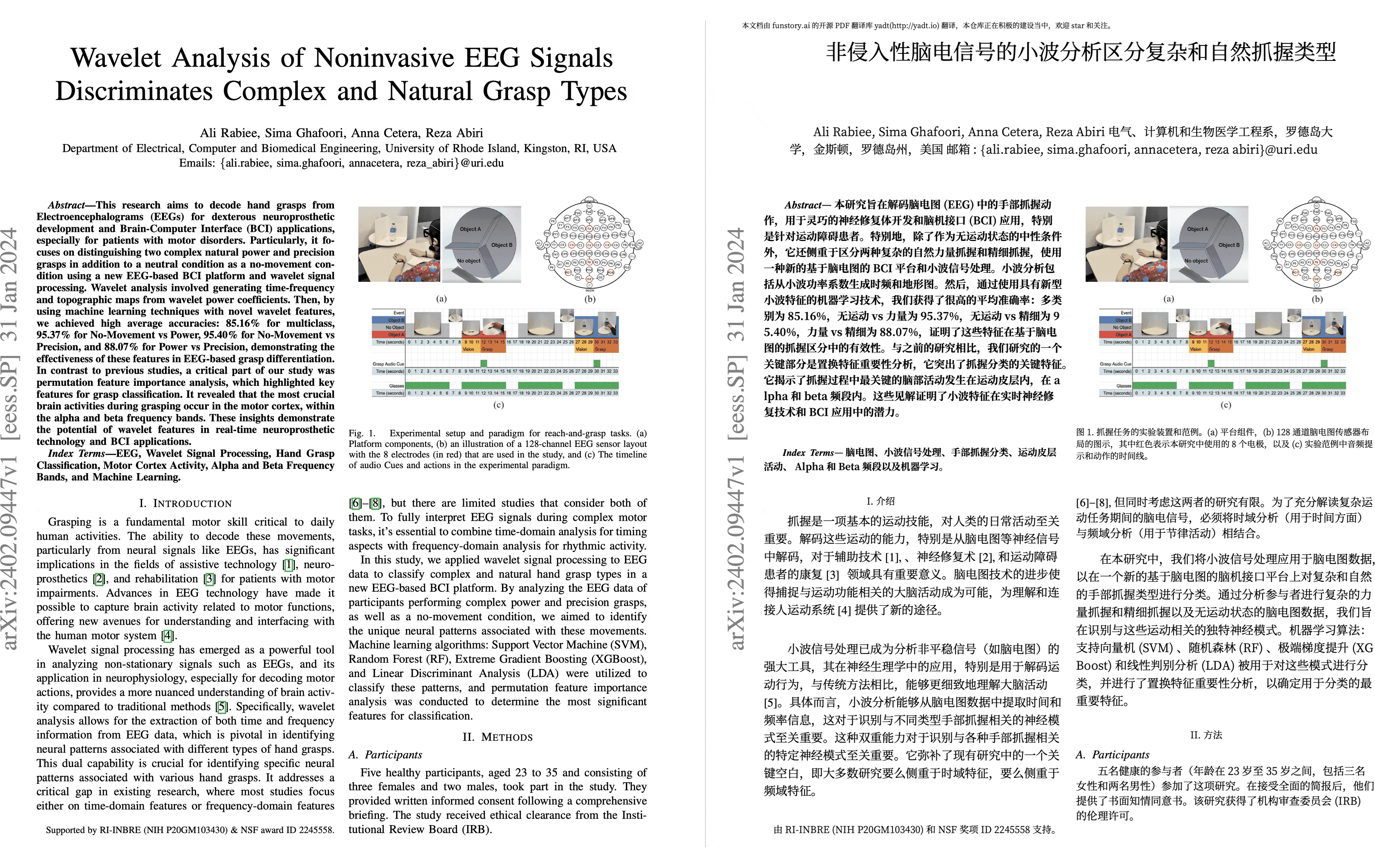
PDF scientific paper translation and bilingual comparison.
- 📊 Preserve formulas, charts, table of contents, and annotations (preview).
- 🌐 Support multiple languages, and diverse translation services.
- 🤖 Provides commandline tool, interactive user interface, and Docker
Warning
This project is provided "as is" under the AGPL v3 license, and no guarantees are provided for the quality and performance of the program. The entire risk of the program's quality and performance is borne by you. If the program is found to be defective, you will be responsible for all necessary service, repair, or correction costs.
Due to the maintainers' limited energy, we do not provide any form of usage assistance or problem-solving. Related issues will be closed directly! (Pull requests to improve project documentation are welcome; bugs or friendly issues that follow the issue template are not affected by this)
For details on how to contribute, please consult the Contribution Guide.
- [Feb. 12, 2026] HTTP API now supports 异步队列任务、状态查询与按需下载翻译结果(by @vmxmy)
- [Jun. 4, 2025] The project is renamed and move to PDFMathTranslate/PDFMathTranslate-next (by @awwaawwa)
- [Mar. 3, 2025] Experimental support for the new backend BabelDOC WebUI added as an experimental option (by @awwaawwa)
- [Feb. 22 2025] Better release CI and well-packaged windows-amd64 exe (by @awwaawwa)
- [Dec. 24 2024] The translator now supports local models on Xinference (by @imClumsyPanda)
- [Dec. 19 2024] Non-PDF/A documents are now supported using
-cp(by @reycn) - [Dec. 13 2024] Additional support for backend by (by @YadominJinta)
- [Dec. 10 2024] The translator now supports OpenAI models on Azure (by @yidasanqian)
Note
pdf2zh 2.0 does not currently provide an online demo
You can try our application out using either of the following demos:
- v1.x Public free service online without installation (recommended).
- Immersive Translate - BabelDOC 1000 free pages per month. (recommended)
Note that the computing resources of the demo are limited, so please avoid abusing them.
-
Windows EXE Recommand for Windows
-
Docker Recommand for Linux
-
uv (a Python package manager) Recommand for macOS
Need a local one-click Docker startup? Run
./script/docker-up.shfrom the project root and openhttp://localhost:7860/.
- Using WebUI
- Using Zotero Plugin (Third party program)
- Using Commandline
For different use cases, we provide distinct methods to use our program. Check out this page for more information.
For detailed explanations, please refer to our document about Advanced Usage for a full list of each option.
Run an HTTP service with:
uvicorn pdf2zh_next.api.app:app --host 0.0.0.0 --port 8000
常用 REST 调用(请在 Header 中添加 Authorization: Bearer <api_key>):
-
创建任务:
curl -X POST \
  -H "Authorization: Bearer <your-user-api-key>" \
  -F "files=@/path/to/paper.pdf" \
  -F "target_language=zh" \
  http://localhost:8000/v1/translations/
-
查询进度:
GET /v1/translations/{task_id}/progress -
查看结果摘要:
GET /v1/translations/{task_id}/result -
下载翻译包:
GET /v1/translations/{task_id}/files/{file_id}/download -
删除任务(附带清理产物):
DELETE /v1/translations/{task_id} -
已结束任务的独立清理:
curl -X POST \
  -H "Authorization: Bearer <your-admin-api-key>" \
  http://localhost:8000/v1/translations/{task_id}/clean
Environment variables:
- 翻译与存储:
PDF2ZH_API_SUPPORTED_FORMATS(默认.pdf),PDF2ZH_API_MAX_FILE_SIZE(默认 104857600),PDF2ZH_API_STORAGE_ROOT,PDF2ZH_API_SECONDS_PER_MB/PDF2ZH_API_ESTIMATE_MIN_SECONDS/PDF2ZH_API_ESTIMATE_MAX_SECONDS,PDF2ZH_API_PREVIEW_CONFIDENCE,PDF2ZH_API_ARTIFACT_EXPIRE_DAYS。 - 并发与生命周期:
PDF2ZH_API_MAX_CONCURRENCY(默认 10),PDF2ZH_API_TASK_TIMEOUT(默认 3600 秒),PDF2ZH_API_CLEANUP_INTERVAL(默认 300 秒),PDF2ZH_API_TASK_RETENTION_HOURS(默认 24 小时)。 - 认证模板:
PDF2ZH_API_USER_*/PDF2ZH_API_ADMIN_*用于权限、配额、文件大小、允许引擎等默认值(详见.env.example)。 PDF2ZH_API_USER_KEYS: 逗号分隔的普通用户密钥列表(必须配置,无内置默认;支持.env)。PDF2ZH_API_ADMIN_KEYS: 逗号分隔的管理员密钥列表(必须配置,无内置默认;支持.env)。PDF2ZH_API_MAX_CONCURRENCY: maximum concurrent translations (default10).PDF2ZH_API_QUEUE_MAXSIZE: optional queue length limit (default unlimited).PDF2ZH_API_EXEC_TIMEOUT: seconds to wait when acquiring a worker slot.PDF2ZH_API_WORKERS: number of background queue workers (defaults toPDF2ZH_API_MAX_CONCURRENCY).
flowchart LR
    subgraph HTTP_API["FastAPI Server"]
        direction TB
        U[Client Request] --> |upload PDF| TQ[translate_pdf]
        TQ --> |create TaskRecord| Q[TASK_QUEUE]
        subgraph Lifespan
            direction TB
            style Lifespan fill:#f5f5f5,stroke:#ccc,stroke-width:1px
            W1[_task_worker_loop #1]
            Wn[_task_worker_loop #N]
        end
        Q --> |await get| W1
        Q --> |await get| Wn
        W1 --> |asyncio.create_task| RT1["_run_task(task1)"]
        Wn --> |asyncio.create_task| RTn["_run_task(taskN)"]
        RT1 --> |await acquire| SEM[SEMAPHORE (max=PDF2ZH_API_MAX_CONCURRENCY)]
        RTn --> |await acquire| SEM
        SEM --> |permit| EX1["_execute_task(task)"]
    end

    subgraph TaskLifecycle["Per-Task Execution"]
        direction TB
        EX1 --> |clone settings\nset output| CFG[settings.validate]
        CFG --> |await| STRM["_stream_translation"]
        STRM --> |async for events| HILO["do_translate_async_stream"]
    end

    subgraph Subprocess["Multiprocessing Layer"]
        direction TB
        HILO --> |spawn| SUBP["_translate_in_subprocess"]
        SUBP --> PROC["multiprocessing.Process"]
        PROC --> WRAP["_translate_wrapper"]
        WRAP --> |babeldoc async loop| BABEL[BabelDOC]
        BABEL --> |progress/error events| PIPE{{Pipe/Queue}}
        PIPE --> |events back| STRM
    end

    STRM --> |finish/error| EX1
    EX1 --> |release| SEM
    EX1 --> |set event\nupdate state| STATE[TaskRecord]
    STATE --> RESP[API Response/Result Polling]
GET /v1/health 返回服务状态与当前队列信息。Future API expansions will be documented here.
If you don't know what code to use to translate to the language you need, check out this documentation
-
Immersive Translation sponsors monthly Pro membership redemption codes for active contributors to this project, see details at: CONTRIBUTOR_REWARD.md
-
SiliconFlow provides a free translation service for this project, powered by large language models (LLMs).
-
1.x version: Byaidu/PDFMathTranslate
-
backend: BabelDOC
-
PDF Library: PyMuPDF
-
PDF Parsing: Pdfminer.six
-
PDF Preview: Gradio PDF
-
Layout Parsing: DocLayout-YOLO
-
PDF Standards: PDF Explained, PDF Cheat Sheets
-
Multilingual Font: see BabelDOC-Assets
-
Documentation i18n using Weblate
We welcome the active participation of contributors to make pdf2zh better. Before you are ready to submit your code, please refer to our Code of Conduct and Contribution Guide.