
Ran Zhou1, Yi Zeng1, Yidong Cai1, Botian Jiang1, Shilin Xu1, Jiajun Zhang1, Minghui Qiu1, Xiangtai Li1, Tianshu Yang1, Siliang Tang2, Juncheng Li2
1Bytedance, 2Zhejiang University *Equal Contribution





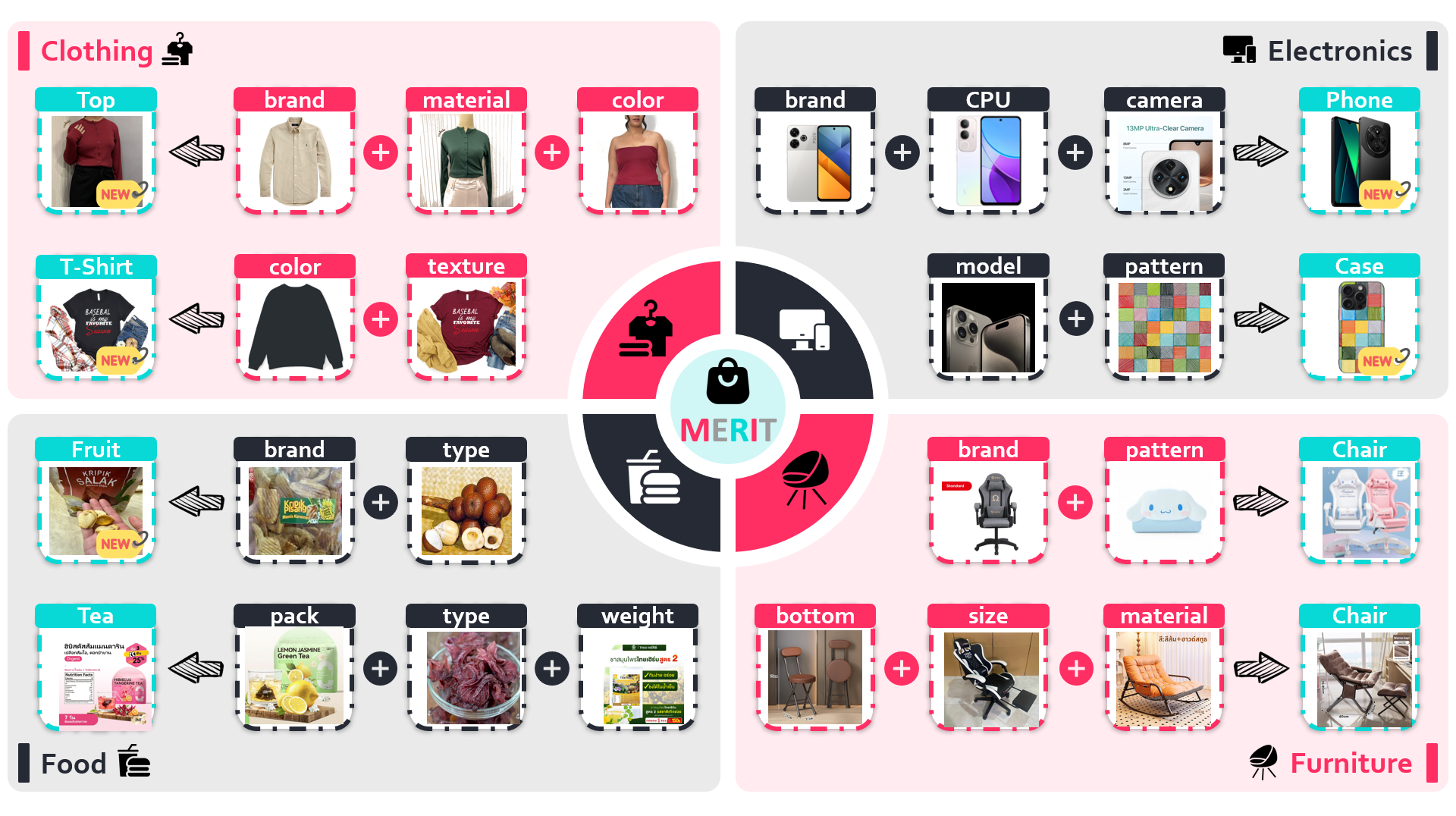
Semantic retrieval is crucial for modern applications yet remains underexplored in current research. Existing datasets are limited to single languages, single images, or singular retrieval conditions, often failing to fully exploit the expressive capacity of visual information as evidenced by maintained performance when images are replaced with captions. However, practical retrieval scenarios frequently involve interleaved multi-condition queries with multiple images. Hence, this paper introduces MERIT, the first multilingual dataset for interleaved multi-condition semantic retrieval, comprising 320,000 queries with 135,000 products in 5 languages, covering 7 distinct product categories. Extensive experiments on MERIT identify existing models's limitation: focusing solely on global semantic information while neglecting specific conditional elements in queries. Consequently, we propose Coral, a novel fine-tuning framework that adapts pre-trained MLLMs by integrating embedding reconstruction to preserve fine-grained conditional elements and contrastive learning to extract comprehensive global semantics. Experiments demonstrate that Coral achieves a 45.9% performance improvement over conventional approaches on MERIT, with strong generalization capabilities validated across 8 established retrieval benchmarks. Collectively, our contributions - a novel dataset, identification of critical limitations in existing approaches, and an innovative fine-tuning framework - establish a foundation for future research in interleaved multi-condition semantic retrieval.
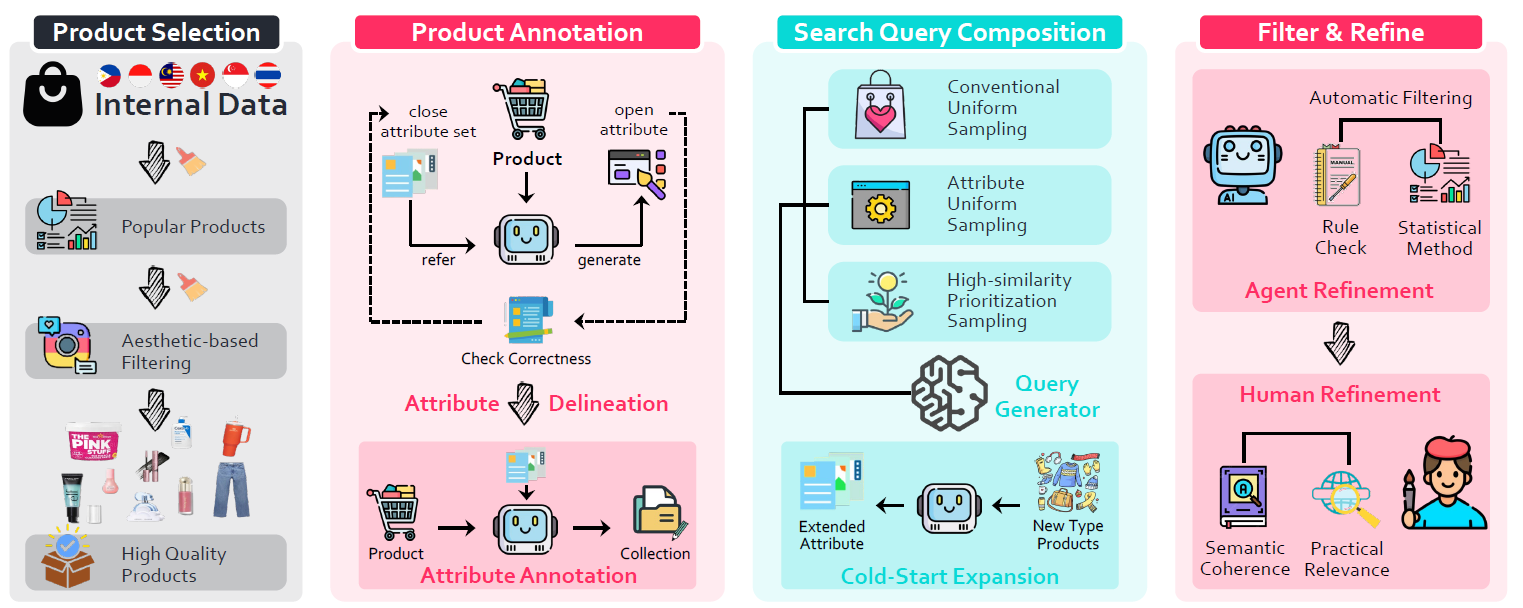
We open source some of the key code for annotation mentioned in our paper, in the merit folder.
conda create --name merit python=3.9.2
conda activate merit
pip3 install -r requirements.txt
pip3 install --upgrade deepspeed transformers torch
pip3 install git+https://github.com/openai/CLIP.git
Specifically, the process is as follows:
# 1️⃣ Using the results of open set labeling, select representative key-values
python3 merit/select_key_value.py
# For the key-values generated by the previous script, we further use GPT to filter out usable key-values. The results are shown in the file `merit/attribute_cards`
# 2️⃣ Using these reduced key-values, we can annotate attribute key-values for each product (note that one SPU has multiple SKUs)
python3 merit/annotate_spu.py
# 3️⃣-1 After annotating the products, combine the products to form query pairs
python3 merit/compose_query.py # 1. Generate query by combining products
python3 merit/annotate_query.py # 2. Generate personalized instructions for query
python3 merit/filter_query.py # 3. Mechanically filter query
# 3️⃣-2 Produce directly from similar products instead of combining them first
python3 merit/compose_query_cold.py # Generate query directly from similar products
# 4️⃣ Manual labeling and filtering
# 📊 For the division of OOD data, see merit/exp_ood_split.py1️⃣ Download the dataset
The dataset can be download in
huggingface-cli download WeiChow/merit --repo-type dataset --local-dir <YOUR SAVE DIR> --local-dir-use-symlinks FalseThen you can use the dataset directly.
2️⃣ Load the dataset
from datasets import load_dataset
from tqdm import tqdm
# https://github.com/weichow23/merit/blob/main/annotator/utils.py
from annotator.utils import read_json_data

# if you download the merit in the default huggingface path you can use "WeiChow/merit" instead of <YOUR SAVE DIR>
train_products = load_dataset("WeiChow/merit")["train"]
test_products = load_dataset("WeiChow/merit")["test"]

train_queries = read_json_data(f"{<YOUR SAVE DIR>}/queries-train.json")
test_queries = read_json_data(f"{<YOUR SAVE DIR>}/queries-test.json")
3️⃣ How to use the dataset (use test set as example)
# Create an inverted index table for products"
# It may cost some time, if you want to accelerate:
# I suggest you store the image in test_products locally and change the field to the local image address,
# and then read it. This is convenient and does not take a minute.
product_map = {p["idx"]: p for p in tqdm(test_products, desc="Creating product map")}

for item in tqdm(test_queries):
  print(item)
  # query instruction
  print(item["query instruction"])
  # query product
  for q in item['query']:
    # image, title, idx, class, country, language, attribute
    q_product = product_map[str(q)]
    print(q_product['image'])
    print(q_product['title'])
  # candidate product
  for c in item ['pos_candidate']:
    c_product = product_map[str(c)]
    print(c_product['image'])
    print(c_product['title'])
  break
4️⃣ Calculate the metrics
# https://github.com/weichow23/merit/blob/main/annotator/utils.py
from annotator.utils import calculate_mrr

# After inference is completed, save the result as a dict in the following format
# Case: result_dict = {"1": -1, "2": -1, "3": 2, "4": -1, "5": 7}
# 1,2,3,4,5 are the idx of the query, and the corresponding value is the position where the first positive sample appears
# (if there is more than one positive sample, the one with a smaller value is taken, that is, the one in front),
# if > 10, it is -1
calculate_mrr(result_dict)Recognizing neglecting specific conditional elements in queries as a primary source of error, we introduce LogoCoral to enhance MLLM-based retriever performance in addressing interleaved multi-condition semantic retrieval tasks through the integration of visual reconstruction during the fine-tuning process of the MLLM-to-retrieval model adaptation.
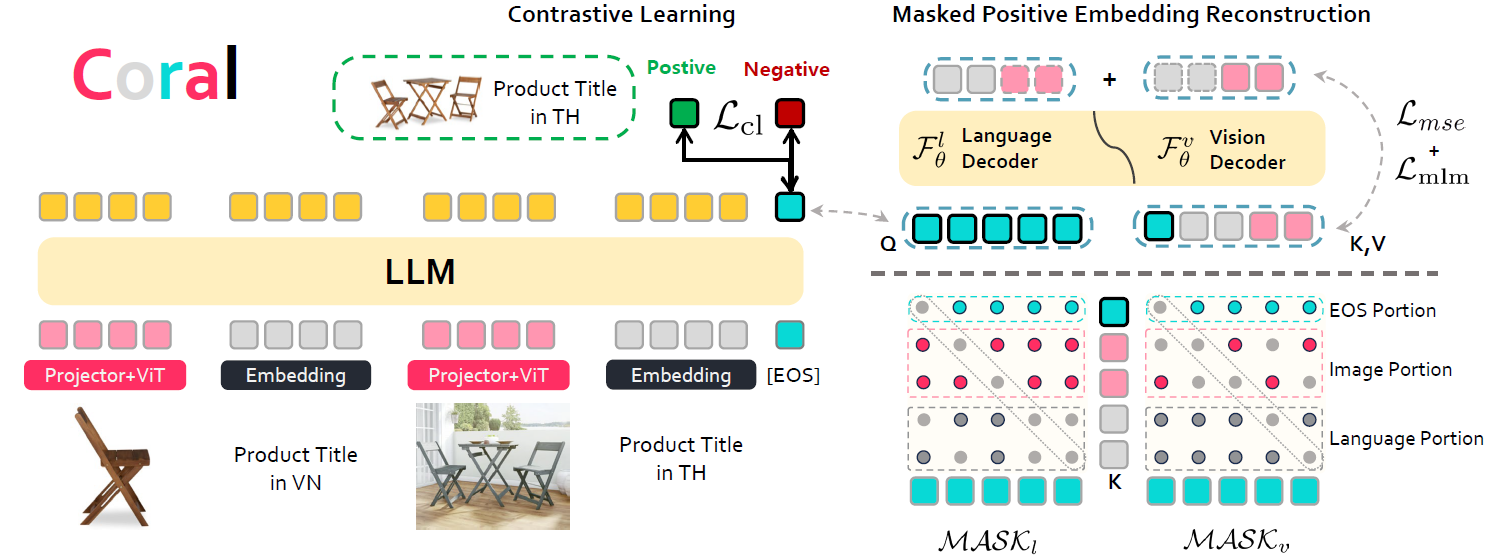
Our released Coral model is based on Qwen implementation. You can find our pre-trained weights at
First, you need to enter the coral directory and use it as the root directory.
.
├── argument
│   ├── arguments.py
├── configs
│   └── deepspeed_zero2.json
├── data
│   ├── conversation.py
│   └── dataset.py
├── model
│   ├── enhancedDecoder.py
│   ├── modeling_base.py
│   ├── modeling_cl.py
│   └── modeling_coral.py
├── README.md
├── scripts
│   ├── run_infer.py
│   └── run_train.py
├── setup.sh
├── trainer
│   └── trainer.py
└── yamls
    └── cora_demo.yaml
1️⃣ Set up environment
To train Coral, you need to install the following additional dependencies:
bash setup.sh2️⃣ Inference After downloading the pre-trained weights, you need to perform inference separately on queries and candidates. The inference outputs will be .npy files. Then you need to calculate the similarity to obtain the top 10 most similar products as the retrieval results for each query.
To launch the inference script, you need to format your data as follows:
{"id": 291, "conversations": [{"from": "human", "value": "Find a product of shoes that have the same closure type with <Product 1> <image>\n\u0e23\u0e2d\u0e07\u0e40\u0e17\u0e49\u0e32\u0e41\u0e15\u0e30\u0e40\u0e14\u0e47\u0e01\u0e0a\u0e32\u0e22\u0e25\u0e32\u0e22\u0e40\u0e1a\u0e47\u0e19\u0e40\u0e17\u0e47\u0e19 2 \u0e40\u0e17\u0e1b\u0e1b\u0e23\u0e31\u0e1a\u0e2a\u0e32\u0e22\u0e44\u0e14\u0e49 \u0e23\u0e38\u0e48\u0e19 SD460 </Product 1> and the same color with <Product 2> <image>\n\u0e40\u0e0b\u0e17\u0e1c\u0e25\u0e44\u0e21\u0e49\u0e1f\u0e23\u0e35\u0e0b\u0e14\u0e23\u0e32\u0e22 \u0e2a\u0e15\u0e2d\u0e40\u0e1a\u0e2d\u0e23\u0e35\u0e48 35 \u0e01\u0e23\u0e31\u0e21 + \u0e17\u0e38\u0e40\u0e23\u0e35\u0e22\u0e19 35 \u0e01\u0e23\u0e31\u0e21 </Product 2>, featuring a superhero theme."}], "pos_cand_list": ["1731463903574001768", "1731463903574067304"], "image": ["xxxx.jpg", "yyyjpg"]}💡: Please don't be surprised if it is displayed as \u... It is not garbled, but because our data contains languages such as 🇹🇭Thai.
"id" represents the query index, "conversations" is used for Qwen inference, "pos_cand_list" contains the correct product retrieval results, and "image" contains local image paths that replace the two placeholders in conversations. The conversations include the images and product titles of the two products after the instruction.
Here is an example of a candidate:
{"id": "1730256425535310625", "conversations": [{"from": "human", "value": "Represent the given product: <image>\nBalo HiP th\u1eddi trang H\u00e0n Qu\u1ed1c, ch\u1ea5t li\u1ec7u v\u1ea3i oxford ch\u1ed1ng n\u01b0\u1edbc, k\u00edch th\u01b0\u1edbc 31*13*40cm, ph\u00f9 h\u1ee3p laptop 15.6 inch."}], "image": "zzzz.jpg"}Run infererence:
python3 scripts/run_infer.py \
    --model_name $model_path \
    --data_path $data_path \
    --max_image_token 576 \
    --tgt_folder $target_folder \
    --batch_size 1 \
    --world_size $WORLD_SIZE \
    --DDP_port $DDP_PORT
3️⃣ Eval see below
For training, you also need to organize the data in conversation format as JSON files. You can refer to the 2️⃣ Inference section above.
Run training:
torchrun --node_rank=0 --nproc_per_node=$WORLD_SIZE --nnodes=$NN_NODES --master_port=$MASTER_PORT scripts/run_train.py --conf yamls/cora_demo.yaml@article{chow2025merit,
title={MERIT: Multilingual Semantic Retrieval with Interleaved Multi-Condition Query},
author={Chow, Wei and Gao, Yuan and Li, Linfeng and Wang, Xian and Xu, Qi and Song, Hang and Kong, Lingdong and Zhou, Ran and Zeng, Yi and Cai, Yidong and others},
journal={arXiv preprint arXiv:2506.03144},
year={2025}
}
MERIT is licensed under the Apache 2.0.