一个原生微信小程序课程表渲染组件。
weapp-class-table 适合展示按周排列的课程表,包含日期表头、节次时间、课程卡片、非本周课程、冲突课程提示和浅色 / 深色主题适配。
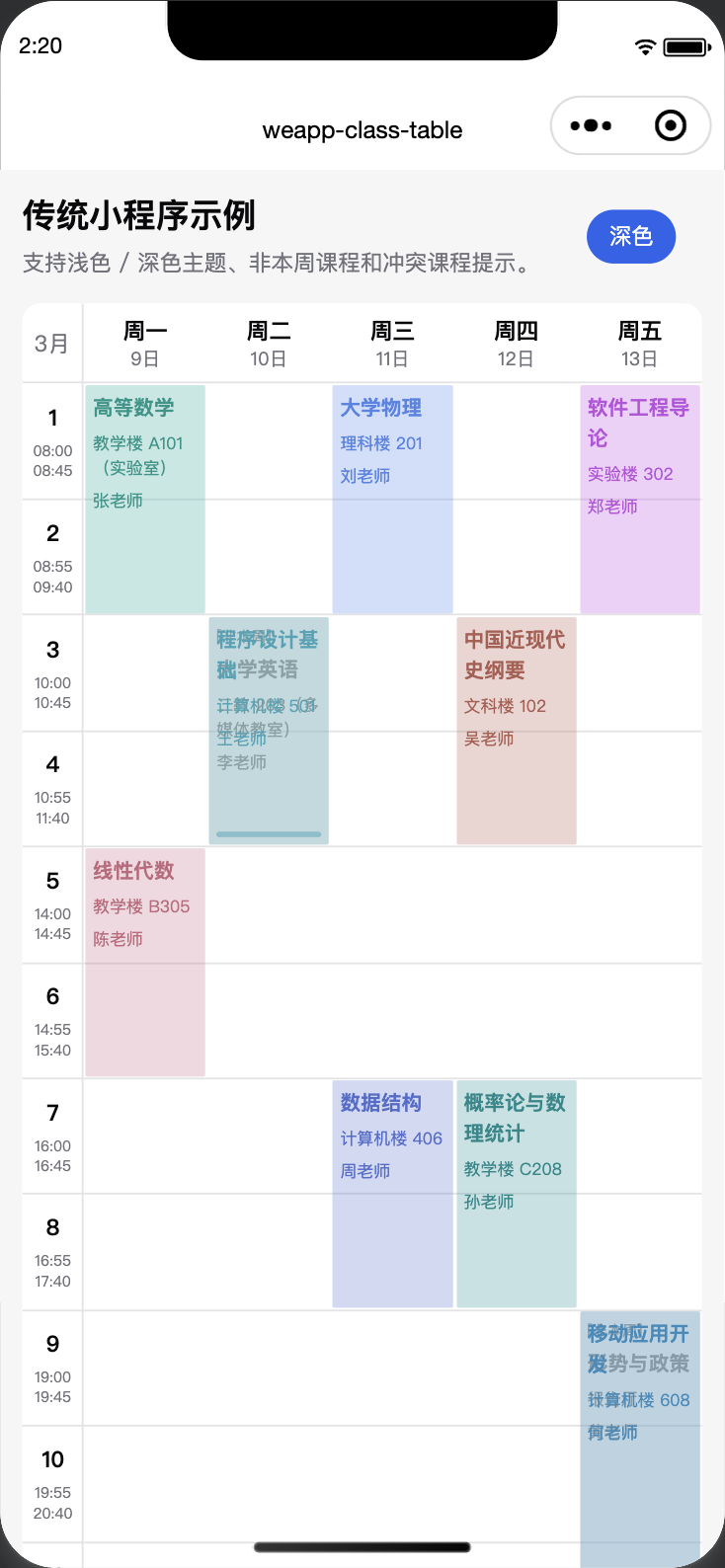
- 支持周一到周五 / 周一到周日显示。
- 支持当前周课程与非本周课程区分。
- 支持同一时间格内的课程冲突提示。
- 支持课程点击事件,返回当前课程和同格课程列表。
- 支持日期表头、节次时间、背景图、最大节次自动扩展。
- 沿用语义主题变量,例如
--card、--foreground、--border。 - 内置课程颜色和
.dark深色模式课程颜色。
将 class-table 目录复制到小程序项目的组件目录中,例如:
miniprogram/components/class-table页面 JSON:
{
  "usingComponents": {
    "class-table": "/components/class-table/index"
  }
}
页面 WXML:
<class-table
  courses="{{ courses }}"
  current-week="{{ currentWeek }}"
  term-start-date="{{ termStartDate }}"
  section-times="{{ sectionTimes }}"
  settings="{{ settings }}"
  bind:courseTap="handleCourseTap"
  bind:weekendDetected="handleWeekendDetected"
/>
页面 JS:
Page({
  data: {
    currentWeek: 3,
    termStartDate: '2026-02-23',
    sectionTimes: {
      1: ['08:00', '08:45'],
      2: ['08:55', '09:40'],
      3: ['10:00', '10:45'],
      4: ['10:55', '11:40'],
    },
    settings: {
      showWeekend: false,
      showOtherWeek: true,
      cellHeight: 120,
    },
    courses: [
      {
        id: 'course-1',
        courseName: '高等数学',
        teacher: '张老师',
        place: '教学楼 A101(实验室)',
        weekday: 1,
        sections: [{ section: 1 }, { section: 2 }],
        weeks: [1, 2, 3, 4, 5, 6, 7, 8],
      },
    ],
  },

  handleCourseTap(event) {
    console.log(event.detail)
  },

  handleWeekendDetected(event) {
    console.log(event.detail)
  },
})示例工程位于:
examples/weapp可以直接用微信开发者工具打开。
为了能直接打开示例,示例内置了一份本地组件副本:
examples/weapp/miniprogram/components/class-table项目中使用时,把组件目录复制到自己的小程序组件目录,并在页面 JSON 中引用:
{
  "usingComponents": {
    "class-table": "/components/class-table/index"
  }
}| 属性 | 类型 | 默认值 | 说明 |
|---|---|---|---|
courses |
Array |
[] |
课程列表。 |
currentWeek |
Number |
1 |
当前周。 |
termStartDate |
String |
'' |
学期第一周周一日期,例如 2026-02-23。 |
sectionTimes |
Object |
{} |
节次时间配置。 |
settings |
Object |
{} |
显示配置。 |
| 事件 | 说明 |
|---|---|
ready |
组件 attached 后触发。 |
courseTap |
点击课程时触发。 |
weekendDetected |
检测到周末课程且 settings.showWeekend 为 false 时触发。 |
courseTap detail:
{
  course,    // 当前点击课程
  courses,   // 同一单元格内的课程列表
  cellIndex, // 单元格索引,例如 "2-3"
}
weekendDetected detail:
{
  hasWeekend: true,
}推荐结构:
interface ClassTableCourse {
  id?: string
  courseName: string
  teacher?: string
  place?: string
  weekday: number
  sections: ClassTableSection[]
  weeks: number[]
}

interface ClassTableSection {
  section: number
}
示例:
{
  id: 'course-1',
  courseName: '高等数学',
  teacher: '张老师',
  place: '教学楼 A101(实验室)',
  weekday: 1,
  sections: [{ section: 1 }, { section: 2 }],
  weeks: [1, 2, 3, 4, 5, 6, 7, 8],
}默认配置:
{
  showWeekend: false,
  showOtherWeek: false,
  cellHeight: 120,
  maxSection: 11,
  background: {
    url: '',
    opacity: 1,
    blur: 0,
  },
}| 字段 | 类型 | 说明 |
|---|---|---|
showWeekend |
Boolean |
是否显示周六、周日。 |
showOtherWeek |
Boolean |
是否显示非本周课程。 |
cellHeight |
Number |
每节课单元格高度,单位 rpx。 |
maxSection |
Number |
默认最大节次,课程节次超过该值时会自动扩展。 |
background.url |
String |
背景图地址。 |
background.opacity |
Number |
背景图透明度。 |
background.blur |
Number |
背景图模糊半径,单位 rpx。 |
组件使用:
{
  "styleIsolation": "apply-shared"
}
这样可以沿用项目中的全局主题变量和 .dark 类。组件内部使用的语义变量包括:
page {
  --background: #f6f6f6;
  --foreground: #09090b;
  --card: #ffffff;
  --card-foreground: #09090b;
  --primary: #2563eb;
  --primary-foreground: #fafafa;
  --muted: #f4f4f5;
  --muted-foreground: #71717a;
  --border: #e4e4e7;
}

.dark {
  --background: #18181b;
  --foreground: #fafafa;
  --card: #09090b;
  --card-foreground: #fafafa;
  --primary: #3b82f6;
  --primary-foreground: #09090b;
  --muted: #27272a;
  --muted-foreground: #a1a1aa;
  --border: #27272a;
}
课程颜色已内置,包含:
.class-table-color-0到.class-table-color-41.class-table-cell-style-0到.class-table-cell-style-41.dark .class-table-cell-style-*深色模式适配
组件会按课程名分配颜色,超过颜色数量后循环使用。
pnpm test校验内容包括:
- 必要文件是否存在。
- README 是否包含原生小程序示例说明。
MIT