A paginated A4 document editor for React
Meta Lexical × A4 page rules


A paginated document editor built as a reusable React library on top of Meta Lexical. Every page is a true discrete A4 page — no fake pages, no CSS hacks, no single-editor visual tricks.
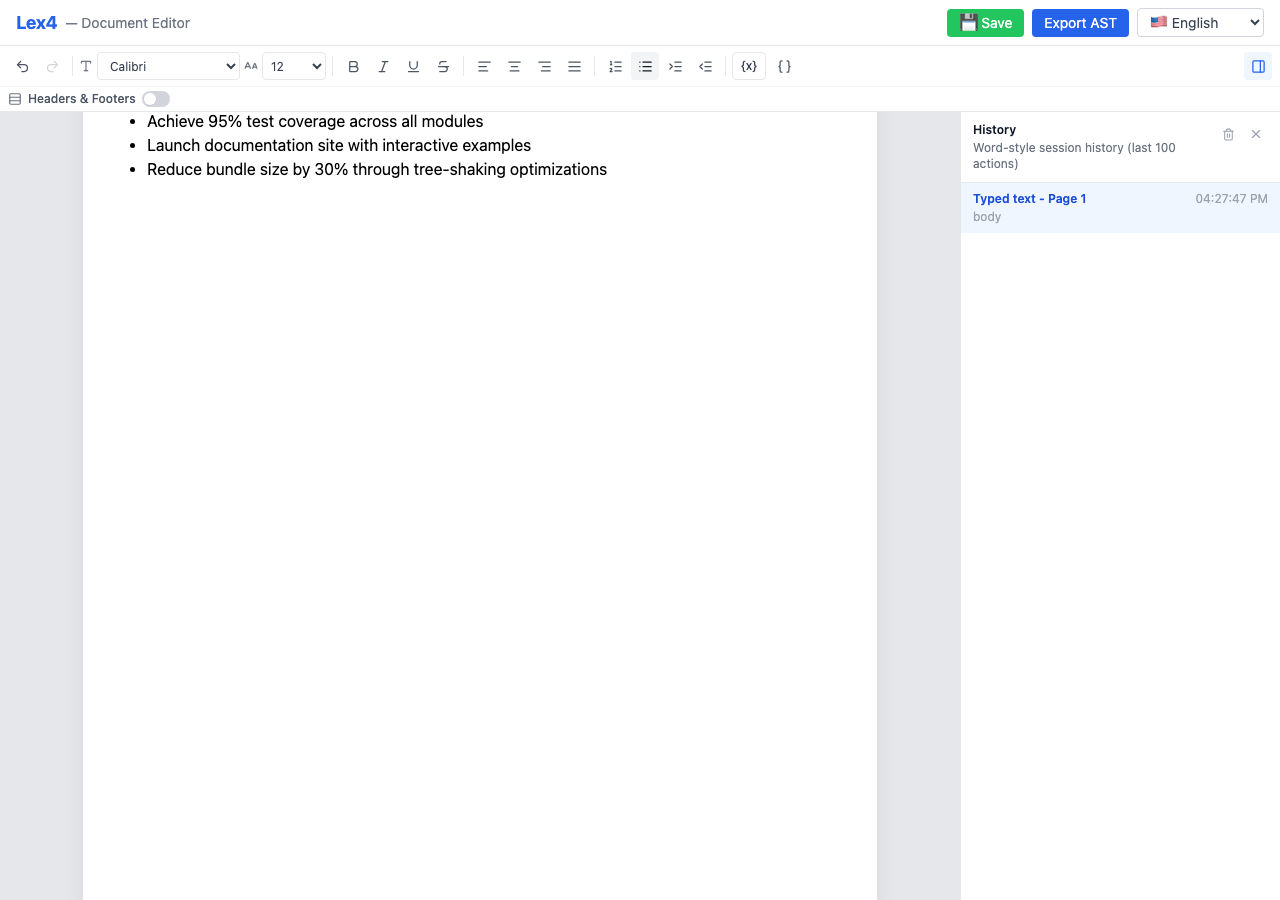
- True A4 pagination — every page is exactly 794 × 1123 CSS pixels (210 mm × 297 mm at 96 DPI)
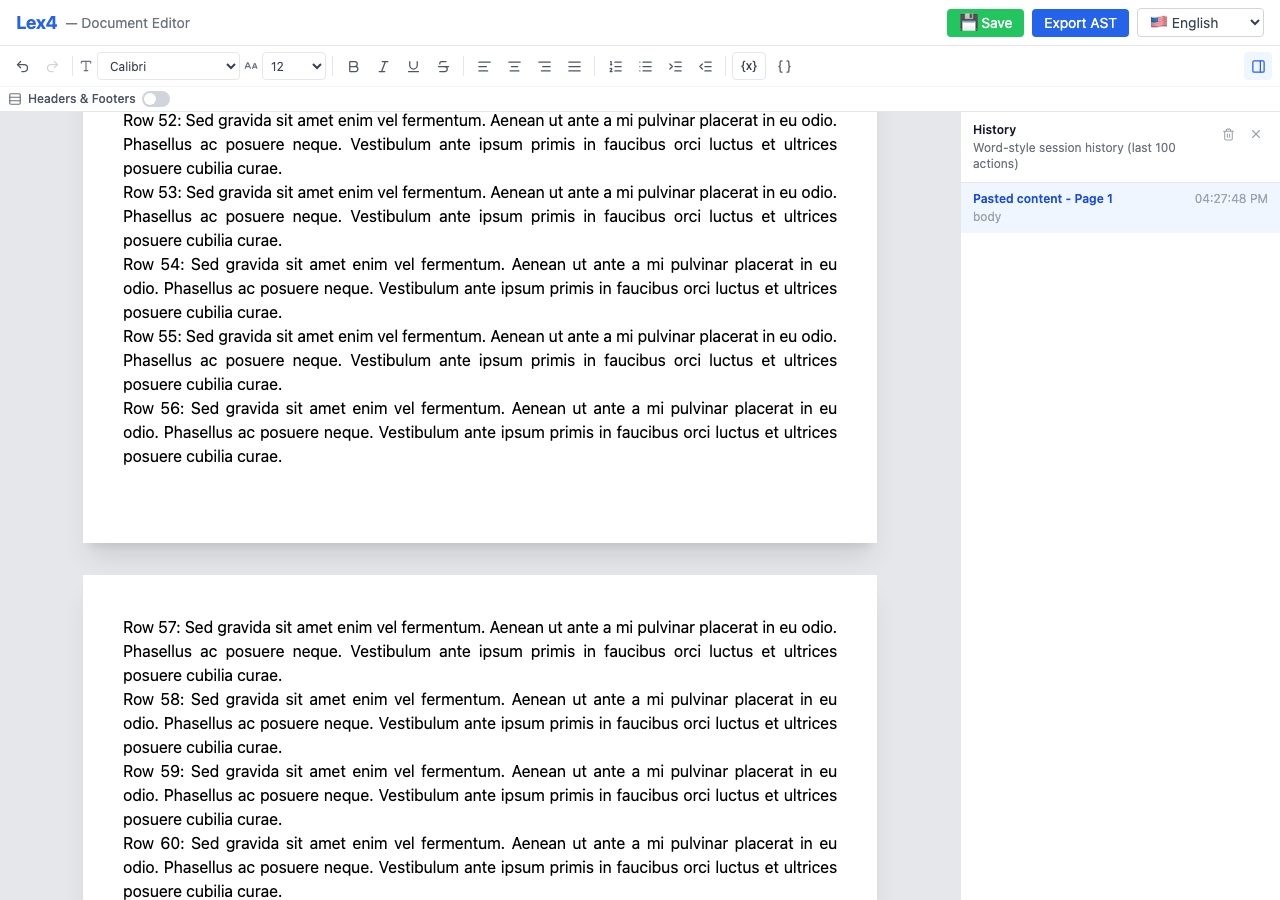
- Automatic content flow — overflow splits at block boundaries with mid-block splitting for oversized paragraphs and lists
- Rich text formatting — bold, italic, underline, strikethrough, alignment, lists, indentation
- Selection-aware formatting — toolbar pressed state follows the caret, partial same-line block restyling is preserved, and selected variable chips can be promoted to headings
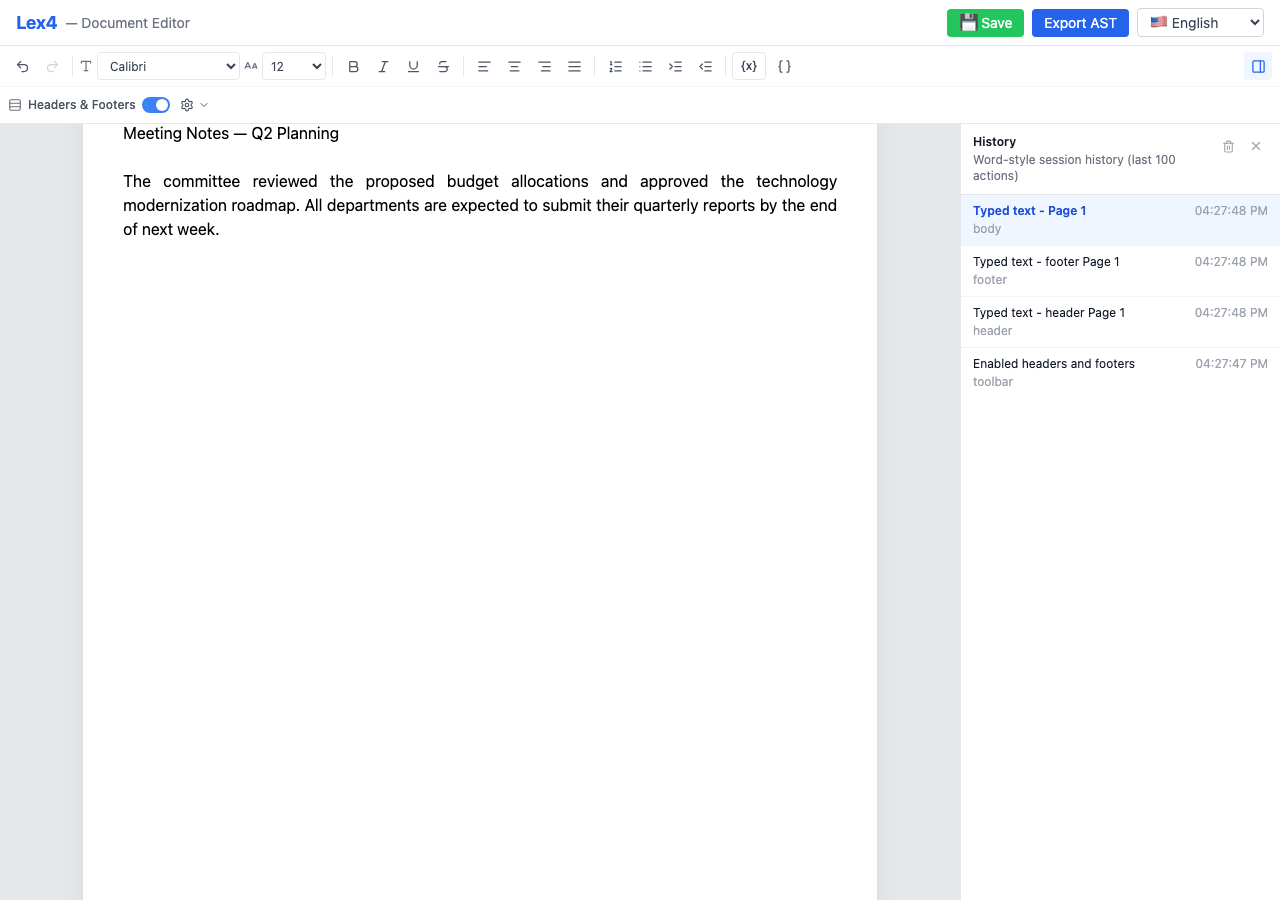
- Headers & footers — global toggle with per-page editable regions and page counters
- Multiple font families — Inter, Arial, Times New Roman, Courier New, Georgia, Verdana and more
- Font size control — per-selection font size with AST-level preservation
- Session history sidebar — Word-style action timeline with full undo/redo
- Extension architecture — opt-in features via composable extensions (
astExtension,variablesExtension) - Document AST export — clean, versioned, Lexical-independent AST for backend DOCX/PDF rendering
- Variables & placeholders — insert dynamic tokens like
{{customer.name}}with metadata export - i18n support — all UI strings externalized; override any subset for localization
- Read-only mode — disable editing while keeping the document viewable
- Zero config — drop in the component and start editing
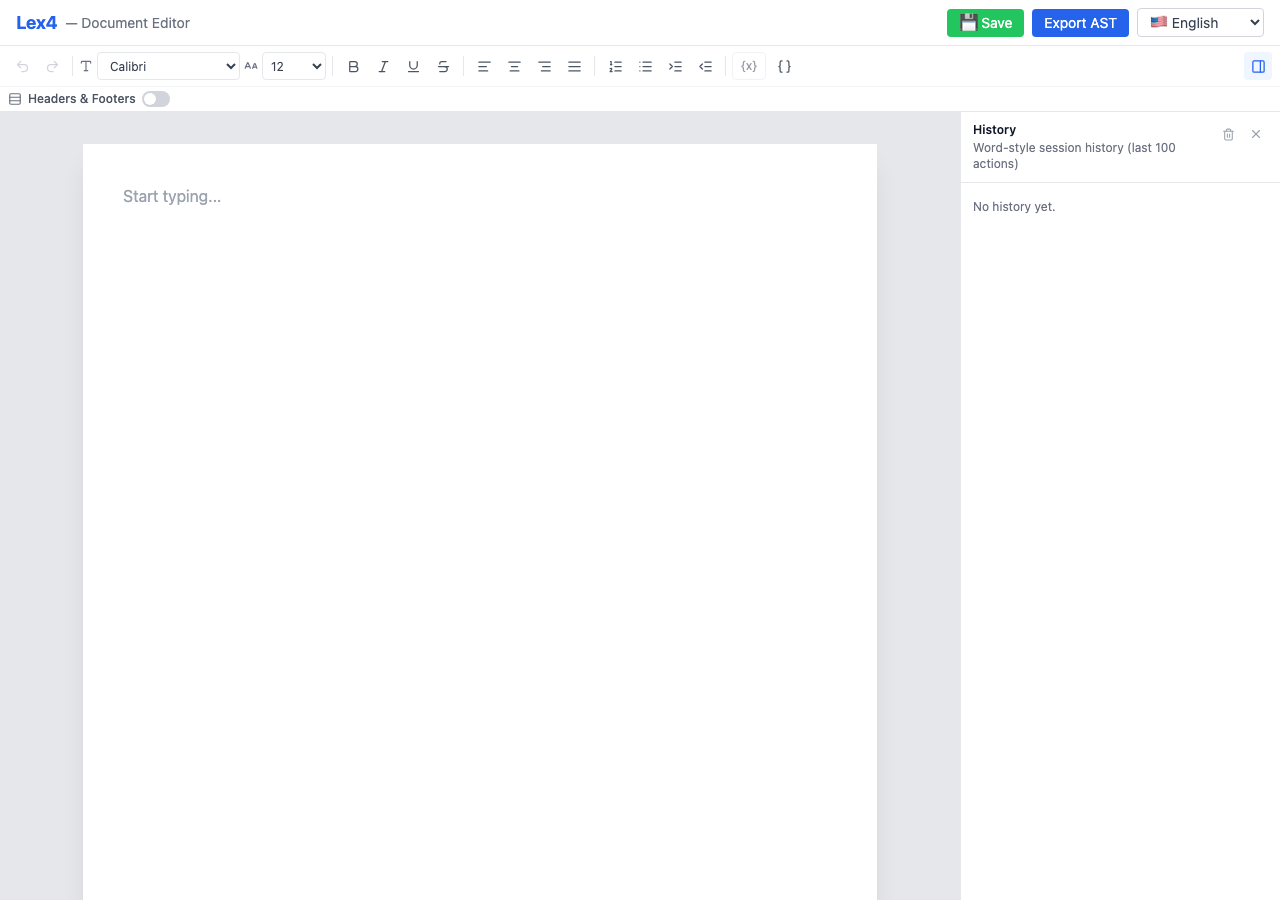
Empty Editor — clean A4 page ready for editing
Headers & Footers — global toggle with editable regions
Multi-Page Document — automatic content flow across pages
Toolbar — full formatting controls

npm install @yurikilian/lex4
# or
pnpm add @yurikilian/lex4
# or
yarn add @yurikilian/lex4The library requires React 18+ as a peer dependency. Lexical packages are bundled.
npm install react react-domimport { Lex4Editor } from '@yurikilian/lex4';
import '@yurikilian/lex4/style.css';
function App() {
return (
<Lex4Editor
onDocumentChange={(doc) => console.log(doc)}
/>
);
}Extensions add opt-in capabilities. The two built-in extensions are astExtension (document AST export) and variablesExtension (dynamic variable placeholders):
import { useRef, useMemo } from 'react';
import {
  Lex4Editor,
  Lex4EditorHandle,
  astExtension,
  variablesExtension,
  VariableDefinition,
} from '@yurikilian/lex4';
import '@yurikilian/lex4/style.css';

const variables: VariableDefinition[] = [
  { key: 'customer.name', label: 'Customer Name', group: 'Customer', valueType: 'string' },
  { key: 'proposal.date', label: 'Proposal Date', group: 'Proposal', valueType: 'date' },
];

function App() {
  const editorRef = useRef<Lex4EditorHandle>(null);

  const extensions = useMemo(() => [
    astExtension(),
    variablesExtension(variables),
  ], []);

  const handleSave = () => {
    const ast = editorRef.current?.getDocumentAst();
    console.log(JSON.stringify(ast, null, 2));
  };

  return (
    <>
      <Lex4Editor
        ref={editorRef}
        extensions={extensions}
        onDocumentChange={(doc) => console.log(doc)}
      />
      <button onClick={handleSave}>Export AST</button>
    </>
  );
}<Lex4Editor
initialDocument={savedDocument}
readOnly={true}
/>The main editor component. Drop it into any React application.
| Prop | Type | Default | Description |
|---|---|---|---|
initialDocument |
Lex4Document |
Empty document | Pre-populate the editor with saved content |
onDocumentChange |
(doc: Lex4Document) => void |
— | Called on every document mutation |
headerFooterEnabled |
boolean |
false |
Initial header/footer toggle state |
onHeaderFooterToggle |
(enabled: boolean) => void |
— | Called when the user toggles headers/footers |
readOnly |
boolean |
false |
Disable editing (view-only mode) |
extensions |
Lex4Extension[] |
[] |
Extensions to load (e.g., astExtension(), variablesExtension(defs)) |
translations |
DeepPartial<Lex4Translations> |
English | Partial i18n overrides, deep-merged with defaults |
toolbar |
Lex4ToolbarConfig |
All controls visible with labels | Controls visibility and labels for built-in toolbar actions such as history, variables, and header/footer |
onSave |
(payload: { document, ast, json }) => void |
— | Called when the host app triggers a save (includes full Lex4Document) |
captureHistoryShortcutsOnWindow |
boolean |
true |
Capture ⌘Z/⌘⇧Z at the window level |
className |
string |
— | Additional CSS class for the editor root |
The editor ref exposes built-in chrome controls, and extensions can add more methods on top.
| Method | Signature | Description |
|---|---|---|
setHistorySidebarOpen(open) |
(open: boolean) => void |
Opens or closes the history sidebar programmatically |
toggleHistorySidebar() |
() => void |
Toggles the history sidebar |
insertDocumentContent(document) |
(document: Lex4Document) => boolean |
Inserts the body content of another saved Lex4 document at the current cursor position |
Extensions are opt-in feature modules that add capabilities to the editor without coupling.
Adds document AST export. Contributes imperative handle methods:
| Method | Signature | Description |
|---|---|---|
getDocumentAst() |
() => DocumentAst |
Returns the document as a clean, typed AST |
getDocumentJson() |
() => string |
Returns the AST serialized as formatted JSON |
buildSavePayload(opts?) |
(opts?) => SaveDocumentRequest |
Wraps the AST into a REST-ready payload |
const extensions = [astExtension()];
// then via ref:
const ast = editorRef.current?.getDocumentAst();Adds variable placeholders — dynamic tokens rendered as non-editable chips in the editor and preserved as structured nodes in the exported AST.
| Method | Signature | Description |
|---|---|---|
insertVariable(key) |
(key: string) => void |
Inserts a variable at the current cursor position |
refreshVariables(defs) |
(defs: VariableDefinition[]) => void |
Updates the available variable definitions |
setVariablePanelOpen(open) |
(open: boolean) => void |
Opens or closes the variable side panel programmatically |
toggleVariablePanel() |
() => void |
Toggles the variable side panel |
Also adds:
- Toolbar button — variable picker dropdown for inserting variables inline
- Host-controlled side panel — opens a searchable variable panel on the right, which can also be controlled from app chrome via the handle methods above
- Variable node — custom Lexical node rendered as a non-editable chip
- Selection formatting — selected chips participate in toolbar inline/block formatting and keep heading/paragraph styling in sync with export
const variables: VariableDefinition[] = [
  { key: 'customer.name', label: 'Customer Name', group: 'Customer', valueType: 'string' },
  { key: 'proposal.date', label: 'Proposal Date', group: 'Proposal', valueType: 'date' },
];

const extensions = [variablesExtension(variables)];
In the exported AST, variables appear as { type: "variable", key: "customer.name" } nodes within block content, and their definitions appear under metadata.variables.
import type { SerializedEditorState } from 'lexical';

type PageCounterMode = 'none' | 'header' | 'footer' | 'both';

/** Top-level document state — serialize this to persist documents */
interface Lex4Document {
  pages: PageState[];
  headerFooterEnabled: boolean;
  pageCounterMode: PageCounterMode;
  defaultHeaderState: SerializedEditorState | null;
  defaultFooterState: SerializedEditorState | null;
  defaultHeaderHeight: number;
  defaultFooterHeight: number;
}

/** State for a single page */
interface PageState {
  id: string;
  bodyState: SerializedEditorState | null;
  headerState: SerializedEditorState | null;
  footerState: SerializedEditorState | null;
  headerHeight: number;
  footerHeight: number;
  bodySyncVersion: number;
  headerSyncVersion: number;
  footerSyncVersion: number;
}| Function | Signature | Description |
|---|---|---|
createEmptyDocument() |
() => Lex4Document |
Creates a blank document with one empty A4 page |
createEmptyPage() |
(id?: string) => PageState |
Creates a single empty page |
| Constant | Value | Description |
|---|---|---|
A4_WIDTH_PX |
794 |
A4 width in CSS pixels at 96 DPI |
A4_HEIGHT_PX |
1123 |
A4 height in CSS pixels at 96 DPI |
A4_WIDTH_MM |
210 |
A4 width in millimeters |
A4_HEIGHT_MM |
297 |
A4 height in millimeters |
MAX_HEADER_HEIGHT_PX |
225 |
Maximum header height (20% of page) |
MAX_FOOTER_HEIGHT_PX |
225 |
Maximum footer height (20% of page) |
These hooks are exported for advanced use cases where you need to build custom page layouts:
| Hook | Description |
|---|---|
usePagination |
Core pagination logic — overflow/underflow detection and page management |
useOverflowDetection |
Monitors content height and triggers reflow when content exceeds the page body |
useHeaderFooter |
Header/footer state management and chrome template application |
All UI strings are externalized and can be overridden via the translations prop. No external i18n library is forced on consumers.
<Lex4Editor
  translations={{
    toolbar: { undo: 'Desfazer', redo: 'Refazer', bold: 'Negrito (Ctrl+B)' },
    header: { placeholder: 'Cabeçalho' },
    footer: { placeholder: 'Rodapé' },
  }}
/>If your app already uses i18next, bridge it:
import { useTranslation } from 'react-i18next';

function App() {
  const { t } = useTranslation();

  return (
    <Lex4Editor
      translations={{
        toolbar: {
          undo: t('editor.undo'),
          redo: t('editor.redo'),
          bold: t('editor.bold'),
        },
      }}
    />
  );
}| Section | Keys | Examples |
|---|---|---|
toolbar |
editing, block type, history | undo, paragraph, heading6, history, openHistory |
history |
labels and action descriptions | title, empty, actions.blockTypeChanged, actions.insertedDocumentContent |
variables |
panel and creation flows | title, available, searchPlaceholder, openPanel, createVariableTitle |
header / footer |
1 each | placeholder |
sidebar |
1 | close |
Dynamic strings use {{key}} interpolation: "Font changed to {{value}}".
Import DEFAULT_TRANSLATIONS and Lex4Translations to see the full shape:
import { DEFAULT_TRANSLATIONS } from '@yurikilian/lex4';
import type { Lex4Translations } from '@yurikilian/lex4';All styling uses CSS custom properties (design tokens) and semantic .lex4-* classes — no Tailwind utilities in the production output. This makes style.css safe to import alongside any CSS framework.
Override tokens on .lex4-editor to theme the entire editor without !important:
.lex4-editor {
  /* Brand / accent */
  --lex4-color-primary: #10b981;         /* emerald instead of blue */
  --lex4-color-primary-light: #ecfdf5;
  --lex4-color-primary-text: #047857;

  /* Surfaces & text */
  --lex4-color-bg: #ffffff;
  --lex4-color-bg-canvas: #f8fafc;       /* lighter canvas */
  --lex4-color-text: #111827;
  --lex4-color-text-secondary: #6b7280;

  /* Dimensions */
  --lex4-sidebar-width: 280px;           /* narrower sidebar */
  --lex4-font-family: 'Times New Roman', serif;
}
See the full list of tokens in packages/editor/src/styles.css.
Every UI region has a semantic class you can target:
| Region | Selector |
|---|---|
| Root | .lex4-editor |
| Toolbar | .lex4-toolbar |
| Toolbar button | .lex4-toolbar-btn |
| Toolbar select | .lex4-toolbar-select |
| Document canvas | .lex4-canvas |
| Page | .lex4-page |
| Page body | .lex4-page-body |
| Page header | .lex4-page-header |
| Page footer | .lex4-page-footer |
| Sidebar | .lex4-sidebar |
| History entry | .lex4-history-entry-row |
| Variable chip | .lex4-variable-chip |
| Variable picker | .lex4-variable-picker |
Extensions can contribute CSS variables and a root class name:
const darkModeExtension: Lex4Extension = {
  name: 'dark-mode',
  cssVariables: {
    '--lex4-color-bg': '#1a1a2e',
    '--lex4-color-text': '#e0e0e0',
    '--lex4-color-bg-canvas': '#16213e',
  },
  rootClassName: 'lex4-dark',
};The AST is a clean, versioned, Lexical-independent structure designed for backend consumption (e.g., DOCX/PDF generation). It preserves semantic structure, formatting marks, font choices, header/footer layout, A4 page metadata, and variable references.
Requires
astExtension()— the AST export is opt-in via the extension system.
// Export via imperative ref
const ast = editorRef.current?.getDocumentAst();

// Or build a REST payload
const payload = editorRef.current?.buildSavePayload({
  exportTarget: 'pdf',
  documentId: 'doc-123',
});

await fetch('/api/documents/export', {
  method: 'POST',
  headers: { 'Content-Type': 'application/json' },
  body: JSON.stringify(payload),
});interface DocumentAst {
version: '1.0.0';
page: {
format: 'A4';
widthMm: 210;
heightMm: 297;
margins: { topMm, rightMm, bottomMm, leftMm };
};
headerFooter: {
enabled: boolean;
pageCounterMode: 'none' | 'header' | 'footer' | 'both';
defaultHeader: ContentAst | null;
defaultFooter: ContentAst | null;
};
pages: PageAst[];
metadata: {
variables: Record<string, VariableDefinitionAst>;
};
}interface SaveDocumentRequest {
document: DocumentAst;
exportTarget?: 'pdf' | 'docx';
documentId?: string;
metadata?: Record<string, string>;
}Unlike most web-based "paginated" editors that use a single editor with CSS visual breaks, Lex4 uses a true multi-editor architecture where each page body is an independent Lexical editor instance coordinated by a unified document state:
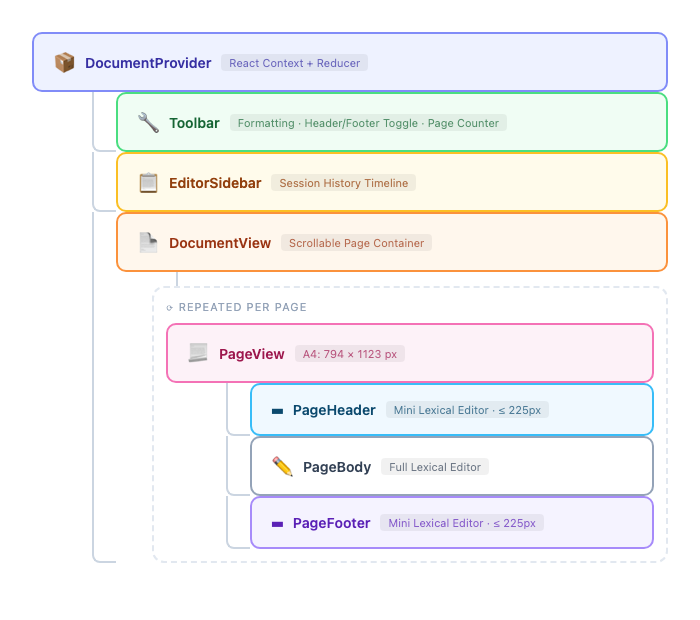
The pagination engine is built as pure functions that transform page state arrays:
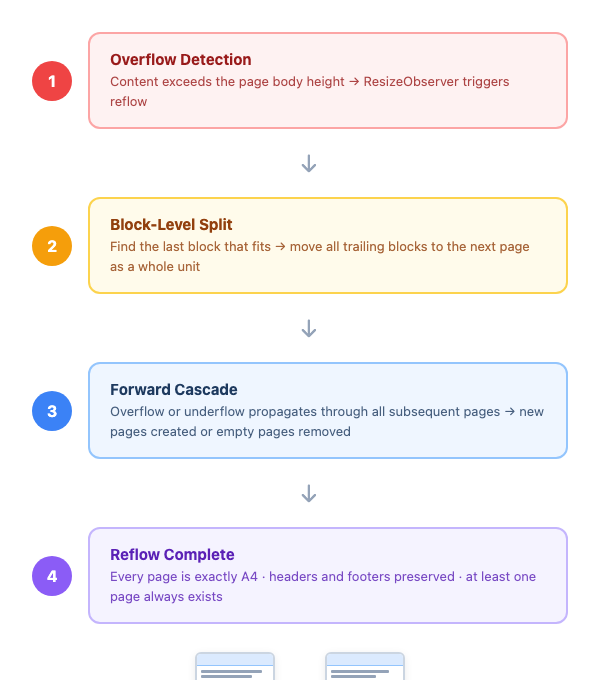
Features are added via composable extensions that can contribute nodes, plugins, toolbar items, side panels, context providers, and imperative handle methods:
interface Lex4Extension {
  name: string;
  nodes?: Klass<LexicalNode>[];        // custom Lexical nodes
  bodyPlugins?: React.ComponentType[];  // plugins per page editor
  toolbarItems?: React.ComponentType[]; // toolbar UI additions
  sidePanel?: React.ComponentType;      // right-side panel
  provider?: React.ComponentType<...>;  // context provider wrapper
  themeOverrides?: Partial<EditorThemeClasses>;
  cssVariables?: Record<string, string>;  // CSS custom property overrides
  rootClassName?: string;                 // extra class on editor root
  handleMethods?: (ctx) => Record<string, Function>;
}- Every page is exactly A4 (794 × 1123 px at 96 DPI) — no dynamic heights
- Header and footer regions never overlap body content
- Overflow always creates full A4 pages, never partial pages
- At least one page always exists — the document is never empty
- Oversized blocks are automatically split across pages (mid-block splitting)
lex4/
├── packages/
│   └── editor/               # @yurikilian/lex4 — the publishable library
│       ├── src/
│       │   ├── ast/          # AST types, serializers, block/inline mappers, payload builder
│       │   ├── components/   # React components (Lex4Editor, PageView, Toolbar, etc.)
│       │   ├── constants/    # A4 dimensions, layout math
│       │   ├── context/      # DocumentProvider, document reducer, actions
│       │   ├── engine/       # Pagination logic — pure functions (reflow, overflow, paginate)
│       │   ├── extensions/   # Extension system, astExtension, variablesExtension
│       │   ├── hooks/        # usePagination, useOverflowDetection, useHeaderFooter
│       │   ├── i18n/         # Translations types, defaults, context provider
│       │   ├── lexical/      # Editor config, plugins (paste, history), custom commands
│       │   ├── types/        # TypeScript interfaces (Lex4Document, PageState, etc.)
│       │   ├── utils/        # Editor state manipulation helpers
│       │   └── variables/    # VariableNode, VariablePlugin, VariableProvider
│       └── dist/             # Built output (ESM + CJS + types + CSS)
├── demo/                     # Demo app (deployed to GitHub Pages)
├── e2e/                      # Playwright end-to-end tests
├── .github/workflows/        # CI, npm publish, GitHub Pages deployment
└── docs/screenshots/         # Screenshots for README
- Node.js ≥ 18
- pnpm ≥ 9
# Clone the repo
git clone https://github.com/yurikilian/lex4.git
cd lex4

# Install dependencies
pnpm install

# Build the library
pnpm build

# Start the demo app at http://localhost:3000
pnpm dev| Command | Description |
|---|---|
pnpm dev |
Start the demo app dev server |
pnpm build |
Build the @yurikilian/lex4 library |
pnpm test |
Run unit tests (Vitest) |
pnpm test:e2e |
Run E2E tests (Playwright) |
pnpm lint |
Type-check all packages |
# Install Playwright browsers (first time only)
pnpm --filter e2e exec playwright install chromium

# Run all E2E tests
pnpm test:e2e

# Run with headed browser
pnpm --filter e2e test:headed

# Run with Playwright UI
pnpm --filter e2e test:ui| Category | Framework | Count | Description |
|---|---|---|---|
| Unit | Vitest | 221 | Engine logic, reducers, AST serializers, i18n, variable nodes |
| E2E | Playwright | 129 | Full user flows — typing, formatting, pagination, header/footer, variables, theme, i18n |
The library is built with Vite in library mode, producing:
| Output | Path | Description |
|---|---|---|
| ESM | dist/lex4-editor.js |
ES module for modern bundlers |
| CJS | dist/lex4-editor.cjs |
CommonJS for Node.js / legacy bundlers |
| Types | dist/index.d.ts |
Full TypeScript declarations |
| CSS | dist/style.css |
Pure CSS with design tokens (no Tailwind) |
| Source maps | dist/*.map |
Debugging support |
React and ReactDOM are externalized — they are not bundled and must be provided by the consuming application. Lexical packages are bundled as direct dependencies.
Releases are automated via GitHub Actions. To publish a new version:
- Update the version in
packages/editor/package.json - Commit and push to
main - Create a GitHub Release with a tag matching the version (e.g.
v0.2.0) - The publish workflow runs CI, then publishes to npm with provenance
Note: You need to add an
NPM_TOKENsecret to the repository settings.
The demo app is automatically deployed to GitHub Pages on every push to main:
🔗 https://yurikilian.github.io/lex4/
To deploy manually, trigger the workflow from the Actions tab.
| Technology | Role |
|---|---|
| TypeScript | Static typing |
| React 18 | UI framework |
| Meta Lexical | Rich text editing engine |
| Vite | Library build (ESM + CJS) and dev server |
| Tailwind CSS | Dev-only utility reference (not in production output) |
| Vitest | Unit testing |
| Playwright | End-to-end testing |
| pnpm | Package manager (monorepo workspaces) |
| GitHub Actions | CI/CD, npm publish, Pages deployment |
| Limitation | Details |
|---|---|
| Heuristic initial pagination | Block heights are estimated at 24px per line until the first render. ResizeObserver corrects this on mount. |
| No collaborative editing | The document model is designed for single-user editing. Real-time collaboration (e.g. CRDT/OT) is out of scope. |
| No table support | Tables are not supported as block types. |
Contributions are welcome! Please:
- Fork the repository
- Create a feature branch (
git checkout -b feat/my-feature) - Commit your changes with clear messages
- Push to your fork and open a Pull Request
Please ensure pnpm lint && pnpm build && pnpm test pass before submitting.