A simple additive scene loading system with a built-in loading screen workflow.
Loads scenes asynchronously in the background, keeps them inactive until fully ready, displays a loading canvas during the transition, and then cleanly activates the new scene while unloading the old one. Designed to provide smooth, controlled scene transitions with minimal setup.
Check out Releases tab to see a history of all versions of this package.
Select `Install package from git URL...` in the Package Manager
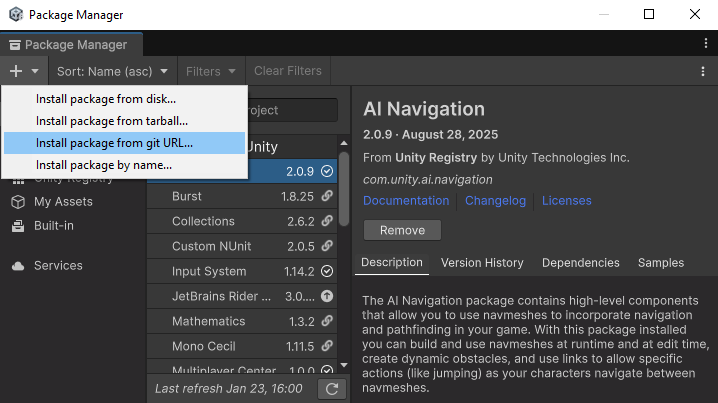
For latest release:
https://github.com/DigitalHazardInc/unity-scene-bridge-networked.git#upm
Or install specific releases:
https://github.com/DigitalHazardInc/unity-scene-bridge-networked.git#v1.0.1
Go to Release and download directly from Assets
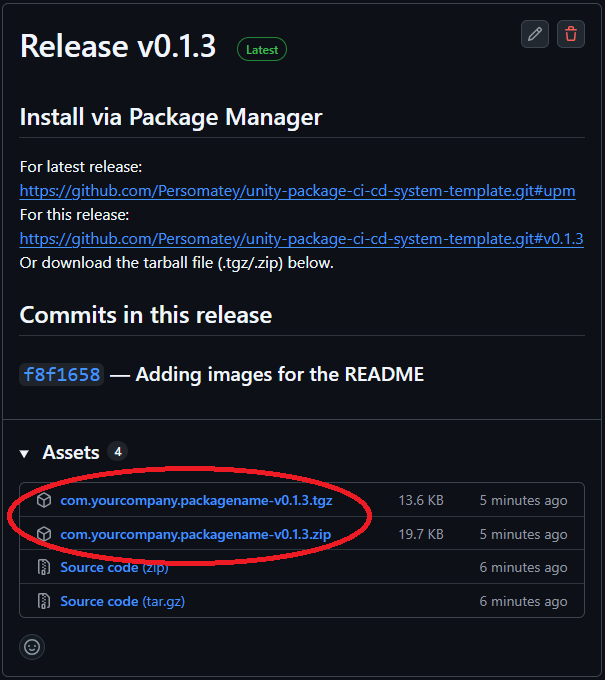
com.huntergoodin.scenebridge-v#.#.#.tgz
com.huntergoodin.scenebridge-v#.#.#.zip
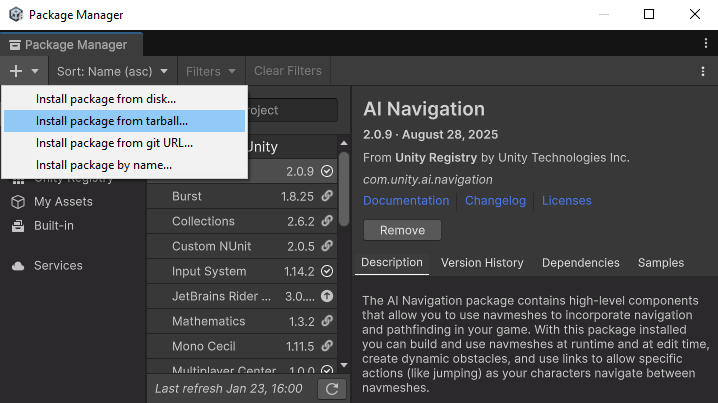
Select `Install package from tarball...` in the Package Manager
- Install the package
- Drag the
SceneBridge Loaderprefab into your scene - Feel free to create your own transition canvases
- Import the sample
- Add the sample scenes to the Build Profile
- A singleton-based Scene Loader
- Centralized loader accessible from anywhere in your project
- Easy
SceneBridge Loaderprefab provided to drag and drop into your project
- Custom loading screens
- Loading screen can display the current progress of the
AsyncOperation - Loading screen can display various backgrounds with a random selection from an array in the
SceneBridge Loaderprefab- (Optional) Text and image color synchronization accross background images
LoadingScreen.correlateTipColorWithBackgoundImgLoadingScreen.correlateHeaderColorWithBackgoundImgLoadingScreen.correlateloadingBarColorWithBackgoundImgInputSystemGatedLoadingScreen.correlateProgColorWithBackgoundImgInputManagerGatedLoadingScreen.correlateProgColorWithBackgoundImg
- (Optional) Text and image color synchronization accross background images
- Loading screen can display various text snippets (for tips, lore tidbits, etc.) with a random selection from an array in the
SceneBridge Loaderprefab - Five types of loading screens (more details in the Loading Screens section):
 └── LoadingScreen
 	├── AutomaticLoadingScreen
 	├── UIGatedLoadingScreen
 	├── InputManagerGatedLoadingScreen
 	└── InputSystemGatedLoadingScreen
- Loading screen can display the current progress of the
- The loading screen you want can be set in
SceneBridgeLoader.chosenLoadingScreen -
- Scene transition animation support
- Transition animations can play into (and out of) screens
- Ex: Play a transition animation into the loading screen, then a transition animation into the new scene.
- Ex: Play a transition animation when loading into a new scene directly
- Duration control for the animations
SceneBridgeLoader.AnimationDuration- Included animations are exactly one second to make it easy to calculate the speed of the animation given a duration
- Mid-point duration control
SceneBridgeLoader.TransitionMidPointDuration- If you want there to be a slight pause in between the "transition in" and "transition out" animations (to hang on a black screen for a sec or something)
- Transitions included in the
SceneBridge Loaderprefab by default:- Fade
- Fade to black / fade out of black
- Included in the nested
Fade Transition Canvascanvas
- Swipe
- Swipe to black / swipe out of black
- Included in the nested
swipe Transition Canvascanvas
- Fade
- It's easy to swap in/out which animations you want into the
SceneBridgeLoader.transitionCanvasesarray- Pass which transition index you want to play by passing it as a variable to the functions outlined below
- Feel free to create your own transition animations!
- Remember to add them to the
SceneBridgeLoader.transitionCanvasesarray -

- Remember to add them to the
- Transition animations can play into (and out of) screens
- Several scene loading functions:
- Outlined in the Loading Functions section
- Maybe sometimes you want the loading screen to appear, sometimes you don't
- Ability to change loading screen shown
- In case there are times when gating progression makes sense, and others where it doesn't
- Scene Cleanup – Automatically unload previous scenes after switching to the new one
- (Optional) DontDestroyOnLoad support for persistence across scenes
- Not sure why you wouldn't want this enabled for a tool like this, but it's an option just in case


- Loading Screen
LoadingScreen.cs- Base class for all loading screens
- Gated Loading Screen
GatedLoadingScreen.cs- Base class for gated loading screens
- Automatic Loading Screen
AutomaticLoadingScreen.cs- Loads directly into the next scene automatically when the scene is ready
- Example Canvas provided in the
SceneBridge Loaderprefab
- UI Gated Loading Screen
UIGatedLoadingScreen.cs- Progression blocked behind a button press
- Example Canvas provided in the
SceneBridge Loaderprefab
- Input Manager Gated Loading Screen
InputManagerGatedLoadingScreen.cs- Uses Unity's old Input Manager
- Progression blocked behind a
if (Input.GetKeyDown())logic gate - Example Canvas provided in the
SceneBridge Loaderprefab
- Input System Gated Loading Screen
InputSystemGatedLoadingScreen.cs- Uses Unity's new Input System
- Progression blocked behind a
if (anyButton.IsPressed())logic gate - Example Canvas provided in the
SceneBridge Loaderprefab
- Load Scene Asynchronously With Loading Screen And Transitions
- Called using
SceneBridgeLoader.Instance.LoadSceneAsynchronouslyWithLoadingScreenAndTransition("scene_name", transitionInIndexFirst, transitionOutIndexFirst, transitionInIndexSecond, transitionOutIndexSecond) - Flow:
- Play transition animation at
transitionInIndexFirst - Enable loading screen
- Play transition animation at
transitionOutIndexFirst - Load scene/gate logic (if any)
- Play transition animation at
transitionInIndexSecond - Disable/reset loading screen
- Enable new scene
- Unload old scene
- Play transition animation at
transitionOutIndexSecond
- Play transition animation at
- Takes a string (
sceneName) for the scenes name you're loading into - Takes an int (
transitionInIndexFirst) for the "transition in" animation (for anim in the index ofSceneBridgeLoader.transitionCanvases) - Takes an int (
transitionOutIndexFirst) for the "transition out" animation (for anim in the index ofSceneBridgeLoader.transitionCanvases) - Takes an int (
transitionInIndexSecond) for the "transition in" animation (for anim in the index ofSceneBridgeLoader.transitionCanvases) - Takes an int (
transitionOutIndexSecond) for the "transition out" animation (for anim in the index ofSceneBridgeLoader.transitionCanvases)
- Called using
- Load Scene Asynchronously With Transitions
- Called using
SceneBridgeLoader.Instance.LoadSceneAsynchronouslyWithTransition("scene_name", transitionInIndex, transitionOutIndex) - Flow:
- Play transition animation at
transitionInIndex - Load new scene
- Enable new scene
- Unload old scene
- Play transition animation at
transitionOutIndex
- Play transition animation at
- Takes a string (
sceneName) for the scenes name you're loading into - Takes an int (
transitionInIndex) for the "transition in" animation (for anim in the index ofSceneBridgeLoader.transitionCanvases) - Takes an int (
transitionOutIndex) for the "transition out" animation (for anim in the index ofSceneBridgeLoader.transitionCanvases)
- Called using
- Load Scene Asynchronously With Loading Screen
- Called using
SceneBridgeLoader.Instance.LoadSceneAsynchronouslyWithTransition("scene_name") - Flow:
- Enable loading screen
- Load scene/gate logic (if any)
- Enable new scene
- Unload old scene
- Disable/reset loading screen
- Takes a string (
sceneName) for the scenes name you're loading into
- Called using
No plans on when I'd release these features, would likely depend on my needs for a specific project/boredom/random interest in moving this project along.
- Minimum loading screen duration
- Add a variable to all loading screens that has X seconds (tunable) alive to prevent loading screens from flashing too quickly on fast loads
- Timer Conditional Loading Screen
- A type of derived loading screen (one for each type of screen) that stays on the mid-transition animation until X seconds (tunable) before it decides to show the loading screen.
- Maybe inheritance isn't the best call here... maybe make this a toggleable option in all loading screen classes? Or use a design pattern like an Interface or something?
- Another solution to the "loading screens from flashing too quickly on fast loads" problem but also one that some games might just feel better with
- A type of derived loading screen (one for each type of screen) that stays on the mid-transition animation until X seconds (tunable) before it decides to show the loading screen.