



Parse your shell history. Recover your past. Understand your work.
TermStory turns your terminal history into a searchable, AI-narrated timeline of your development life. It groups shell commands into sessions, correlates Git commits, resolves project names, and renders everything into a high-density TUI dashboard — with a built-in forensic engine that can recover the real dates of commands you typed before you even knew timestamps were missing.
One-liner (recommended):
curl -fsSL https://raw.githubusercontent.com/bitflicker64/Termstory/main/scripts/install.sh | bashOr from PyPI:
pip install termstoryTermStory works best when your shell records timestamps.
echo '\nsetopt EXTENDED_HISTORY\nsetopt HIST_STAMPS="yyyy-mm-dd"' >> ~/.zshrc
source ~/.zshrc
(If you have old history without timestamps, TermStory's Timestamp Detective will automatically forensically recover real dates.)
# Launch the interactive TUI Dashboard
termstory ui

# View your developer activity for today
termstory today

# Search across your history and session summaries
termstory search auth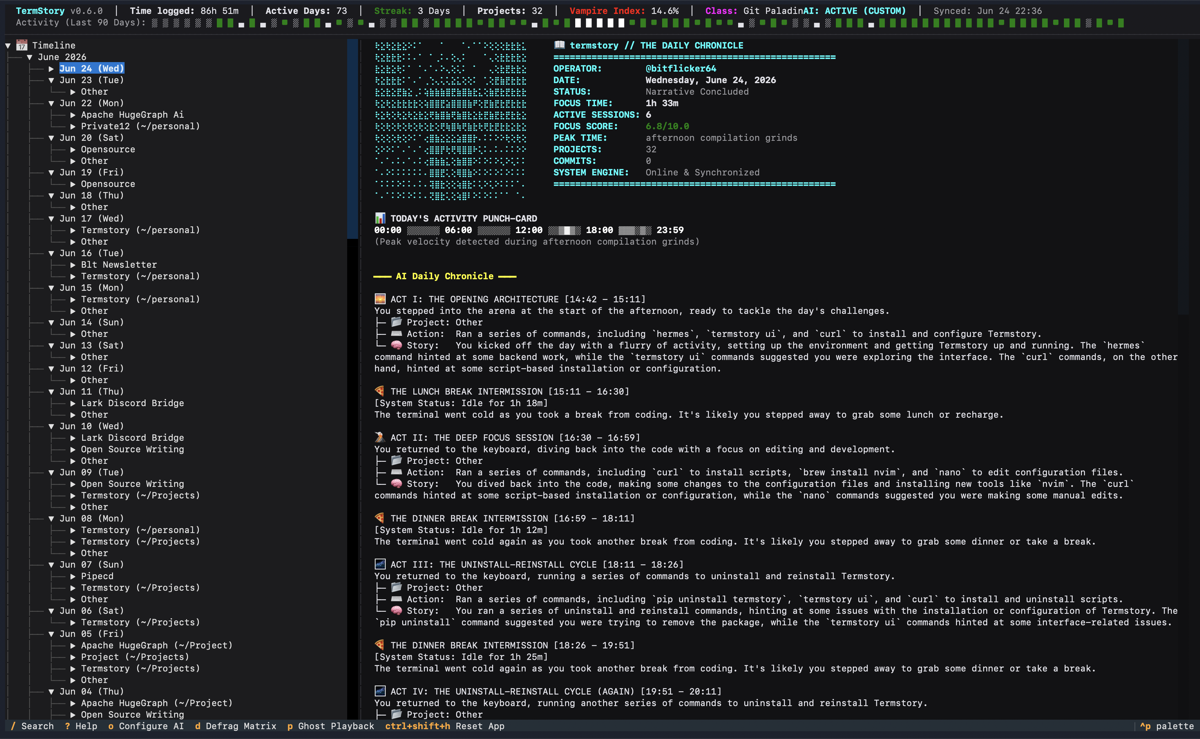
TermStory v0.6.0 — AI-narrated daily chronicle, project timeline, focus metrics, and command playback.
Learn more about TermStory by exploring the detailed documentation below:
- Architecture & Core Concepts — Project layout, ingestion pipeline, timestamp detective, and git correlation.
- Database Schema — Thread-safe SQLite WAL schema and concurrency handling.
- Privacy Sanitizer — Learn how TermStory redacts credentials and protects local PII.
- AI Integration — Zero-dependency LLM client supporting Groq, OpenAI, and Ollama.
- TUI & AI Narratives — Dashboard layout, interactive features, and AI-generated logs.
- CLI Reference — Extended subcommands (Predict, Ask, RPG Classes, Replay, etc.).
- Configuration — Setup guide for AI providers and settings.
- Troubleshooting — Tips for recovering history and handling errors.
We welcome contributions! Please see CONTRIBUTING.md for guidelines on how to get started, set up your development environment, and submit pull requests.
Use the dedicated uninstaller script — it removes the venv, data directory, and the PATH line that the installer added to your shell RC file:
curl -fsSL https://raw.githubusercontent.com/bitflicker64/Termstory/main/scripts/uninstall.sh | bash -s -- --yesOr run locally:
bash scripts/uninstall.sh --yesOr uninstall by hand (a subset of what the script does):
pip uninstall termstory -y 2>/dev/null
rm -rf ~/.termstory-venv
rm -rf ~/.termstoryMIT © TermStory Contributors
GitHub: https://github.com/bitflicker64/Termstory
PyPI: https://pypi.org/project/termstory/