A real-time voice and text chat platform built with .NET and WebSocket technology, featuring AI-powered conversation, speech-to-text, text-to-speech, and multi-language support.
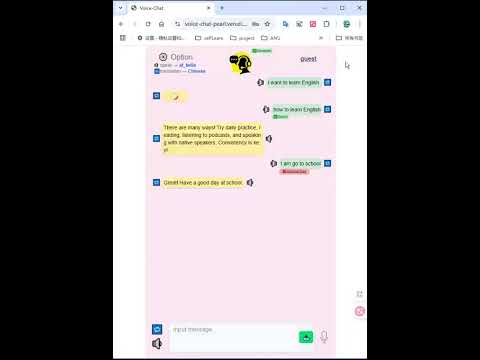
Voice-Chat is a comprehensive communication platform that enables users to interact through multiple modalities:
- Voice Conversations: Real-time voice chat with speech recognition and AI responses
- Text Messaging: Traditional text-based chat with AI assistance
- Language Translation: Instant translation of text to different languages
- Conversation History: Persistent chat history tracking
- Audio Synthesis: Text-to-speech conversion with customizable voice options
The platform uses a WebSocket-based architecture for real-time communication:
- WebSocket Manager: Handles client connections and message routing
- Request Handler: Processes different message types and coordinates services
- AI Integration: Powered by Google Gemini for intelligent responses
- Speech Services: Speech-to-text and text-to-speech capabilities
- Data Persistence: Chat history and user data management
- React-based user interface
- Real-time WebSocket communication
- Audio recording and playback capabilities
The platform communicates via WebSocket messages with JSON payloads. All messages require a type field to specify the request type.
Initiates a voice conversation session where the client will send audio data.
{
  "type": "voiceChat",
  "audioType": "mp3",
  "language": "English",
  "replyAudio": {
    "style": "voice type",
    "type": "wav",
    "speed": 1.0
  }
}
After sending this message, the client should send binary audio data in the next WebSocket frame.
Sends a text message for AI conversation.
{
  "type": "textChat",
  "content": "ask text",
  "language": "English",
  "replyAudio": {
    "style": "voice type",
    "type": "wav",
    "speed": 1.0
  }
}Translates text to a specified target language.
{
  "type": "textTranslation",
  "content": "Hello world",
  "language": "Spanish"
}Retrieves the user's conversation history.
{
  "type": "textHistory"
}Requests a voice sample with specific audio settings.
{
  "type": "voiceSample",
  "replyAudio": {
    "voice": "voice type",
    "speed": 1.0
  }
}The server responds with:
- Text responses: JSON-formatted chat replies and translations
- Binary responses: Audio data for voice synthesis
- History responses: JSON array of previous conversations
- Speech Recognition: Converts audio input to text using advanced STT services
- Multiple Audio Formats: Supports MP3 and other common audio formats
- Real-time Processing: Low-latency audio processing for smooth conversations
- Intelligent Responses: Powered by Google Gemini for contextual conversations
- Multi-language Support: Conversations in multiple languages
- Formatted Prompts: Optimized prompt formatting for better AI responses
- Text-to-Speech: Converts AI responses back to speech
- Voice Customization: Multiple voice options and speed controls
- Voice Samples: Preview different voice settings before use
- Conversation History: Persistent storage of chat sessions
- User Tracking: Individual user session management
- Message Threading: Proper conversation flow tracking
- Real-time Translation: Instant text translation between languages
- Localized Responses: AI responses in the user's preferred language
- Global Communication: Bridge language barriers in conversations
- .NET 9.0 or later
- Node.js and npm
- Google Gemini API key
- Speech services API credentials
FRONTEND_ACCESS_KEY = "set a private key by yourself for backend access"

SPEECH_TO_TEXT_API_URL = "deepgram url"
SPPECH_TO_TEXT_API_KEY = "your key"

GEMIMNI_API_URL = "url"
GEMIMNI_API_KEY = "your key"

TEXT_TO_AUDIO_API_URL = "third party url"
TEXT_TO_AUDIO_API_KEY = "your key"


SUPABASE_URL = "your supabase url"
SUPABASE_KEY = "your supabase api key"
# Additional service keys as needed- Backend:
cd backend
dotnet restore
dotnet run- Frontend:
cd frontend
npm install
npm run devConnect to the WebSocket endpoint with a user ID header:
ws://localhost:5000/ws
Headers: {
    accessKey: accessKey,
    userId: userId,
  },
- Client sends
voiceChatmessage with audio settings - Client sends binary audio data
- Server processes speech-to-text
- Server generates AI response
- Server sends text response and audio reply
- Client sends
textChatmessage with text content - Server processes with AI
- Server sends formatted response
- Server optionally sends audio version
- Client sends
textTranslationwith source text - Server translates using AI
- Server returns translated text
The platform includes comprehensive error handling for:
- Invalid message formats
- Missing required fields
- Audio processing failures
- AI service timeouts
- Network connection issues
- Group chat capabilities
- File sharing support
- Advanced voice effects
- Video calling integration
- Mobile app development
Built with ❤️ using .NET, WebSockets, Next.js.