A ROS2-based autonomous trace-car simulation built in Gazebo, featuring a custom race track and vehicle model.
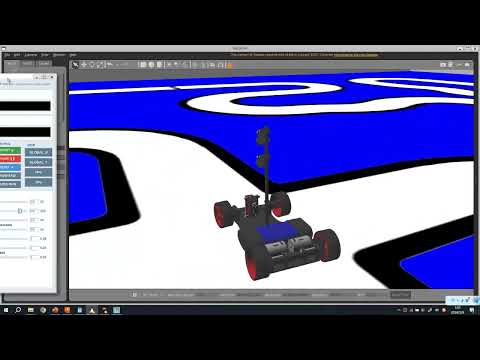

|

|

|

|
trace_car is a ROS 2 + Gazebo line-tracing car project built with colcon and CMake, and implemented with both C++ and Python. It uses CCD-style perception, a controller state machine, and a Gazebo camera/control plugin to simulate an autonomous car following a road map in a closed track.
The project is centered on these goals:
- build the car model from CAD/Fusion360 assets and convert meshes into Gazebo-friendly formats
- build a 9 m x 9 m road/ground map and surround it with walls
- spawn the model in Gazebo, attach the camera and ros2_control plugins, and run the controller stack
- detect road position and road type from CCD images using NumPy-based image processing
- publish steering and wheel commands to keep the car on track
- provide a Tkinter GUI for simulation control, parameter tuning, and live status monitoring
- ROS 2
- Gazebo
colcon/CMake- NumPy
- OpenCV
- Tkinter
- Qt / Gazebo plugin interface
This repository follows the same development flow used in the codebase:
- Install the ROS 2, Gazebo, controller, and Python dependencies with scripts/install_deps.sh.
- Build the model from CAD/Fusion360, export to
obj, then convert todaefor Gazebo. - Build the road and ground texture/mesh assets for the 9 m x 9 m simulation area.
- Create the ROS 2 package
trace_carand wire the model, world, and messages into the build. - Build the world configuration.
- Add the road map into Gazebo.
- Add surrounding walls.
- Build the car model configuration.
bodywheel_L_backwheel_R_backsteer_axis_Lsteer_axis_Rwheel_L_frontwheel_R_frontccd_closeccd_far
- Build the launch files.
gzservergzclient- car model publisher
- car model spawn
- Add the Gazebo plugins.
libgazebo_ros_camera.solibgazebo_ros2_control.so
- Add
controller_managerlaunch steps.joint_state_broadcasterwheel_velocity_controllersteer_position_controller
- Implement
ccd_node.py/ccd_node.cpp.- startup warm-up loop
- subscribe to CCD camera images
- spatial median filter
- temporal median filter
- local smoothing and edge detection
- enumerate edges, build light windows, and choose the correct lane window
- compute road center and center error
- debounce road type detection
- publish
road_typeandcenter_errorto the controller node
- Implement
controller_node.py/controller_node.cpp.- startup warm-up loop
- subscribe to perception data
- PD steering control from center error
- speed target selection from road type
- state machine for cross/stop locking
- cross unlock after odometer distance
- cross center-error decay for lane estimation
- steering dynamics limiting and Ackermann steering calculation
- subscribe to Gazebo joint states
- record odometer during cross and stop
- speed dynamics limiting and rear-wheel differential speed calculation
- publish steering and wheel commands back to Gazebo
- Build the Tkinter GUI.
- CCD image monitor: image, left edge, right edge, center, road width, average brightness
- car information monitor: steer, speed, road type
- simulation control: start, pause, reset
- runtime parameter tuning via
declare_parameter+ sliders - show and hide raw CCD images even under strong noise
- Add user camera switching in Gazebo.
- self-built plugin reads
camera_view_cmd - reads
car_infoto get current steering state - applies frame transformation and pose composition
- supports global static view, global track view, first-person view, and third-person view
- self-built plugin reads
- Convert the Python implementation to C++, complete the
CMakeLists.txt, and build the whole project. - Add
ccd_node,controller_node, and GUI monitor nodes to the launch file.
launch/: Gazebo and robot launch filesmodels/: robot and mesh assetsworlds/: track/world definitionsconfig/: controller configurationmsg/: custom ROS 2 messagessrc/: C++ nodes and plugin codetrace_car/: Python nodes and logicrviz/: RViz configurationscripts/: helper scripts
launch/car_sim.launch.py: starts the full simulation stacklaunch/car_model.launch.py: publishes the robot description and spawns the modeltrace_car/ccd_node.pyandsrc/ccd_node.cpp: CCD perception pipelinetrace_car/controller_node.pyandsrc/controller_node.cpp: steering and wheel control pipelinetrace_car/monitor_gui.py: Tkinter GUI for simulation control and live monitoringsrc/camera_view_plugin.cpp: custom Gazebo camera plugin
You can install the project dependencies with the helper script in scripts/install_deps.sh.
From the package root:
chmod +x scripts/install_deps.sh
./scripts/install_deps.sh
The script installs the ROS 2, Gazebo, controller, and Python packages used by the project, then prints the workspace build command for the next step.
From the workspace root:
colcon build --symlink-install
source install/setup.bash
If this is a new shell, source your ROS 2 installation first, then source the workspace overlay.
Launch the full simulation:
ros2 launch trace_car car_sim.launch.pyThis brings up:
- Gazebo server
- Gazebo client
- robot description publisher and model spawn
ccd_nodecontroller_node- GUI monitor
The main nodes communicate through these topics:
/ccd/ccd_close/image_rawand/ccd/ccd_far/image_raw: CCD camera images/perception: road type and center error/joint_states: wheel joint feedback from Gazebo/wheel_velocity_controller/commands: rear wheel speed commands/steer_position_controller/commands: steering commands/car_info: controller state for the GUI/ccd_detection: CCD monitor data for the GUI/gui_control: start, pause, and reset commands/camera_view_cmd: camera view switching commands
The CCD node is designed around a stable warm-up and a two-stage filter pipeline:
- wait for a fixed number of frames before publishing control data
- apply a spatial median filter to suppress pixel noise
- apply a temporal median filter to stabilize frame-to-frame fluctuations
- smooth the detected light window before doing edge detection
- detect left and right edges from averaged brightness differences
- choose the best window around the road center
- compute road center and center error
- debounce road type classification before publishing it
The controller node turns perception into motion with a small state machine:
- use center error for steering PD control
- use road type for target speed selection
- lock cross and stop decisions when they are detected
- release cross lock after the odometer passes the cross distance
- decay the stored cross center error during the cross section to estimate lane position
- limit steering change rate and speed change rate
- compute Ackermann steering and rear wheel speed split
- publish commands to the Gazebo controllers
The Tkinter GUI is used for interactive tuning and monitoring:
- CCD image monitor with edges, center, road width, and average brightness
- car information monitor with steering, speed, and road type
- simulation controls for start, pause, and reset
- live parameter adjustment through sliders backed by ROS 2 parameters
- raw CCD image display toggle for noisy input debugging
The custom Gazebo camera plugin supports multiple viewpoints:
GLOBAL static view: set once in pre-render and keep the camera at a fixed poseGLOBAL track view: follow the car position while keeping a preset camera rotationFIRST PERSON view: compose the car pose with a relative poseTHIRD PERSON view: combine car pose, steering yaw, and a relative offset, with low-pass filtering to reduce jitter
- The package is tuned around the included CCD image width and track geometry.
- If you change the mesh names, joint names, or topic names, update the launch files, model file, and controller code together.
- The current codebase contains both Python and C++ versions of the perception/controller stack; the C++ path is already wired into
CMakeLists.txt.
- If Gazebo cannot find the plugin, make sure the workspace has been built and sourced.
- If the car does not move, confirm that
controller_manager,joint_state_broadcaster, and the wheel/steer controllers are running. - If the CCD pipeline is noisy, lower the raw-image threshold values or adjust the GUI parameters.