Getting Started
FINAL CUT is a library for creating text-based terminal applications. It runs on several Unix-like platforms. The release of FINAL CUT is licensed under the terms of the GNU Lesser General Public License v3.0 (GNU LGPL v3), which allows flexible licensing of applications. FINAL CUT was written in the programming language C++. The object-oriented design allows the creation of fast and lean programs.
FINAL CUT is a widget toolkit. A user interface usually consists of several widgets. FINAL CUT draws widgets on virtual windows and then mapped them on a virtual terminal. It uses the terminal capabilities from the Termcap library to display the character matrix of the virtual terminal on the screen or a terminal emulator. It uses various optimization methods to improve the drawing speed.
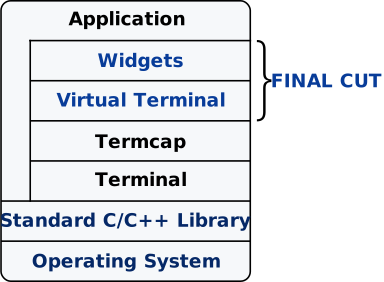
Figure 1. Structure of a FINAL CUT application
FINAL CUT has many widgets. It offers buttons, input fields, menus, and
dialog boxes that cover the most common use cases. Widgets are visual
elements that are combined to create user interfaces. Own widgets can be
easily created by creating a derived class of FWidget or other existing
widgets. All widgets are instances of
FWidget
or its subclasses.
A widget can contain any number of child widgets. Child widgets are displayed
in the display area of the parent widget. Window widgets based on FWindow
have their own virtual display area and are independent of the parent widget.
When a parent widget is disabled, hidden, or deleted, the same operation is
used recursively to all its child widgets. The base class FObject implements
the self-organized object tree behavior. For example, addChild() removes
the child ownership from an existing parent object before assigning it to
the new target. When a child becomes deleted, the parent-child relationship
causes its reference in the parent object to be removed. An explicit
delChild() is no longer required here.
An FApplication widget is the top-level widget of an application. It is
unique and can not have a parent widget. The class FApplication manages
all settings and assigns keyboard and mouse input to the different widgets.
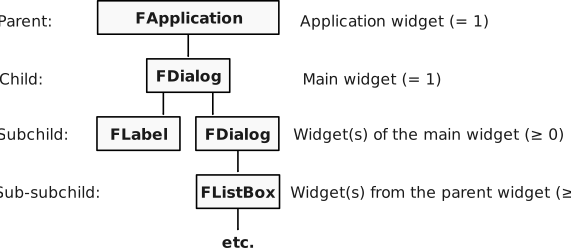
Figure 2. Widget tree of a FINAL CUT application
The main widget of a FINAL CUT application is the only object that
FApplication can have as a child. This main widget is usually a window
object that contains all sub-widgets of the application. A sub-widget can
also be another window.
This introduction to FINAL CUT begins with a brief example.
The following example demonstrates how to create an empty dialog box with dimensions of 30 by 10 characters.
File: dialog.cpp
#include <final/final.h>

auto main (int argc, char* argv[]) -> int
{
  finalcut::FApplication app(argc, argv);
  finalcut::FDialog dialog(&app);
  dialog.setText ("A dialog");
  const finalcut::FPoint position{25, 5};
  const finalcut::FSize size{30, 10};
  dialog.setGeometry (position, size);
  finalcut::FWidget::setMainWidget(&dialog);
  dialog.show();
  return app.exec();
}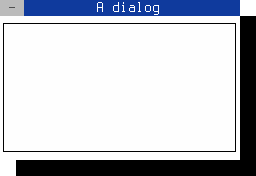
Figure 3. A blank dialog
> [!NOTE] > You can close the dialog with the mouse, > Shift+F10 or Ctrl+^
Important
Before continuing, ensure that FINAL CUT, all required dependencies, and a C++ compiler are installed.
To compile a FINAL CUT application, specify the locations of the header files and the FINAL CUT library. Build tools such as GNU Autotools or CMake can automate this configuration. These requirements also apply when integrating FINAL CUT into your own projects.
Step 1: Verify that FINAL CUT is installed. The header files should be located in the standard include directory, and the library should be located in one of the library search paths on your system.
Step 2: Save the source code file as dialog.cpp to continue with the compilation.
Step 3: Use the following command to compile the code with the GNU Compiler Collection (GCC):
g++ dialog.cpp -o my-dialog -O2 -lfinalRun the application using the following command:
./my-dialogThe following command demonstrates compilation of the source file using GCC and pkg-config. Ensure the current directory contains the source code file.
g++ dialog.cpp -o my-dialog `pkg-config --libs finalcut`The executable application my-dialog is now generated.
Follow the GNU Automake instructions as outlined below.
File: Makefile.am
LDADD = -lfinal
bin_PROGRAMS = my-dialog
my_dialog_SOURCES = dialog.cpp
Create a configure.ac template that includes the required GNU autoconf M4 macros.
File: configure.ac
AC_INIT([my-dialog], [1.0])
AM_INIT_AUTOMAKE([foreign])
AC_PROG_CC
AC_PROG_CXX
AC_PROG_INSTALL
AC_CONFIG_FILES([Makefile])
AC_OUTPUT

AC_CHECK_LIB([final],
             [main],
             [],
             [AC_MSG_ERROR([libfinal not found!])])
Initiate the build system with the following command:
autoreconf --installExecute the configure script:
./configureBuild the executable application using the following command:
makeThe executable application my-dialog is now generated.
Follow the CMake instruction file as outlined below.
File: CMakeLists.txt
cmake_minimum_required(VERSION 3.12)
project(my-dialog)
list(APPEND CMAKE_MODULE_PATH "${PROJECT_SOURCE_DIR}/cmake/Modules")
find_package(finalcut REQUIRED)
add_executable(my-dialog dialog.cpp)
target_link_libraries(my-dialog PRIVATE finalcut::libfinal)
Note
If CMake does not locate the package file (FindFinalCut.cmake) on the system, copy it from the FINAL CUT source directory to the local CMake directory.
mkdir cmake/Modules
cp {finalcut-source-directory}/Findfinalcut.cmake cmake/Modules/
Create a build directory and change to it:
mkdir build && cd buildRun cmake with the source directory as an argument:
cmake ..Build the executable application using the following command:
makeThe executable application my-dialog is now generated.
#include <final/final.h>All final cut programs have to include the final.h header.
finalcut::FApplication app(argc, argv);This line creates the finalcut::FApplication object app with
the command line arguments argc and argv. This object manages
the application main event loop. It receives keyboard and mouse events
and sends them to the target widgets. You have to create an application
object before you can create a widgets object.
The next line
finalcut::FDialog dialog(&app);creates the finalcut::FDialog object dialog with the object app
as parent object. The finalcut::FDialog class is the base class for
creating dialog windows.
dialog.setText ("A dialog");The title bar of the dialog box gets the text "A dialog".
finalcut::FPoint position{25, 5};
finalcut::FSize size{30, 10};
dialog.setGeometry (position, size);
The dialog window gets a width of 30 and a height of 10 characters. The position of the window in the terminal is at x=25 and y=5.
Note
x=1 and y=1 represents the upper left corner.
finalcut::FWidget::setMainWidget(&dialog);The dialog object was now selected as the main widget for the application.
When you close the main widget, the entire application quits.
dialog.show();A window or widget is not visible directly after its creation.
Only the call of show() makes it (and its child objects,
if available) visible.
return app.exec();The last line calls exec() to start the application and to return
the result to the operating system. The application then enters its
main event loop, processing all
events, including user interactions with the TUI, until the window closes.
Note
Each FINAL CUT application has exactly one main event loop.